

Create widgets with AI. Edit without code. Embed anywhere.
Create, customize, embed.
Create widgets with AI. Edit without code. Embed anywhere.
Go from idea to live embed in seconds. Prompt it with AI, customize a template, or drop in your own code — Fugte instantly builds the interface controls and hosts the link.
Start for FREE — you'll sign in to Fugte to generate it.
Create widget
Start building free See how it works
Works with Canva Shopify WordPress Notion Webflow
Create. Customize. Embed anywhere.
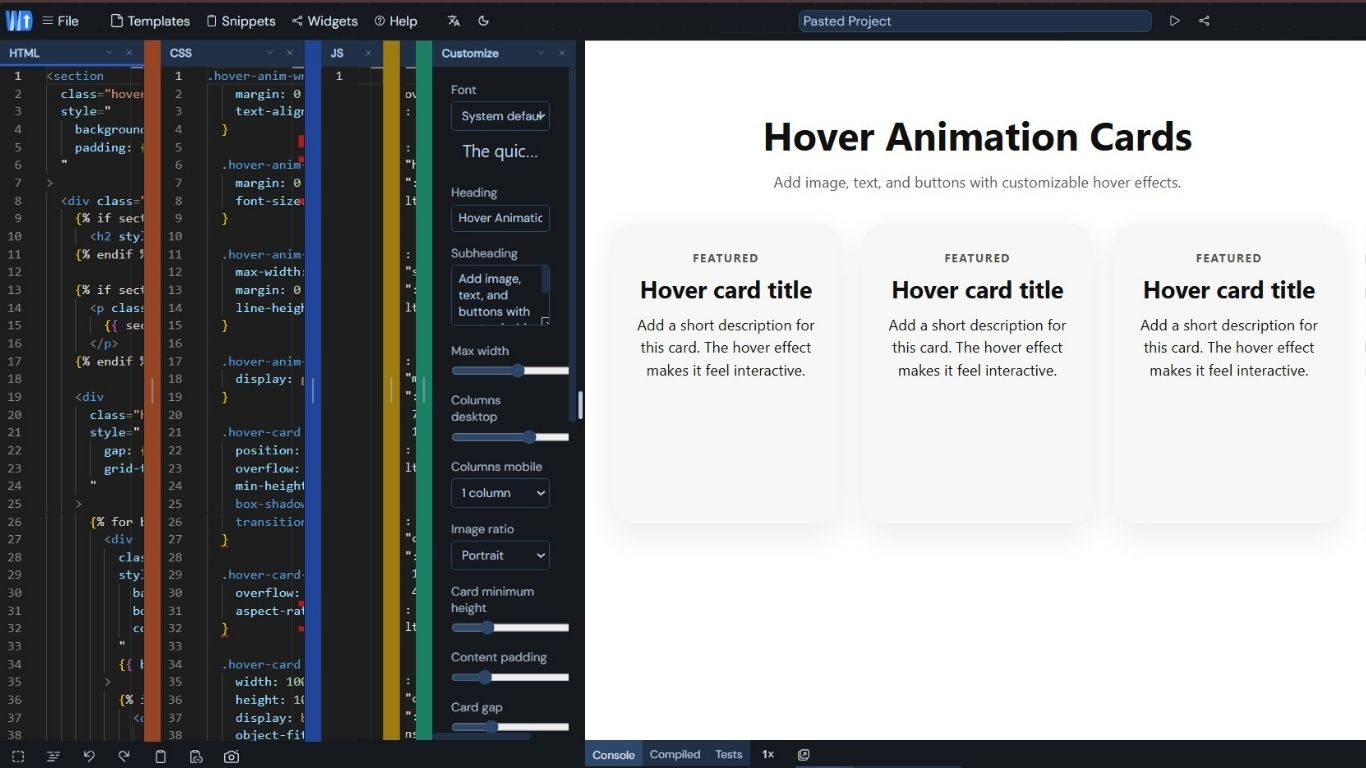
No-code customizer
Shape content with fluid controls.
Text, colors, images, icons, and options become simple editable fields.
Hosted widget
Every widget gets a clean current.
Share a public URL or paste the iframe into Canva, Shopify, or any site.
Best for No-code creators Canva creators Shopify owners Client projects
The concept
The Theme Customizer for standalone web embeds.
Think of Fugte as the Shopify Theme Customizer for standalone web embeds. You write the raw HTML/JS/CSS once, our engine automatically exposes safe visual UI controls, and it outputs a fast CDN link you can embed anywhere.
See it in action
Code it once. Customize it endlessly.
Turn static, hard-coded HTML into dynamic embeds. Fugte automatically exposes visual UI controls so anyone can tweak the design without touching a single line of code.
Create with built-in AI Describe the widget you need, start from a starter, or bring your own code.
Customize the important parts Make text, colors, images, icons, and options editable without rebuilding.
Embed anywhere Copy a hosted URL or iframe and drop the widget into real pages and builders.
Starter widgets
Start from something real.
Use a starter when you do not want a blank page, or ask the built-in AI to shape a widget for your shop, client, Canva design, or landing page.
Commerce Pricing Table Three-tier pricing with feature lists and a highlighted plan. View starter Content FAQ Accordion Searchable, expandable Q&A list — great for support deflection and SEO. View starter Interactive Father's Day Flipbook A funny interactive Father’s Day flipbook card with peelable pages, dad jokes, photo pages, and customizable covers. View starter Media Countdown Timer Build urgency for launches, promos, and registration deadlines. View starter Lead capture Newsletter Signup Conversion-ready email capture section for blogs, launches, and product updates. View starter Social proof Testimonial Carousel Credibility-first testimonial slider with proof links and author details. View starter
Features
The anatomy of a Fugte widget.
Fugte brings built-in creation, editable settings, safe hosting, embed delivery, starter widgets, sharing, and simple pricing.
Schema HTML JS CSS
Turn Any Idea Into a Widget
Describe the widget you want, start from a starter, or bring your own HTML/CSS/JS when you want full control.
HTML JSON
No-code customization
Turn hard-coded text, colors, numbers, images, and toggles into friendly fields you can update later.
Host Embed Safe
Lightweight hosted widgets
Fugte hosts the result for you and serves it through isolated iframe embeds, so you do not need to deploy code yourself.
+
Starter widgets when you need a shortcut
Remix pricing tables, countdowns, forms, galleries, testimonials, music players, and more when you do not want to start from a blank page.
fugte.com/w/widget X URL </>
Share-ready links
Every widget gets a clean public URL and iframe snippet for Canva, Shopify, WordPress, Notion, Webflow, or a normal website.
Pricing for experiments
Start free while you test ideas, then upgrade when you want white-label embeds, more storage, or client-ready delivery.
Workflow
Create, customize, embed.
A compact flow for builders who want to create a widget, tune it, host it, and share it without managing deployment.
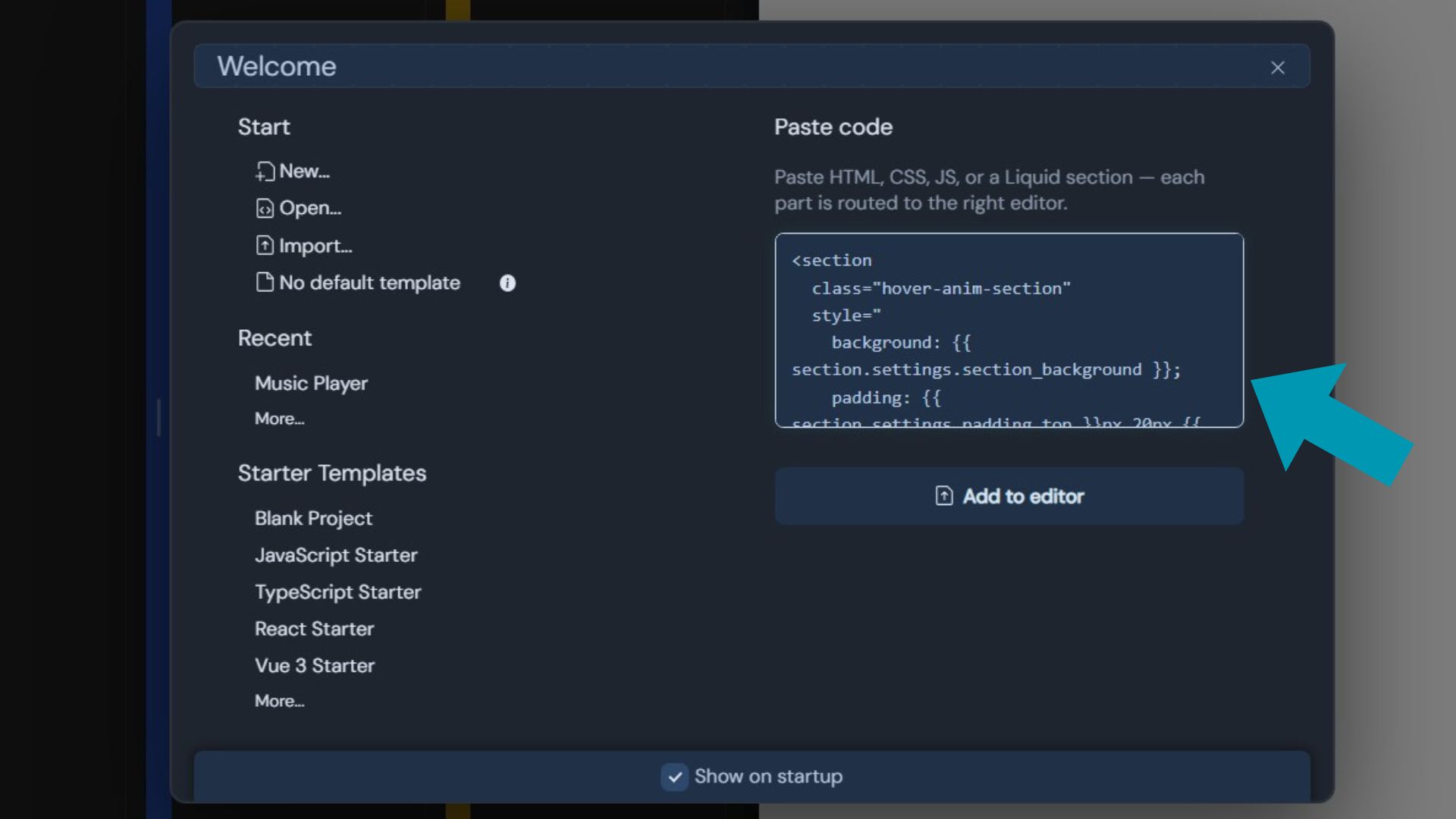
Step 1
Create or start with a widget
Use Fugte AI, a starter, or your own front-end code.
Step 2
Customize what stays editable
Expose the text, colors, images, icons, and settings you want to change later.
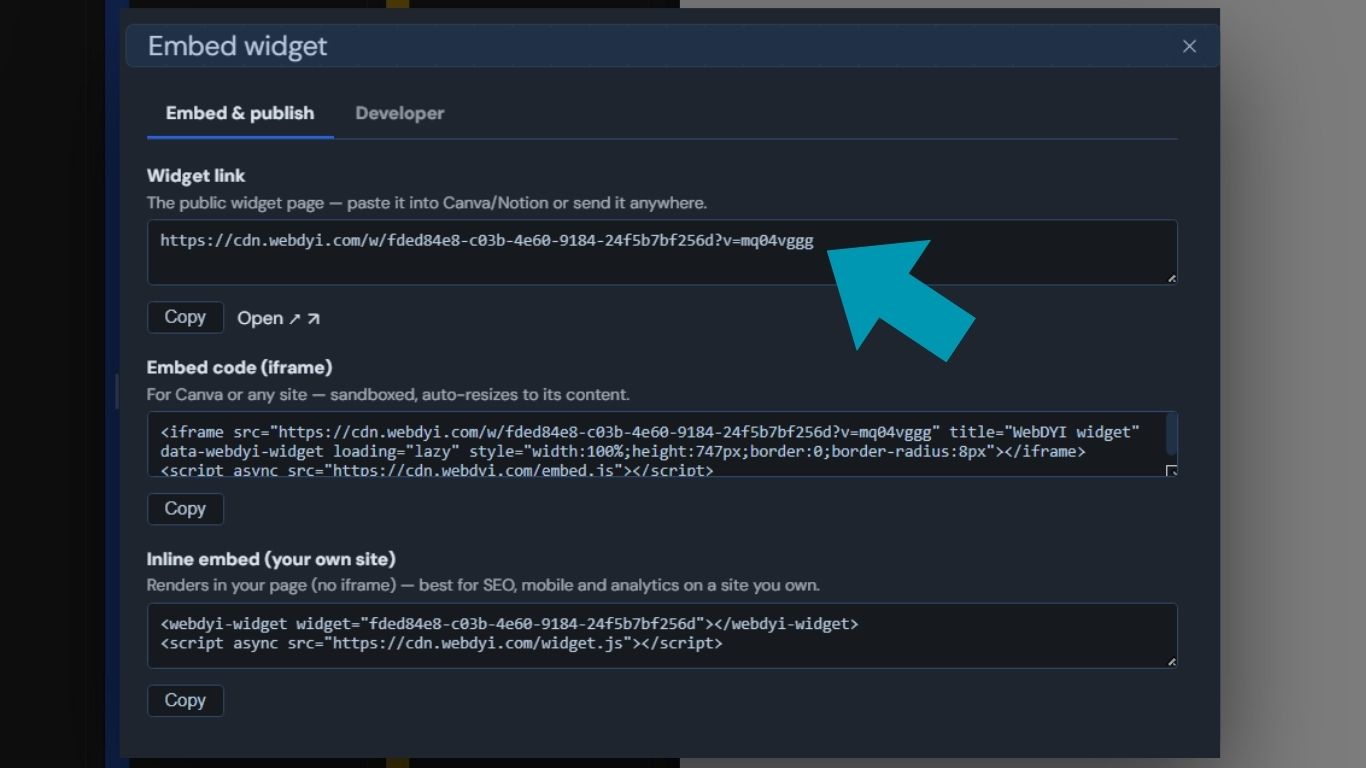
Step 3
Embed the widget
Send a link or place the widget inside Canva, Shopify, WordPress, Webflow, or Notion.
Pricing
Start free.
Upgrade when it matters.Simple plans for widget experiments, published widgets, and client-ready embeds when your idea starts working.
Free
$0 / forever
For individuals and small projects
- Unlimited widgets
- Unlimited views
- Access to starter widgets
- 10 MB storage
- 50 AI credits/month
- Fugte branding on widgets Start free
- Everything in Free
- 30 MB storage
- 100 AI credits/month
- No Fugte branding
- Email support Start building
- Everything in Basic
- 200 MB storage
- 500 AI credits/month
- Priority support
Basic
$4.99 / month
For growing projects and small businesses
Creator Coming soon
$14.99 / month
For creators and businesses needing more resources
Frequently Asked Questions
Common questions.
What is Fugte?
Fugte is a publishing layer for interactive widgets. Create with the built-in AI or a starter, choose what should be editable, and publish a hosted widget link.
Do I need to understand the code?
No. You can create with AI and customize through safe controls. If you do bring your own code, Fugte helps make the important parts editable without working in code all day.
Where can I embed widgets?
Use Fugte links or iframe snippets in platforms that support embeds, including Canva, Shopify, WordPress, Webflow, Notion, and normal websites.
Can I export my code if I decide to leave Fugte?
Yes. However you created it — with our built-in AI, from a starter, or by bringing your own HTML, CSS, and JavaScript — the widget's code is yours. View it anytime in the editor's Code view and download a self-contained copy of the widget. You are not locked into our infrastructure.
Can I edit the code myself if I'm comfortable with it?
Absolutely. The editor has a full Code view for your HTML, CSS, and JavaScript, so if you know how to code you can tweak the widget directly — no need to use the no-code controls. Editing your code is part of the free plan; you never have to pay just to change it.
Will my widgets slow down my website or Notion page?
No. Each published widget is precompiled into a tiny static page served from a global CDN and loaded inside an isolated iframe, so your host page's load time stays unaffected no matter how complex the widget's logic is.
Is it safe to embed Fugte widgets on my store?
Yes. Every widget runs in a sandboxed, cross-origin iframe, so its code can't read or interfere with your site's cookies, session data, or page — it stays fully isolated from the parent page.
Do you track the people who view my widgets?
No. The widget CDN is cookieless and we don't run third-party advertising trackers or profile your widgets' viewers across the web. Our edge network logs standard request metadata (such as IP address and user-agent) for security and reliability — see our Privacy Policy for details.
Do I have to re-embed my widget every time I update it?
No. Your embed points to a stable hosted URL. Edit in the Fugte dashboard, publish, and every live embed serves the updated version usually within about a minute with no need to paste a new snippet.
Create it.
Customize it. Embed it.Build your next interactive widget with Fugte, then publish a hosted link people can actually use.