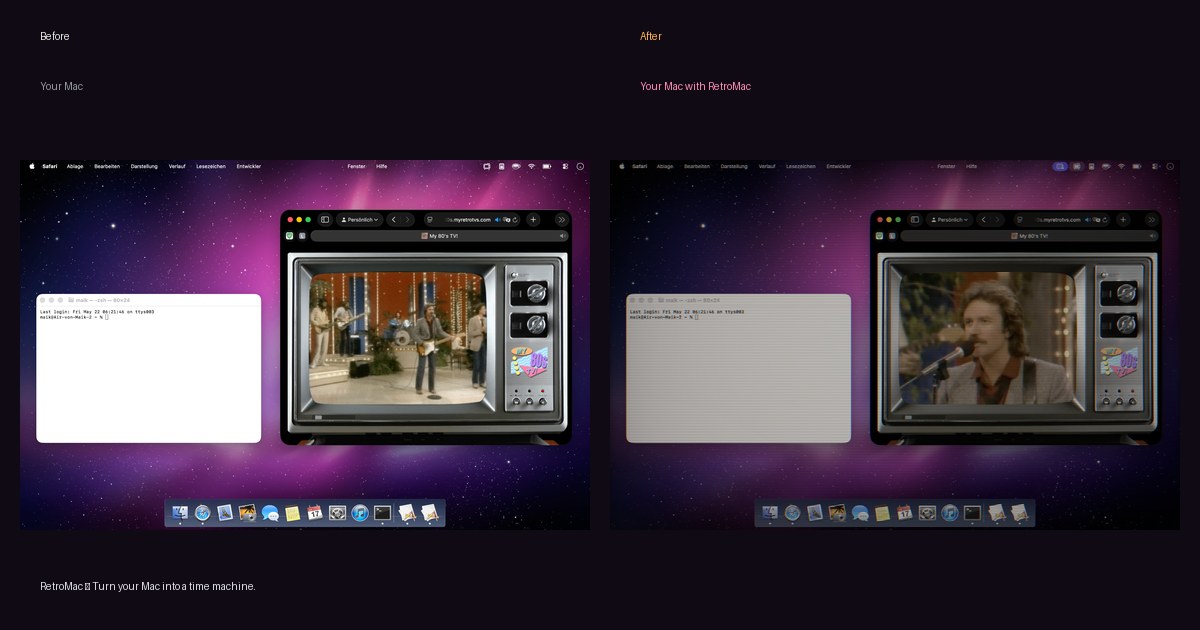
Turn your Mac into a time machine.
▲ RETROMAC ▼ macOS
Turn your Mac into a time machine.
Drop a live CRT glow, VHS flicker or a full Macintosh look over your whole screen - one click, no restart.
Built it for myself. Turns out a few thousand people wanted it too.
Grab the DMGPoke around the looks → ▾
Free, no account · 20 shaders for free, more if you want · Whole screen or just one window - \* Free to download and use. If you want the extra shader presets, custom presets or the webcam shader, you can throw me €8.88 once. No subscription, no nonsense.
\~/retromac/overview.mp4
Your browser doesn't support video.
★ Loved by 5,000+ Mac users·▲ Featured on Product Hunt·Press: ifun.de · Caschys Blog · YouTube
◆ AS SEEN IN ◆
Featured in.
- t3n.de↗
 t3n"The free app RetroMac lets you give your current macOS version a fresh Aqua look."
- ifun.de↗
ifun.de"RetroMac simulates classic operating systems."
- stadt-bremerhaven.de↗
Caschys Blog"Send your Mac back to the CRT era with a single piece of software."
- youtube.com↗
Mr. Sujano"YouTube feature"
- 01
- 02
- 03
- 04
- 05
- 06
- 07
- 08
\~/about/at-a-glance.txt
RetroMac at a glance
PlatformmacOS 14+ (Apple Silicon & Intel)
TypeMenu bar app
Effects30+ live CRT / VHS / LCD shaders
ThemesWin 98/XP, Mac OS 9/X, BeOS, Snow Leopard
PriceFree, optional €8.88 one-time Pro
PrivacyNo account, no subscription, no tracking

30+ shaders. Endless eras.
Pick one - your whole screen instantly looks like it.

CRT Royal

Sony Trinity

NTSC Composite

Retro LCD

VHS

VCR

Macintosh Classic

Game Boy
Previous slideNext slide
◆ THEMES ◆
A few impressions.
New: more authentic Windows 98, XP, Mac OS X, Mac OS 9 and BeOS - now with Solitaire, Minesweeper & friends.
\~/themes/win98
1998
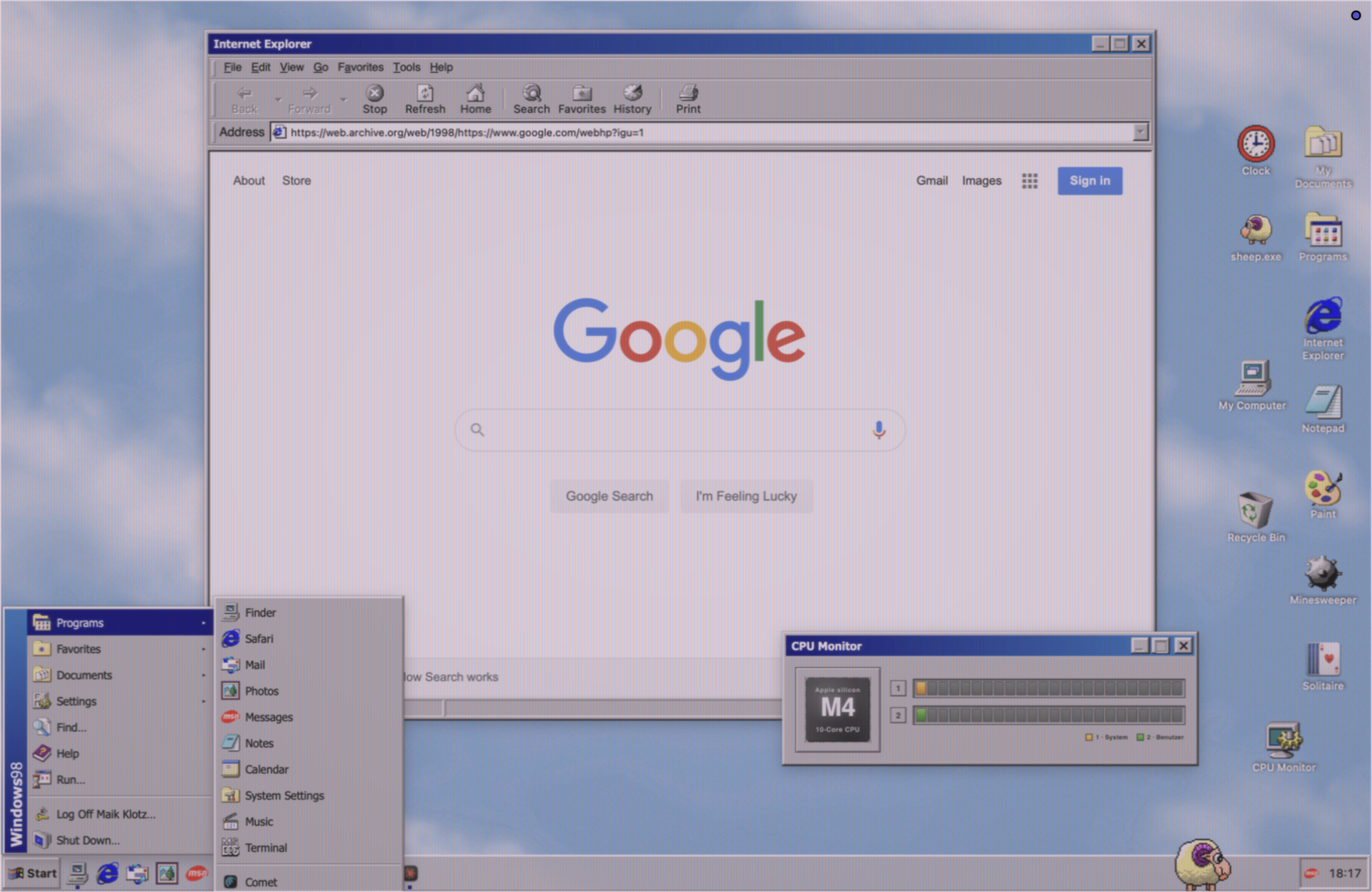
Windows 98
1998
\~/themes/winxp
2001

Windows XP
2001
\~/themes/macos9
1999
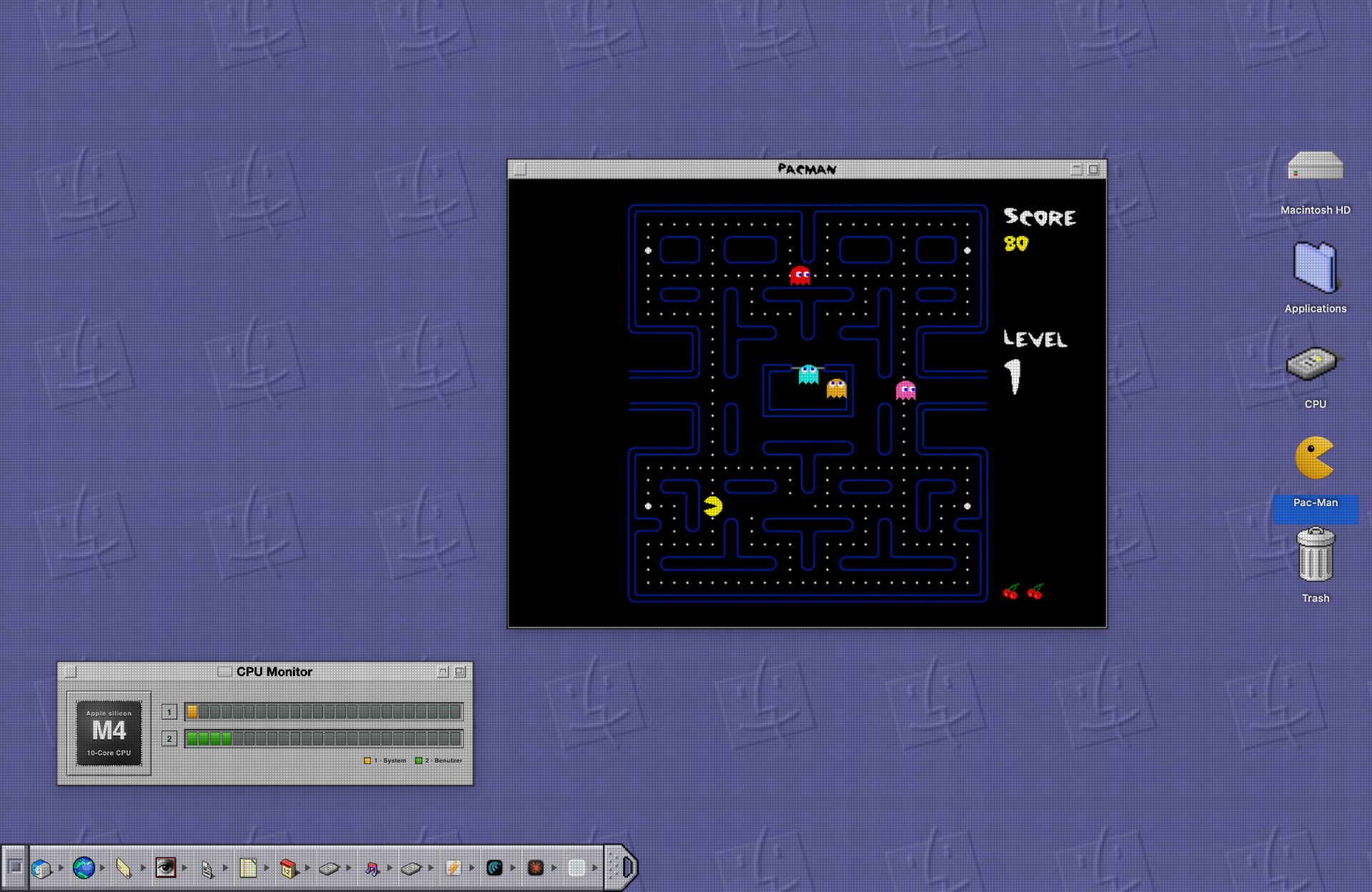
Mac OS 9
1999
\~/themes/macosx
2001

Mac OS X
2001
\~/themes/beos
2000

BeOS
2000
\~/themes/snow-leopard
2009

Snow Leopard
2009
Previous slideNext slide
// new\_shaders.txt
$ New shaders drop monthly. Get them first + a free wallpaper pack.
\>\_
\> subscribe\_
Your dock from back then. Today.
Pick your favorite dock from the classic Mac and Windows years. Custom icons, clock and transparency - exactly your way.
Mac OS 9
1999

Mac OS X
2001

Windows 98
1998

Windows XP
2001

Snow Leopard
2009

Maik's FavouriteANIMATED
Animated
◆ WHAT'S IN THE BOX ◆
What's in the box.
Real retro look, live
30+ CRT, VHS and LCD shaders run in real time on top of your screen - from Sony Trinitron to a worn VHS tape, no restart needed.Whole OS makeovers
Win 98, XP, Mac OS 9, Mac OS X, BeOS, Snow Leopard - period-correct desktops, docks, boot splashes and even Solitaire & Minesweeper.Auto-matching
The right look per app, automatically - Finder stays clean, your editor goes full CRT, your retro emulator looks like a tube.Stays fast
Eco modes throttle the shader when you're on battery, so your fans stay quiet and your battery doesn't melt.Webcam shaders
Your CRT-shaded video shows up as "RetroMac" in Zoom, Meet, Teams or OBS. iPhone Continuity Camera + USB supported.Themed Dock
Swap your Dock for a Mac OS 9 Control Strip, an OS X Aqua bar, or Maik's Favourite - where Pac-Man patrols the icons.Yours to tweak
Intensity, colors, icons, per-display and per-app rules. Import your own Metal shaders. No account, no telemetry.Floating icon & Apple logo
A floating icon for one-tap access to shaders and themes - and swap the Apple logo in your menu bar for Rainbow, Aqua or Aqua Classic.◆ FROM REDDIT ◆
What people are saying.
Real reactions from r/macapps and friends.
u/Ok\_Improvement5621
"Wow. Just wow. Love the idea and the styles… Back 2 the future!"
u/North-Active-6731
"Absolutely love the shaders on this app, it's excellent and couldn't have come better. Bought and paid to support further development."
u/OhSirrah
"Wow it's almost like you reimplemented the dock. I've never seen that done before."
u/Wif001
"Nice one! Windows XP looks hilarious on my MacBook."
Previous slideNext slide

◆ HI ◆
Made by one person
Hi, I'm Maik - an indie dev from Germany.
I built RetroMac because I missed the warm CRT glow of the computers I grew up with. It started as a tiny weekend hack just for me, and quietly turned into the thing on this page.
It's free. The optional Pro unlock is a one-time €8.88 - no VC, no subscription, no roadmap meetings.
Stuff people ask.
What is RetroMac?
Does it change my apps or files?
Can I apply the look to just one window?
Does it work with multiple displays?
Is it good for retro games?
Can I customize everything?
Will it slow my Mac down?
Which macOS do I need?
Is it a subscription?
Does RetroMac work on Apple Silicon (M1/M2/M3/M4)?
How is RetroMac different from a wallpaper or screensaver?
Can I use the CRT effect for screen recordings and streaming?
What is RetroMac?
RetroMac is a small macOS menu bar app that paints a live retro look on top of your screen. One click swaps between CRT, VHS, LCD and full classic-OS themes like Windows 98 or Mac OS 9. It's a one-time purchase, no subscription, and runs entirely on your Mac.
Does it change my apps or files?
No. RetroMac only paints a shader over what's already on screen. Your apps, files and system settings stay completely untouched. Quit RetroMac and everything looks exactly like macOS did before.
Can I apply the look to just one window?
Yes. You can run the CRT or VHS shader on the whole screen, on a single display in a multi-monitor setup, or on just one window - per-app rules included. Finder stays sharp while your editor or emulator goes full tube.
Does it work with multiple displays?
Yes. Each connected display can have its own theme and shader settings, and shaders render on every screen, not just the main one. Great if you have an old monitor on the side you want to feel really old.
Is it good for retro games?
Honestly, it's the best part. CRT, VHS and Game Boy shaders make pixel art look the way it was meant to - phosphor masks, scanlines, NTSC composite bleed. Works on top of emulators and the built-in retro game launcher.
Can I customize everything?
Pretty much. Intensity, colors, dock style, icons, per-display and per-app rules. You can also import your own Metal shaders and build custom presets if you want to go deeper.
Will it slow my Mac down?
On a modern Mac you really won't notice. Built-in eco modes throttle the shader when you're on battery, so fans stay quiet and your battery doesn't suffer.
Which macOS do I need?
macOS 14 or newer. RetroMac is a universal binary, signed and notarized by Apple, so it opens without Gatekeeper warnings on a clean Mac.
Is it a subscription?
No. RetroMac is free to download and use. The optional Pro unlock is a one-time €8.88 - it adds extra shader presets, custom presets and the webcam shader. No recurring charges, no account required.
Does RetroMac work on Apple Silicon (M1/M2/M3/M4)?
Yes. RetroMac ships as a universal binary and runs natively on Apple Silicon (M1, M2, M3, M4) and Intel Macs. Metal shaders are GPU-accelerated, so on Apple Silicon it stays smooth even at full screen.
How is RetroMac different from a wallpaper or screensaver?
A wallpaper sits behind your windows; a screensaver only appears when you're idle. RetroMac is a live shader that sits on top of everything you do - your terminal, browser, editor, games. It's the difference between a sticker on the monitor and an actual CRT.
Can I use the CRT effect for screen recordings and streaming?
Yes. Screenshots and screen recordings capture the shaded picture as you see it. For video calls and streaming, the optional webcam shader exposes a virtual camera ("RetroMac") that works in Zoom, Meet, Teams and OBS - great for retro-styled streams and lower-thirds.
New shaders drop monthly
Get them first, plus a free wallpaper pack. One email a month, no spam.
\>\_
\> subscribe\_
Impressum
Angaben gemäß § 5 TMG
Maik Klotz
Blauwunderstr. 10
57072 Siegen
Deutschland
Kontakt
Telefon: +49 179 3280054
E-Mail: info@klotzbrocken.de
Inhaltlich verantwortlich gemäß § 18 Abs. 2 MStV
Maik Klotz
Blauwunderstr. 10
57072 Siegen
EU-Streitschlichtung
Die Europäische Kommission stellt eine Plattform zur Online-Streitbeilegung (OS) bereit: <https://ec.europa.eu/consumers/odr/>
Verbraucherstreitbeilegung
Ich bin nicht bereit oder verpflichtet, an Streitbeilegungsverfahren vor einer Verbraucherschlichtungsstelle teilzunehmen.
Haftung für Inhalte
Als Diensteanbieter bin ich gemäß § 7 Abs. 1 TMG für eigene Inhalte auf diesen Seiten nach den allgemeinen Gesetzen verantwortlich. Nach §§ 8 bis 10 TMG bin ich als Diensteanbieter jedoch nicht verpflichtet, übermittelte oder gespeicherte fremde Informationen zu überwachen oder nach Umständen zu forschen, die auf eine rechtswidrige Tätigkeit hinweisen. Verpflichtungen zur Entfernung oder Sperrung der Nutzung von Informationen nach den allgemeinen Gesetzen bleiben hiervon unberührt. Eine diesbezügliche Haftung ist jedoch erst ab dem Zeitpunkt der Kenntnis einer konkreten Rechtsverletzung möglich. Bei Bekanntwerden entsprechender Rechtsverletzungen werde ich diese Inhalte umgehend entfernen.
Haftung für Links
Dieses Angebot enthält Links zu externen Websites Dritter, auf deren Inhalte ich keinen Einfluss habe. Deshalb kann ich für diese fremden Inhalte auch keine Gewähr übernehmen. Für die Inhalte der verlinkten Seiten ist stets der jeweilige Anbieter oder Betreiber der Seiten verantwortlich. Die verlinkten Seiten wurden zum Zeitpunkt der Verlinkung auf mögliche Rechtsverstöße überprüft. Rechtswidrige Inhalte waren zum Zeitpunkt der Verlinkung nicht erkennbar. Eine permanente inhaltliche Kontrolle der verlinkten Seiten ist jedoch ohne konkrete Anhaltspunkte einer Rechtsverletzung nicht zumutbar. Bei Bekanntwerden von Rechtsverletzungen werde ich derartige Links umgehend entfernen.
Urheberrecht
Die durch den Seitenbetreiber erstellten Inhalte und Werke auf diesen Seiten unterliegen dem deutschen Urheberrecht. Die Vervielfältigung, Bearbeitung, Verbreitung und jede Art der Verwertung außerhalb der Grenzen des Urheberrechts bedürfen der schriftlichen Zustimmung des jeweiligen Autors beziehungsweise Erstellers. Downloads und Kopien dieser Seite sind nur für den privaten, nicht kommerziellen Gebrauch gestattet. Soweit Inhalte auf dieser Seite nicht vom Betreiber erstellt wurden, werden die Urheberrechte Dritter beachtet. Sollten dennoch Urheberrechtsverletzungen auffallen, bitte ich um einen entsprechenden Hinweis. Bei Bekanntwerden von Rechtsverletzungen werde ich derartige Inhalte umgehend entfernen.
Magst du RetroMac? Spendier mir einen Kaffee auf Ko-fi →