


Introducing pg_re2, fast, RE2-powered regular expressions in Postgres
\->Scroll to top
<-Back
- Blog
- /
- Engineering
 View as Markdown Open this page in Markdown
 Open in ChatGPT Ask questions about this page
 Open in Claude Ask questions about this page
 Open in v0 Ask questions about this page
Copy pageCopied!More actions
Introducing pg\_re2, fast, RE2-powered regular expressions in Postgres


Jul 8, 2026 · 10 minutes read
Speed is a feature that motivates much of ClickHouse product design and engineering. One can plainly see this attention to performance in our development of benchmarks, such as ClickBench and PostgresBench, some of which have become industry standards. Unsurprisingly this ethos reaches the deepest crevices of our products, down to SQL functions and operators.
In that spirit, we've introduced pg\_re2, a Postgres extension providing fast RE2\-powered regular expressions in Postgres. Install it from PGXN or GitHub; ClickHouse Managed Postgres already has it.
You can install it like so:
1CREATE EXTENSION re2;Copy command
Then you're ready to go!
1SELECT 'HouseQuake' @~ 'Quake\b';Copy command
1?column?
2----------
3 t
4(1 row)
Copy command
Hit the docs for the full list of features.
Of course, Postgres itself provides a wealth of regular expression operators and functions. Why provide an alternate? Two reasons: speed, of course, but also compatibility.
##
Ultimately, the Postgres and RE2 regular expression engines rest on fundamentally different search algorithms. Postgres POSIX regular expressions depend on backtracking, returning the longest match, while RE2 relies on finite automata. In his article announcing RE2 back in 2010, Russ Cox summarized:
RE2 demonstrates that it is possible to use automata theory to implement almost all the features of a modern backtracking regular expression library like PCRE. Because it is rooted in the theoretical foundation of automata, RE2 provides stronger guarantees on execution time than and enables high-level analyses that would be difficult or impossible with ad hoc implementations. Finally, RE2 is open source. Have fun!
Such findings underpin the choice to power ClickHouse string search, string replacement, string extraction, and string splitting with RE2. We wanted to provide similar benefit to our Postgres users.
###
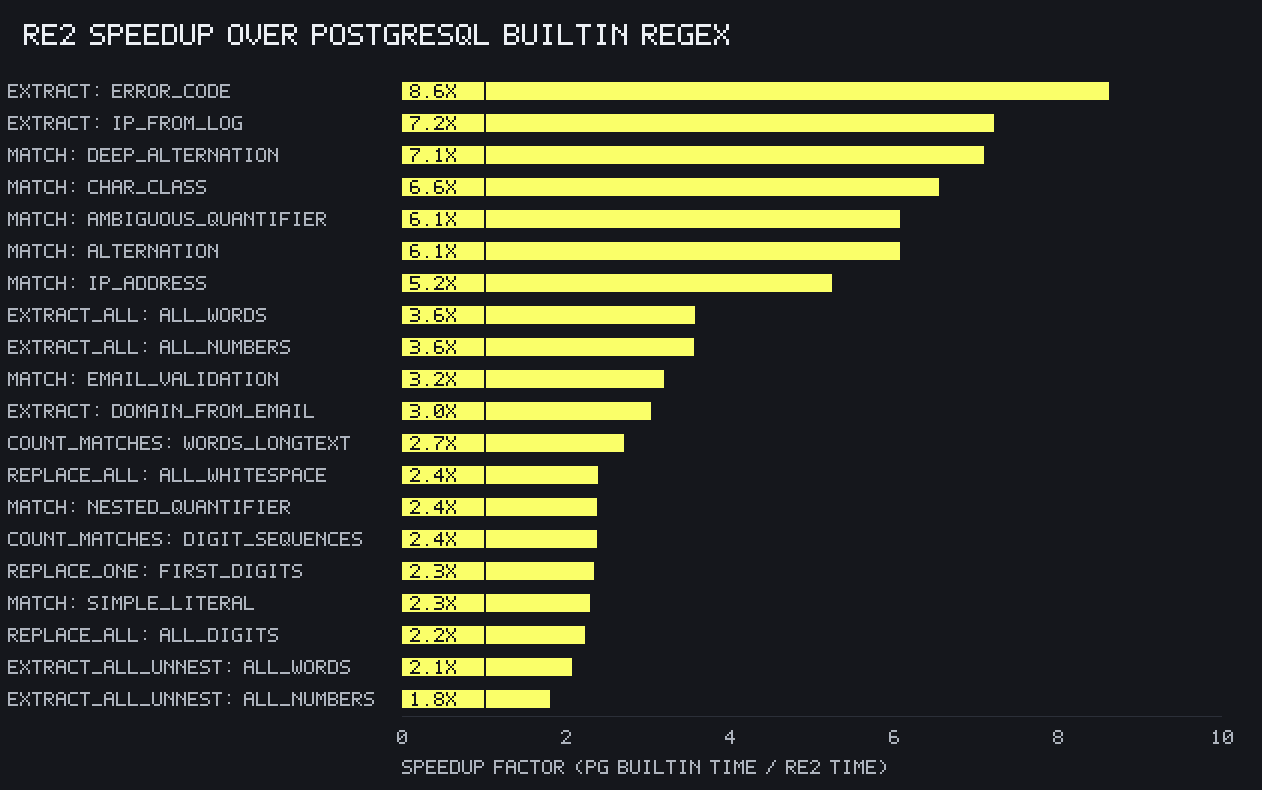
Naturally, the pg\_re2 project includes a benchmark that compares the raw performance of its RE2-backed regex functions to the Postgres native functions. This graph summarizes the horizontal speedup factors on an AWS m6g.2xlarge instance with PostgreSQL 18:
Findings:
####
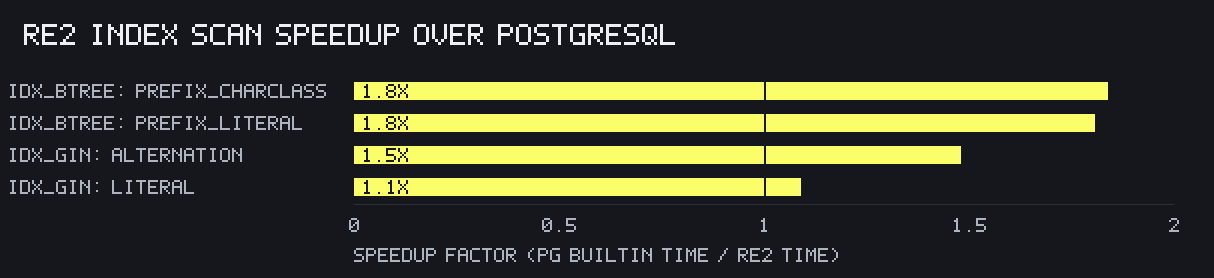
pg\_re2 v0.4.0 adds a matching operator, `@~`, to complement the Postgres `~`operator, along with btree and GIN index support to reduce the need for table scans when evaluating RE2 regular expressions. A second benchmark compares RE2 to Postgres regular expression index performance on the same server:
Findings:
Overall, the performance improvements identified by Russ Cox hold true for regular expressions in Postgres, too.
##
The second driver for creating pg\_re2 was compatibility with ClickHouse regular expression functions. Turns out that RE2 differs from Postgres POSIX expressions not only in speed but also syntax. These variations matter because pg\_clickhouse v0.2.0 added pushdown for several PostgreSQL operators and functions. It works well for simple regexen:
1SELECT id, by FROM log.entries WHERE by ~ 'Click' ORDER BY id;Copy command
1id |     by
2----+------------
3  1 | ClickHouse
4  5 | MouseClick
5 (2 rows)
Copy command
If you'd like to follow along, the following examples use this ClickHouse table:>
> 1CREATE TABLE entries (
2 id UInt32 NOT NULL,
3 by String NOT NULL
4) ENGINE = MergeTree ORDER BY (id);
5
6INSERT INTO entries VALUES
7 ( 1, 'ClickHouse' ),
8 ( 2, 'HouseQuake' ),
9 ( 3, 'HouseQuake' ),
10 ( 4, 'QuakerOats' ),
11 ( 5, 'MouseClick' );> >
Copy command>
And this pg\_clickhouse foreign table configuration in Postgres:>
> 1CREATE EXTENSION pg_clickhouse;
2CREATE EXTENSION re2;
3CREATE SERVER ch FOREIGN DATA WRAPPER clickhouse_fdw OPTIONS(driver 'binary');
4CREATE USER MAPPING FOR CURRENT_USER SERVER ch;
5CREATE SCHEMA log;
6IMPORT FOREIGN SCHEMA "default" FROM SERVER ch INTO log;> >
Copy command
It's also useful for simple anchored expressions like `^` and `$`:
1SELECT id, by FROM log.entries WHERE by ~ '^House' ORDER BY id;Copy command
1id |     by
2----+------------
3  2 | HouseQuake
4  3 | HouseQuake
5(2 rows)
Copy command
But sometimes pg\_clickhouse returns unexpected results:
1SELECT id, by ~ 'Quake\b' FROM log.entries WHERE by ~ 'Quake\b';Copy command
1id | ?column?
2----+----------
3  2 | f
4  3 | f
5(2 rows)
Copy command
Here `by ~ 'Quake\b'` in the `WHERE` clause, which pushes down to ClickHouse, returns true for two rows, but the same expression in the select list, which executes in Postgres, surprisingly returns false! How could that be?
##
This perplexing outcome derives from a difference between the two engines. In ClickHouse, `\b` represents a word boundary, while in Postgres it represents a backspace character. Thus the `WHERE` expression pushed down to ClickHouse returns true, while the `SELECT` expression that executes in Postgres does not.
A panoply of such variations exists between these two engines. Quite a few of the backslash features work differently or don't exist in one or the other:
| Feature | Postgres | ClickHouse | | ----------- | ----------------------------------- | --------------------------- | | \\b | backspace | word boundary | | \\B | Backslash | not word boundary | | \\cx | low-order 5 bits same as x | 🚫 | | \\C | 🚫 | match a single byte | | \\uwxyz | character with hex value 0xwxyz | 🚫 | | \\Ustuvwxyz | character with hex value 0xstuvwxyz | 🚫 | | \\m | beginning of word | 🚫 | | \\M | end of word | 🚫 | | \\y | word boundary | 🚫 | | \\Y | not word boundary | 🚫 | | \\Z | end of string | 🚫 | | \\1, \\2 … | backreference to nth capture | 🚫 | | \\f | form feed | form feed | | \\Q...\\E | 🚫 | literal text | | \\p{Foo} | 🚫 | Unicode character class Foo | | \\pF | 🚫 | Unicode character class F | | \[:ascii:\] | ASCII characters | ASCII characters |
Both also support flags passed via `(?xyz)` or via an additional argument to Postgres functions. But the flags deviate substantially:
| Flag | Postgres | ClickHouse | | ---- | ---------------------------------- | ---------------------------- | | b | rest of regex is a basic regex | 🚫 | | c | case-sensitive matching | 🚫 | | e | rest of regex is an extended regex | 🚫 | | g | return all matches | 🚫 | | i | case-insensitive matching | case-insensitive | | m | historical synonym for n | ^ and $ match begin/end line | | n | newline-sensitive matching | 🚫 (use m) | | p | partial newline-sensitive matching | 🚫 | | q | rest of regex is literal text | 🚫 | | s | non-newline matching (default) | let . match \\n (default) | | t | tight syntax (e.g., not expanded) | 🚫 | | w | inverse partial newline-sensitive | 🚫 | | x | expanded syntax | 🚫 | | U | 🚫 | ungreedy |
The wording for flags supported by both engines differs, but seems to amount to the equivalent behaviors. For example, PostgreSQL's term "non-newline matching" means the pattern is insensitive to and therefore does match newlines. These documentation differences complicate validation of the behaviors difficult without testing!
But wait, there's more! A few examples:
##
These variations constitute a fraction of the differences between the two regular expression engines. Clearly one must be wary of them when querying pg\_clickhouse tables. Test your regular expressions thoroughly, especially when using flags, character classes, and backslash features.
To simplify the problem (or maybe create two problems), we've added pg\_re2function pushdown to pg\_clickhouse v0.3.0. Using pg\_re2 functions for columns in pg\_clickhouse tables provides multiple benefits over pushing down Postgres regex functions:
The benefits become clear when revisiting the unanticipated results that started this section:
1SELECT id, by ~ 'Quake\b' FROM log.entries WHERE by ~ 'Quake\b';Copy command
1id | ?column?
2----+----------
3  2 | f
4  3 | f
5(2 rows)
Copy command
Note again that `~` returns true when pushed down to ClickHouse, but false when executed in Postgres. Replacing the Postgres `~` operator with the re2 extension's `re2match()` function still pushes down to the ClickHouse match function:
1SELECT id, re2match(by, 'Quake\b')
2FROM log.entries where re2match(by, 'Quake\b');
Copy command
1id | re2match
2----+----------
3  2 | t
4  3 | t
5(2 rows)
Copy command
But because the re2 extension uses the same RE2 library as ClickHouse, the query now returns consistent results: `re2match()` returns true when executing in Postgres and when pushed down to ClickHouse.
##
The re2 extension derives from our goal to synthesize Postgres & ClickHouse as cooperating parts of a single, high performance data platform. It thus duplicates the full suite of ClickHouse regex functions described in the string search, string replacement, string extraction, and string splitting documentation, and its test suite draws from ClickHouse's existing regex tests.
We therefore wholeheartedly recommend using pg\_re2 where possible for faster regex execution on Postgres. Even more so for analytical queries to ensure performance and pushdown remain consistent once the data migrates to ClickHouse.
Try Postgres managed by ClickHouse
ClickHouse + Postgres has become the unified data stack for applications that scale. With Managed Postgres now available in ClickHouse Cloud, this stack is a day-1 decision.
---
Share this post


Subscribe to our newsletter
Stay informed on feature releases, product roadmap, support, and cloud offerings!
Recent posts

User stories
How Bullet uses ClickHouse Cloud to give DeFi's fastest exchange real-time analytics
ClickHouse · Jul 15, 2026

Engineering
@clickhouse/rowbinary: when your library is also a parser compiler
Peter Leonov · Jul 14, 2026

Engineering
How we configure huge pages in ClickHouse Managed Postgres
Kaushik Iska · Jul 14, 2026

User stories
How Insider One uses ClickHouse Cloud to power real-time customer engagement at scale
ClickHouse · Jul 13, 2026