Reverse Engineering Crazy Taxi, Part 3
Jun 4, 2026
Reverse Engineering Crazy Taxi, Part 3
#### Turning bytes into brands
Table of Contents \[+\]
This is the third of a series of posts detailing how I put interactive, 3D versions of Crazy Taxi’s levels onto the web. If you haven’t read the preceeding posts, I’d highly recommend it, since this builds off many of the ideas developed there.
- Part 1: Introduction & archive reversing
- Part 2: Reversing shape files
- Part 3: Reversing textures & rendering every shape file (you are here)
By the end of Part 2, we’d covered quite a bit of ground: learning about how 3D models are stored as vertex attributes, how those attributes are represented in the GameCube’s Graphics Library (a.k.a. GX), and how Crazy Taxi’s `.shp` file format contains the GX Display Lists that describe how to draw a model. After all of this, we were only able to render one measly cube.
And we didn’t even cover everything needed to do that! I skipped over how Jasper, noclip.website’s creator, reverse engineered the texture format, and didn’t really touch on how noclip turns GX DisplayLists into WebGL/WebGPU calls that can be rendered in the browser.
In this post, we’ll right some of those wrongs by exploring a much more complicated `.shp` model, and by the end of this we should be able to render any of Crazy Taxi’s 2,700+ models. And as for which model to target, for my money, there’s really only one choice:
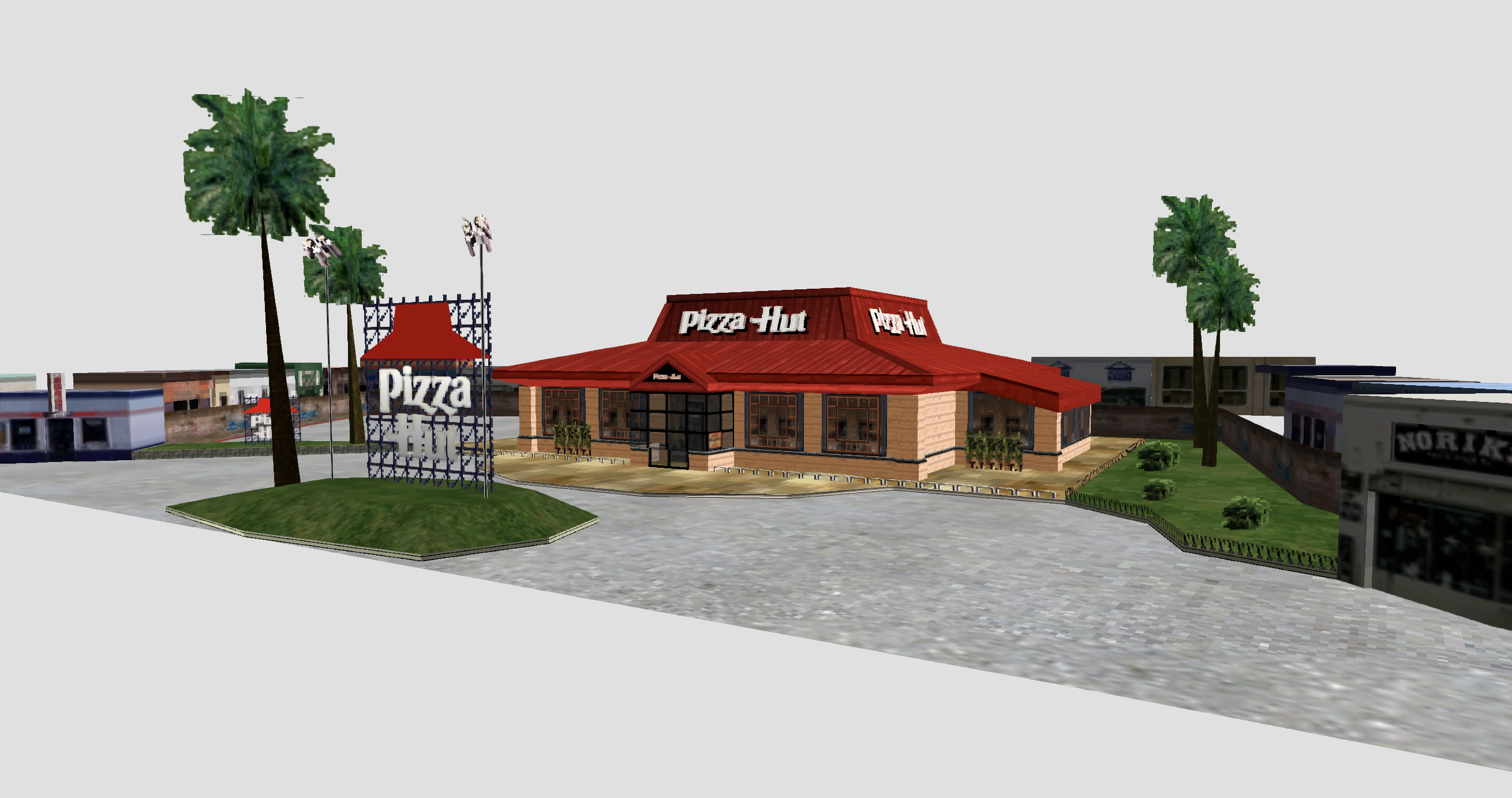
Pizza Hut, serenely floating in the limbo of noclip
Finding the hut
To be honest, rendering Crazy Taxi’s Pizza Hut was kinda priority number 1 for me when I got started with this project. I can’t exactly say why, but the idea of painstakingly recreating this egregious example of product placement was just really funny to me. Also, because the Pizza Hut, KFC, FILA, and Tower Records models all got de-branded in later versions of the game due to licensing issues, it made this process a bizarre case of consumerist preservation.
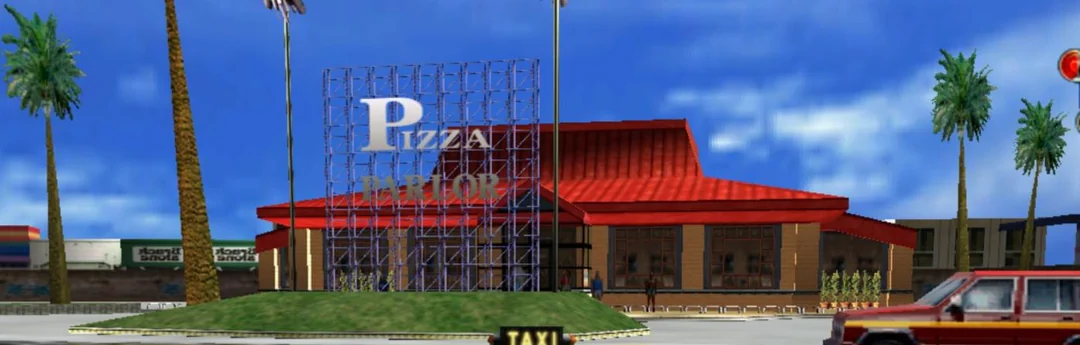
'Pizza Parlor' in the Xbox Live Arcade port, via Reddit user u/tejojo
As it turns out, finding out which `.all` archive contains the Pizza Hut was a pretty easy task: simply `grep` for “pizza” in our expanded archive directories:
$ grep -R -i pizza ct-extract/
Binary file ct-extract/poldc2_stream.all/course_dc3b_052k.shp matches
Binary file ct-extract/poldc1_stream.all/course_4b_048_a_ph.shp matches
Looking for “pizza” in the `strings` output of these models gives us some more helpful output:
$ strings ct-extract/poldc2_stream.all/course_dc3b_052k.shp | grep -i pizza
TT_PizzaHut_log_01_tr.tex
$ strings ct-extract/poldc1_stream.all/course_4b_048_a_ph.shp | grep -i pizza
TT_PizzaHut_log_01_tr.tex
So, assuming that “log” means “logo”, it looks like we have two .shp models that contain a Pizza Hutty logo.. At first it might seem odd that there’s two Pizza Hut models, but if you’ve played the console version of Crazy Taxi, you might already know why that is.
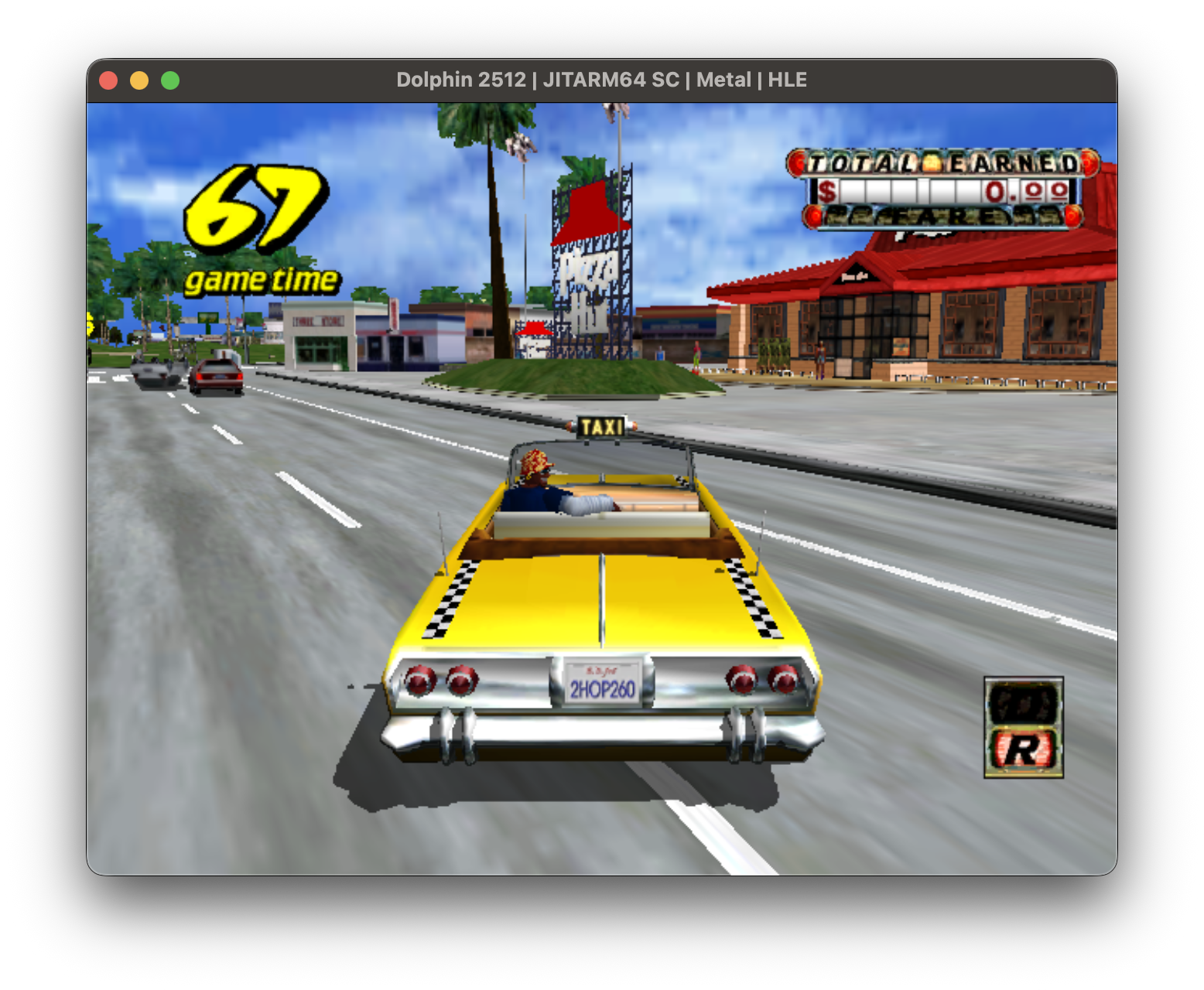
When Crazy Taxi was ported from the arcade to consoles, it touted both its original “Arcade Mode” map, as well as a new and much larger map which was confusingly named “Original Mode”. And both maps contain a Pizza Hut model with slightly different surroundings:
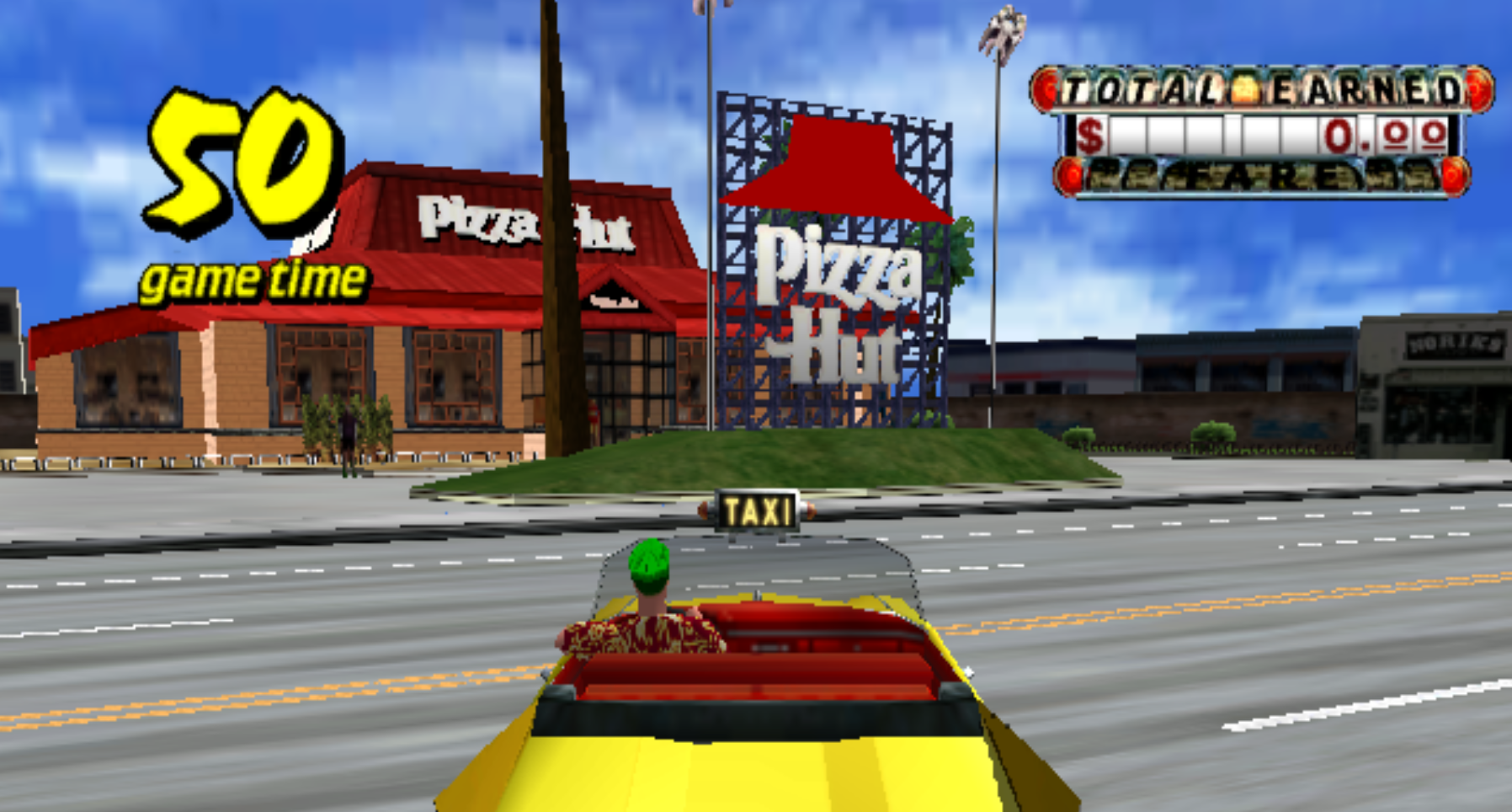
Pizza Hut in Arcade Mode
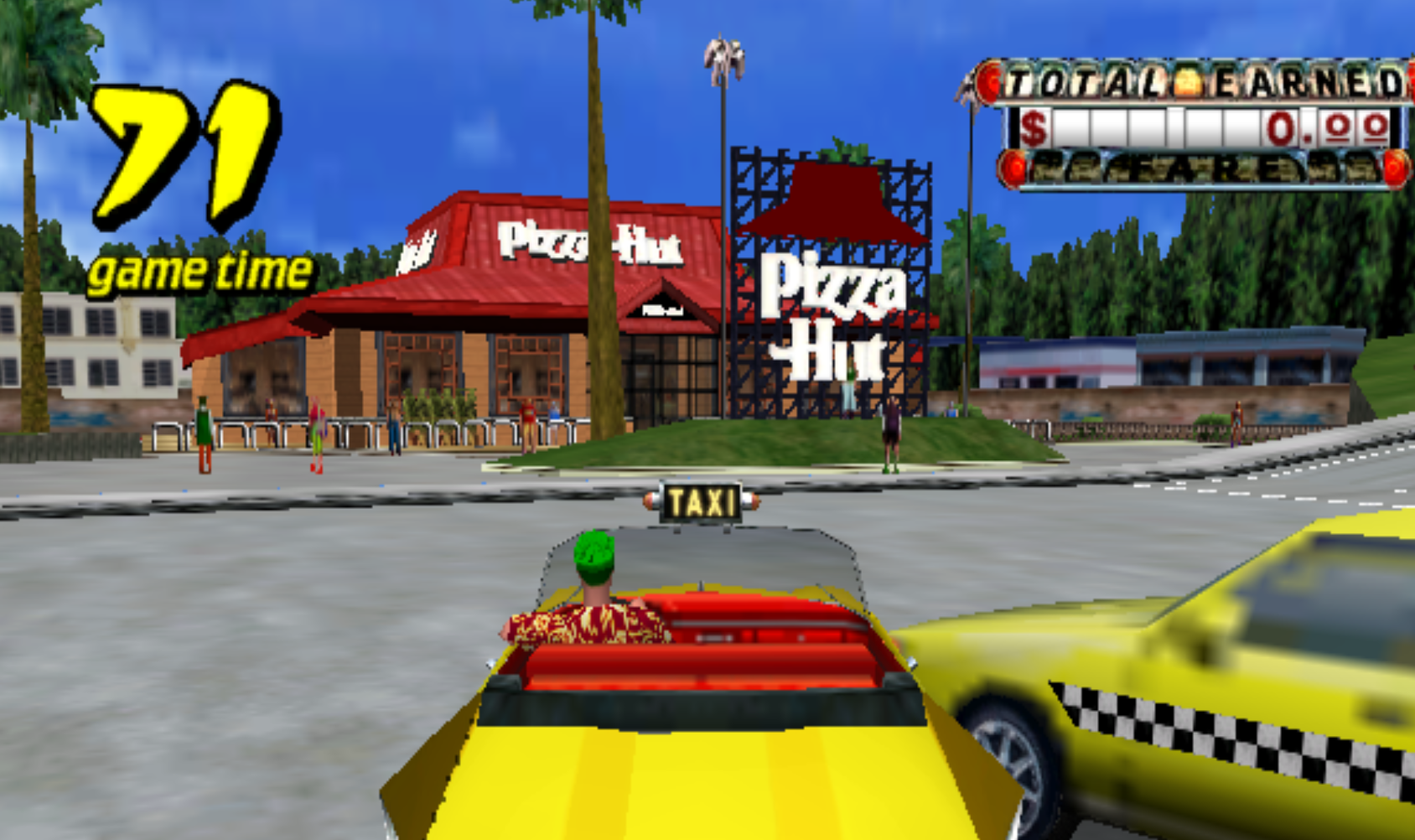
Pizza Hut in Original Mode
Either model would work just fine for our purposes, but let’s see if we can determine which model is which.
Original Recipe
So we know our Pizza Huts are in `poldc1_stream.all` and `poldc2_stream.all`, but after grepping around some more, I couldn’t find anything clearly indicating which one of these files corresponds to Arcade Mode vs. Original Mode. That said, we can definitely make some educated guesses. Here are all the archive files that start with “pol” (which I’m guessing is short for “polygon”):
polDC0.all
poldc1_stream.all
poldc1.all
poldc2_stream.all
poldc2.all
poldc3_stream.all
poldc3.all
Being that there are 2 main maps in the GameCube version (Arcade and Original) and a bunch of mini-maps (the Crazy Box collection), my guess was that the “dc1”, “dc2”, and “dc3” might refer to those, with “DC0” seemingly being the odd one out as it has no `_stream` companion. Maybe it’s used for shared models, or models used in the main menu?
And, since our Pizza Hut `.shp` files were in archive files referencing `dc1` and `dc2`, I assumed that those might be our Arcade and Original maps.
But is `dc1` the Arcade map, or is `dc2`? Well, I know the Original mode map features a sprawling subway system, and only `poldc2.all` contains models with “train” in their names. So, for now, let’s assume that `dc1` refers to Arcade and `dc2` refers to Original.
About those textures
Now that we’ve got a guess on which `.shp` represents the Arcade Mode’s Pizza Hut, I’d like to finally demystify how we parsed the textures in the previous post’s cube model. But first, how do we find a model’s textures?
Recall that our `.shp` file contains not only a model’s vertex attributes and GX Display Lists, but also a list of texture files at the end. Let’s take a look at the list for the Arcade version of Pizza Hut:
course\_4b\_048\_a\_ph.shp
Offset
00000000 ⋮ 00007c4000007c5000007c6000007c7000007c8000007c9000007ca000007cb000007cc000007cd000007ce000007cf000007d0000007d1000007d2000007d3000007d4000007d5000007d6000007d7000007d8000007d9000007da000007db000007dc000007dd000007de000007df000007e0000007e1000007e2000007e3000007e4000007e5000007e6000007e7000007e8000007e9000007ea000007eb000007ec000007ed000007ee000007ef000007f0000007f1000007f2000007f3000007f4000007f5000007f6000007f7000007f8000007f9000007fa000007fb000007fc000007fd000007fe000007ff000008000000080100000802000008030000080400000805000008060000080700000808000008090000080a0000080b0000080c0000080d0000080e0000080f000008100000081100000812000008130000081400000815000008160000081700000818000008190000081a0000081b0000081c0000081d0000081e0000081f000008200000082100000822000008230000082400000825000008260000082700000828000008290000082a0000082b0000082c0000082d0000082e0000082f000008300000083100000832000008330000083400000835000008360000083700000838000008390000083a0000083b0000083c0000083d0
Bytes
(start of file)
0x7c40 hidden
77686974652e74657800000000000000
00000000000000000000000000000000
00000000000000000000000054545f73
686f705f30342e746578000000000000
00000000000000000000000000000000
000000000000000054545f73756e5f30
342e7465780070005f74722e626d7000
00000000000000000000000000000000
0000000054545f61645f30335f74722e
746578007000722e626d700000000000
00000000000000000000000000000000
54545f686f7573655f30382e74657800
00000000000000000000000000000000
00000000000000000000000054495f73
746f6e655f3573712e74657800000000
00000000000000000000000000000000
000000000000000054545f73686f705f
30312e74657800700070000000000000
00000000000000000000000000000000
0000000054545f686f7573655f30362e
74657800007000000000000000000000
00000000000000000000000000000000
54545f61645f30382e746578002e626d
70000000000000000000000000000000
00000000000000000000000054545f79
616e655f30322e746578000070000000
00000000000000000000000000000000
000000000000000054545f686f757365
5f30392e746578007000000000000000
00000000000000000000000000000000
0000000054545f73616e5f30342e7465
780000626d7000000000000000000000
00000000000000000000000000000000
54545f73616b755f30315f74722e7465
78000000000000000000000000000000
00000000000000000000000054545f61
645f30365f74722e7465780000000000
00000000000000000000000000000000
000000000000000054495f77616c6c5f
37362e74657800007000000000000000
00000000000000000000000000000000
0000000054545f73616e5f30312e7465
78002e626d7000000000000000000000
00000000000000000000000000000000
54495f6b7573615f312e74657800626d
70007000000000000000000000000000
000000000000000000000000544d5f6d
696b692e7465780030312e626d700000
00000000000000000000000000000000
000000000000000054545f7472656530
325f74722e7465780000000000000000
00000000000000000000000000000000
0000000054495f747265655f31315f74
722e746578002e626d70000000000000
00000000000000000000000000000000
54545f73616b755f30325f74722e7465
78000000000000000000000000000000
00000000000000000000000054545f6b
6162655f30382e746578007000000000
00000000000000000000000000000000
0000000000000000544d5f6761726173
315f74722e7465780000000000000000
00000000000000000000000000000000
0000000054545f50697a7a614875745f
6c6f675f30315f74722e746578000000
00000000000000000000000000000000
54495f77616c6c5f32392e7465780000
00000000000000000000000000000000
00000000000000000000000054545f73
686f70425f3030342e74657800000000
00000000000000000000000000000000
000000000000000054545f73616e5f30
332e74657800365f74722e626d700000
00000000000000000000000000000000
0000000054495f77616c6c5f36372e74
6578006d700000000000000000000000
00000000000000000000000000000000
54495f706f6c655f312e74657800626d
70000000000000000000000000000000
00000000000000000000000054495f6c
696768745f365f74722e746578000000
00000000000000000000000000000000
000000000000000054495f75656b695f
31615f74722e74657800000000000000
00000000000000000000000000000000
0000000054495f75656b695f31625f74
722e7465780000000000000000000000
00000000000000000000000000000000
54495f73616b755f31625f74722e7465
78000000000000000000000000000000
00000000000000000000000054545f42
6b696e675f6d61646f2e746578000000
00000000000000000000000000000000
000000000000000054545f6d61646f5f
30322e746578006d7000000000000000
00000000000000000000000000000000
0000000054545f686f7573655f30372e
74657800000000000000000000000000
00000000000000000000000000000000
54545f6d61646f5f30382e7465780000
00000000000000000000000000000000
00000000000000000000000054545f73
686f705f30362e746578000000000000
00000000000000000000000000000000
000000000000000054495f73686f705f
34642e74657800000000000000000000
00000000000000000000000000000000
0000000054545f79616e655f30312e74
65780000000000000000000000000000
00000000000000000000000000000000
544d5f6b6162655f74696c652e746578
00000000000000000000000000000000
00000000000000000000000054545f61
645f31315f74722e7465780000000000
00000000000000000000000000000000
000000000000000043305a5f68617368
69676f5f74722e746578000000000000
00000000000000000000000000000000
0000000054495f73686f705f31302e74
65780000000000000000000000000000
00000000000000000000000000000000
00000000000000000000000000000000
ASCII
\-
⋮
white.tex.......
................
............TT\_s
hop\_04.tex......
................
........TT\_sun\_0
4.tex.p.\_tr.bmp.
................
....TT\_ad\_03\_tr.
tex.p.r.bmp.....
................
TT\_house\_08.tex.
................
............TI\_s
tone\_5sq.tex....
................
........TT\shop\
01.tex.p.p......
................
....TT\_house\_06.
tex..p..........
................
TT\_ad\_08.tex..bm
p...............
............TT\_y
ane\_02.tex..p...
................
........TT\_house
\_09.tex.p.......
................
....TT\_san\_04.te
x..bmp..........
................
TT\_saku\_01\_tr.te
x...............
............TT\_a
d\_06\_tr.tex.....
................
........TI\wall\
76.tex..p.......
................
....TT\_san\_01.te
x..bmp..........
................
TI\_kusa\_1.tex.bm
p.p.............
............TM\_m
iki.tex.01.bmp..
................
........TT\_tree0
2\_tr.tex........
................
....TI\_tree\_11\_t
r.tex..bmp......
................
TT\_saku\_02\_tr.te
x...............
............TT\_k
abe\_08.tex.p....
................
........TM\_garas
1\_tr.tex........
................
....TT\PizzaHut\
log\_01\_tr.tex...
................
TI\_wall\_29.tex..
................
............TT\_s
hopB\_004.tex....
................
........TT\_san\_0
3.tex.6\_tr.bmp..
................
....TI\_wall\_67.t
ex.mp...........
................
TI\_pole\_1.tex.bm
p...............
............TI\_l
ight\_6\_tr.tex...
................
........TI\ueki\
1a\_tr.tex.......
................
....TI\_ueki\_1b\_t
r.tex...........
................
TI\_saku\_1b\_tr.te
x...............
............TT\_B
king\_mado.tex...
................
........TT\mado\
02.tex.mp.......
................
....TT\_house\_07.
tex.............
................
TT\_mado\_08.tex..
................
............TT\_s
hop\_06.tex......
................
........TI\shop\
4d.tex..........
................
....TT\_yane\_01.t
ex..............
................
TM\_kabe\_tile.tex
................
............TT\_a
d\_11\_tr.tex.....
................
........C0Z\_hash
igo\_tr.tex......
................
....TI\_shop\_10.t
ex..............
................
................
Data Inspector Range:
| Bits | uint | int | float | | ---- | ---- | --- | ----- | | 8 | \- | \- | \- | | 16 | \- | \- | \- | | 32 | \- | \- | \- |
Endianness: Big Little
Unsurprisingly, there’s quite a few more textures here than were in `cube0.shp`, and keen eyes might recognize `white.tex`, which was also present in `cube0.shp`. Actually, every single `.shp` file’s texture list starts with `white.tex`, and I never really figured out why.
Anyway, our goal is to turn this block of data into a list of filenames. You might take a second to scan through this listing and see if you can identify how to parse it into one.
Using a similar analysis to .all files in Part 1, it’s pretty clear that this list uses fixed-length blocks of `0x2c` bytes, and since the strings themselves have no clear lengths defined, we can assume they’re null-terminated, i.e. the string’s end is indicated by a 00 byte. And sure enough, we do see a null byte at the end of each occurrence of `.tex`. But we’ve also got some random ASCII data strewn after these termination bytes, such as at offsets `0x7ca6` and `0x7cd4`.
While this might be meaningful data, I think this is much more likely to be junk data similar to what we saw at the end of Part 2, Section 7. And since it always follows the terminating null byte, it’s very easy to simply discard this data.
Now that we’ve got a list of the Pizza Hut’s texture files, let’s try reading one of them.
Photo Shop
The first texture listed in our Pizza Hut model is called `TT_shop_04.tex`, which we can find in all three of the level texture archives: `texDC1.all`, `texDC2.all`, and `texdc3.all`. It’s possible these are all the same, but since we’re targeting the Arcade mode version, let’s pick the one from `texDC1.all`. Here’s the first chunk of data from the texture file:
TT\_shop\_04.tex
Offset
00000000000000100000002000000030000000400000005000000060000000700000008000000090 ⋮ 00000aff
Bytes
0000004000000040000000000000000e
000000010000000100000003b0107d00
b0187d00000000000000000000000000
00000000000000000000000000000000
00000000000000000000000000000000
00000000000000000000000000000000
f7bef75d01030103f7bfe6355ff8c0c0
f7bef75d01030103f7beef3c60406040
f7beeeb855880000f7bfee5555aa0000
f7bef79eaaaaaaaaf7bef79eaaaaaaaa
0xa5f hidden
(end of file)
ASCII
...@...@........
..............}.
..}.............
................
................
................
...\].......5\_...
...\].......<\`@\`@
....U......UU...
................
⋮
\-
Data Inspector Range:
| Bits | uint | int | float | | ---- | ---- | --- | ----- | | 8 | \- | \- | \- | | 16 | \- | \- | \- | | 32 | \- | \- | \- |
Endianness: Big Little
Now, since Jasper’s the one who figured out the `.tex` format, I’ll mostly be echoing his wisdom here, but if you’ve worked with textures a bit before, you might be able to figure out a bit of what’s going on here without too much difficulty.
That’s because texture formats are often just different rearrangements of the same basic types of data: the dimensions of the texture, maybe a flag or two describing the format of the pixel data, and some information about a somewhat complicated thing called a mipmap. Setting aside that last item for now, take a look at the binary data and see if you can make a guess as to the dimensions our texture. Hint: it’s usually a nice even power of 2, and will be rather small since we’re looking at a GameCube texture.
Once we’ve got our dimensions, the next step is figuring out what the pixel data’s format is, and here we’ve got good news and bad news. The bad news is there’s a ton of pixel data formats out there, and some of the more common compressed ones (like Unity’s Crunch) are complicated and not well documented. The good news is GameCube’s GX API only uses a handful of formats, all of which are fairly well understood at this point. And notably, one of the more common GX formats called `CMPR` (for “compressed”) uses a flag value 0x0E, which just so happens to be what we see in `TT_shop_04.tex` at offset `0x0C`!
But before we dig into how these pixels are encoded, let’s revisit mipmaps, since they’ll soon become quite relevant.
A little image goes a long way
Mipmaps are a fairly old and commonplace technique of storing smaller versions of a texture alongside the original. Usually, these smaller copies are ones whose dimensions are reduced by increasing powers of 2, so in addition to our 64x64 texture above, its mipmap would also include copies at 32x32, 16x16, 8x8, and so on. Why would we do this? Well, it all comes down to nasty property of digital signals called aliasing.
Suppose you’re looking at a 3D scene of a black and white checkerboard floor. The tiles closest to your camera will look pretty normal, since the tiles are large enough that your screen’s pixels generally only need to be entirely white or entirely black. But because of perspective, as your eye looks farther into the distance, the tiles will become smaller. And since the pixels on your screen aren’t getting any smaller, eventually you’ll run into instances where a single pixel will need to somehow depict both a black and a white tile, meaning some of the checkerboard image’s data will necessarily have to be discarded.
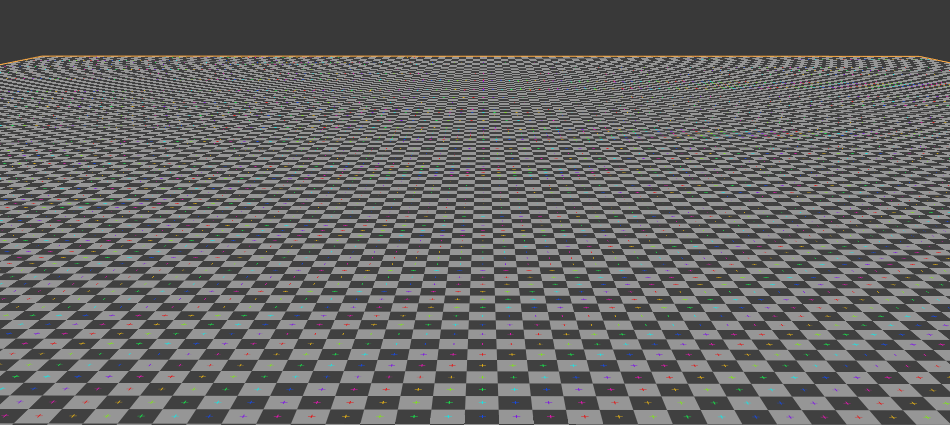
A checkerboard floor exhibiting aliasing artifacts. Image by BillyBob CornCob
As you can see in this image, this can lead to all sorts of artistically undesirable effects, such as jaggies and moiré patterns. These are due to the mathematically fascinating, but extremely obnoxious, phenomenon known as aliasing. Aliasing occurs whenever you sample a signal at a much lower frequency than its original, which in our case translates to picking a pixel color from a texture at a lower resolution than the original.
You’ve probably heard of anti-aliasing, which refers to a family of techniques for mitigating the aforementioned jaggies etc. Unfortunately, anti-aliasing techniques are generally more computationally expensive than simply telling the GPU to simply plop down the color of the nearest texture pixel, or texel. So, instead of letting the shader do all the work all the time, developers will usually create pre-downsampled versions of their textures to be used when the image would be rendered small enough. And this, dear readers, is what a mipmap is.
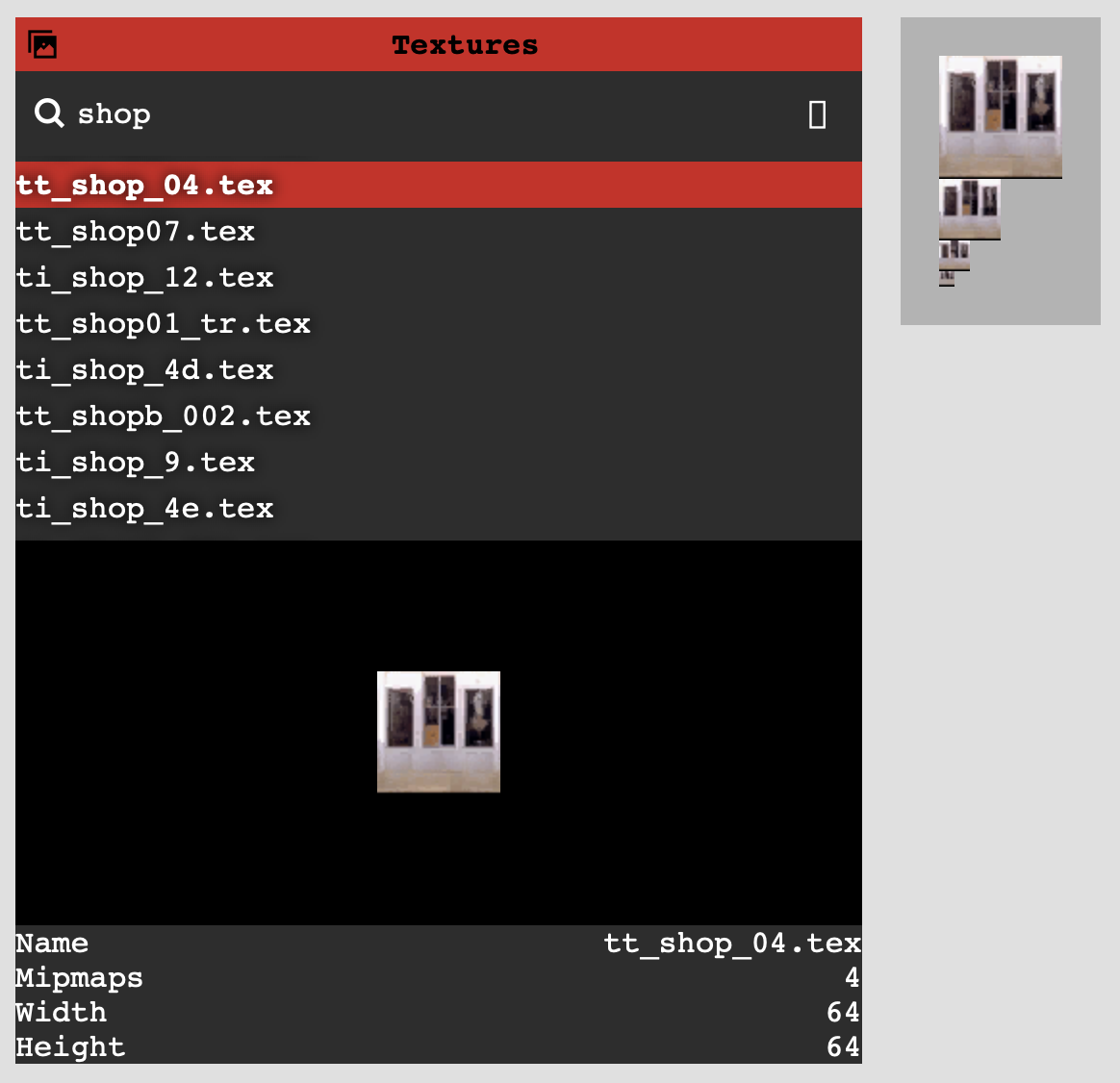
Screenshot from noclip's UI showing each mipmap for TT\_shop\_04.tex
A GPU can easily use its depth buffer to sample smaller mips for further pixels, letting us do a depth-aware form of anti-aliasing very cheaply. Here’s the same checkerboard example from above, but this time using mipmapping to prevent aliasing:
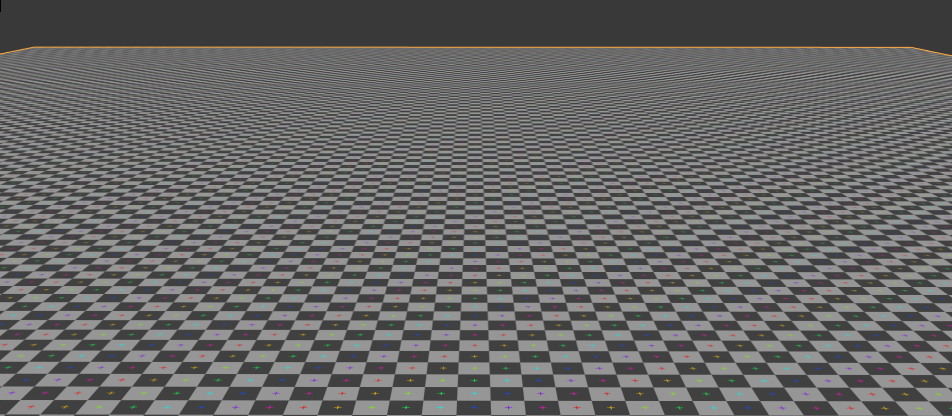
A checkerboard floor without aliasing artifacts, due to use of mipmapping. Image by BillyBob CornCob
With all of this in mind, let’s see if we can make sense of our texture’s pixel data.
CMPR? I hardly KNWR!
So what does our texture data look like? Well, since it’s compressed using Nintendo’s `CMPR` format, it’s not super easy to visually inspect the values and look for RGB pixel data. But based on noclip’s implementation of CMPR, we can do some basic sanity checks here.
`CMPR` images are composed of 8-byte blocks, each of which represents a 4x4 grids of pixels in the image. A block starts with two colors encoded as `RGB565` values, a two-byte format where 5 bits are used to encode a red value, 6 bits are used for green, and 5 are used for blue. Two more colors are produced by blending between the initial two, forming a table of 4 colors. The remaining 4 bytes is used to represent the 16 pixels, each being composed of two bits that represent which of the four colors is used for that pixel.
To illustrate this, I made a little widget that decodes each block of pixels individually. Select blocks in the list at the top-left, and it’ll show how the 8 bytes of that block turn into 16 pixels:
TT\_shop\_04.tex
Block 0Block 1Block 2Block 3Block 4Block 5Block 6Block 7Block 8Block 9Block 10Block 11Block 12Block 13Block 14Block 15Block 16Block 17Block 18Block 19Block 20Block 21Block 22Block 23Block 24Block 25Block 26Block 27Block 28Block 29Block 30Block 31Block 32Block 33Block 34Block 35Block 36Block 37Block 38Block 39Block 40Block 41Block 42Block 43Block 44Block 45Block 46Block 47Block 48Block 49Block 50Block 51Block 52Block 53Block 54Block 55Block 56Block 57Block 58Block 59Block 60Block 61Block 62Block 63Block 64Block 65Block 66Block 67Block 68Block 69Block 70Block 71Block 72Block 73Block 74Block 75Block 76Block 77Block 78Block 79Block 80Block 81Block 82Block 83Block 84Block 85Block 86Block 87Block 88Block 89Block 90Block 91Block 92Block 93Block 94Block 95Block 96Block 97Block 98Block 99Block 100Block 101Block 102Block 103Block 104Block 105Block 106Block 107Block 108Block 109Block 110Block 111Block 112Block 113Block 114Block 115Block 116Block 117Block 118Block 119Block 120Block 121Block 122Block 123Block 124Block 125Block 126Block 127Block 128Block 129Block 130Block 131Block 132Block 133Block 134Block 135Block 136Block 137Block 138Block 139Block 140Block 141Block 142Block 143Block 144Block 145Block 146Block 147Block 148Block 149Block 150Block 151Block 152Block 153Block 154Block 155Block 156Block 157Block 158Block 159Block 160Block 161Block 162Block 163Block 164Block 165Block 166Block 167Block 168Block 169Block 170Block 171Block 172Block 173Block 174Block 175Block 176Block 177Block 178Block 179Block 180Block 181Block 182Block 183Block 184Block 185Block 186Block 187Block 188Block 189Block 190Block 191Block 192Block 193Block 194Block 195Block 196Block 197Block 198Block 199Block 200Block 201Block 202Block 203Block 204Block 205Block 206Block 207Block 208Block 209Block 210Block 211Block 212Block 213Block 214Block 215Block 216Block 217Block 218Block 219Block 220Block 221Block 222Block 223Block 224Block 225Block 226Block 227Block 228Block 229Block 230Block 231Block 232Block 233Block 234Block 235Block 236Block 237Block 238Block 239Block 240Block 241Block 242Block 243Block 244Block 245Block 246Block 247Block 248Block 249Block 250Block 251Block 252Block 253Block 254Block 255
Bytes: f7bef75d01030103
| Color | Source | Result | | ----- | --------------------- | ------- | | 0 | 11110 111101 11110 | #f7f7f7 | | 1 | 11110 111010 11101 | #f7ebef | | 2 | blend(color0, color1) | #f7f2f4 | | 3 | blend(color0, color1) | #f7eff2 |
Pixels:
00
00
00
01
00
00
00
11
00
00
00
01
00
00
00
11
Result texture:
It’s actually pretty remarkable that we can achieve such a decent color gradient using only 4 bytes of data, and by using just 4 more bytes for 16 pixels, we end up with a surprisingly rich way to represent an image using very little data.
Since we know our image’s dimensions (64x64), we would expect our texture to have 64∗644∗4=256\\frac{64 \ 64}{4 \ 4} = 2564∗464∗64\=256 of these blocks. But recall that our texture is mipmapped, so there’s also a 32x32 copy of the texture, which works out to 32∗324∗4=64\\frac{32 \ 32}{4 \ 4} = 644∗432∗32\=64 more blocks. Then a 16x16 copy (16 blocks), then an 8x8 (4 blocks), a 4x4 (1 block), and finally the 2x2 and 1x1 mips which are allotted 1 block apiece.
All told, that’s 343 blocks, which at 8 bytes per block yields 2,744 bytes total for this texture. But if you subtract the offset where `TT_shop_04.tex`’s pixel data starts (`0x60`) from where it ends (`0xAFF`), you get 2,720 bytes. We’re missing 24 bytes, or 3 `CMPR` blocks!
As it turns out, that’s equal to the number of blocks for the 4x4, 2x2, and 1x1 mips. So one might guess that 3 of our 6 mips are excluded from the texture data, and as it turns out, the `u32` at offset `0x18` of `TT_shop_04.tex` happens to equal 3. Doing a similar block-count analysis on other `CMPR` textures reveals the same pattern, so let’s go ahead and name the `u32` at `0x18` `num_mips`.
Now that we’ve squared away our textures, let’s figure out how to get the rest of this Pizza Hut drawn.
VAT hunting
Recall from Part 2 that the thing which actually renders stuff on GameCube is called a Display List (or DL), and it starts with an index into Vertex Attribute Table (or VAT). The VAT contains all the useful format information for the shape’s vertex positions, texture coordinates (aka `uv` coordinates), color data, etc. But crucially, the DLs only contain an index into the VAT, and not the VAT entry itself.
Since we didn’t have the VAT entry for `cube0.shp` in Part 2, we basically eyeballed the binary data for colors, positions, etc. until we figured out their various formats, allowing us to actually render the dang thing. That approach just isn’t going to scale to 2,700+ other models, so it’s high time we actually figured how those VAT entries are created.
And I won’t beat around the bush, this process sucked. I ended up spending hours in Ghidra, an open source reverse engineering toolkit, poring over the game’s executable trying to find something that resembled the VAT list. And although I won’t be detailing this exploration since it was mostly fruitless, I wanted to mention it because sometimes the process of reverse engineering has dead ends and leads that go nowhere, and that’s OK! During this process I still learned a lot, and ended up manually annotating a bunch of code that ended up being helpful later in the project.
All that said, I did find one promising lead in Ghidra: the `GXFIFO` register. While flailing about and basically decompiling functions at random, I found a bunch that referenced a named register called `GXFIFO`. I recognized GX as the codename for GameCube’s graphics system, and knew `FIFO` to mean “first-in, first-out”, which generally refers to a queue-like interface. Asking Jasper about it, he mentioned that reading/writing to the `GXFIFO` register is pretty much the only way to interface with the GameCube’s GPU pipeline. Display Lists, for example, are submitted to the GPU by writing them to `GXFIFO`. And indeed, when a game creates VAT entries, it does so by writing them there.
He also mentioned that if spelunking in Ghidra isn’t seeming fruitful, the GameCube emulator Dolphin has a great feature called the FIFO Player which records all data written to the `GXFIFO` register and lets you inspect them. This, as it turns out, was our ticket.
Run it back
As I alluded to earlier, virtually everything on the screen in a GameCube game is drawn by sending commands to the `GXFIFO` register. So, if you keep track of the data written to `GXFIFO`, along with some bookkeeping about the state of some other registers, you can effectively analyze and play back any number of frames without even having the game’s binary. This is exactly what Dolphin’s FIFO Player does, and despite having a few warts, it’s one of the most useful tools I used while reversing Crazy Taxi.
Here’s an example of the FIFO player analyzing a frame captured outside of our Pizza Hut:
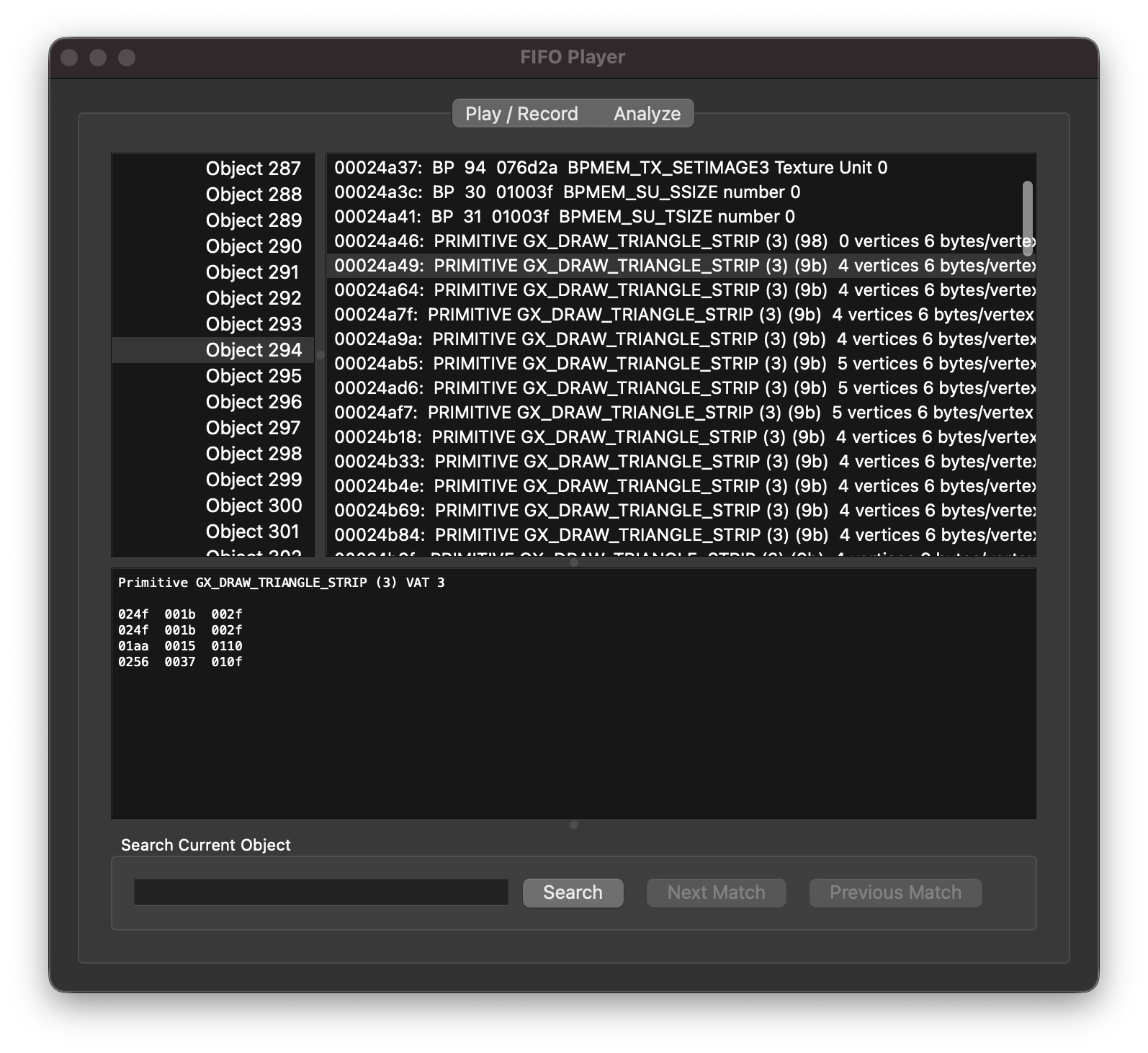
Dolphin's FIFO Player displaying frame data, and the rendered game frame itself
In the screenshots above, we’re looking at a single `GX_DRAW_TRIANGLES` Display List that happens to correspond to the Pizza Hut’s roof. How’d I know it’s the roof? In the FIFO Player window, if you click back over to the “Play/Record” tab, you can set a limit to how many objects are rendered per frame. As it turns out, if you set that limit to 293 objects, the roof disappears, but set it to 294 and it comes back, meaning “Object 294” is our guy.
Tabbing through the Display Lists is very cool, but as a reminder, we’re here to see some VAT entries. And although the DL in the screenshot above does mention `VAT 3`, the VAT entry itself is nowhere to be found in any of the FIFO calls. Tragically, that’s because by the time this frame was recorded, the VAT entries had all already been sent to the `GXFIFO` register. So what do we do?
We fork Dolphin
We fork Dolphin. You see, as I mentioned before, the FIFO Player records not only `GXFIFO` data, but also some data about the other GameCube registers. And as it happens, VATs are stored in a section of registers called the Command Processor, or CP. If we modify Dolphin to dump the CP registers, we can view the state of the VAT at the time of this frame!
This can be done in a couple ways, but I went about it by iterating through every single CP register related to VATs on each draw call. Now, for every single draw call, Dolphin will dump every VAT entry, yielding 8 sections (one per VAT entry) of rather verbose info like this:
VTXFMT 3
Position elements: 3 (x, y, z) (1)
Position format: Short (3)
Position shift: 14 (6.1035156e-05)
Normal elements: 1 (normal) (0)
Normal format: Unsigned Byte (0)
Color 0 elements: 3 (r, g, b) (0)
Color 0 format: RGB 24 bits 888 (1)
Color 1 elements: 3 (r, g, b) (0)
Color 1 format: RGB 16 bits 565 (0)
Texture coord 0 elements: 2 (s, t) (1)
Texture coord 0 format: Short (3)
Texture coord 0 shift: 7 (0.0078125)
Byte dequant: shift applies to u8/s8 components
Normal index 3: single index shared by normal, tangent, and binormal
Texture coord 1 elements: 1 (s) (0)
Texture coord 1 format: Unsigned Byte (0)
Texture coord 1 shift: 0 (1)
Texture coord 2 elements: 1 (s) (0)
Texture coord 2 format: Unsigned Byte (0)
Texture coord 2 shift: 0 (1)
Texture coord 3 elements: 1 (s) (0)
Texture coord 3 format: Unsigned Byte (0)
Texture coord 3 shift: 0 (1)
Texture coord 4 elements: 1 (s) (0)
Texture coord 4 format: Unsigned Byte (0)
Enhance VCache (must always be on): Yes
Texture coord 4 shift: 0 (1)
Texture coord 5 elements: 1 (s) (0)
Texture coord 5 format: Unsigned Byte (0)
Texture coord 5 shift: 0 (1)
Texture coord 6 elements: 1 (s) (0)
Texture coord 6 format: Unsigned Byte (0)
Texture coord 6 shift: 0 (1)
Texture coord 7 elements: 1 (s) (0)
Texture coord 7 format: Unsigned Byte (0)
Texture coord 7 shift: 0 (1)
As it happens, regardless of which frame I dumped these VAT entries, the output was always the same. And while that ends up being incredibly convenient for us since it means Crazy Taxi only uses 8 VATs, it’s by no means guaranteed to be the case! If a game needs more than 8 VAT formats, it can create new ones at runtime, meaning the CP state might change between frames. But, because Crazy Taxi has a fairly simple set of model formats, it seems to set its 8 VATs at startup and then never changes them. As such, we can just record the above output for a single draw call, and then we’ve got all the VAT entries we’ll need to render every model in the game.
noclip expects VATs to be defined in terms of TypeScript enums, so the Dolphin output above would become something like this in our renderer:
let vat: GX_VtxAttrFmt[] = [];
vat[GX.Attr.POS] = {
    compCnt: GX.CompCnt.POS_XYZ,
    compType: GX.CompType.S16,
    compShift: 14,
};
vat[GX.Attr.NRM] = {
    compCnt: GX.CompCnt.NRM_XYZ,
    compType: GX.CompType.U8,
    compShift: 0,
};
vat[GX.Attr.CLR0] = {
    compCnt: GX.CompCnt.CLR_RGB,
    compType: GX.CompType.RGB8,
    compShift: 0,
};
vat[GX.Attr.CLR1] = {
    compCnt: GX.CompCnt.CLR_RGB,
    compType: GX.CompType.RGB565,
    compShift: 0,
};
vat[GX.Attr.TEX0] = {
    compCnt: GX.CompCnt.TEX_ST,
    compType: GX.CompType.S16,
    compShift: 7,
};
vats[GX.VtxFmt.VTXFMT3] = vat;
Repeat for each VAT, and now noclip knows how to read every draw call for every model.
So close, and yet…
So we’ve got our textures decoded, and we’ve got our DLs matched up with their VATs, but there’s one major thing keeping us from Pizza Time: how do we know which textures each DL should use?
In the last post, `cube0.shp` had 2 draws and 2 textures, and simply lining them up worked just fine. And if we look at `course_4b_048_a_ph.shp` a.k.a. Pizza Hut, we’ve got 44 draws and 44 textures. So surely we can just do the same thing?
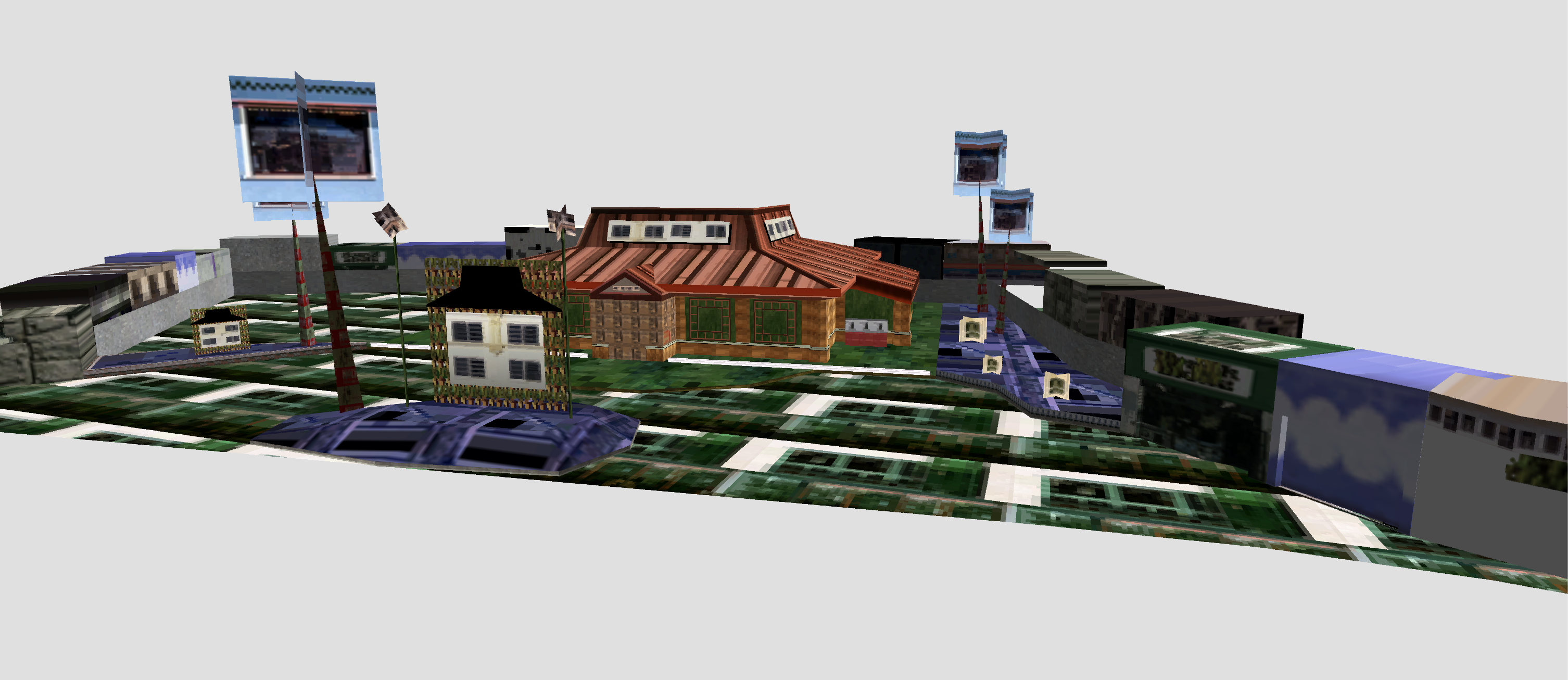
Pizza Hut Gone Wrong
Well, it’s certainly a look.
On the bright side, we seem to have the right shape for a Pizza Hut, which means our VATs are probably just fine, but clearly something’s terribly wrong with the textures. And besides looking terrible, this approach just breaks for some other models! For example, `course_dc3b_052k.shp` (a.k.a. the Other Pizza Hut) has 91 draws but only 89 textures, foiling our one-to-one approach. So clearly, the Crazy Taxi engine is doing something slightly more sophisticated to associate DLs with their textures.
To rectify this, it’s time we briefly returned to the humble `.shp` file, since there’s one block of data there we haven’t yet explored.
The final `unk`s
By the end of Part 2, here’s the Rust struct we used to parse our `.shp` file header:
#[derive(DekuRead)]
#[deku(endian = "big")]
pub struct ShpHeader {
    #[deku(assert_eq = "1.0")]
    pub version: f32,
    unk_block1: [u8; 0xc8],
    // vertex attributes
    pub pos_offset: u32,
    pub norm_offset: u32,
    pub clr_offsets: [u32; 2],
    pub tex_offsets: [u32; 8],
    padding0: [u8; 0x14],
    // final four offsets
    pub unk_offset0: u32,
    pub pos_offset_dupe: u32,
    pub display_list_offset: u32,
    pub texture_list_offset: u32,
}
Note that we have two remaining unknown parts: a block of `0xc8` bytes near the start, and one of the “final four offsets” to some unknown data elsewhere in the file. If there’s some association between draw calls and textures, it would need to be of variable size and possibly much larger than `0xc8` bytes, so we can probably rule that section out. Instead, let’s take a look at the data pointed to by Pizza Hut’s `unk_offset0`:
course\_4b\_048\_a\_ph.shp
Offset
00000000 ⋮ 000020400000205000002060000020700000208000002090000020a0000020b0000020c0000020d0000020e0000020f000002100000021100000212000002130000021400000215000002160000021700000218000002190000021a0000021b0000021c0000021d0000021e0000021f000002200000022100000222000002230000022400000225000002260000022700000228000002290000022a0000022b0000022c0000022d0000022e0000022f000002300000023100000232000002330000023400000235000002360000023700000238000002390000023a0000023b0000023c0000023d0000023e0000023f000002400000024100000242000002430000024400000245000002460000024700000248000002490000024a0000024b0000024c0000024d0000024e0000024f000002500000025100000252000002530000025400000255000002560000025700000258000002590000025a0000025b0000025c0000025d0000025e0000025f000002600000026100000262000002630000026400000265000002660000026700000268000002690000026a0000026b0 ⋮ 000083e0
Bytes
(start of file)
0x2040 hidden
00000038000000000000000000000001
00000000000000000000000000000000
00000000000026c00000034000000001
00000000000000000000000000000002
00000000dfdfdfff00002a00000003e0
00000002000000000000000000000000
0000000200000000ffffffff00002f00
00000500000000040000000000000000
0000000000000002000000004c4c4cff
00003400000002200000000500000000
00000000000000000000000200000000
ffffffff000036200000050000000006
00000000000000000000000000000002
000000004c4c4cff00003b2000000440
00000007000000000000000000000000
00000002000000004c4c4cff00003f60
00000180000000080000000000000000
000000000000000200000000eaeaeaff
000040e0000001000000000900000000
00000000000000000000000200000000
4c4c4cff000041e0000001600000000a
00000000000000000000000000000002
00000000a1a1a1ff00004340000001c0
0000000b000000000000000000000000
00000002000000004c4c4cff00004660
000000e00000000e0000000000000000
000000000000000200000000ffffffff
00004740000002000000000f00000000
00000000000000000000000200000000
d6d6d6ff00004940000002e000000010
00000000000000000000000000000002
00000000d7d7d7ff00004c2000000160
00000011000000000000000000000000
0000000200000000ae8360ff00005260
00000140000000150000000000000000
000000000000000200000000787878ff
00005880000004400000001800000000
00000000000000000000000200000000
c4c4c4ff00005cc0000001a000000019
00000000000000000000000000000002
00000000a1a1a1ff00005e6000000160
0000001a000000000000000000000000
0000000200000000e0e0e0ff00005fc0
000000800000001b0000000000000000
000000000000000200000000e5e5e5ff
00006040000000a00000001c00000000
00000000000000000000000200000000
a1a1a1ff00006380000000a000000021
00000000000000000000000000000002
00000000ffffffff0000642000000080
00000022000000000000000000000000
0000000200000000ffffffff000064a0
00000060000000230000000000000000
0000000000000002000000004c4c4cff
00006500000000e00000002400000000
00000000000000000000000200000000
4c4c4cff000065e00000010000000025
00000000000000000000000000000002
00000000d7d7d7ff000066e000000080
00000026000000000000000000000000
0000000200000000ffffffff00006760
00000800000000270000000000000000
000000000000000200000000753726ff
00006f60000007200000002800000000
00000000000000000000000200000000
a16c3eff00007a00000000400000002b
00000000000000000000000000000002
00000000505050ff00007a4000000200
00000000000000000000000000000000
0000000200000000a10000ff00002de0
00000120000000030000000000000000
000000000000000200000000a1a1a1ff
00004500000001200000000c00000000
00000000000000000000000200000000
a1a1a1ff00004620000000400000000d
00000000000000000000000000000002
000000004c4c4cff00004d80000001e0
00000012000000000000000000000000
00000002000000009c9c9cff00004f60
000001a0000000130000000000000000
0000000000000002000000004c4c4cff
00005100000001600000001400000000
00000000000000000000000200000000
4c4c4cff000055200000036000000017
00000000000000000000000000000002
00000000000000ff000060e000000140
0000001d000000000000000000000000
0000000200000000cececeff00006220
000000600000001e0000000000000000
000000000000000200000000a1a1a1ff
00006280000000800000001f00000000
00000000000000000000000200000000
a1a1a1ff000063000000008000000020
00000000000000000000000000000002
00000000a1a1a1ff0000768000000080
00000029000000000000000000000000
0000000200000000d68f53ff00007700
000003000000002a0000000000000000
0000000000000002000000007b3d26ff
00000038000000000000000000000000
00000000000000000000000000000000
00000000000053a00000018000000016
00000000000000000000000000000002
00000000a1a1a1ff0000000000000000
0x5d20 hidden
(end of file)
ASCII
\-
⋮
...8............
................
......&....@....
................
..........\*.....
................
............../.
................
............LLL.
..4.... ........
................
......6 ........
................
....LLL...; ...@
................
........LLL...?\`
................
................
..@.............
................
LLL...A....\`....
................
..........C@....
................
........LLL...F\`
................
................
..G@............
................
......I@........
................
..........L ...\`
................
..........\`...R\`
...@............
............xxx.
..X....@........
................
......\\.........
................
..........^\`...\`
................
..............\_.
................
................
..\`@............
................
......c........!
................
..........d ....
..."............
..............d.
...\`...#........
............LLL.
..e........$....
................
LLL...e........%
................
..........f.....
...&............
..............g\`
.......'........
............u7&.
..o\`... ...(....
................
.l\>...z....@...+
................
....PPP...z@....
................
..............\-.
... ............
................
..E.... ........
................
......F ...@....
................
....LLL...M.....
................
..............O\`
................
............LLL.
..Q....\`........
................
LLL...U ...\`....
................
..........\`....@
................
..............b
...\`............
................
..b.............
................
......c........
................
..........v.....
...)............
..........S...w.
.......\*........
............{\=&.
...8............
................
......S.........
................
................
⋮
\-
Data Inspector Range:
| Bits | uint | int | float | | ---- | ---- | --- | ----- | | 8 | \- | \- | \- | | 16 | \- | \- | \- | | 32 | \- | \- | \- |
Endianness: Big Little
For a long time, I just referred to this as the “mystery shp section”, since it has a sorta chaotic structure that didn’t clearly map to anything.
It also has some somewhat misleading features, such as the fact that 100% of the shape files’ mystery sections start with 00000038 followed by a bunch of null bytes. This, I can say now with the benefit of hindsight, is what we in the business call a red herring. You see, `0x38` happens to point exactly to the start of the `unk_block1` in the shape file’s header, leading me to believe there was a connection between the two. And if there is, it sure isn’t related to what the remainder of this section represents!
But anyway, this section took me quite a while to crack, so please bear with me while I try to recap my thought process for decoding it.
Pattern recognition
Here’s the mystery section data again:
course\_4b\_048\_a\_ph.shp
Offset
00000000 ⋮ 000020400000205000002060000020700000208000002090000020a0000020b0000020c0000020d0000020e0000020f000002100000021100000212000002130000021400000215000002160000021700000218000002190000021a0000021b0000021c0000021d0000021e0000021f000002200000022100000222000002230000022400000225000002260000022700000228000002290000022a0000022b0000022c0000022d0000022e0000022f000002300000023100000232000002330000023400000235000002360000023700000238000002390000023a0000023b0000023c0000023d0000023e0000023f000002400000024100000242000002430000024400000245000002460000024700000248000002490000024a0000024b0000024c0000024d0000024e0000024f000002500000025100000252000002530000025400000255000002560000025700000258000002590000025a0000025b0000025c0000025d0000025e0000025f000002600000026100000262000002630000026400000265000002660000026700000268000002690000026a0000026b0 ⋮ 000083e0
Bytes
(start of file)
0x2040 hidden
00000038000000000000000000000001
00000000000000000000000000000000
00000000000026c00000034000000001
00000000000000000000000000000002
00000000dfdfdfff00002a00000003e0
00000002000000000000000000000000
0000000200000000ffffffff00002f00
00000500000000040000000000000000
0000000000000002000000004c4c4cff
00003400000002200000000500000000
00000000000000000000000200000000
ffffffff000036200000050000000006
00000000000000000000000000000002
000000004c4c4cff00003b2000000440
00000007000000000000000000000000
00000002000000004c4c4cff00003f60
00000180000000080000000000000000
000000000000000200000000eaeaeaff
000040e0000001000000000900000000
00000000000000000000000200000000
4c4c4cff000041e0000001600000000a
00000000000000000000000000000002
00000000a1a1a1ff00004340000001c0
0000000b000000000000000000000000
00000002000000004c4c4cff00004660
000000e00000000e0000000000000000
000000000000000200000000ffffffff
00004740000002000000000f00000000
00000000000000000000000200000000
d6d6d6ff00004940000002e000000010
00000000000000000000000000000002
00000000d7d7d7ff00004c2000000160
00000011000000000000000000000000
0000000200000000ae8360ff00005260
00000140000000150000000000000000
000000000000000200000000787878ff
00005880000004400000001800000000
00000000000000000000000200000000
c4c4c4ff00005cc0000001a000000019
00000000000000000000000000000002
00000000a1a1a1ff00005e6000000160
0000001a000000000000000000000000
0000000200000000e0e0e0ff00005fc0
000000800000001b0000000000000000
000000000000000200000000e5e5e5ff
00006040000000a00000001c00000000
00000000000000000000000200000000
a1a1a1ff00006380000000a000000021
00000000000000000000000000000002
00000000ffffffff0000642000000080
00000022000000000000000000000000
0000000200000000ffffffff000064a0
00000060000000230000000000000000
0000000000000002000000004c4c4cff
00006500000000e00000002400000000
00000000000000000000000200000000
4c4c4cff000065e00000010000000025
00000000000000000000000000000002
00000000d7d7d7ff000066e000000080
00000026000000000000000000000000
0000000200000000ffffffff00006760
00000800000000270000000000000000
000000000000000200000000753726ff
00006f60000007200000002800000000
00000000000000000000000200000000
a16c3eff00007a00000000400000002b
00000000000000000000000000000002
00000000505050ff00007a4000000200
00000000000000000000000000000000
0000000200000000a10000ff00002de0
00000120000000030000000000000000
000000000000000200000000a1a1a1ff
00004500000001200000000c00000000
00000000000000000000000200000000
a1a1a1ff00004620000000400000000d
00000000000000000000000000000002
000000004c4c4cff00004d80000001e0
00000012000000000000000000000000
00000002000000009c9c9cff00004f60
000001a0000000130000000000000000
0000000000000002000000004c4c4cff
00005100000001600000001400000000
00000000000000000000000200000000
4c4c4cff000055200000036000000017
00000000000000000000000000000002
00000000000000ff000060e000000140
0000001d000000000000000000000000
0000000200000000cececeff00006220
000000600000001e0000000000000000
000000000000000200000000a1a1a1ff
00006280000000800000001f00000000
00000000000000000000000200000000
a1a1a1ff000063000000008000000020
00000000000000000000000000000002
00000000a1a1a1ff0000768000000080
00000029000000000000000000000000
0000000200000000d68f53ff00007700
000003000000002a0000000000000000
0000000000000002000000007b3d26ff
00000038000000000000000000000000
00000000000000000000000000000000
00000000000053a00000018000000016
00000000000000000000000000000002
00000000a1a1a1ff0000000000000000
0x5d20 hidden
(end of file)
ASCII
\-
⋮
...8............
................
......&....@....
................
..........\*.....
................
............../.
................
............LLL.
..4.... ........
................
......6 ........
................
....LLL...; ...@
................
........LLL...?\`
................
................
..@.............
................
LLL...A....\`....
................
..........C@....
................
........LLL...F\`
................
................
..G@............
................
......I@........
................
..........L ...\`
................
..........\`...R\`
...@............
............xxx.
..X....@........
................
......\\.........
................
..........^\`...\`
................
..............\_.
................
................
..\`@............
................
......c........!
................
..........d ....
..."............
..............d.
...\`...#........
............LLL.
..e........$....
................
LLL...e........%
................
..........f.....
...&............
..............g\`
.......'........
............u7&.
..o\`... ...(....
................
.l\>...z....@...+
................
....PPP...z@....
................
..............\-.
... ............
................
..E.... ........
................
......F ...@....
................
....LLL...M.....
................
..............O\`
................
............LLL.
..Q....\`........
................
LLL...U ...\`....
................
..........\`....@
................
..............b
...\`............
................
..b.............
................
......c........
................
..........v.....
...)............
..........S...w.
.......\*........
............{\=&.
...8............
................
......S.........
................
................
⋮
\-
Data Inspector Range:
| Bits | uint | int | float | | ---- | ---- | --- | ----- | | 8 | \- | \- | \- | | 16 | \- | \- | \- | | 32 | \- | \- | \- |
Endianness: Big Little
If you stare at the bytes long enough, you might notice that after the first few dozen bytes, there’s a pattern of 4-byte values like dfdfdfff or ffffffff regularly occurring every 36 bytes. And if you count the total bytes from the start of the section to the last such 4-byte value at offset `0x26b4`, that gives 1,656 bytes, which is a multiple of 36. Thus, it seems likely that this section is composed of 36-byte blocks.
And! As it happens, 165636=44\\frac{1656}{36}=44361656\=44, which is exactly the number of draw calls/textures in this Pizza Hut model!
Moreover, if we ignore the first red herring block, each block seems to start with a suspiciously offset-sized value, like 000026c0 in the second block, which happens to point to the model’s first Display List. The third block starts with 00002a00, which the start of another Display List, and so on. Indeed, the only block that doesn’t follow this pattern is our red herring at the start.
To me, this is was enough to suggest that each of these blocks might be metadata about each of the DLs. And with a bit more poking around at the values, I was able to pretty quickly deduce that each block’s first `u32` was a DL offset, the second was that DL’s length, and the third always seemed to be smallish `u32` that always seemed to be less than the number of textures. So, I tried parsing them with something like this:
#[derive(DekuRead)]
#[deku(endian = "big")]
pub struct ShapeDrawInfo {
    pub display_list_addr: u32,
    pub display_list_size: u32,
    pub texture_index: u32,
    pub unk_0x0c: u32,
    pub unk_0x10: u32,
    pub unk_0x14: u32,
    pub unk_0x18: u32,
    pub unk_0x1c: u32,
    pub unk_0x20: u32,
}
Finally, if for each `ShapeDrawInfo` we draw the DL at `display_list_addr` with the texture specified by `texture_index`, we get this:
Pizza Hut Restored
Pizza Time
At last, we are ready to go full Hut. Behold:
Magnificent. And, if we compare this `poldc1` model with a screenshot of the Arcade Mode version of Pizza Hut, we find that it is a match:
Pizza Hut in Arcade Mode
Now let’s see if the `poldc2` version matches Original Mode:
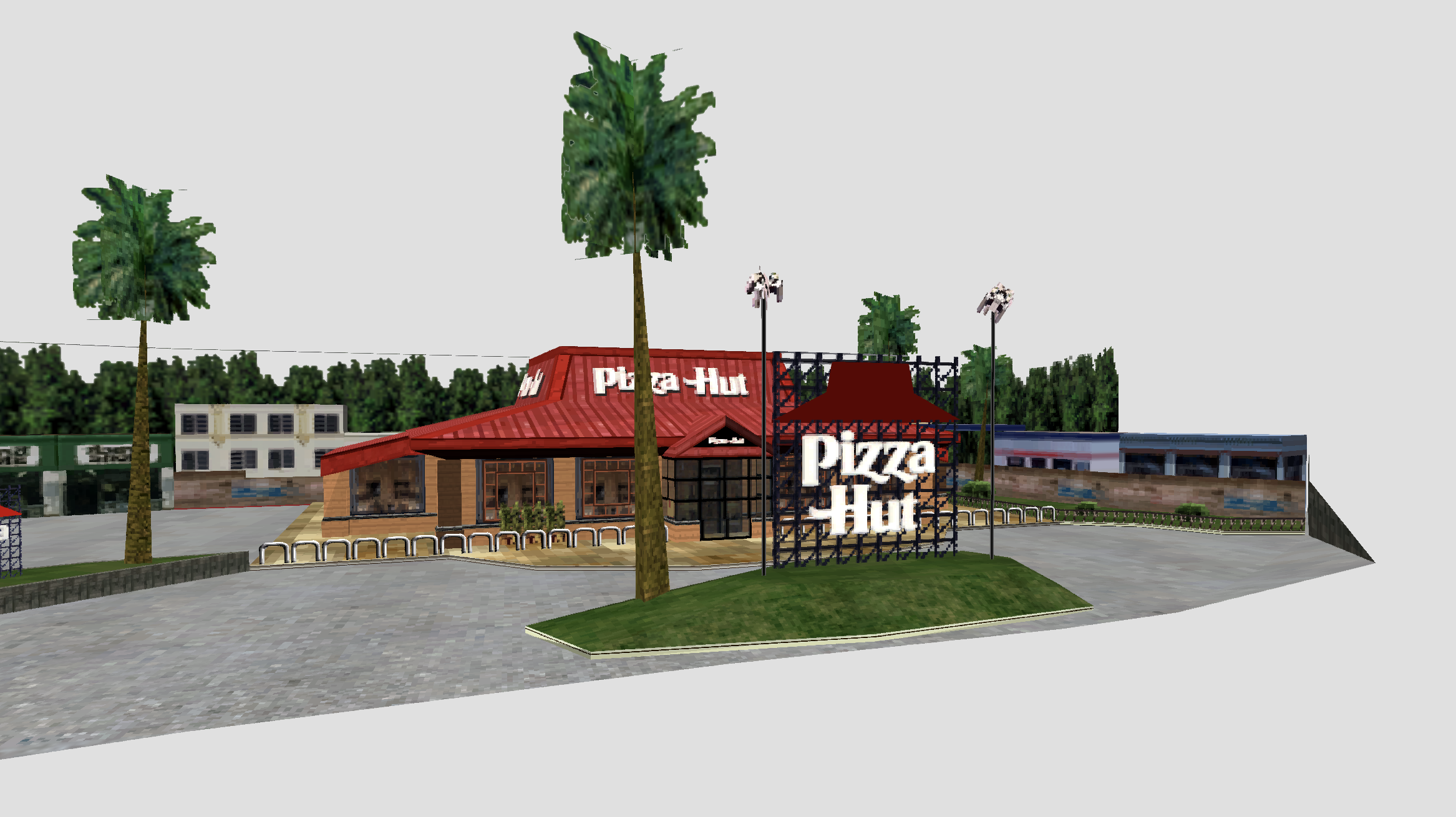
Pizza Hut model from poldc2\_stream.all, and a screenshot from Original Mode
Theory confirmed, but that’s not all! Through the use of judicious `grep`ing, we can determine the `.shp` for any of our beloved brands, letting us finally display any storefront we could possibly want:
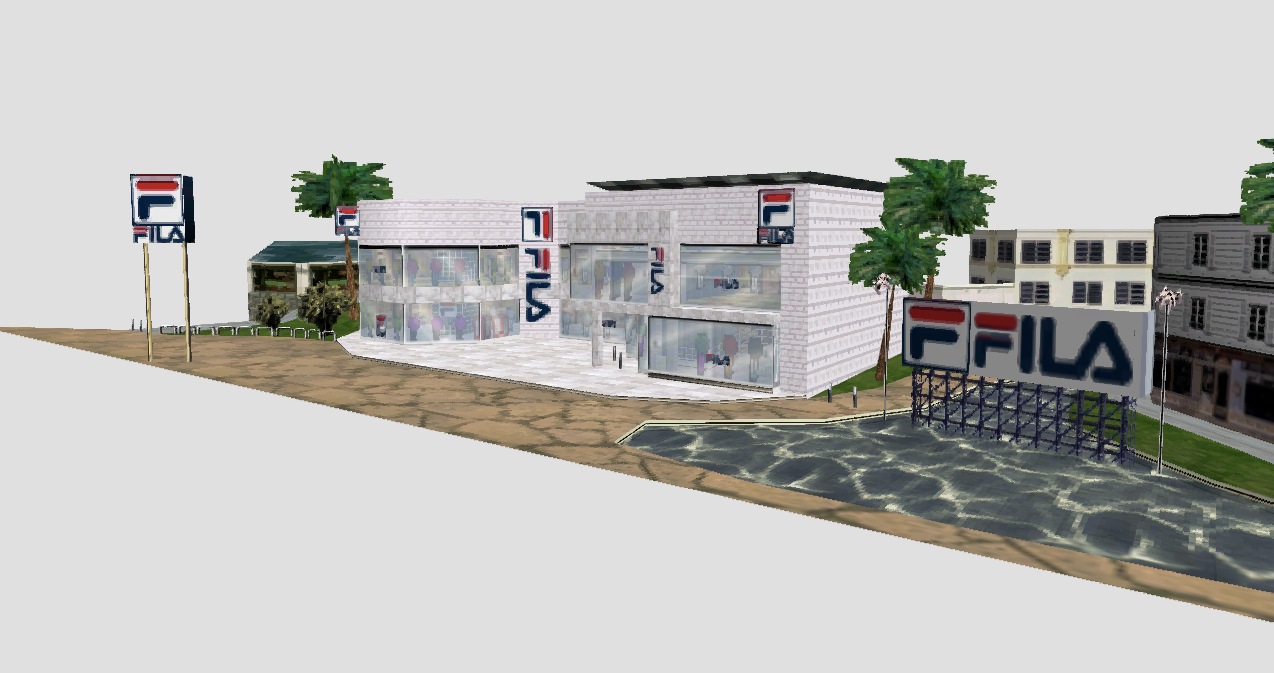
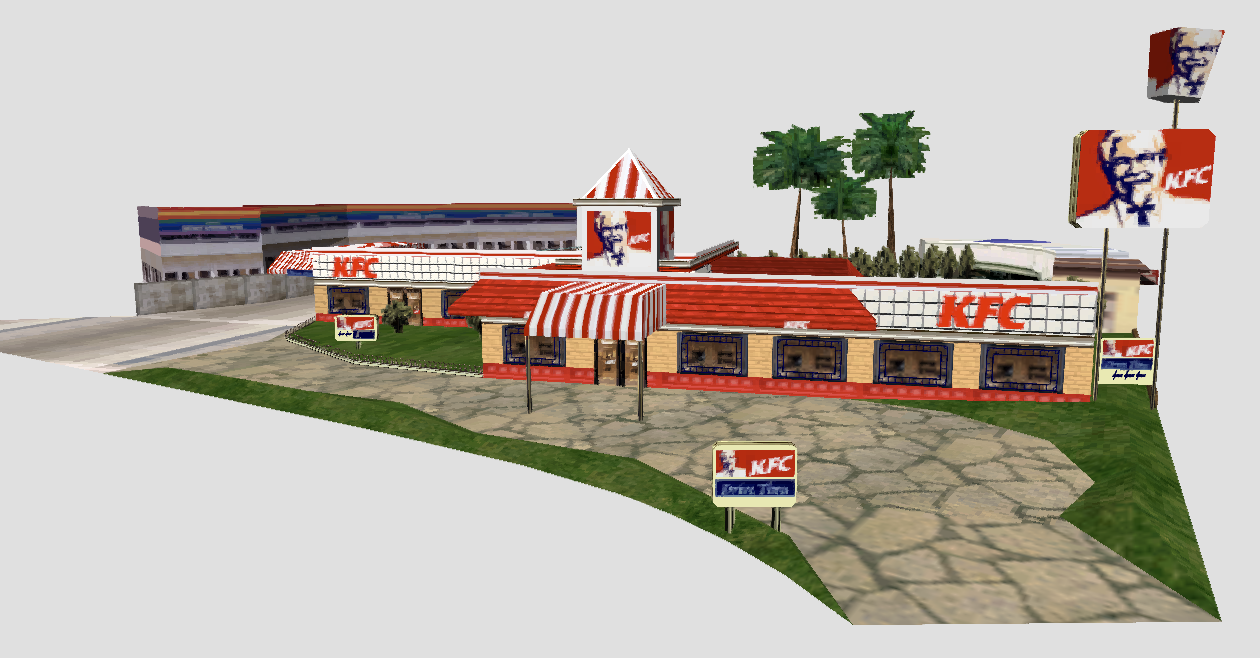
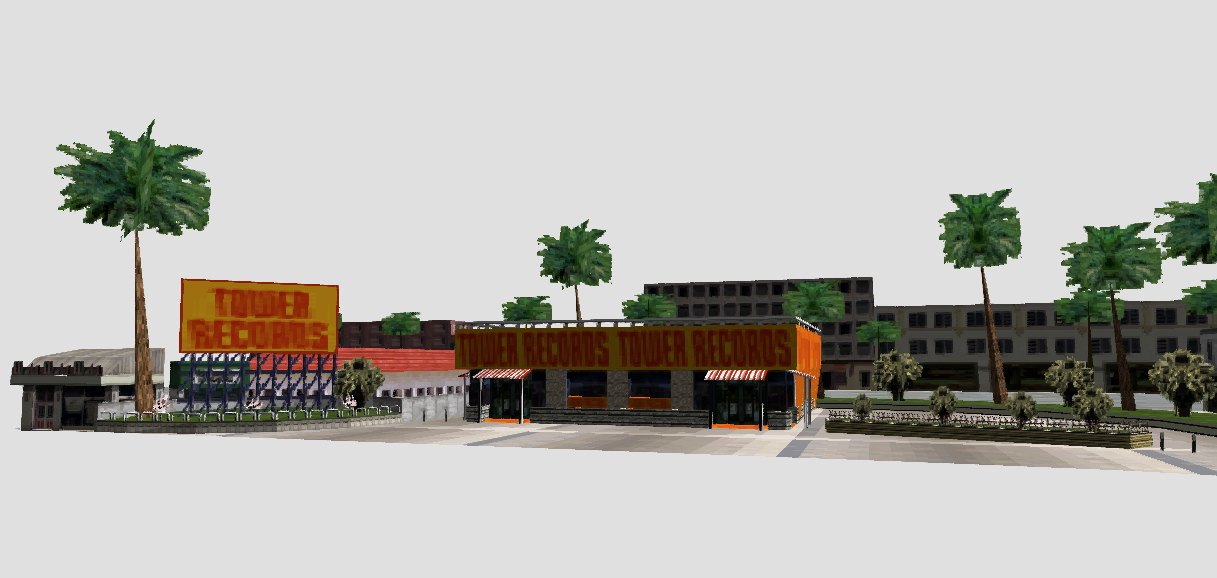
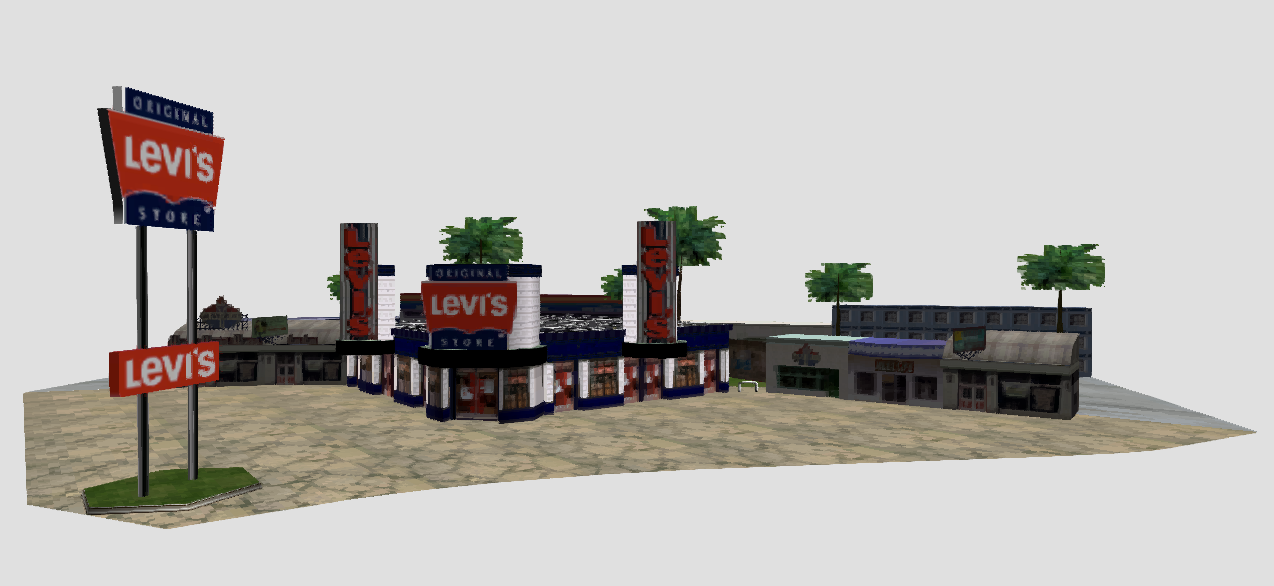
Various branded storefronts floating in the void
Indeed, any individual shape file we choose can now be rendered! Which naturally begs the question, what would happen if we render them all at once?
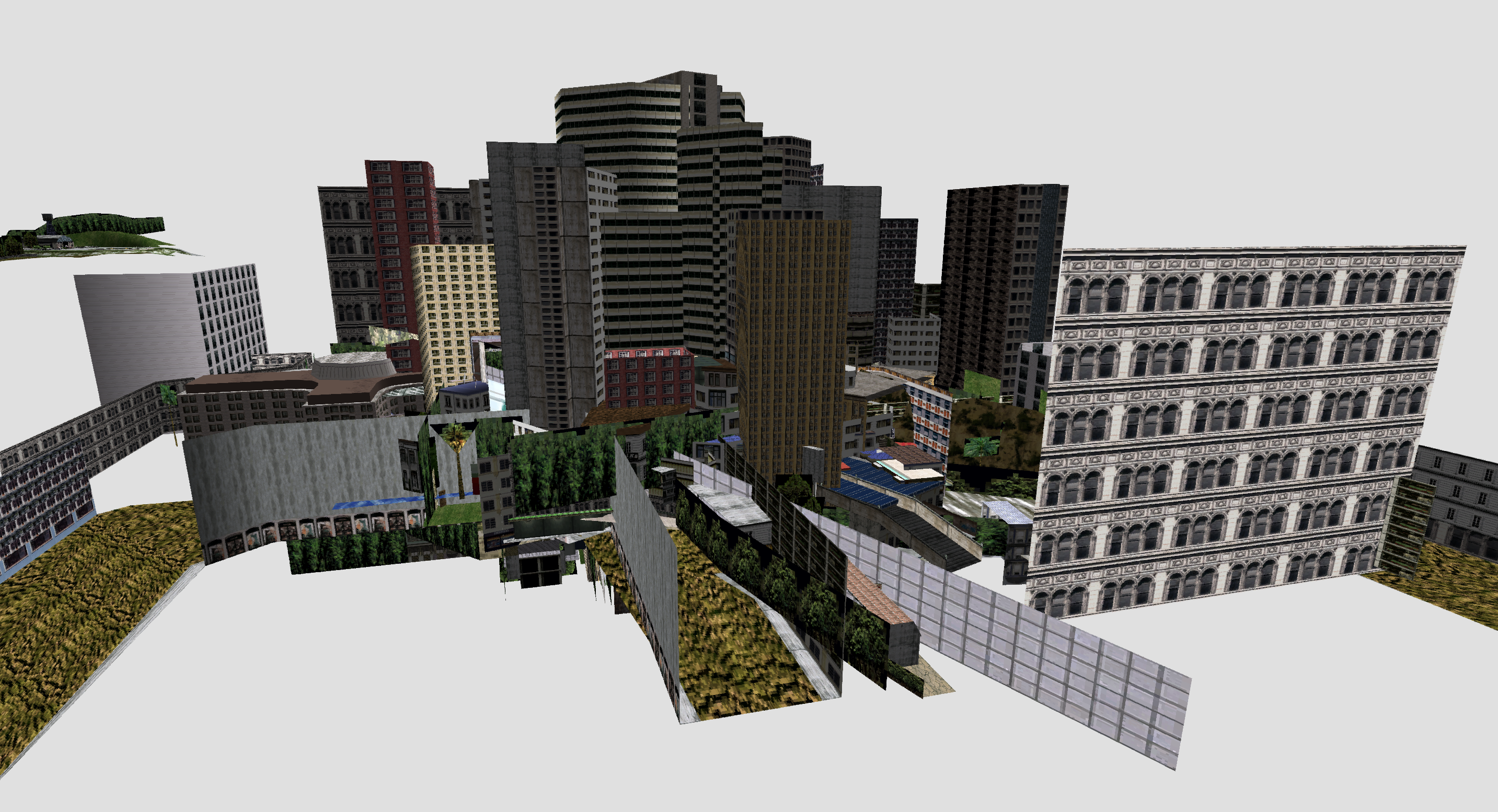
Hundreds of models overlapping chaotically
Hm. That, um, doesn’t seem right. As it happens, there’s a bit more involved in assembling each of these pieces to form the game world. In the next post we’ll dive into that and, hopefully, end up with a nearly complete Crazy Taxi level!