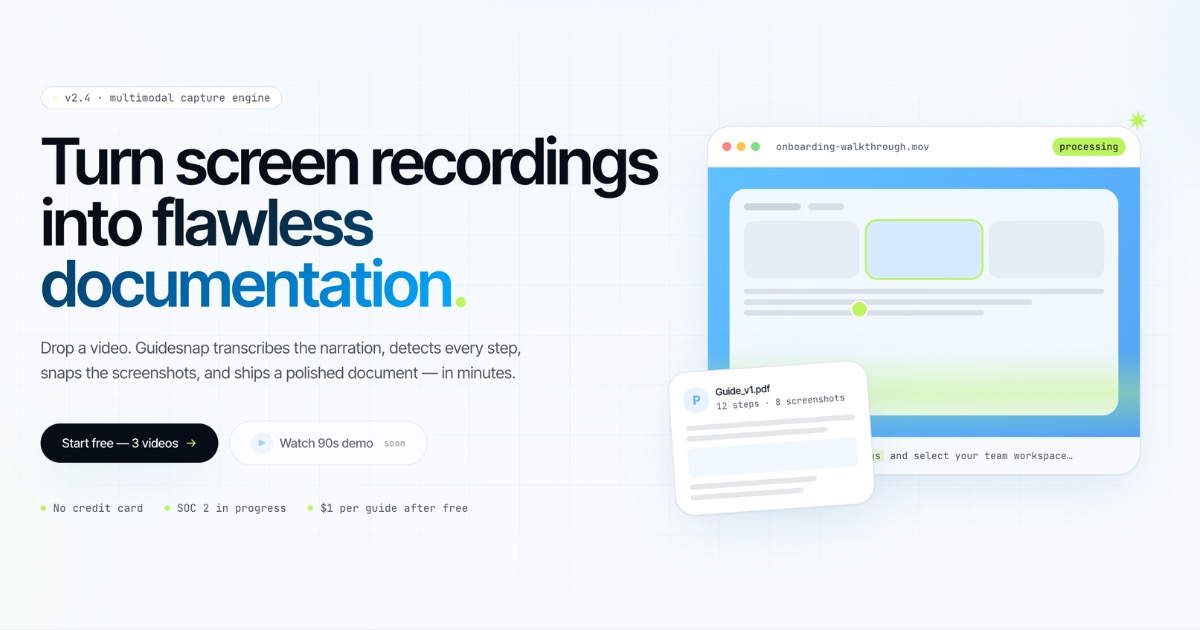

Turn screen recordings into flawless documentation.
Screen recording → polished PDF guide
Turn screen recordings into flawless documentation.
Drop a video. Guidesnap transcribes the narration, detects every step, snaps the screenshots, and ships a polished document — in minutes.
- 3 guides free
- No card required
- Fully editable PDF
- ✓3 guides included
- ✓Then $3 per guide on pay-as-you-go
- ✓No subscription required Start free →
- ✓After your 3 free guides
- ✓Top up from $10 — balance never expires
- ✓No monthly guide cap Get started →
- ✓30 guides included every month
- ✓$3 per guide beyond your limit
- ✓Cancel or change anytime Start Pro →
- ✓90 guides included every month
- ✓$3 per guide beyond your limit
- ✓Cancel or change anytime

onboarding-walkthrough.mov
Screen recording · 34:12
InputPDF guide
00:12 — Open Settings from the sidebar…
00:42 — click Settings, select team workspace…
01:08 — Invite teammates with a magic link…
Onboarding\_Guide.pdf
12 steps · 8 screenshots
Ready
1
Open the Team workspace
Switch to the shared team area.
2
Invite via email or link
Add teammates with a magic link.
3
Assign a role
Pick Admin, Editor, or Viewer.
Transcribe
Detect steps
Export PDF
Trusted by
colleagues✷co-workers✷neighbors✷that one guy from accounting✷your manager's manager✷people just really tired of writing docs manually✷colleagues✷co-workers✷neighbors✷that one guy from accounting✷your manager's manager✷people just really tired of writing docs manually✷
colleagues✷co-workers✷neighbors✷that one guy from accounting✷your manager's manager✷people just really tired of writing docs manually✷colleagues✷co-workers✷neighbors✷that one guy from accounting✷your manager's manager✷people just really tired of writing docs manually✷
✷How it works
From rough recording to ready-to-ship guide.
Four automatic stages — upload once, get a polished guide in minutes. No midnight screenshot marathons.
01✷
Upload & configure
Drop any .mp4, .mov, .webm, or .mkv — up to 90 minutes. Name the guide, toggle screenshots, and add your logo before you hit generate.
upload → configure
→
02✷
AI transcribes & detects
Whisper-class speech recognition turns narration into text. Vision models watch the cursor, clicks, and scene changes — then split the walkthrough into steps.
transcribe → segment → plan
→
03✷
Screenshots & assembly
Each step gets a title, description, and a crisp screenshot. Snapped at the right moment — no manual capture.
capture(frames) → compose
→
04✷
Export & refine
Download a polished PDF with cover, TOC, and callouts. Tweak steps in the editor and rebuild the PDF — no re-upload needed.
export.pdf → edit → rebuild
✷Engineered for documentation teams
Six things that turn screen recordings into a serious workflow.
❝
AI transcription
Whisper-class speech recognition turns narration into clean, structured text — automatically.
◎
Auto step detection
Vision models follow the cursor, clicks, and scene changes. Each action becomes a numbered step with a title and description.
▣
Screenshot per step
Crisp frames captured at the right moment for every step. Toggle screenshots off when you want a text-only guide.
✎
PDF editor & rebuild
Tweak titles, steps, and copy right in the browser. Rebuild the PDF without re-uploading the recording.
✦
Your branding
Add your logo and company name before you generate. Every export ships with your look — not a generic template.
◐
90-minute recordings
Long walkthroughs welcome — up to 90 minutes per upload. English, Russian, and dozens of other languages supported.
✷The output
A PDF that looks like a senior tech writer made it.
Title page, overview, numbered steps with screenshots and checklists. Edit in the browser, then export a polished PDF — share, send, or print.
P
Onboarding\_Guide\_v1.pdf
12 pages · 1.4 MB
Guidesnap · Internal
How to onboard a new teammate
Generated from onboarding-walkthrough.mov · 34 min 12 sec
1
Open the Team workspace
Switch from your personal view to the shared team area where invites and roles are managed.
1. Click your avatar in the top-right 2. Choose Team workspace from the menu
2
Invite via email or magic link
Add teammates with an email invite or a time-limited magic link you can paste into Slack.
1. Click Invite member 2. Enter an email or copy the magic link
3
Assign a role
Roles control what each person can edit. Most new teammates should start as Editor.
1. Open the member row 2. Pick Admin, Editor, or Viewer
✷
#### Polished, not improvised
Senior-grade layout with optional logo and company name. No fiddling with fonts, no manual cropping.
✷
#### Ready to share
One clean PDF — drop it into Slack, email it, or print it. Looks the same on every device.
✷
#### Edit & rebuild
Tweak titles, steps, and copy after export. Rebuild the PDF without re-processing the video.
✷Pricing
Simple pricing. No surprises.
Start free, scale with pay-as-you-go or a monthly plan.
Free
$0
Every new account starts here.
Pay as you go
$3per guide
Buy guides when you need them.
✷ Most popular
Pro
$29/ month
For solo creators.
Team
$79/ month
For small teams with heavier volume.
Need SSO, SLA, or custom volume? Contact us for Enterprise.
✷FAQ
Answers, before you ask.
How long does processing take?+
What video formats do you accept?+
Can I edit the guide after it's generated?+
How does pricing work?+
Can I try it before paying?+
Is my video data used to train models?+
Will it make me look like I actually wrote this myself?+
✷
120+ guides shipped this week
Stop writing docs.
Start recording them.3 free guides. No card required. Watch your first walkthrough turn into a polished PDF in minutes.
Have a question? Write to the foundert.me/vanmurten →