

Eoin-McMahon/comhad
S3 TUI client. Contribute to Eoin-McMahon/comhad development by creating an account on GitHub.
5 stars · 0 forks · Rust
README
Comhad (pronounced "KOH-ad") is the Irish word for "file". ✨ Features
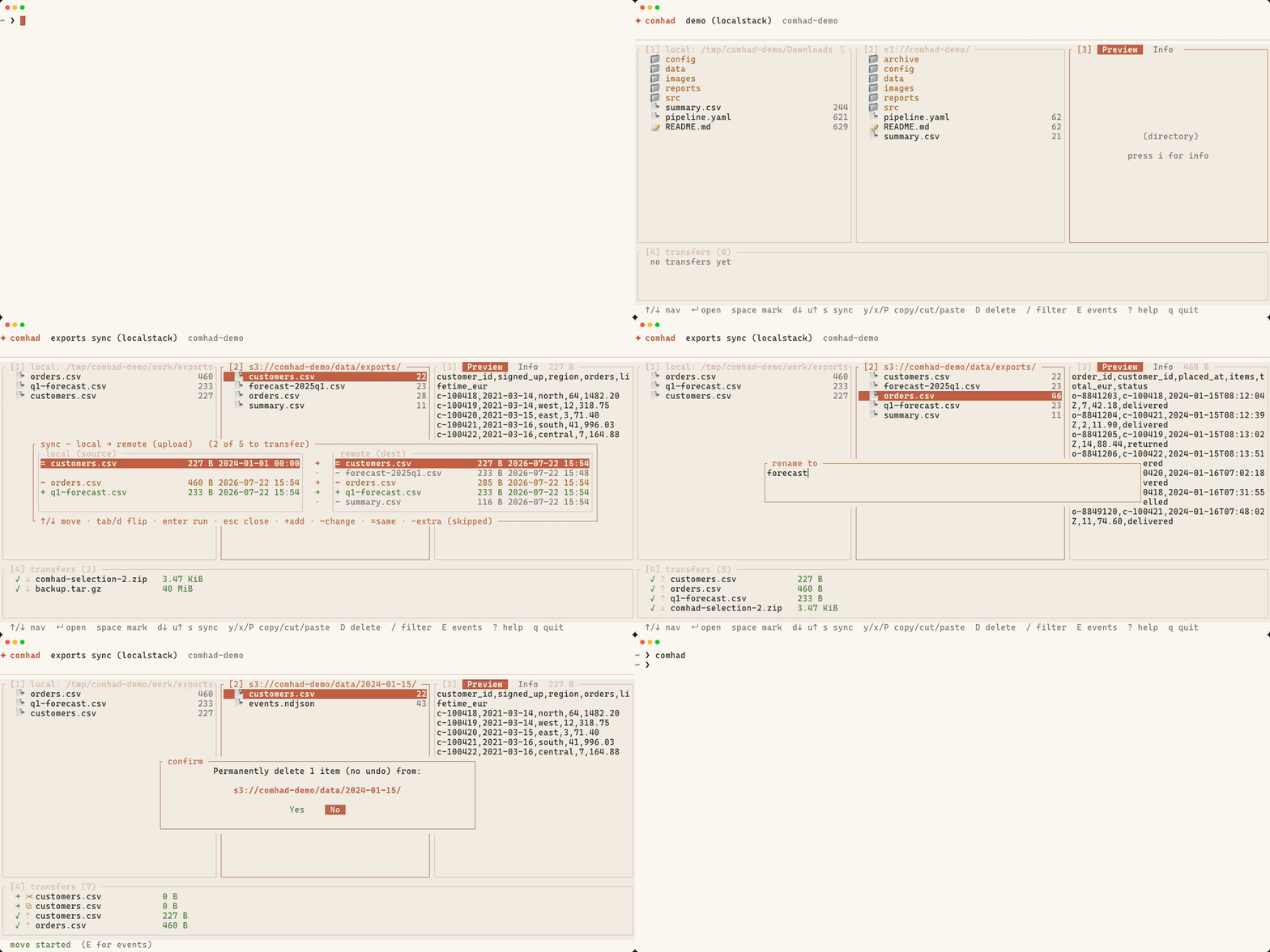
Ranger-style panes: local ⇄ S3 side by side, with a third pane for preview or object info. Real previews: syntax-highlighted text, and images inline via Kitty, iTerm2 or Sixel. Background transfers: every download, upload and zip runs as a cancellable job with live progress. Copy, cut and paste: across directories, across panes, across backends, with ghost rows showing where things will land. Non-destructive sync: a git-diff-style view of what will be added and updated, in either direction. Sync never deletes. Fuzzy deep filter: / searches the listing and quietly recurses, surfacing matches from nested prefixes. Paired directories: a bookmark remembers the local directory that goes with its bucket, so sync and downloads point at the right place on connect. Safe by default: every write confirms first, with the destination spelled out and No preselected on delete.
📦 Installation Requires Rust 1.85 or newer (install Rust). 📥 Install from crates.io cargo install comhad 🏗️ Build from source git clone https://github.com/Eoin-McMahon/Comhad.git cd Comhad cargo install --path ./ On Linux, clipboard support needs the X11 headers: sudo apt install libxcb1-dev libxcb-render0-dev libxcb-shape0-dev libxcb-xfixes0-dev. 🚀 Quick start comhad Press a on the bookmark list to add a connection, fill in the wizard, and enter to connect. That's the whole setup: no config file required. If you want one, for startup defaults, theme colours or custom keybindings, you can add ~/.comhad/config.toml yourself (see the Configuration section below), but it's entirely optional. ⌨️ Keys
Key Action
hjkl / arrows navigate; l/enter opens, h goes up
space / v mark item / visual-mode range select
d / u download / upload marked items
y x P copy / cut / paste, in any direction
D / r delete (no undo) / rename
s sync dialog
/ fuzzy filter, with recursive deep matches
p / i preview pane / info pane
L / 1-4 show the local pane / jump to a pane
t E ? q theme / events log / help / quit
Full keybindings and what each feature does → ⚙️ Configuration Bookmarks live in ~/.comhad/bookmarks/*.json, one per connection, and can be managed entirely from the app. Everything else is optional: ~/.comhad/config.toml sets startup defaults, theme colours and keybindings, and comhad works fine without it. Configuration reference → 🧑💻 Development cargo build --release cargo test cargo clippy --all-targets Storage backends sit behind a single StorageProvider trait in src/provider/, so adding another service is a matter of implementing that trait, the most useful place to start if you'd like to contribute. Issues and pull requests welcome. 📄 License MIT © Eóin McMahon comhad (pronounced "KOH-ad") is the Irish word for "file".