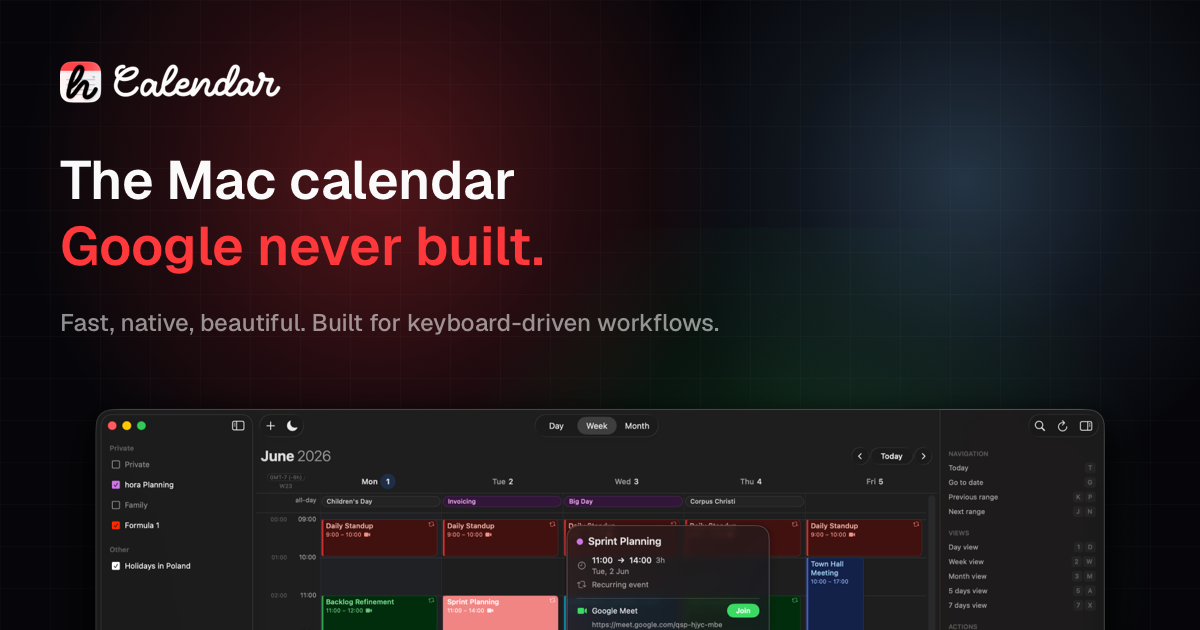

The Mac Calendar Google never built.
The Mac Calendar Google never built.
Fast, Native, Beautiful. Built for keyboard-driven workflows. Finally, Google Calendar feels at home on your Mac.


1,006\+ Mac users already use hora.

Featured on


See hora in action.
01
Meet hora
Watch hora in action and discover its key features.
01
Focus Time Scheduling
Block deep work without breaking your week.
02
NLP Quick add
Type like you talk. Hora handles the rest.
03
Menu bar
Stay on top of your day without losing focus.
04
Themes
Match hora to your workspace, mood, and system appearance.
01
Focus Time Scheduling
Block deep work without breaking your week.
02
NLP Quick add
Type like you talk. Hora handles the rest.
03
Menu bar
Stay on top of your day without losing focus.
04
Themes
Match hora to your workspace, mood, and system appearance.
Native by design
Built for how you work on Mac.
#### Feels like a real Mac app
Opens instantly. Scrolls smoothly. No Electron, no web views — just native SwiftUI.
#### Plan without friction
Week and month views with drag-and-drop, timeline resize, and fast search across all calendars.
#### Next meeting. Always visible.
See what's coming up from the menu bar and join it in one click. No app switching.
#### Google Calendar, done right
Multiple accounts, color-coded calendars, and native Meet, Zoom, and Teams links.
#### Built for speed
Familiar Google Calendar-style shortcuts. Stay in flow without reaching for the mouse.
#### Your data stays yours
A direct connection between your Mac and Google. No servers, no tracking, no middleware.
Integrations
Works with your world.
#### Google Calendar
Real-time sync with Google Calendar.

#### Zoom
Create & join Zoom meetings with one click.

#### Microsoft Teams
Create & join Microsoft Teams meetings with one click.
#### Apple Intelligence
Quick Add, Focus Time Scheduling, and TL;DR meeting summaries on your machine.
I've been using calendar apps for years, and they always felt off.>
Too simple. Too complex. Too slow.>
So I started building my own.>
hora is a native macOS calendar designed to feel right.

Maciej Szamowski
Founder and developer
[](https://x.com/moto%5Fszama)[](https://bsky.app/profile/szamski.bsky.social)
Already in real Mac calendars.
1,006+
Mac users already use hora Calendar.
“
Finally an app that does not ship a whole browser alongside it.
Ivor
Discovered this calendar by accident, on the #mimestream reddit. Great piece of software for those who use Google Calendar either through workspace or ordinary GMail account! Thanks!
sparekontoX
There's a new calendar app with a "Mimestream feel". Taking a Google service and making a native Mac App to utilize it. It's still in beta but I think it will get there.

narich
First of all great work with the application so far, just got the invitation and still testing. Finally a decent MacOS calendar app!

luchian.bordiyan
I don't know how I stumbled across this app but I am so grateful that I did. I use Mime Stream for emails and kept on thinking to myself, I wish there was a really well-made Mac-native app for calendar just like I see MimeStream for my mail.

sj
Simple pricing rules forever.
Pick a one-time purchase or a lower annual plan.
Both include Family Sharing.
Shared across Mac, iPhone & iPad apps.
One-time
Launch Offer
$49.90 one-time
Subscription
$29.99 / year
Compare pricing alternativeshora, Fantastical, and Notion Calendar+
Alternative
Price
hora CalendarBest for Mac
$49.90 lifetime or $29.99/year
Native, Google-focused, Family Sharing included.
Fantastical
$57–$84/year
Broader suite, higher annual cost for Google-only use.
Notion Calendar
Free
Good free option, but web-tech based and less native.
Compare against Fantastical in detail →

Mobile Beta Sign-up
Want to stay updated?
Subscribe for information about iOS/iPadOS beta availability.
Email addressKeep me notified
What's Next
1. ✓Shipped
Mac App Store Launch
hora is live on the Mac App Store. One-time purchase or subscription, both with Family Sharing. 2. Up nextiOS & iPadOS TestFlight
A native companion app for iPhone and iPad. Same SwiftUI foundation, designed for touch — public beta on TestFlight coming soon. 3. On the horizonmacOS, iOS & iPadOS 27 App Store Launch
One hora across every Apple platform — a unified release for macOS 27, iOS 27, and iPadOS 27.Frequently Asked Questions
Short answers to the things people ask before downloading hora.
06 questions / quick answers
01What is hora Calendar?
hora is a native macOS desktop app for Google Calendar. It connects directly to the Google Calendar API — no CalDAV, no web views, no Electron. Built entirely in SwiftUI for speed and a native feel.
02Who is hora for?
Anyone on macOS who uses Google Calendar and wants a faster, keyboard-friendly experience. It's especially useful if you manage multiple Google accounts or prefer native apps over browser tabs.
03How is hora different from Fantastical or Notion Calendar?
hora focuses exclusively on Google Calendar and uses the official API for direct access. There's no CalDAV translation layer, which means faster sync and full feature support like Google Meet link creation. It's also built purely in SwiftUI with no Electron or web technologies.
04Is hora free?
hora is a paid app. There's a limited-time one-time purchase for $49.90, or a $29.99/year subscription — both include Family Sharing.
05When does hora launch?
hora is on the Mac App Store now. The iOS/iPad app is coming next — subscribe to the newsletter above for a heads-up when the iOS/iPadOS beta is ready.
06Does hora work with Outlook or iCloud calendars?
Not at the moment. hora is built specifically for Google Calendar. Support for other providers may come in the future, but the focus right now is on making the best possible Google Calendar experience on macOS.
Still have questions?
Talk directly with the community and the developer behind hora.
From the Blog
Notes on building a faster, more native calendar for the Mac.
012026-07-286 min readOne Month Building a Better Calendar App for macOSOne month after launch, hora is a more reliable Google Calendar app for Mac. Here is what changed, and what the work taught me.Read article→022026-07-249 min readNotion Calendar Alternative: 6 Best Options for 2026Compare six Notion Calendar alternatives for Mac, Google Calendar, multiple providers, task planning, and free workflows.Read article→032026-07-179 min readHow to Transfer Apple Calendar to Google CalendarMove your Apple Calendar events to Google Calendar with an .ics export, avoid duplicates and missing invite data, and choose between transfer and sync.Read article→