docktor. The dock you deserve.
Public pre-release 0.11.2
docktor. The dock you deserve.
docktor parks music, calendar, weather, and live window previews right where your cursor already goes.
macOS 26.0 (Tahoe) or later · Universal build · No account required

Public pre-release 0.11.2
docktor. The dock you deserve.
docktor parks music, calendar, weather, and live window previews right where your cursor already goes.
macOS 26.0 (Tahoe) or later · Universal build · No account required
Live Dock Previews
3 Built-in Widgets
Music + Synced Lyrics
Local-First Privacy
ScreenCaptureKit Thumbnails
Calendar via EventKit
Open-Meteo Weather
Minimized + Hidden Windows
Live Dock Previews
3 Built-in Widgets
Music + Synced Lyrics
Local-First Privacy
ScreenCaptureKit Thumbnails
Calendar via EventKit
Open-Meteo Weather
Minimized + Hidden Windows
How it works
The Dock becomes a control surface.
docktor doesn't try to replace macOS. It sharpens the one place you already visit all day with previews, widgets, and quick info.
01
Hover
Preview every window for an app before you commit to switching.
02
Glance
Keep music, meetings, and weather beside the Dock.
03
Act
Click a preview, pause a track, or check the next event.
Dock Previews
Find the right window before you switch.
Hover an app and docktor turns the Dock into a live window chooser. Real thumbnails, one-click activation, and no need to open Mission Control.
ScreenCaptureKit thumbnails update in real time
Shows minimized and off-screen windows alongside visible ones
Click to focus the exact window you need
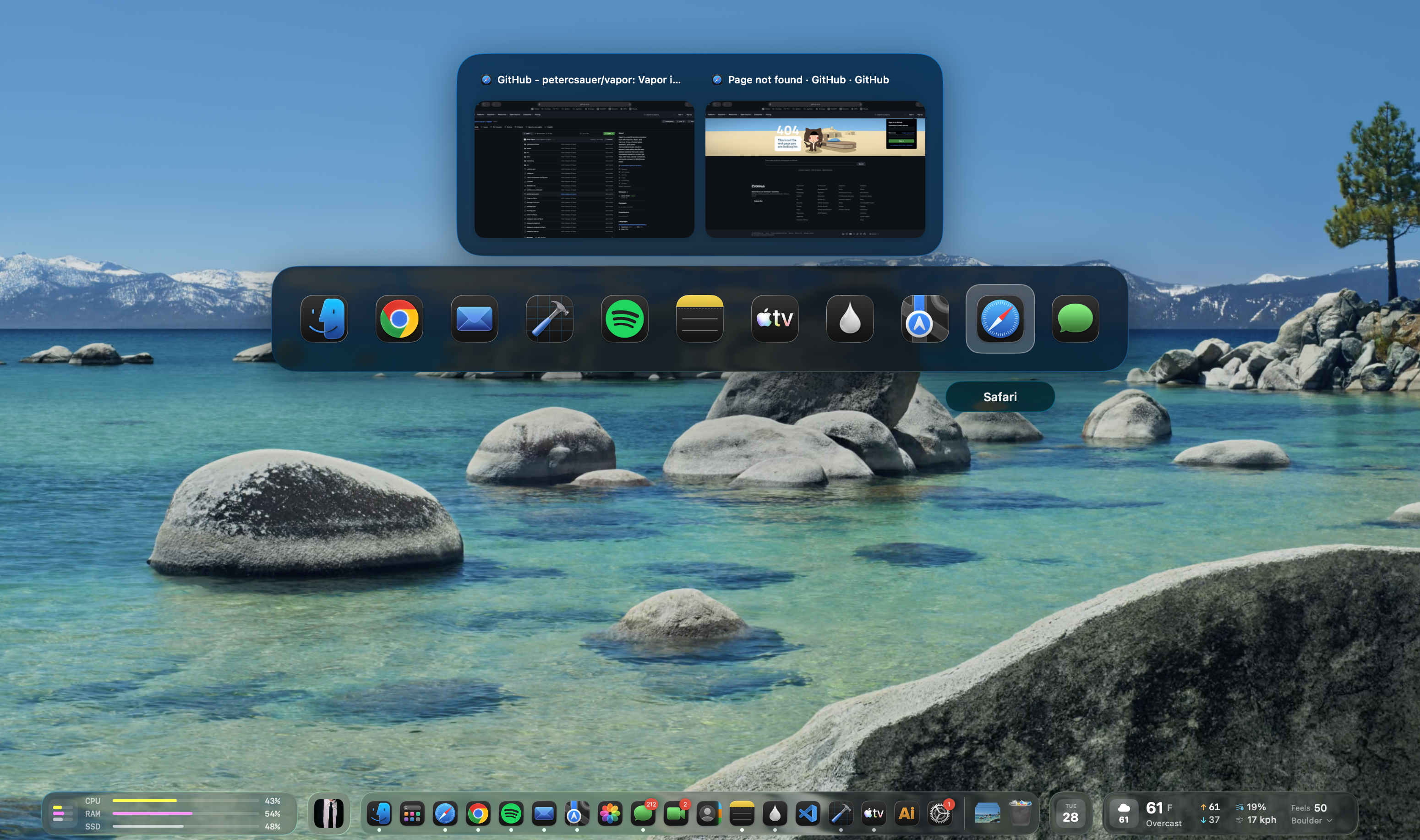
Window Switcher
Cmd+Tab, but you can actually see what you're switching to.
docktor replaces the stock Cmd+Tab switcher with live window thumbnails so you pick the right window on the first try.
Live thumbnails instead of just app icons
See every window, not just the frontmost one
Keyboard-driven — works exactly where muscle memory expects
Music
Control playback without leaving what you're doing.
The Music widget shows the current track next to the Dock and keeps transport controls one hover away. It works with Spotify and Apple Music.
Play, pause, and skip from the bar, or open the drawer for the queue and playlists
Works with Spotify (Web API) and Apple Music
Synced lyrics scroll in a second drawer when the track has them
Drawer pages remember where you left off
Calendar
See your next event before it starts.
The Calendar widget reads your Apple Calendar and shows the next event with a live countdown. The drawer holds the rest of the day.
Reads Apple Calendar through EventKit — no Google account
Countdown gets more urgent as the event approaches
Opens the meeting link when the countdown ends (optional)
Drawer shows your full schedule
Weather
Check conditions at a glance.
The Weather widget shows current conditions in the bar and a 12-hour forecast in the drawer, using data from Open-Meteo.
Temperature, feels-like, and condition in the bar
12-hour forecast with precipitation chance
Humidity, wind, UV index, and sunrise/sunset in the drawer
Save multiple locations or follow your current one
System Stats
Keep an eye on your Mac without opening Activity Monitor.
The System Stats widget puts CPU, memory, and disk right next to the Dock, with drawer pages that break down each one and chart the last few minutes.
CPU, RAM, and SSD usage at a glance in the bar
Drawer pages for CPU, memory, and storage with the top processes
Live sparklines show the trend over the last few minutes
Reads local system counters — nothing leaves your Mac
Release
What's new in 0.11.2
Public release 0.11.2 — docktor-0.11.2.dmg.
01
Widgets stay put under Dock magnification.
docktor now reacts live to macOS Dock magnification: widgets no longer jitter as the Dock's icons grow and shrink, and Dock hover previews are suppressed while magnification is on so they don't misfire against the breathing Dock. The affected preview and tooltip controls in Settings grey out with an explanation while magnification is active.
02
Side-Dock gap fixed.
With the Dock on the left or right edge of the screen, the widget row is now centered along the screen bottom instead of leaving an empty gap beside the Dock.
Full changelog
Read the release notes before installing the pre-release build.
Privacy
Every prompt has a job.
docktor is most useful when it can see the Dock and render previews. Optional prompts stay scoped to the feature you turn on. No Google OAuth. No account required for core features.
Accessibility
Dock position + window metadata
Required
Screen Recording
Live window thumbnails via ScreenCaptureKit
Required
Calendar
Apple Calendar events via EventKit
Optional
Location
Weather widget via Open-Meteo
Optional
Notifications
Timer alerts and maintainer replies to your feedback
Optional
Automation
Apple Music playback via Apple Events
Optional

Put the Dock to work.
docktor is a free public pre-release. Download it and put your Dock to work today — no account required.
macOS 26.0 (Tahoe) or later·Universal binary·Free