


The frame you approve is the frame you ship.
The viewport is the exporter
The frame you approve is the frame you ship.
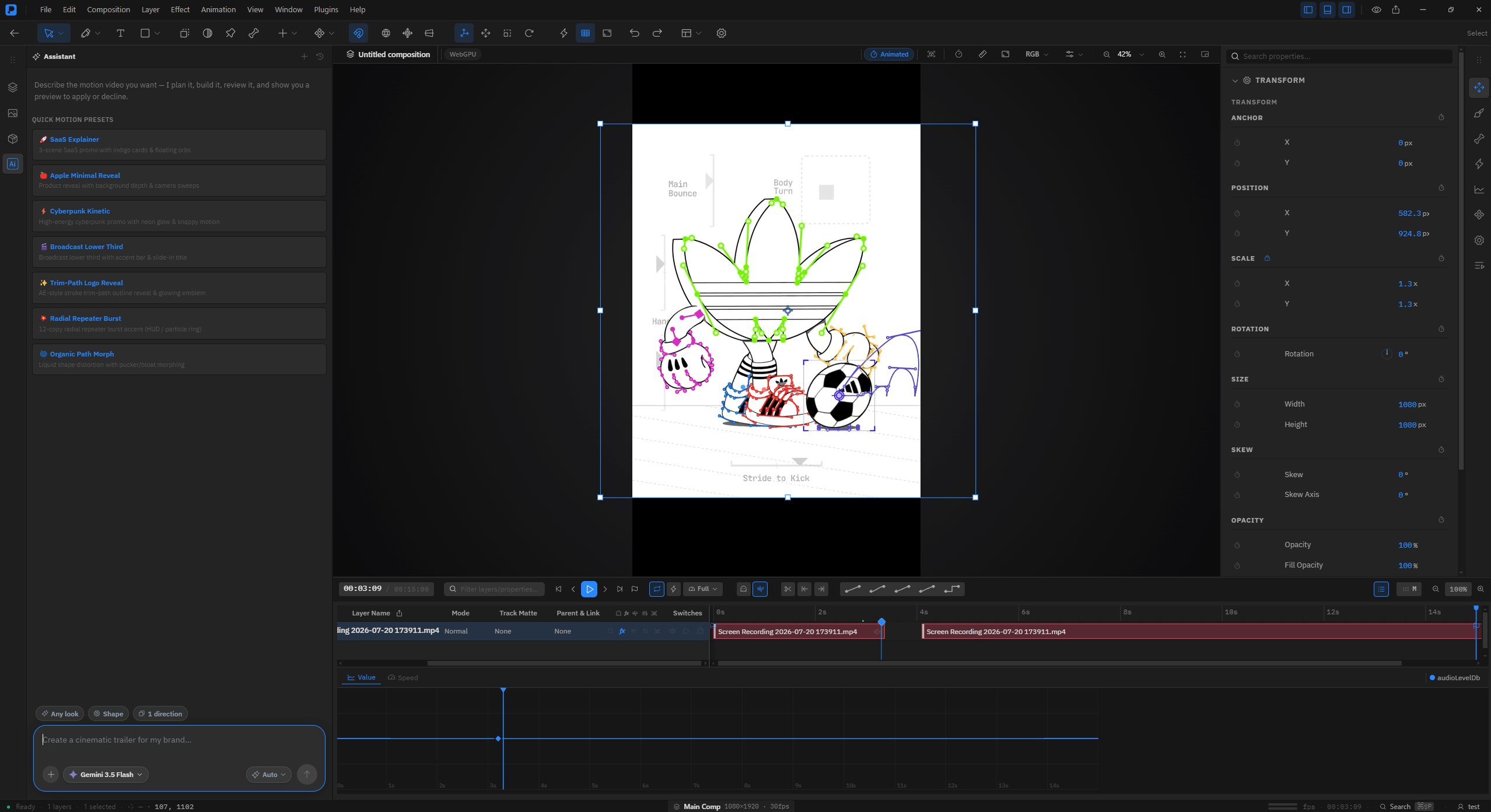
Premation is a professional motion studio. Dynamic WebGPU timeline rendering ensures your preview and final export are identical.
Download StudioExplore Workspace
60.0 fps
Search layers
Composition 1
Title / lockup
Product plate
Camera 1
bg\_gradient
4 items·1 selected
Main CompWebGPURGB48 %
PREMATION
1920 × 1080
Transform
Position
X960px
Y540px
Scale
X100%
Y100%
Rotation
Rotation0°
Opacity
Opacity100%
00:00:04:12/ 00:10:00Full100 %
Layer NameModeTrack MatteParent & Link
1Title / lockupNormalNoneNone
Position
Opacity
2Product plateNormalNoneNone
3Camera 1NormalNoneNone
4bg\_gradientNormalNoneNone
0s2s4s6s8s10s
●Unsaved changes·4 layers·1 selectedMain Comp1920 × 1080 · 30 fps60 fps·00:00:04:12·Search⌘⇧P
SVGLottieMP4 - H.264WebM - VP9 + alphaMOV - ProRes 4444PNG sequenceGIFImage sequencesWAV audio
Everything a shot needs, in one document
Layers, curves, depth, rigging and rendering live in the same project file - no round-trips between four applications to finish one ten-second title card.
01 // Animation
Keyframes on any numeric property
Linear, ease, ease-in, ease-out, hold and custom bezier. The graph editor edits value and velocity curves directly, and position keeps X and Y as independent tracks so they can be eased separately.
- Graph editor
- Keyframe assistants
- Expressions
- Motion presets
- ### Deterministic by construction One frame loop feeds every format, and frame time is index / fps rather than wall-clock. Re-render after a crash and you resume identical work.
- ### It refuses to write an empty file Every path asserts on a real frame count. A zero-frame encode is an error, not a silently successful black video.
- ### Peak memory is one frame Frames go to a temp directory and ffmpeg encodes in a child process. A multi-gigabyte export never passes through the app's memory.
- ### Preview the actual export The export dialog renders real export frames with the same snapshot builder the encoder receives, and lets you scrub the whole range first.
- All 17 blend modes, track and alpha mattes, parenting and adjustment layers
- Classic-3D layer model: flat planes in 3D space, lit and shadowed
- Keyframe assistants - easy ease, time-reverse, sequence layers, stagger
- Expression controls: slider, angle, point, colour, checkbox, dropdown, layer
- Collapse Transformations and Continuous Rasterization, on the same sunburst column
- Interpret Footage: conform frame rate, pixel aspect, alpha, loop - stored on the asset
- Proxies, generated or attached, substituted in the viewport and never in output
- SelectionV
- RotationW
- Pan behindY
- PenG
- RectangleQ
- TextCmdT
- Easy easeF9
- Graph editorShiftG
- Reveal animatedU
- Pre-composeCmdShiftC
- Comp settingsCmdK
- Command paletteCmdShiftP
- Every tool — compositions, graph editor, 2.5D, rigging, particles
- No account, no network — projects are .motion bundles on disk
- Export to every format, offline, with no watermark
- The AI assistant with your own provider key
- AGPL-3.0 source — read it, build it, fork it
- Cloud projects, autosave and version history
- End-to-end encrypted project sync across machines
- Hosted mp4 rendering — your machine stays free
- The plugin registry, and update checks
- The AI assistant with your own provider key
- WindowsWindows 10 and 11 · x64.exeDownload
- macOSDetectedApple silicon · Intel.dmgDownload
- LinuxAppImage · x64.AppImageDownload
00:00:02:04/ 00:10:00Full100 %
Layer NameSwitches
1Title / lockup
Position
Scale
Opacity
2Product plate
3Camera 1
4bg\_gradient
0s2s4s6s8s10s
Graph · Value
02 // 2.5D
Cameras, lights and depth
Make any layer 3D to gain Z position and X/Y rotation. One- and two-node cameras with depth of field, lights with cone angle and shadows, extrusion and bevels for shapes and text. Grab a camera or a light in an orthographic view and move it, parent it to a null, and animate from there.
Composition 1WebGPURGB62 %
Camera 1 · two-nodeKey light1 View · Active Camera
Camera
Transform
Position Z\-1400px
Point of Int.card\_03
Depth of Field
Focus Dist.1400px
Aperture28
Blur Level100%
Light
Cone Angle90°
Cast ShadowsOn
03 // Type
Per-glyph text animators
A real selector stack: animate position, scale, rotation, opacity, tracking or colour across characters, words or lines, with range and wiggly selectors. Text on a path included.
Text Animator 19 charactersRGB100 %
PREMATION
range selector · 0 → 42 %
Animator 1
Range Selector
Based OnCharacters
Start0%
Offset42%
ShapeEase Out
Properties
Position Y\-55px
Rotation\-29°
Opacity6%
Tracking12
04 // Rigging
Bones and puppet pins on flat artwork
The bone tool builds a skeleton with forward kinematics, linear blend skinning and FABRIK IK. The puppet tool deforms a triangulated mesh from pins with an as-rigid-as-possible solver.
rig\_characterARAP · FABRIK IKRGB80 %
PinPositionMesh312 triStiffness0.62
chain · IK
Puppet Pin⌘PBone⌘B
Rigging
Puppet
Pin 1 · X172px
Pin 1 · Y110px
Stiffness0.62
Bone Chain
SolverFABRIK
Iterations12
SkinningLBS
IK Blend100%
05 // Vector
Paths that behave
Pen, pencil, pressure-sensitive brush and curvature tools. Boolean merges, trim paths, pucker/bloat, twist, zig-zag, repeaters, dashed and tapered strokes.
Shape Layer 1VectorRGB100 %
Stroke4 pxTrim0 → 64 %Repeat× 5MergeAdd
pen · trim paths · repeater · boolean merge
Contents
Stroke
Width4px
TaperBoth
Dashes2
Trim Paths
Start0%
End64%
Offset0°
Repeater
Copies5
Offset18px
06 // Particles
A deterministic emitter
Rate, lifetime, velocity, gravity, turbulence, size and colour over life. The same field always produces the same field, so a re-render is identical to the first one.
Particle System 1deterministicRGB100 %
same frame → same field
Emitter
Rate240 / s
Lifetime1.40 s
Velocity320
Gravity\-90
Turbulence0.35
Size / Life1 → 0
Workspace
One timeline
Every panel edits the same document, and every edit goes through one command system with a real undo stack.
ComposeMultiple compositions per project, each with its own size, frame rate, duration and background. Nest one inside another as a pre-comp with time remapping, and instance it more than once. A placed composition is sealed - it renders at its own size, through its own camera - until you collapse transformations and let it meet the host’s.AnimateStage in 3DRender
00:00:04:12/ 00:10:00Full100 %
Layer NameSwitches
1Title / lockup
2Product plate
3bg\_gradient
4grade\_adjust
0s2s4s6s8s10s
Text
Image
Solid
Adjustment
Shift-Ggraph editor·F9easy ease·Ureveal animated4 layers
Describe the motion. Revert instantly.
The optional assistant acts through the same tool registry as the UI: insert layers, keyframe values, and offsets. Every change is one undo step away.
Prompt index
Stagger the five cards in from the left, 4 frames apart, easing out.Give the headline a per-glyph fade-up with a range selector.Add a two-node camera and push it through the stack over 3 seconds.
assistant / tool registrymain\_comp
Stagger the five cards in from the left, 4 frames apart, easing out.
History - 1 entry addedCmd-Z
Export
A render you can bet the deadline on
One deterministic frame loop feeds every format. Two exports of the same project produce identical frames, and a re-render after a crash resumes identical work.
| Export formats, codecs and alpha-channel support| Format | Codec | Alpha | Notes | | --------------------------------------------------------- | -------------- | ----- | ------------------------------------------ | | MP4 | H.264 · AAC | No | The default for sharing. Needs ffmpeg. | | WebM | VP9 · Opus | Yes | Smaller than MP4, plays on the web. | | MOV | ProRes 4444 | Yes | Lossless hand-off. Large. Needs ffmpeg. | | GIF | GIF89a | No | Palettised across the animation. No audio. | | PNG sequence | zip of PNGs | Yes | The archival option. Audio rides along. | | Lottie | bodymovin JSON | No | Vector shapes and transform tracks. |
Modelled on Classic 3D
Premation maps directly to AE concepts. The tools, coordinates and shortcuts are exactly where your hands expect them. Key differences are explicitly documented.
Cmd on macOS / Ctrl on Windows and Linux.
AllToolsTimelineApplication
Pricing
You pay for hosting, not for the tool
The editor is open source and complete, and the AI assistant runs on your own provider key. So there are exactly two choices: run it yourself for nothing, or let us host your projects.
Self-hosted
Freeforever
The whole editor on your own machine, under the AGPL.
The assistant needs the desktop app and an OS keystore to hold your key. Everything else runs anywhere the app does.
Cloud
Free in beta
Freein beta
Everything in self-hosted, plus the cloud — free while we're in beta.
Free and open to everyone during the beta. Paid plans are coming soon at $12/month; your projects will always export back to the free build.
Same editor either way. The cloud plan is for keeping your work synced, versioned and rendered off your own machine — cancel it and your projects export straight back to the free build.
FAQ
The questions worth asking first
Is Premation ready for real work?
It is used in earnest, but it is pre-1.0 - version 0.1.0. Expect rough edges, and expect the project file format to still move. Around 5,400 automated tests across roughly 470 suites cover the app and its engine packages, alongside a pixel-comparison render-test harness with committed reference frames.
Is it open source?
The editor is, under the GNU AGPL v3.0. One source tree builds two editions: the open-source local edition runs entirely on your machine - no accounts, no network, projects as .motion bundles on disk - and the server edition adds cloud projects, sync and hosted rendering on top of a hosted backend that is not open source and is not distributed with the editor. The AI assistant works in both editions on your own provider key; the cloud is what you pay for, not the editor and not the assistant.
What does it need to run?
A GPU with WebGPU or WebGL2. WebGPU is preferred and used when available; WebGL2 is the fallback, and the engine steps down automatically and shows which tier it landed on in the viewport header. There is no software renderer - if both tiers fail the app tells you, rather than showing a blank stage.
Do I need ffmpeg?
Only for MP4, WebM, GIF and ProRes export. Premation looks for $FFMPEG\_PATH, then a bundled copy in app resources, then ffmpeg on your PATH. Without it, PNG and JPEG sequences, still frames, Lottie and project export all still work.
I know After Effects. How much has to be learned?
Little. Premation is modelled on AE's Classic 3D workflow - the tools, panel layout and most keyboard shortcuts are where you expect them, and shortcuts can be remapped. Where the 3D model diverges from AE, that is documented rather than glossed over.
Can I bring artwork in from elsewhere?
Static SVGs arrive as one intact layer; animated SVGs (CSS or SMIL) are converted into real keyframe tracks you can retime. Lottie/bodymovin files arrive as baked tracks. Images, video, image sequences and audio import too, and video layers seek frame-accurately during export.
Will 4K footage actually cut in this?
Yes, via proxies. Seeking is 97.6% of the cost of 4K playback and the only part that scales with resolution, so Premation transcodes a low-resolution stand-in with ffmpeg in a child process - the clip stays usable at full resolution while it runs. The proxy is substituted in the interactive viewport only. Export, the offline renderer and the export preview reach full resolution by doing nothing, so there is no opt-out to forget.
Is the AI assistant required?
No. It is optional and bring-your-own-key in both editions: you connect your own Anthropic, OpenAI or Gemini key and your prompts go straight to your provider account with no added fees. The local edition keeps that key in your operating system's keystore and calls the provider from your machine; the server edition keeps it encrypted on the backend. Either way it edits through a tool registry (insert layers, set properties, create keyframes) and every change lands as one reversible edit on the normal undo stack. There are no AI credits.


Open Premation. The first keyframe is seconds away.
Free for the public beta. No sign-up required. Project files are saved directly on your local disk as plain JSON-based files.
Every build is published on GitHub Releases, next to the source it was built from. The links above always fetch the latest release. Installers are unsigned during the beta.
Check this before you download
Premation renders every frame on the GPU. It needs WebGPU, or WebGL2 as a fallback - there is no software renderer. If both tiers fail, the app tells you rather than showing a blank stage.
GPU & System Requirements
Graphics ProcessorDedicated GPU (NVIDIA/AMD) or Apple Silicon (M1/M2/M3/M4)The engine picks WebGPU when it can and falls back to WebGL2; there is no software rasteriser. The tier it landed on is shown in the viewport header, and if both fail it says so rather than showing a blank stage.
Integrated GraphicsIntel Iris Xe / AMD Radeon Graphics with current driversFine for lighter compositions. Note that a WebGL2 fallback can report a maximum texture size of 4096, which bounds how far Continuous Rasterization will re-raster vector content.
System Memory8GB RAM minimum / 16GB+ recommendedMemory scales with composition resolution and cached pre-comps. Export is the exception: frames stream to disk one at a time, so peak export memory is one frame rather than the whole render.
Operating systemWindows 10 / 11 x64. macOS and Linux from sourceA desktop application, not a web app - it runs in Electron with native menus and filesystem access. Building from source needs Node.js 20 or newer; ffmpeg is optional and only MP4, WebM, GIF and ProRes export need it.