
The 10 Ways NAS is Getting Enshitified

1 10 WAYS that NAS is Getting Screwed
1.1 The Widespread Adoption of Soldered LPDDR RAM on x86 Hardware
1.2 Persistent Network Stagnation and Multi-Gigabit Price Premiums
1.3 Drive Lock-In Policies and Ecosystem Validation Restrictions
1.4 Integration of Fixed Low-Capacity OS Drives
1.5 PCIe Lane Throttling and Mismatched Hardware Connectivity
1.6 Recycled Hardware Generations and Disguised Product Refreshes
1.7 Hard Drive Capacity Squeeze and Escalating Total Cost of Ownership
1.8 DRAM-Less SSD Architectures and Reduced NAND Channel Densities
1.9 Escalating Software Memory Requirements and Relabeled Modules
1.10 Software Homogenization and Interface Uniformity
1.11 Conclusion: The Shift Toward Closed Storage Appliances…
1.15 Discover more from NAS Compares
10 WAYS that NAS is Getting Screwed
Over the past 18 to 24 months, the consumer and prosumer Network Attached Storage (NAS) market has undergone a noticeable shift in design priorities, hardware architecture, and software accessibility. While broader industry pressures—ranging from component supply constraints to shifting manufacturing priorities—have introduced genuine engineering challenges, many recent market adjustments reflect cost-cutting measures and ecosystem lock-in at the expense of end-user control. What was long considered an industry defined by modularity, local ownership, and hardware longevity is increasingly adopting the restrictive design patterns common in mobile and walled-garden tech ecosystems. The following evaluation details the primary structural shifts and hardware trade-offs currently impacting local storage hardware.

The Widespread Adoption of Soldered LPDDR RAM on x86 Hardware
Historically, soldered LPDDR memory was primarily restricted to low-power ARM-based NAS units. Over the past 18 months, however, x86-based platforms utilizing modern Intel and AMD processors—particularly entry-to-midrange systems powered by Intel N100 and N150 chips—have increasingly transitioned to non-upgradable, surface-mounted RAM. This architectural shift eliminates the user’s ability to expand memory capacity as self-hosting demands grow, effectively putting a permanent ceiling on running memory-heavy Docker containers, ZFS pools, or virtual machines. Beyond limiting post-purchase scalability, fixing LPDDR4X or LPDDR5 modules directly to the PCB introduces a single point of failure; if an individual memory chip fails out of warranty, the entire mainboard requires replacement rather than a simple $30 SODIMM swap.
Persistent Network Stagnation and Multi-Gigabit Price Premiums
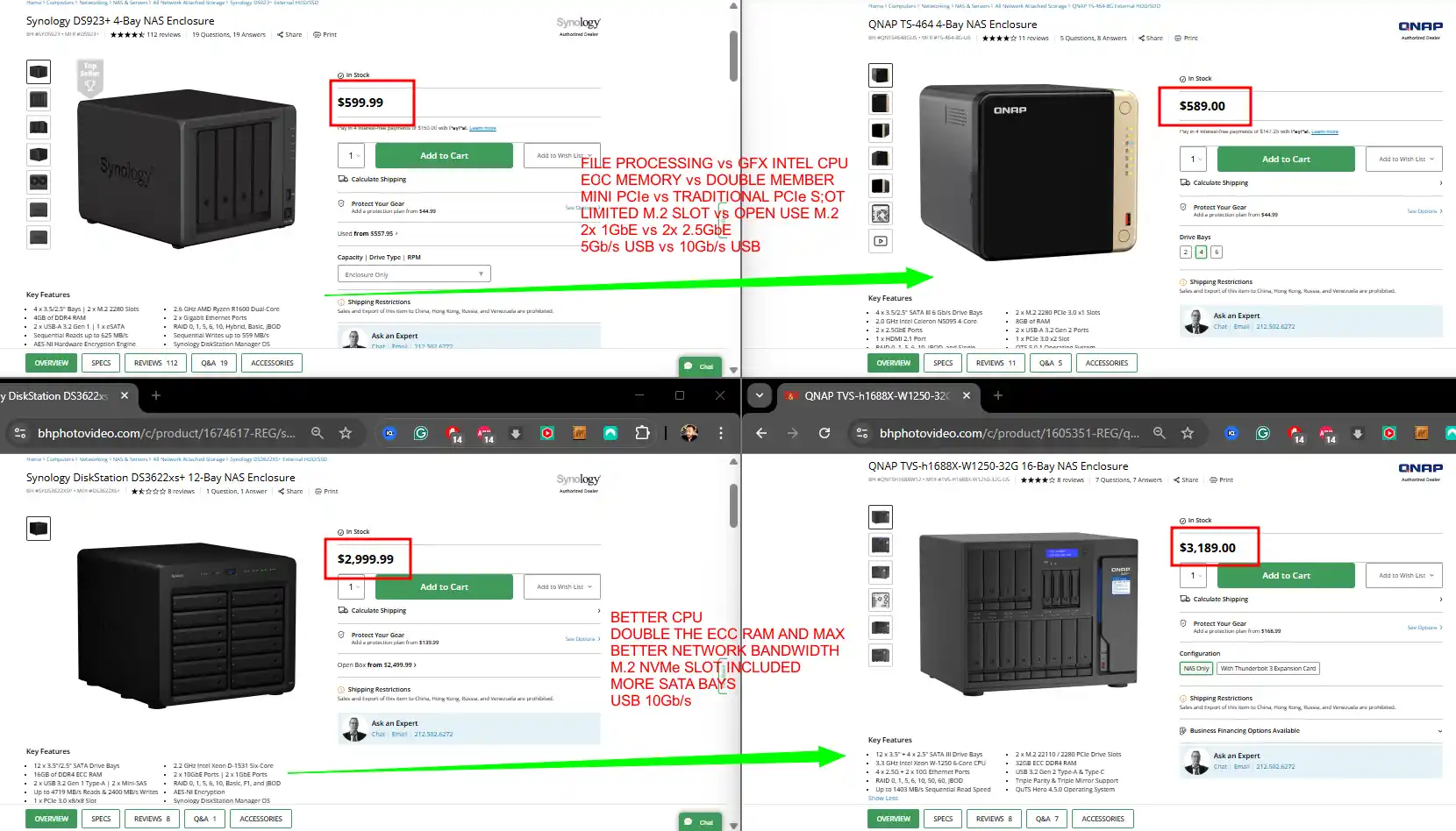
Despite 2.5GbE becoming standard across mainstream consumer motherboards and home networking hardware, many primary NAS manufacturers continue to ship mid-range enclosures equipped with 1GbE ports. Upgrading to 10GbE connectivity—or intermediate speeds like 5GbE—remains locked behind significant hardware price premiums, despite the widespread availability of low-cost, power-efficient PHY controllers from vendors like Realtek and Aquantia. Rather than integrating multi-gigabit networking natively into base platforms as standard hardware, manufacturers frequently leverage 10GbE as an artificial segmentation tool. This forces users to purchase expensive proprietary expansion cards or jump into top-tier product lines simply to achieve local transfer speeds that keep pace with modern storage media.

Drive Lock-In Policies and Ecosystem Validation Restrictions
In an effort to capture a larger share of storage hardware margins, major NAS vendors have instituted strict drive validation policies and hardware-level locks. While users were historically free to install any standard 3.5-inch SATA hard drive or 2.5-inch SSD, recent ecosystem changes—most notably across Synology’s enterprise and high-end RackStation series—restrict core features unless proprietary, vendor-branded drives are installed. Attempting to use third-party drives in these configurations results in persistent system warnings, blocked storage pool creation, or disabled health monitoring features. Although public pushback led to a partial relaxation of HDD restrictions on select 2025 and 2026 desktop models under DSM 7.3, restrictions on third-party M.2 NVMe storage pools and enterprise-tier hardware remain firmly in place, forcing buyers into significantly higher per-terabyte costs for identical underlying OEM drives.

Integration of Fixed Low-Capacity OS Drives
Manufacturers are increasingly shipping NAS units with operating systems pre-installed on integrated eMMC flash, soldered UFS 3.1 storage, or ultra-small 64GB M.2 2230 drives. While fixed flash like UFS 3.1 offers respectable throughput up to 1.6GB/s, its non-removable design creates a permanent hardware failure point; if the onboard flash wears out or corrupts, the entire unit becomes unusable. In systems that avoid soldered flash by using low-capacity M.2 2230 drives for the OS, the drive frequently occupies a full-sized M.2 PCIe slot. This consumes valuable motherboard real estate that would otherwise be allocated toward user-accessible NVMe storage pools or high-speed caching drives, restricting hardware expansion purely to save on manufacturing costs.
PCIe Lane Throttling and Mismatched Hardware Connectivity
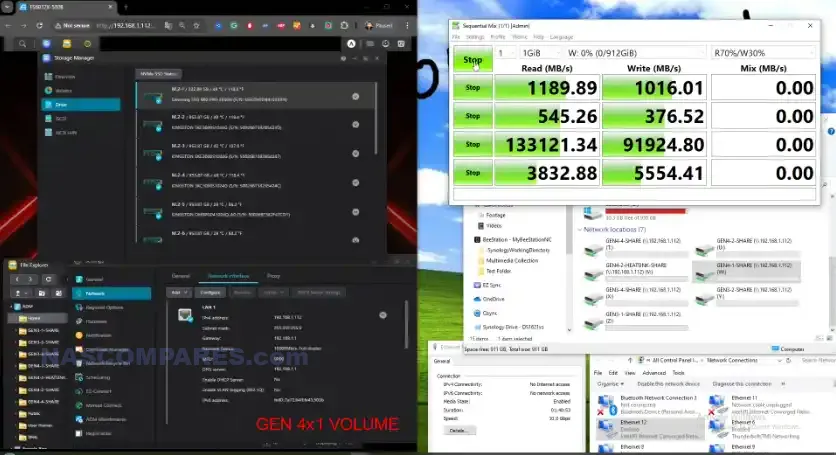
Marketing materials for modern consumer NAS units frequently advertise high-throughput connectivity options, such as USB 4, Thunderbolt 4, 10GbE networking, or arrays of 4 M.2 NVMe slots. However, a closer inspection of internal motherboard architecture reveals severe PCIe lane starvation. To accommodate multiple high-speed controllers on low-power mobile or entry-level x86 chipsets, manufacturers frequently wire M.2 slots or network controllers to PCIe Gen 3 x1 or Gen 3 x2 interface lanes instead of standard Gen 3 x4 or Gen 4 x4 configurations. This creates a severe internal bandwidth bottleneck: while individual NVMe SSDs or high-speed expansion interfaces are physically supported, their actual throughput is cut to a fraction of standard operational speeds, preventing users from achieving advertised performance during sustained local network transfers or multi-drive reads.
Recycled Hardware Generations and Disguised Product Refreshes
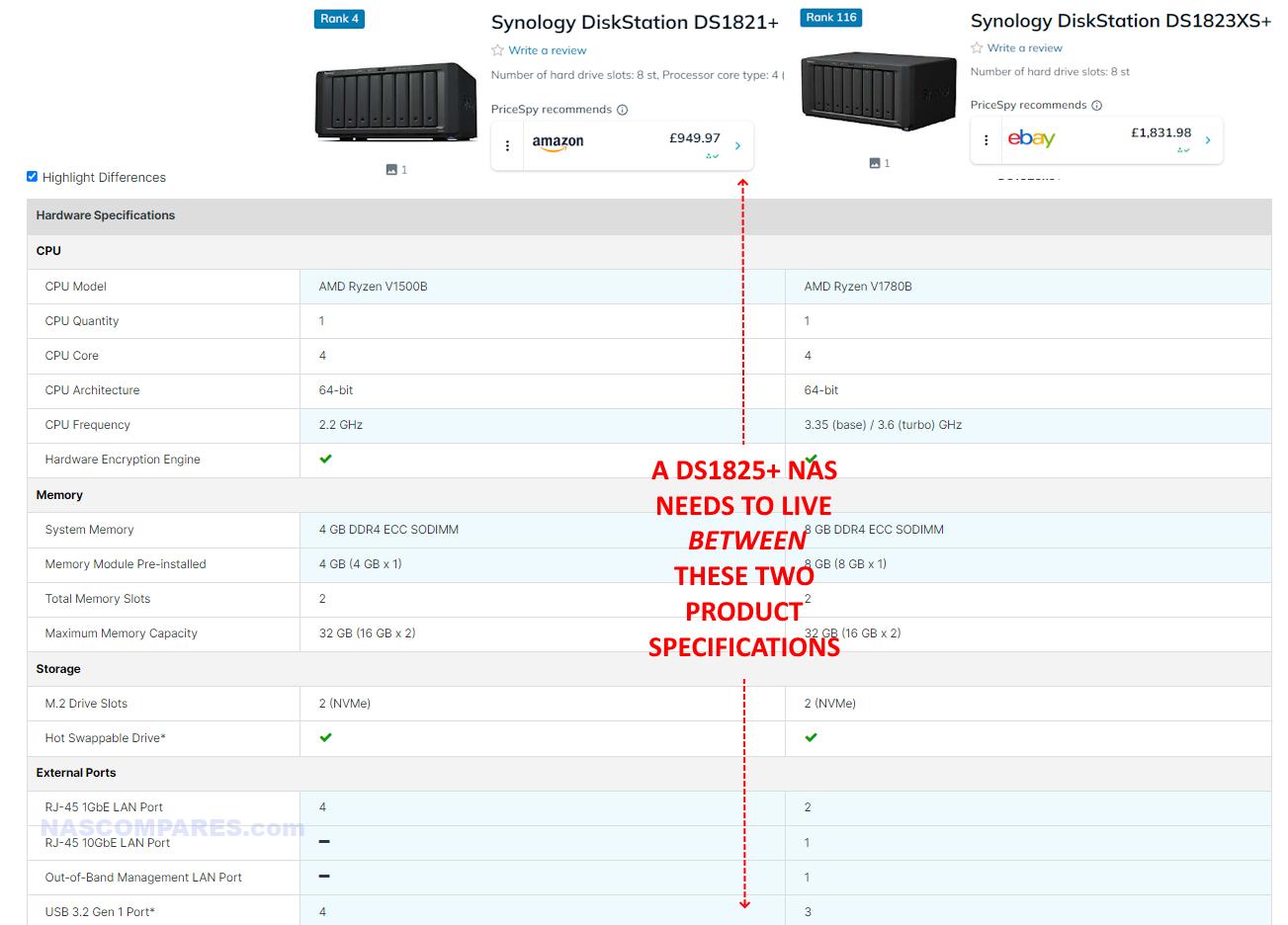
A growing trend among established NAS manufacturers involves re-releasing 2 to 4-year-old hardware architectures under new model numbers with minimal, surface-level modifications. Rather than updating base system-on-chips (SoCs) or underlying motherboard layouts to match contemporary processing standards, vendors frequently carry over legacy processors, backplanes, and internal chassis designs while swapping out minor peripheral controllers—such as replacing 1GbE ports with 2.5GbE without altering the core architecture—or even reducing overall port selection. This strategy allows manufacturers to refresh product catalogs and reset MSRPs without investing in genuine platform generation upgrades, offering existing users negligible performance incentives to upgrade while obscuring the age of the underlying silicon from new buyers.
| 28TB Hard Drive $449.99 – BLACK FRIDAY 2025 | 28TB Hard Drive $449.99 – JULY 2026 |
| --------------------------------------------------------------------------------------- | ------------------------------------------------------------------------------------------- |
|  |
 |
Hard Drive Capacity Squeeze and Escalating Total Cost of Ownership
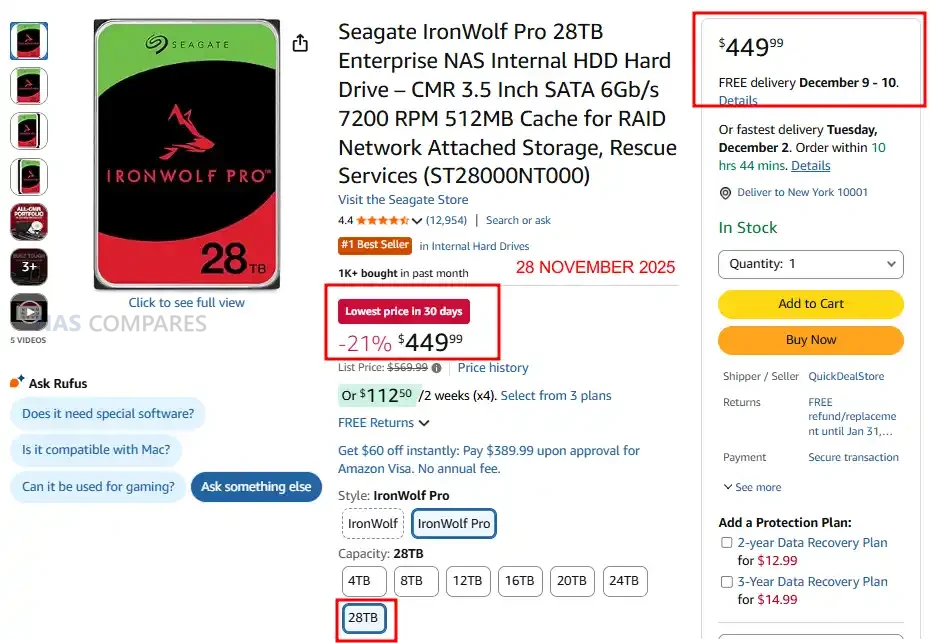
The mechanical hard drive market is undergoing a structural capacity squeeze that directly impacts NAS affordability and drive selection. At the low end, smaller 1TB and 2TB drives are steadily being phased out of production due to low profit margins and SSD price parity. At the high end, capacities exceeding 16TB are increasingly diverted directly to enterprise cloud providers and AI data centers before reaching retail channels. This dual pressure shrinks consumer options, leaving a narrow middle ground where drive prices remain high. Consequently, populating an entry-level 2-bay or 4-bay NAS enclosure can cost 2 to 4 times the price of the base hardware itself, significantly inflating the overall total cost of ownership (TCO) and creating a massive financial barrier for new buyers.

DRAM-Less SSD Architectures and Reduced NAND Channel Densities
The proliferation of DRAM-less NVMe SSDs reliant on Host Memory Buffer (HMB) architecture presents significant performance bottlenecks when integrated into local storage arrays. While HMB is functionally adequate for bursty, intermittent consumer desktop tasks, sustained NAS workloads—such as continuous write caching, database logging, and virtual machine execution—suffer severe write latency spikes and degraded throughput without dedicated onboard DRAM caching. Concurrently, SSD manufacturers have steadily reduced the physical NAND channel count on modern drives, consolidating multi-terabyte capacities into a single NAND package. This reduction in physical flash modules restricts parallel controller channels, causing sustained write speeds to drop significantly during large data ingests or storage pool rebuilds compared to older multi-chip Gen 3 and Gen 4 designs.

Escalating Software Memory Requirements and Relabeled Modules
As NAS operating systems and built-in software ecosystems have expanded in complexity, baseline system memory requirements have steadily increased from 2GB to a minimum of 4GB or 8GB for reliable multi-service operation. Simultaneously, rising DRAM component costs and global memory market pressures have squeezed hardware profit margins. To maintain competitive retail pricing without reducing baseline memory specs, manufacturers are increasingly sourcing modules from obscure, lesser-known suppliers or applying proprietary brand stickers over unverified third-party RAM. This lack of transparency regarding the underlying silicon manufacturer, timing parameters, and quality control creates potential system stability risks for memory-sensitive workloads like containerization or ZFS/Btrfs file checks, while making it more difficult for users to source guaranteed-compatible secondary expansion modules.
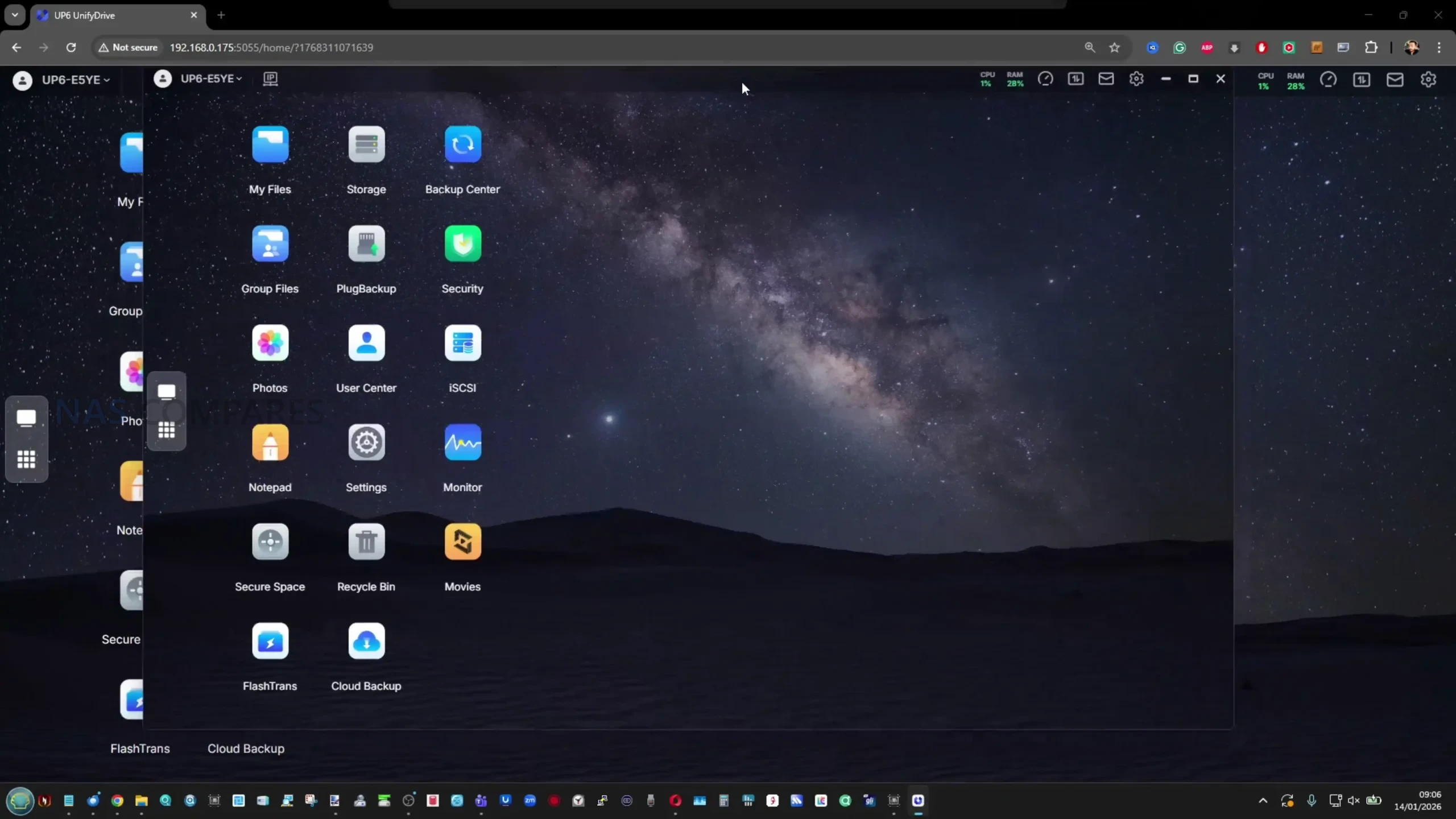
Below are 4 Different NAS OS’… Seriously…
|  |
 |
| --------------------------------------------------------------------------------------------------------- | ------------------------------------------------------------------------------------------------------------------------- |
|
 |
 |
Software Homogenization and Interface Uniformity
As new turnkey hardware vendors enter the market, a growing number of NAS operating systems are converging on nearly identical Debian-derived software platforms. Rather than developing distinct, specialized operating environments tailored to specific storage paradigms, ZFS management, or security profiles, emerging brands are increasingly wrapping lightweight desktop skins around the same underlying open-source Linux foundations. This homogenization reduces software diversity across the market, leaving users with web interfaces that mirror one another in layout, service management, and functional limitations. Consequently, software differentiation is diminished, leaving buyers with functionally equivalent management stacks regardless of the specific vendor chosen.

Conclusion: The Shift Toward Closed Storage Appliances…
The cumulative impact of these hardware and architectural trends marks a fundamental transition in the pre-built NAS market. By pairing anti-repairability choices—such as soldered LPDDR memory and non-replaceable boot drives—with artificial PCIe bandwidth constraints, recycled processor platforms, and vendor-enforced hardware validation, manufacturers are shifting consumer NAS products from open, modular storage nodes into locked-down appliances. While this strategy streamlines manufacturing pipelines and incentivizes ongoing subscription or cloud tier upgrades, it significantly raises the overall total cost of ownership while capping long-term hardware utility. Consequently, the gap between commercial off-the-shelf enclosures and custom-built, open-source alternatives continues to widen, pushing enthusiasts and small businesses toward self-assembled systems running independent storage platforms to preserve long-term repairability, performance, and hardware ownership.
🏷️ DEALS & OFFERS
Synology DS925+ 4-Bay NAS AMAZON  USA WAS $639.99, NOW $511.99 20% OFF PRIME [\[LINK\]](https://nascompares.com/link.php?ref=singledeal&u=https://amzn.to/3SnYv2x)
Synology DS1525+ 5-Bay NAS AMAZON USA WAS $799.99, NOW $639.99 20% OFF PRIME [\[LINK\]](https://nascompares.com/link.php?ref=singledeal&u=https://amzn.to/4waEr2l)
Synology DS425+ 4-Bay NAS AMAZON USA WAS $519.99, NOW $415.99 20% OFF PRIME [\[LINK\]](https://nascompares.com/link.php?ref=singledeal&u=https://amzn.to/4oFs3Vm)
Synology DS725+ 2-Bay NAS AMAZON USA WAS $519.99, NOW $415.99 20% OFF PRIME [\[LINK\]](https://nascompares.com/link.php?ref=singledeal&u=https://amzn.to/4ezg1rV)
Synology DS223j 2-Bay NAS AMAZON USA WAS $194.99, NOW $159.00 18% OFF PRIME [\[LINK\]](https://nascompares.com/link.php?ref=singledeal&u=https://amzn.to/4vpxPNj)


💎 INNER CIRCLE
Private 🔒 Inner Circle content in last few days : Lincstation N1 NAS - Still a BANGER 2 Years Later? PLEX and Advert Funded Streaming - I Have a Bad Feeling About This... Synology RS1226+ Revealed - 2019 HARDWARE at 2026 PRICES... Synology NAS - One Year Later (Is it Better Now?) Xiaomi NAS Revealed... wait... WHAT??? 4 Incredible Docks & Hubs That Changed How I Use My MacBook Access content via Patreon or KO-FI
Share this:
Like this:
Like Loading…
Related
---
Discover more from NAS Compares
Subscribe to get the latest posts sent to your email.
Type your email…
Subscribe
DISCUSS with others your opinion about this subject. ASK questions to NAS community SHARE more details what you have found on this subject IMPROVE this niche ecosystem, let us know what to change/fix on this site
ASK YOUR QUESTIONS HERE
224 thoughts on “The 10 Ways NAS is Getting Enshitified”
1. Honestly I’m surprised the NAS companies haven’t just shut down. There is a deliberate Drive buy pretty much every digitally based company in the world right now to make home Computing technology impossible to get it’s because they are all invested into becoming the next rental industry, they’re pushing hard for subscription-based cloud services being the only option. REPLY ON YOUTUBE Loading... 2. I have had one of the Qnap TS932x nas boxes and the performance has always kinda sucked. I have it loaded with five HGST 12TB enterprise drives in RAID5 and 16GB of RAM and connection to the switch via 10G but the performance still sucks. Gonna be rolling my own finally and doing away with the compromises I have been living with. Likely to the chagrin of my electric bill but… There are really no NAS solutions out there that appeal anymore. REPLY ON YOUTUBE Loading... 3. Don’t worry. The AI bubble has already burst. There simply isn’t enough revenue. In 6 months or a year, we’re going to be able to buy “barely used” hardware from bankrupt data centers at pennies on the dollar. REPLY ON YOUTUBE Loading... 4. idk wym by enshitification… I feel like they’ve been pretty shitty almost all along\~?.. REPLY ON YOUTUBE Loading... 5. Even DDR2 has increased in price REPLY ON YOUTUBE Loading... 6. Just build a truenas box. REPLY ON YOUTUBE Loading... 7. I have been wanting a Ugreen nas for years. Was finally able to get them in Australia and I brought one earlier this year. Wish that I brought hard drives first instead of waiting because they have gone up a silly amount since then and now I can’t actually afford the hard drives to put in it. Right now it had a hard drive that is somewhere over 12 years old from one of my old external hard drives just so I can do something with the NAS while I save up for drives and hope that they don’t go up even more in price. REPLY ON YOUTUBE Loading... 8. And yet YouTube shills keep right on shilling and not calling out these companies. Gotta keep the gravy train going. P.S. UGreen UGOS still sucks 2+ years later with no sign of UGreen actually doing anything about it. REPLY ON YOUTUBE Loading... 9. Next up: rant on sloppy shitification-developers who DONT BOTHER writing code that dosent require a Starship to pull it. And not to forget, overselling the capability of their NAS products. The product line is like reading the small text on your subsciption contract. You realise after 7 months, that you just wasted your money, got poor performance, and csnt afford what you actually need after all. And the last. NAS designs are solely relying on disks and memory performance, to get performance. So why are the mostly delivered as you are just going to use it as a time capsule? REPLY ON YOUTUBE Loading... 10. I’m frankly unable to purchase more drives for my NAS, because 20TB drives are hard to come by, and also incredibly expensive to purchase. REPLY ON YOUTUBE Loading... 11. So happy with my consumer grade desktops running windows server. A total 160GB ram REPLY ON YOUTUBE Loading... 12. People need to just buy old PC’s and jam drives in. Underclock and you’re set. What’s a 1st gen i5 worth? 50 bucks? REPLY ON YOUTUBE Loading... 13. Some old dell optiplex with an old 6tb drive is my Plex and nas REPLY ON YOUTUBE Loading... 14. Bless you. I’ve been a casual viewer since 2022 and I’ve seen how things have declined. Thanks for the helpful videos you’ve made over the years. Glad I bought in 2022! REPLY ON YOUTUBE Loading... 15. When i started buying my refurbished 14tb drives they had 5-10khr for $185usd. Theyre now pushing $375usd. REPLY ON YOUTUBE Loading... 16. The first sample is always free. And now that everyone has had theirs, it is the sellers market. REPLY ON YOUTUBE Loading... 17. Didn’t know Critical Drinker is a NAS reviewer now REPLY ON YOUTUBE Loading... 18. Didn’t know Critical Drinker is a NAS reviewer now REPLY ON YOUTUBE Loading... 19. I’ve left NAS hardware behind just because of enshitification. Now i use high end mini-pc and some really good quality DAS enclosures hooked up. Gives me way better flexibility but maybe cost a little bit extra. But i rather pay a little extra then lock myself into to a all-in-one eco system. REPLY ON YOUTUBE Loading... 20. I’ve left NAS hardware behind just because of enshitification. Now i use high end mini-pc and some really good quality DAS enclosures hooked up. Gives me way better flexibility but maybe cost a little bit extra. But i rather pay a little extra then lock myself into to a all-in-one eco system. REPLY ON YOUTUBE Loading... 21. I went shopping on Amazon yesterday for a nas and drives and the bottom line is, it’s all way too over priced now and unaffordable. I’ll have to pass. ???? REPLY ON YOUTUBE Loading... 22. I went shopping on Amazon yesterday for a nas and drives and the bottom line is, it’s all way too over priced now and unaffordable. I’ll have to pass. ???? REPLY ON YOUTUBE Loading... 23. all you need is a few hdds and a linux machine REPLY ON YOUTUBE Loading... 24. all you need is a few hdds and a linux machine REPLY ON YOUTUBE Loading... 25. Rip nas REPLY ON YOUTUBE Loading... 26. Rip nas REPLY ON YOUTUBE Loading... 27. 10 commandements of enshitification REPLY ON YOUTUBE Loading... 28. 10 commandements of enshitification REPLY ON YOUTUBE Loading... 29. So what’s a good nas? REPLY ON YOUTUBE Loading... 30. So what’s a good nas? REPLY ON YOUTUBE Loading... 31. Gotta hope the AI bubble bursts soon. I cannot handle all this bonkers price increases an enshottification of products related to that. I just want more storage, bu the harddrives cost about as much as the same capacity ssds used to cost before the AI stuff ruining everything. REPLY ON YOUTUBE Loading... 32. Gotta hope the AI bubble bursts soon. I cannot handle all this bonkers price increases an enshottification of products related to that. I just want more storage, bu the harddrives cost about as much as the same capacity ssds used to cost before the AI stuff ruining everything. REPLY ON YOUTUBE Loading... 33. Gotta hope the AI bubble bursts soon. I cannot handle all this bonkers price increases an enshottification of products related to that. I just want more storage, bu the harddrives cost about as much as the same capacity ssds used to cost before the AI stuff ruining everything. REPLY ON YOUTUBE Loading... 34. Gotta hope the AI bubble bursts soon. I cannot handle all this bonkers price increases an enshottification of products related to that. I just want more storage, bu the harddrives cost about as much as the same capacity ssds used to cost before the AI stuff ruining everything. REPLY ON YOUTUBE Loading... 35. Gotta hope the AI bubble bursts soon. I cannot handle all this bonkers price increases an enshottification of products related to that. I just want more storage, bu the harddrives cost about as much as the same capacity ssds used to cost before the AI stuff ruining everything. REPLY ON YOUTUBE Loading... 36. Gotta hope the AI bubble bursts soon. I cannot handle all this bonkers price increases an enshottification of products related to that. I just want more storage, bu the harddrives cost about as much as the same capacity ssds used to cost before the AI stuff ruining everything. REPLY ON YOUTUBE Loading... 37. Gotta hope the AI bubble bursts soon. I cannot handle all this bonkers price increases an enshottification of products related to that. I just want more storage, bu the harddrives cost about as much as the same capacity ssds used to cost before the AI stuff ruining everything. REPLY ON YOUTUBE Loading... 38. A few years ago I have bought a slightly used 4TB WD Red SA500. Now the price has doubled ???? effing absurd! REPLY ON YOUTUBE Loading... 39. A few years ago I have bought a slightly used 4TB WD Red SA500. Now the price has doubled ???? effing absurd! REPLY ON YOUTUBE Loading... 40. A few years ago I have bought a slightly used 4TB WD Red SA500. Now the price has doubled ???? effing absurd! REPLY ON YOUTUBE Loading... 41. A few years ago I have bought a slightly used 4TB WD Red SA500. Now the price has doubled ???? effing absurd! REPLY ON YOUTUBE Loading... 42. A few years ago I have bought a slightly used 4TB WD Red SA500. Now the price has doubled ???? effing absurd! REPLY ON YOUTUBE Loading... 43. A few years ago I have bought a slightly used 4TB WD Red SA500. Now the price has doubled ???? effing absurd! REPLY ON YOUTUBE Loading... 44. A few years ago I have bought a slightly used 4TB WD Red SA500. Now the price has doubled ???? effing absurd! REPLY ON YOUTUBE Loading... 45. I have been and still am lucky enough to have enough budget to buy a small enterprise grade server for my home server. It’s surely not cheap, but in the long run worth it. I had a Microserver Gen8 which did his job for 10 years with only one hardware failure, which was covered by warranty. It only needed to be replaced because the maximum of 16 GB RAM got too small. Otherwise I would have kept it. These days I would recommend a brand new low end spec Dell T350 or a used one with higher end specs. I did the latter. and for a home server the performance is absurdly fast, one benchmark once said the hard drive performance (SAS 12G hardware RAID 10) is in the top 1% ???? I see the huge performance headroom as future proofing. The power consumption isn’t that bad by the way, it sits at roughly 90 watt. I also use a UGREEN NAS, but only as a sink for backups. then I don’t have to care all that much about performance. REPLY ON YOUTUBE Loading... 46. I have been and still am lucky enough to have enough budget to buy a small enterprise grade server for my home server. It’s surely not cheap, but in the long run worth it. I had a Microserver Gen8 which did his job for 10 years with only one hardware failure, which was covered by warranty. It only needed to be replaced because the maximum of 16 GB RAM got too small. Otherwise I would have kept it. These days I would recommend a brand new low end spec Dell T350 or a used one with higher end specs. I did the latter. and for a home server the performance is absurdly fast, one benchmark once said the hard drive performance (SAS 12G hardware RAID 10) is in the top 1% ???? I see the huge performance headroom as future proofing. The power consumption isn’t that bad by the way, it sits at roughly 90 watt. I also use a UGREEN NAS, but only as a sink for backups. then I don’t have to care all that much about performance. REPLY ON YOUTUBE Loading... 47. I have been and still am lucky enough to have enough budget to buy a small enterprise grade server for my home server. It’s surely not cheap, but in the long run worth it. I had a Microserver Gen8 which did his job for 10 years with only one hardware failure, which was covered by warranty. It only needed to be replaced because the maximum of 16 GB RAM got too small. Otherwise I would have kept it. These days I would recommend a brand new low end spec Dell T350 or a used one with higher end specs. I did the latter. and for a home server the performance is absurdly fast, one benchmark once said the hard drive performance (SAS 12G hardware RAID 10) is in the top 1% ???? I see the huge performance headroom as future proofing. The power consumption isn’t that bad by the way, it sits at roughly 90 watt. I also use a UGREEN NAS, but only as a sink for backups. then I don’t have to care all that much about performance. REPLY ON YOUTUBE Loading... 48. I have been and still am lucky enough to have enough budget to buy a small enterprise grade server for my home server. It’s surely not cheap, but in the long run worth it. I had a Microserver Gen8 which did his job for 10 years with only one hardware failure, which was covered by warranty. It only needed to be replaced because the maximum of 16 GB RAM got too small. Otherwise I would have kept it. These days I would recommend a brand new low end spec Dell T350 or a used one with higher end specs. I did the latter. and for a home server the performance is absurdly fast, one benchmark once said the hard drive performance (SAS 12G hardware RAID 10) is in the top 1% ???? I see the huge performance headroom as future proofing. The power consumption isn’t that bad by the way, it sits at roughly 90 watt. I also use a UGREEN NAS, but only as a sink for backups. then I don’t have to care all that much about performance. REPLY ON YOUTUBE Loading... 49. I have been and still am lucky enough to have enough budget to buy a small enterprise grade server for my home server. It’s surely not cheap, but in the long run worth it. I had a Microserver Gen8 which did his job for 10 years with only one hardware failure, which was covered by warranty. It only needed to be replaced because the maximum of 16 GB RAM got too small. Otherwise I would have kept it. These days I would recommend a brand new low end spec Dell T350 or a used one with higher end specs. I did the latter. and for a home server the performance is absurdly fast, one benchmark once said the hard drive performance (SAS 12G hardware RAID 10) is in the top 1% ???? I see the huge performance headroom as future proofing. The power consumption isn’t that bad by the way, it sits at roughly 90 watt. I also use a UGREEN NAS, but only as a sink for backups. then I don’t have to care all that much about performance. REPLY ON YOUTUBE Loading... 50. I have been and still am lucky enough to have enough budget to buy a small enterprise grade server for my home server. It’s surely not cheap, but in the long run worth it. I had a Microserver Gen8 which did his job for 10 years with only one hardware failure, which was covered by warranty. It only needed to be replaced because the maximum of 16 GB RAM got too small. Otherwise I would have kept it. These days I would recommend a brand new low end spec Dell T350 or a used one with higher end specs. I did the latter. and for a home server the performance is absurdly fast, one benchmark once said the hard drive performance (SAS 12G hardware RAID 10) is in the top 1% ???? I see the huge performance headroom as future proofing. The power consumption isn’t that bad by the way, it sits at roughly 90 watt. I also use a UGREEN NAS, but only as a sink for backups. then I don’t have to care all that much about performance. REPLY ON YOUTUBE Loading... 51. I have been and still am lucky enough to have enough budget to buy a small enterprise grade server for my home server. It’s surely not cheap, but in the long run worth it. I had a Microserver Gen8 which did his job for 10 years with only one hardware failure, which was covered by warranty. It only needed to be replaced because the maximum of 16 GB RAM got too small. Otherwise I would have kept it. These days I would recommend a brand new low end spec Dell T350 or a used one with higher end specs. I did the latter. and for a home server the performance is absurdly fast, one benchmark once said the hard drive performance (SAS 12G hardware RAID 10) is in the top 1% ???? I see the huge performance headroom as future proofing. The power consumption isn’t that bad by the way, it sits at roughly 90 watt. I also use a UGREEN NAS, but only as a sink for backups. then I don’t have to care all that much about performance. REPLY ON YOUTUBE Loading... 52. I’m currently sat with an unused DS714+ after my WD drives failed (remember that issue that surfaced from some 6 years ago?). My drives both died at the same time right as the Hard drive prices popped. Managed to salvage everything, but that has eaten up almost all my SSDs which were originally purchased for other reasons. So right now, I’m kinda cock blocked. Need to get a couple of 12tb drives, don’t wanna have my wallet ravaged in the process, meanwhile my stuff isn’t really in the safest place. On top of that, once I turn back on that DS714+, who knows what BS Synology have been whacking onto the OS. Just before my drive died, they’d pulled support for h265 and I was about to try learning gore to use Jellyfin instead of their built in media software, which had been great for years. It’s all a load of cobblers and I don’t have time for all their shit. REPLY ON YOUTUBE Loading... 53. I’m currently sat with an unused DS714+ after my WD drives failed (remember that issue that surfaced from some 6 years ago?). My drives both died at the same time right as the Hard drive prices popped. Managed to salvage everything, but that has eaten up almost all my SSDs which were originally purchased for other reasons. So right now, I’m kinda cock blocked. Need to get a couple of 12tb drives, don’t wanna have my wallet ravaged in the process, meanwhile my stuff isn’t really in the safest place. On top of that, once I turn back on that DS714+, who knows what BS Synology have been whacking onto the OS. Just before my drive died, they’d pulled support for h265 and I was about to try learning gore to use Jellyfin instead of their built in media software, which had been great for years. It’s all a load of cobblers and I don’t have time for all their shit. REPLY ON YOUTUBE Loading... 54. I’m currently sat with an unused DS714+ after my WD drives failed (remember that issue that surfaced from some 6 years ago?). My drives both died at the same time right as the Hard drive prices popped. Managed to salvage everything, but that has eaten up almost all my SSDs which were originally purchased for other reasons. So right now, I’m kinda cock blocked. Need to get a couple of 12tb drives, don’t wanna have my wallet ravaged in the process, meanwhile my stuff isn’t really in the safest place. On top of that, once I turn back on that DS714+, who knows what BS Synology have been whacking onto the OS. Just before my drive died, they’d pulled support for h265 and I was about to try learning gore to use Jellyfin instead of their built in media software, which had been great for years. It’s all a load of cobblers and I don’t have time for all their shit. REPLY ON YOUTUBE Loading... 55. I’m currently sat with an unused DS714+ after my WD drives failed (remember that issue that surfaced from some 6 years ago?). My drives both died at the same time right as the Hard drive prices popped. Managed to salvage everything, but that has eaten up almost all my SSDs which were originally purchased for other reasons. So right now, I’m kinda cock blocked. Need to get a couple of 12tb drives, don’t wanna have my wallet ravaged in the process, meanwhile my stuff isn’t really in the safest place. On top of that, once I turn back on that DS714+, who knows what BS Synology have been whacking onto the OS. Just before my drive died, they’d pulled support for h265 and I was about to try learning gore to use Jellyfin instead of their built in media software, which had been great for years. It’s all a load of cobblers and I don’t have time for all their shit. REPLY ON YOUTUBE Loading... 56. I’m currently sat with an unused DS714+ after my WD drives failed (remember that issue that surfaced from some 6 years ago?). My drives both died at the same time right as the Hard drive prices popped. Managed to salvage everything, but that has eaten up almost all my SSDs which were originally purchased for other reasons. So right now, I’m kinda cock blocked. Need to get a couple of 12tb drives, don’t wanna have my wallet ravaged in the process, meanwhile my stuff isn’t really in the safest place. On top of that, once I turn back on that DS714+, who knows what BS Synology have been whacking onto the OS. Just before my drive died, they’d pulled support for h265 and I was about to try learning gore to use Jellyfin instead of their built in media software, which had been great for years. It’s all a load of cobblers and I don’t have time for all their shit. REPLY ON YOUTUBE Loading... 57. I’m currently sat with an unused DS714+ after my WD drives failed (remember that issue that surfaced from some 6 years ago?). My drives both died at the same time right as the Hard drive prices popped. Managed to salvage everything, but that has eaten up almost all my SSDs which were originally purchased for other reasons. So right now, I’m kinda cock blocked. Need to get a couple of 12tb drives, don’t wanna have my wallet ravaged in the process, meanwhile my stuff isn’t really in the safest place. On top of that, once I turn back on that DS714+, who knows what BS Synology have been whacking onto the OS. Just before my drive died, they’d pulled support for h265 and I was about to try learning gore to use Jellyfin instead of their built in media software, which had been great for years. It’s all a load of cobblers and I don’t have time for all their shit. REPLY ON YOUTUBE Loading... 58. Building your own is the way to fix the issue. Sure it will use more power than a dedicated NAS as it will use normal DDR instead of LPDDR, have a CPU with a higher TDP, a more power hungry PCH, etc But you can then add a good video card for transcoding media and it will also run cooler than a conventional NAS, heck since it is not as “Small” it had the ability to hold more drives. heck An old ATX case, like those from the mid 2000s that had 9 5.25″ drive bays, if you get one of those 5.25 to 5 3.5″ drive bay adapters you can take that case and fit 15 HDDs inside it. REPLY ON YOUTUBE Loading... 59. This is why although I have interest in the subject I’ll never buy a “turnkey” NAS. REPLY ON YOUTUBE Loading... 60. Some great nas platforms for diy Intel c246 chipset boards + e21xxg or e22xxg xeon, or Ryzen Pro Apu g or ge variants am5 or am4 available on AliExpress. The problem is ecc udimm pricing. I would go ddr4 ecc udimm if I had to buy today. REPLY ON YOUTUBE Loading... 61. At the end of the day its just a x86 computer with some software. REPLY ON YOUTUBE Loading... 62. Getting pissed while talking about Enshitification. Seems fair. ???????? REPLY ON YOUTUBE Loading... 63. Enshitification from one POV but widespread selling of NAS to the mass market from the other. Many just want an appliance to back up family photos and don’t care about the internal components. Apple have been doing it for a long time, it hasn’t done them any harm. REPLY ON YOUTUBE Loading... 64. 16:00 heh, there are so few 5 Gbps switches out there, at least 2.5 Gbps is commonplace nowadays 🙁 REPLY ON YOUTUBE Loading... 65. 6:24 – Well, I was gonna compliment on being a Stout drinker (like a proper nerd) and comment on the glass, but now you’re say such things, I’mma just ???? REPLY ON YOUTUBE Loading... 66. A year and a half ago I made my own NAS using a mix of consumer and homelab/enterprise parts. I spent roughly $2500, but now, the price of that \exact\ system is closer to $7000 (USD). It’s insane how expensive everything has gotten REPLY ON YOUTUBE Loading... 67. 6:40 – HEY! That’s not fair! I don’t just drink for fun. I can drink when I’m sad too. REPLY ON YOUTUBE Loading... 68. I’ve been asking myself since Synology started stripping things away from their NAS, are we pretty much circling back to DIY Servers again? Your choice of hardware, your choice of software. I love the idea of plug and play NAS’s, but with what you’re sharing, are we? ???? REPLY ON YOUTUBE Loading... 69. Still using my Fujitsu Celvin NAS (QNAP) from 10 years ago and running… Upgraded RAM and one of the 4 6 TB discs replaced in warranty due to failure, apart from that so happy with that buy. REPLY ON YOUTUBE Loading... 70. Synology leads the way. REPLY ON YOUTUBE Loading... 71. get a cheap mATX ASrock board with AM4 from ASrock (that supports ECC), a Ryzen 5 5600 and UDIMM DDR4 ECC memory and as many drives u want/can afford and then install TrueNAS.. if u’re fancy u can add a PCIe NanoKVM. There NEVER was a need for QNAP or Synology. REPLY ON YOUTUBE Loading... 72. economic activity is bound to population dynamics, which is plateauing (at least in “the west”) .. this means no meaningful GDP growth, which means a technical flaw in money (economists call it zero lower bound) FORCES the users of money to either try to increase economic activity artificially (repeat revenue, sales, etc. = enshittifying the products) or have the money circulation go down which causes havoc on the day-to-day operations of an economy (= economic downturn, recession, depression). We could solve that issue, but IMHO economists don’t understand how money actually works. REPLY ON YOUTUBE Loading... 73. Great job nas REPLY ON YOUTUBE Loading... 74. My “NAS” has always been a retired 2U server. Never understood the whole NAS craze. REPLY ON YOUTUBE Loading... 75. there is nothing special about 10gbe. I use $50 X540 NICs in my homebrew NAS build with no problems. PCIe 3.0×8 is enough for dual 10gbe. The new PCIe 4.0 NICs only need two lanes for basically full speed. PCIe 5.0 only needs one. REPLY ON YOUTUBE Loading... 76. Just dont buy it! REPLY ON YOUTUBE Loading... 77. It won’t be a better story until the AI bubble bursts. REPLY ON YOUTUBE Loading... 78. I have a basic multi hard drive enclosure that I run in a Windows raid for my jellyfin server. I really think people putting together their own Nas devices like this is the future. Which is good, because it is much easier to deploy open source solutions. The future is open source because people are learning that companies will screw them every time. REPLY ON YOUTUBE Loading... 79. Just have to think things through more. Its not rocket science. All this hardware nonsense made me buy an older QNAP recently. Did not need any of the new bangs and whistles and its got lots of lovely wiggle room. And of course No.1. The price was really good. Plenty of 2nd hand but nearly new HDD of all sizes on “EBay” great prices particularly the auctions, buyer beware of course. out of maybe 20 HDD bought the last year only had one D.O.A. but got the money back no problems very quickly and bought another which is working just fine. REPLY ON YOUTUBE Loading... 80. Amazing ! Every few years since the early 80s .. everything doubled in spec. 8bit to 16bit, to 32bit to 64bit. Memory capacity doubled. Clock speeds doubled. Graphics resolution doubled. CPU cores doubled. Networking speeds doubled. Internet capacity doubled. Hard drive capacity doubles. GPU power doubles. Double double double, while the costs get marginally cheaper for twice the product. Now, for the first time in 50 years, costs double, but you can’t even build something as good as last year’s model. Dafuq REPLY ON YOUTUBE Loading... 81. used dell servers, just saying REPLY ON YOUTUBE Loading... 82. This is why I’m going to TrueNAS on my Next NAS. But the hardware has to come down in price. The one I was planning was already going to be 6 grand with a planned 10 year lifespan. (The last 3 NAS’s have had ever expanding lifespans with my QNAP being 6 years.) With OpenAI frak’n the market I’d now be looking at the price of a used BMW…..Ummm no. I’m crazy, I’m not THAT crazy. Also I upgraded my QNAP to QUTS Hero to 6.0.0.3500. Holy crap is this garbage. Both from a UI and simply a functional standpoint. Did they use AI to program this slop? REPLY ON YOUTUBE Loading... 83. Tell the NAS manufacturers to F off by building your own. No longer rocket science REPLY ON YOUTUBE Loading... 84. i got into this at the worse time.. ???? REPLY ON YOUTUBE Loading... 85. NVMe slots running with single PCIe lanes really is a terrible configuration in 2026. Paying an arm and a leg for an SSD and only getting a quarter the speed out of it hurts. REPLY ON YOUTUBE Loading... 86. The enshitification of everything. Greed will always triumph – it’s built into the human dna. ???? REPLY ON YOUTUBE Loading... 87. It will continue to ache knowing that I decided right before the rampocalypse to wait until I could afford the NAS setup I wanted. Had no idea at the time how much opportunity I’d be missing over the course of several years. REPLY ON YOUTUBE Loading... 88. I don’t know why, but watching this I feel like Ugreen was really needed on the market, as at least with the 4800 plus, they seem to be doing alright. Love that thing… REPLY ON YOUTUBE Loading... 89. chapter is way out of sync here REPLY ON YOUTUBE Loading... 90. First world problems….unless you are a reviewer struggling for content…. REPLY ON YOUTUBE Loading... 91. What horrifies me more than the cheapening of the NAS hardware is the insane inflation in price for the drives. I just went back and looked from when I replaced my NAS in March 2023. (For the record, I replaced a mostly dead home built with a Synology DS923+ on sale at Amazon for $488). The ST4000VNZ06 Seagate IronWolf 4tb CMR drives in March 2023 were $70 each. Now they start at $240- for the same bleeping drive! REPLY ON YOUTUBE Loading... 92. The word normalised is NOT spelled with a zed…You’re British – do better ???? Don’t participate in the enshitification of the English language. REPLY ON YOUTUBE Loading... 93. What do you want your NAS to do? The problem is not the NAS or how they are made, it is companies like Synology that tried to turn the NAS into an application server. This is the issue. Extra RAM and higher power processors are needed for applications, not for basic NAS function. To fix the NAS situation, start going back to basics. Use them as an actual NAS and have a separate application server. REPLY ON YOUTUBE Loading... 94. I tend to think that a lot of your points, while valid, aren’t really exclusive to the NAS side of the industry. So many companies are using every tactic they believe they’ll get away with t maximise their bottom line. My current policy is just to suspend buying new hardware until things settle down. No guarantee that it will, but generally I’ve found that if demand exists, there will be eventually people coming along and meeting it. If you have to meet today’s needs (I’m aware that some might not), defer upgrading for tomorrow’s capacity until tomorrow. REPLY ON YOUTUBE Loading... 95. Advice please. We have a 20TB USB-C external drive, a 32GB i9 Windows PC with USB 3.2 gen 2, and a 16GB M4 Mac Mini. What’s the best way to make the 20TB drive accessible on the 1Gb network? REPLY ON YOUTUBE Loading... 96. PS. your timestamps are currently mis-labeled 🙂 REPLY ON YOUTUBE Loading... 97. 14:15 – …sitting here with x2 24TB WD UltraStar DC HC580s in a QNAP TR-002 and x4 24TB WD UltraStar DC HC590s in a Ugreen DH4300 Plus…so not quite the same, but I feel I’m in the guilty list… o\_o REPLY ON YOUTUBE Loading... 98. 15:20 This! You are 100% correct. 2.5Gbe and 5Gbe were never part of the original specs and we are 20+ years overdue for a networking \\standard\\ upgrade. REPLY ON YOUTUBE Loading... 99. I am going to defend PCIe lane limiting. Even with 25G networking, if you have TWO PCie Gen 3 x1 SSDs, you are going to max out the link. When you have 8 SSDs, you are literally wasting 24 PCIe lanes if you wire it full. Even high-end storage servers often cut NVMe lanes in half. Even high-end enterprise E.3 Gen6 drives often run on single lane, and many, many use two lanes for Gen5 and Gen4 drives. Except for purpose built storage systems for AI, I don’t recall ever seeing fully-wired front loading x4 lane Gen5 U.3 server. Not only it’s so much more expensive,but gives nothing back. REPLY ON YOUTUBE Loading... 100. It feels like every company is going through enshitification at the same time. REPLY ON YOUTUBE Loading... 101. Boy-o-boy, I got a UGreen NAS about a year ago and it’s been a complete champ. Glad it’s not a turd. REPLY ON YOUTUBE Loading... 102. Most people dont need 10G ports since almost everyone has a 1G network. 2.5G, 5G and 10G are a complete waste when you are sticking them on 1G cables! ???? If you want 10G you have upgrade your entire network to 10G, otherwise it is pointless. REPLY ON YOUTUBE Loading... 103. the whole point of these plug´n play nas systems were supposed to be it was simple and cheap. Not being locked to specific drives or unopgradeable boxes, its gotten so bad that at this point most people would be better off transforming a old (junkyard is usually free) pc into a nas. slap in some SATA PCI-E 1X to SATA3.0 and a bunch of drives and whatever OS that suits and its all gucci. REPLY ON YOUTUBE Loading... 104. It’s not like enshitification is just happening with NAS. It’s practically everything nowadays. REPLY ON YOUTUBE Loading... 105. Aren’t all ram chips made by the same 3/4 companies anyway so what difference does it really make? REPLY ON YOUTUBE Loading... 106. Agreed. TrueNAS has been the right answer for a while now, and I’d guess this channel’s audience skews heavily toward rolling their own rather than buying prebuilt under the current enshittification regime. Quiet case (Fractal Define or similar), skip the fancy hot swap sleds, use whatever parts (and RAM!!!) you already have on hand. Should hold up fine for the next few years. The other thing is that all the Chinese NAS distros carry real risk under the 2017 National Intelligence Law, which obliges any Chinese company to assist state intelligence work, spyware or remote access included, whether the company wants to or not. Is the MSS interested in the photo archive of your Beanie Baby collection? Almost certainly not. But it’s an unnecessary risk when non-Chinese options exist. Routers are harder. Still probably smarter to grab a GL.iNet Flint 3, or wait for the Flint 4. Router distros just aren’t in the shape TrueNAS is as a NAS OS. REPLY ON YOUTUBE Loading... 107. Your ugreen link doesn’t work. Can you link to the Pro model also? REPLY ON YOUTUBE Loading... 108. Build your own rather than trying to being restricted by bottom of the barrel solutions just because they pay affiliate commissions. REPLY ON YOUTUBE Loading... 109. #sad REPLY ON YOUTUBE Loading... 110. They need a way to force your data into the cloud (oneedrive on windows 11 basically evil) REPLY ON YOUTUBE Loading... 111. I don’t agree. What really is destroying the reason for building and owning a NAS is HDD prices. Exactly one year ago, I paid 252.- Swiss Francs for a 20 TB Toshiba MG10ACA20Te HDD. Today the same drive would cost me 658.- Swiss Francs. This totally ruins the business case for hosting your own data. Compared to this, your points seem not that relevant (at least until 13:13 in your video when I stopped watching). REPLY ON YOUTUBE Loading... 112. For every person saying NAS devices are too expensive, yes. They have always been overpriced. You can build your own NAS with any mini ITX a few hard drives and a case. The real problem is price for any component has shot up because of the AI bubble. REPLY ON YOUTUBE Loading... 113. “We’re British! We drink, because we’re sad, to get sadder!” – I love you, British People! (even though some baddies made you leave the EU 😉 ! (a Danish fan) REPLY ON YOUTUBE Loading... 114. I built my own, installed Proxmox and never looked back. REPLY ON YOUTUBE Loading... 115. I was thinking of buying a pre-built NAS for my new home which is wired with CAT6A to every room and then I found pretty much every offering to be extremely lacking… I just got a Dell PowerEdge R740XD and slapped TrueNAS on top of it. No limits, I am in control of everything and I have true out of band management. Plus, I can tune the components for performance, power efficiency, I can add a low-power GPU later for Plex encoding. These prebuilt NAS products are just a joke considering the prices they ask and the limits they impose on you… Go get some second hand enterprise equipment and just do it better and cheaper. REPLY ON YOUTUBE Loading... 116. Its almost as if Big Tech doesn’t really want us self-hosting at all… REPLY ON YOUTUBE Loading... 117. Time to build your own nas. REPLY ON YOUTUBE Loading... 118. @bitpickersplace494 I have the old 1621+ with 32gb Kingston ram the fast ones and i dont get any complaints from it that im using the wrong ram. Had those warnings after reboot on dsm 7.1 to 7.2 at 7.3 it stopped and i havent seen one since. I still get updates im currently running DSM 7.4.0080 something. Aswell i just upgraded both nas and pcs with the dirt cheap ConnectX3 10gbe cards. And yes im running the connectX3 Pro on windows 11 24H2. No software needeed to be installed on the 1621+ just power on and it just worked. For Windows 11 to recognize the card i had run the the driver installer for Client, Windows 10, version1909, v50.53000 10 and after reboot i installed the driver for server 2019 software 5.50.54000version All are work just perfectly hitting 993mbits, with many small and petty files i reach 793-901mbits.. wanna buy a syno ? Go for the 1621+ or the 1821+ as they are basically still the best ones unless you need onthefly video conversions as it not as fast as the intel ones.. What ever you do DONT go any higher than those 2 nases.. it is what it is. REPLY ON YOUTUBE Loading... 119. aaand its estimated 1% of the world is presently using AI agents. What till it scales up from there. REPLY ON YOUTUBE Loading... 120. All we really need is for someone to make a nice nas chassis that can fit mini-itx and like 8 hot swap drives, and people can just make their own true/free-nas devices with little effort.. REPLY ON YOUTUBE Loading... 121. All understood! But why buy purpose built NAS at all ? For GBP500, this year \[2026\] I bought a second hand Supermicro server with 12 bays,8 x 10GBE RJ45 ports and 32 GB of DDR4. It has 11 PCIE and bifurcation. It has a 16port SAS2 controller. All I had to add was 5x 12TB EXOS drives and a couple of fast NVME to get a 48TB system. I am running the free Starwinds SAN software. It drives all 8 ports simultaneously at 8.6Gbps and as far as I can see has no compromises. REPLY ON YOUTUBE Loading... 122. You will own nothing and store your data in the cloud servers and like it REPLY ON YOUTUBE Loading... 123. Great video and great beer. Cheers. REPLY ON YOUTUBE Loading... 124. Cost cutting, or someone on the supply chain was stealing the memory and selling it. REPLY ON YOUTUBE Loading... 125. I use a CM3588 with NAS kit and OpenVaultMedia OS and I love it REPLY ON YOUTUBE Loading... 126. When it came time to replace my both my 8 bay QNAP NAS devices (Both more then 7 years old). I turned to a local off lease recycler here in Toronto. Got 2 fantastic Xeon Supermicro servers for $200 each, installed TrueNAS and they run like champs. That is the way to go. These NAS companies have lost there minds. REPLY ON YOUTUBE Loading... 127. Hehe, I wasn’t expecting to hear Kraftwerk Roboter music in this video ???? You know what bothers me the most about NAS devices? – No possibility to install own OS on almost all those devices at EoL of the OS/Device. – Hard Drive, SSD, RAM limitations/blacklists – 1 Gigabit Ethernet port (it’s 2026 not 2014!) – bad hardware choices (Synology Intel Atom C200 bug / NAS manufacturers who used a specific series of AMD IoT and Laptop CPUs where solder balls lost connection to the motherboard due to bad cooling design) REPLY ON YOUTUBE Loading... 128. 1:25 Before the ratification of the CAMM2 standard by JEDEC in Dec 10, 2023, the only way to have LPDDR was to solder it to the Mobo. There was literally no way before that to have socketed LPDDR (unless you count Dell’s propiertary CAMM(1) ). Even after CAMM2 was ratified, is still rare, so, if the NAS designer wants to use LPDDR (to get a small form factor and less heat), the choices are make a more costly upgradeable NAS (because it uses CAMM2 memory) that almost no one will buy (because it is more costly) or solder the RAM. Also considering that a NAS takes 18\~30 months to design, you may understand why there are not that many NAS units using CAMM2 REPLY ON YOUTUBE Loading... 129. the nas or the nas os … i am trying to build my own off mint REPLY ON YOUTUBE Loading... 130. 10:55 everything becomes crab REPLY ON YOUTUBE Loading... 131. I’m so relieved I got my DXP4800+, 4 ironwolf drives and RAM and NVME upgrades just in time. It would cost about double now. What’s happening is terrifying. REPLY ON YOUTUBE Loading... 132. I stick with my Dell/HP mini PCs as Server/NAS and the N40L as offline Backup. Did configure a two bay Synology for Home Assistant backups but it’s keeping the disks spinning nearly all time, which is pointless for a backup NAS. I might build something of my own too for that purpose, wich doesn’t waste as much Energy. REPLY ON YOUTUBE Loading... 133. Simple solution: Use TrueNAS and built your own system to your specs. REPLY ON YOUTUBE Loading... 134. Hard drives are insane. WD and Seagate pretty much have no NAS drives in stock above 12tb, and the enterprise level few they have cost $1000+ per drive. I was happy to find a refurbished Exos X20 18tb for $500 and 5 years warranty. However Synology branded drives are still in stock surprisingly but a 20tb Plus is still $750. We NEED the AI bubble to blow up ASAP. REPLY ON YOUTUBE Loading... 135. NASComplaints is all the rage. It’s seagulls’ fault. LPDDR requires to be soldered or LPCAMM2 modules. You don’t want the latter because of extreme shortage of it. REPLY ON YOUTUBE Loading... 136. For the first time ever I have ever thought of adding my Synology DS918 NAS and four 16Tb drives to my House Contents Insurance. It wasn’t till I saw your last episode saying the world was ending that I decided to find out how much it would cost to replace all this. I don’t feel well.???????????? REPLY ON YOUTUBE Loading... 137. We live in such an anti consumer world at the moment. Desperate for legislation to stop AI sucking up the component market. It’s so bad for any part of the economy that isn’t AI. REPLY ON YOUTUBE Loading... 138. Like everything else around us. REPLY ON YOUTUBE Loading... 139. I routinely adjure people not to enverb their nouns, but I don’t even have a clean way to tell you not to re-ennoun (re-noun?) your enverbed nouns!????Very informative and eye-opening video, though. REPLY ON YOUTUBE Loading... 140. 5 GbE drives me batty. Especially if I’ve already got 10 GbE it’s so useless. Save the PCIe for something else! REPLY ON YOUTUBE Loading... 141. Google smiling at the EN-S\*T-cation. Good for the cloud. REPLY ON YOUTUBE Loading... 142. Has anyone noticed that with every video Robbie has more and more grey hairs? The world of NAS is getting more and more depressing. REPLY ON YOUTUBE Loading... 143. ???????????? REPLY ON YOUTUBE Loading... 144. 15:17 This is on purpose, of course. Gotta pay Netflix and Amazon for content REPLY ON YOUTUBE Loading... 145. I clicked expecting a 29-minute breakdown of why Illmatic is still undefeated… REPLY ON YOUTUBE Loading... 146. From the title I thought this was going to be all about Ugreen. REPLY ON YOUTUBE Loading... 147. 11. Fewer USB ports and restrictions on functions 🙂 I’m happy with my TS-453Be that has 5 USB ports. I personally used WiFi module and 2.5 GBe adapter. REPLY ON YOUTUBE Loading... 148. When you can’t get any better, you get worse, lol. REPLY ON YOUTUBE Loading... 149. You will own no data and be happy. REPLY ON YOUTUBE Loading... 150. There’s a saying here… \”Vice of asking, virtue of not giving.”\ REPLY ON YOUTUBE Loading... 151. It just needs to do its job, it does not need an ever increasing load of unnecessary bells and whistles so you have something new to talk about. Just saying. REPLY ON YOUTUBE Loading... 152. I was gifted a hikvision CCTV set and the box had a note to say that a HDD was also included. However upon opening it, the HDD was missing. As it was a gift and I had a HDD from my previous CCTV kit, I didn’t make a fuss. REPLY ON YOUTUBE Loading... 153. I still use DJ218+ and TS453Be that have been made before all these enshitification 🙂 REPLY ON YOUTUBE Loading... 154. Build, don’t buy. Yeah HDDs are still not cheap, SSDs are not cheap, RAM is not cheap and with a paid OS… it’s simpler to just run a server with Docker/Portainer and call it a night. Hey, at least you’ll own your shit with lesser risk of others peeping at it (looking at you Google and others) Anyways cheers… having a beer too before guests arrive and all hell breaks lose. REPLY ON YOUTUBE Loading... 155. it’s definitely beelink or buying a motherboard these days ❤ for big storage anyway REPLY ON YOUTUBE Loading... 156. rollin’ in like the Critical Drinker.. REPLY ON YOUTUBE Loading... 157. even if the prices are insane, I feel there is not much time left to be independent. The Govt’s want us to use clouds and give them our data. If it cost me 1.5k to set up the NAS and be done with it, it’s still worth it. REPLY ON YOUTUBE Loading... 158. I won a ME Pro last year, but harddrives are so expensive now, I’m not going to spent my money on this. Glad I bought 4 Samsung 1Tb m.2 each for 40€ brand new before this crazyness started… REPLY ON YOUTUBE Loading... 159. A nice used PC with unraid or other OS blow these prepackaged ones away anyway. Yah I have 2 older QNAP devices I keep for fun, but I have no need for prepackaged NAS solutions anymore, been like that for years; they just aren’t worth it. REPLY ON YOUTUBE Loading... 160. Boy am I glad I turbocharged my NAS right when the Beelink me mini came out, and put in 4x4tb m.2\`s, a 9bay sata controller and a 10gbe ethernet controller.. plus externeral 8 bays of 5tb 2.5″ drives.. this setup would be an absolute fortune now. Plus Beelink was so kind and upgrade my me mini from the 12g ram to the 16g ram version because the 12g original me mini had a power issue and wasnt able to stably run all its m.2 slots equipped which was later fixed. REPLY ON YOUTUBE Loading... 161. Only “NAS” appliance I have for personal use is a pair of Terramaster F4-220s which are about a decade old at this point. Upgraded the memory to 4GB, yanked the shit USB drive and crappy OS(managed to corrupt the original btrfs file system in 30 mins) and put real Linux on an external SSD connected via USB leaving the 4 internal bays dedicated to RAID 10 ZFS. Single GbE port but that is fine for my needs. My 2nd Terramaster is on a shelf as spare in case the first one ever failed. My main home file server is just a regular Linux box with 8 HDDs in it in hardware RAID 10 with battery backed cache with a low power 25W Xeon and ECC memory. The terramasters have done far better than I originally expected quality wise. REPLY ON YOUTUBE Loading... 162. If the NAS is just being used for its primary design purpose, i.e. network storage, the x1 NVMe slots are not a true bottleneck. 3.0×1 can max out a pair of 2.5GbE NICs, so it really doesn’t matter that much for that use case. The NICs are the real bottleneck. Twin 2.5GbE NICs gives you 10 Gbit aggregate duplex bandwidth. 3.0 is 8GT/s, so a single x1 simplex lane gives you around 8 Gbit bandwidth. A single 3.0×1 NVMe is potentially a marginal bottleneck with twin 2.5GbE NICs, but 2 or more x1 slots should be capable of maxing out the NICs (and 4 200–250MB/s SATA NAS HDDs can also more or less max out those NICs). The NICs can certainly be maxed out on read performance from either a single NVMe or a set of 4 HDDs, and 2HDDs will come close to maxing them out. Where it matters is if you want to run something heavier, like a DB server locally on the NAS. That’s more likely to hit the limits of the x1 slots, but it’s also going to hit the limits of the low power CPU (e.g. Celeron N5105) driving them. There’s a reason real DB (or other heavy workload) servers tend to be a lot more expensive than one of these smaller NAS units. I.e. I think there’s nothing really wrong with 4 3.0×1 NVMe slots on a twin 2.5GbE NAS, as long as you’re getting it at a reasonable price. It should do the job very nicely as network storage (aka file server, or even a web server that’s mostly just serving files). REPLY ON YOUTUBE Loading... 163. Almost all problems mentioned in this video can be solved by building your own NAS using Open Media Vault. The software (OMV) is free. And thanks to Debian under the hood it’s both light, runs very well on older hardware and is suitable for server builds using repurposed parts. REPLY ON YOUTUBE Loading... 164. Network Attached Shite REPLY ON YOUTUBE Loading... 165. This feels like the start of one of “Louis Rossman’s” videos???????????????? REPLY ON YOUTUBE Loading... 166. \# we are the robots # REPLY ON YOUTUBE Loading... 167. This is why I built my own (leaving asidethe horror show that is HDD pricing at the moment). From now on when someone bothers me with “But why not just buy one?” I’ll send them the link to this video REPLY ON YOUTUBE Loading... 168. It is beyond strange what is happening in the IT industry. Vendors are acting completely irrational and it is costing them money but they simply don’t care. It is not just Crypto Mining, or Covid 19, or AI Data Centres, or (insert next excuse) – the trend is consistently worryingly and difficult to understand what is really going on. REPLY ON YOUTUBE Loading... 169. Recent videos.. they are both therapy and depressive at the same time! ???? Shared pain is half pain.. but it costs 10 times more! ???? REPLY ON YOUTUBE Loading... 170. I just found out yesterday when trying to replace 7 year old NAS drives that some online retailers seemingly like to limit your purchase of a NAS drive to 1. How can we even build a NAS when already agreeing to be bent over on price and they still won’t let you!? REPLY ON YOUTUBE Loading... 171. Love the Kraftwerk music bed. REPLY ON YOUTUBE Loading... 172. You are making me sad that you are sad. Honestly thought you were just drinking Coke. Now I know that you were drinking your favorite brew. REPLY ON YOUTUBE Loading... 173. Honestly though, Synology’s decisions have put them in a position where they deserve every bit of stick they get REPLY ON YOUTUBE Loading... 174. I blame Apple. They stopped at creating their own SoCs and modems, when they should have been building their own fabs 15 years ago. They’d be a $10T company if they could also make memory. This is Timmy’s most massive misstep. REPLY ON YOUTUBE Loading... 175. Thanks for the Kraftwerk earwig ???? REPLY ON YOUTUBE Loading... 176. This too shall pass….i think. REPLY ON YOUTUBE Loading... 177. Btw, yesterdays video, “Synology game over”: shipping 1st gen Zen cores in 2026 does feel a bit insulting. REPLY ON YOUTUBE Loading... 178. Why would you think NAS would be immune?? REPLY ON YOUTUBE Loading... 179. this might be interesting; open source browser-based management tools. 45Drives uses Houston(?) or “Cockpit” – i haven’t tried that, yet – i think it can do everything, including ZFS, iSCSI, even VMs(?). I think it’s available in the Ubuntu repos. Perhaps you can colab with them and create an into, with your special flavour? ..no pressure, just pointing out that the DIY segment feels a bit underrepresented here. I also like libvirt + virsh/virt-manager via SSH – but that might be too close to the metal (diy) for your audience? REPLY ON YOUTUBE Loading... 180. I always thought you had to come down from above with a winch to get on that chair. And…. I’m happy you’re not looking at me. REPLY ON YOUTUBE Loading... 181. Like the rest of the retail world the market is polarising into the lower class peasant devices with anything chucked in and the better devices kept for the rich (ie business users). Cough up or live with it is the new model ???? Only the manufacturers and their shareholders will win and this will be short term but that is all the shareholders care about – they will jump ship when the market tanks and let the company sink without a second thought… REPLY ON YOUTUBE Loading... 182. 8:14 nah, mate, this is fine. DRAMless SSDs are not for me. You probably know your fellow Brit, Ian Cutress (TechTechPotato), whos catch phrase is “What’s your minimum specification?” – well, mine is redundancy, redundant NVMe cache for redundant spinning storage (a fast NVMe read cache doesn’t need redundancy, because the spinners are the source of truth, the fast NVMe write cache DOES), and DRAM on an SSD. All my SSDs have internal DRAM cache, even the cheap/used laptop pulls (Samsung PM981). In my not so humble opinion, a NAS (my home server) needs to be reliably simple. Those DRAMless NVMe SSDs are HMB tentacle monsters, that waste bandwidth on DMA traffic, in order to maintain their FTL table – conceptually, HMB feels like an incomplete implementation. REPLY ON YOUTUBE Loading... 183. it just sucks, man. but thanks for the vid. REPLY ON YOUTUBE Loading... 184. You know Ted too? REPLY ON YOUTUBE Loading... 185. That’s why I built my own from a Dell T340. A few hundred bucks and I used my existing drives with Unraid. REPLY ON YOUTUBE Loading... 186. Why does pre soldered memory save cost? The elimination of slots? That doesn’t seem like it would save them all that much. REPLY ON YOUTUBE Loading... 187. Watching this as my new DIY Unraid server is building the parity. So glad i bought 3x 16Tb WD Gold drives in February. The costs have exploded; 1 drive today’s costs as much as a paid for the 3 in February. REPLY ON YOUTUBE Loading... 188. I still believe that I bought in at the perfect time…. DS1522+ with DX517… 10x 18TB 2x1TB-nvme 10 GigNic… 32G-RAM I did the math I paid 1/3rd the cost it is today REPLY ON YOUTUBE Loading... 189. dont buy a nas build one REPLY ON YOUTUBE Loading... 190. Perhaps time for a different career? REPLY ON YOUTUBE Loading... 191. external hdd for the win REPLY ON YOUTUBE Loading... 192. The tech world is in a race to the bottom. REPLY ON YOUTUBE Loading... 193. My thoughts are whatever you buy. Buy to last a minimum of 10yrs. 10GBE is still premium because I am going to assume our other everyday devices are not.???? I am still Rocking a Pixel 6. And Mac whatever from 7yrs ago. My NAS however is CWWK P6 with a properly tuned bios with Gen 3 SSD NVME running idle at 95° F 35°C. Just saying.???? REPLY ON YOUTUBE Loading... 194. 5:10 I’d only be worried about CXMT, who haven’t quite earned a reliability reputation, yet. The other big 3 (edit; Samsung, Micron, SK Hynix) certainly know how to make reliable DRAM, regardless under which brand their IC chips are soldered onto a DIMM. ???? A brand, in my mind, is just the cherry on top. Everyone has engineers who know how to make DIMMs – they’re probably using automated tools like Altium, with a JEDEC spec auto-routing preset for stuff like trace length matching, min/max trace distances, ground planes, etm. To an end-user the BRAND value lies mostly in warranty duration and customer service quality, imho. (biz vs. engineering) REPLY ON YOUTUBE Loading... 195. Gee, I thought I was the miserable one! Go have a drink, Robbie. You deserve it. REPLY ON YOUTUBE Loading... 196. 6:38 Well… at least ya own it???????????? REPLY ON YOUTUBE Loading... 197. Hi! We have no plans to enshittify our NAS. Here is our response: 1:32 We have no plans to make soldered RAM a regular feature into our x86 NAS devices. SO-DIMM is the way to go. I have put in a suggestion to AMD’s engineering team to see if CAMM2 memory or its derivatives can be used in a product like Strix Halo. 2:58 We have no plans to implement fixed storage in this manner. You choose your storage. 5:10 We can’t avoid RAM price increases. We have debated using different brands of RAM, but we will continue using the same industrial-grade modules to maintain our low failure rates. 6:39 Not a chance. Vendor lock-in is dumb. 8:20 We have no control over this. 10:50 We can’t help if they copy us 😉 12:10 I personally have successfully pushed my PMs to advertise performance achievable in real world scenarios. Who wants to take a product home and be disappointed? I wouldn’t. 15:39 Up until recently, it’s been not only expensive, but difficult to implement. 10GbE chips up until last year ran hot and required engineering that added to the already-expensive controller and PHY. More cooling needed, more copper, more power usage, more PCI Express lanes. We upgraded our 2.5GbE chips to 5GbE…at the time, the cost difference was negligible and we barely touched the price. We definitely want to add 10GbE in NASes where it makes sense, IE, when the CPU can handle it and no other bottlenecks. 17:42 We did this too, but indicate our minor upgrades with a plus symbol on the model name to be more honest. REPLY ON YOUTUBE Loading... 198. With a couple of NVME you can easily saturate a 10 Gbit connection. REPLY ON YOUTUBE Loading... 199. Just buy your own cloud hardware ! NAS manufacture : REPLY ON YOUTUBE Loading... 200. Also who cares about Crapy Web UIs on a NAS? The stupid web interface is NOT an Operating System. Learn UNIX and Install a good Linux Distro or FreeBSD, NetBSD, OpenIndiana and run ZFS. Never ever bother again with Vendor Lock-in crap. Or, if you really need something to click on in a browser there’s Open Media Vault REPLY ON YOUTUBE Loading... 201. When my DS916+ dies I’m done with NAS. For my use (backup and media server) I’m far better off with a Mac Mini and a DAS. Most people do NOT need a NAS for home use. REPLY ON YOUTUBE Loading... 202. Wouldn’t all turnkey OS looking the same make the choice easier, not harder, as you no longer need to compare software features? REPLY ON YOUTUBE Loading... 203. The real question is when the bubble bursts on AI will the players left on the field pickup the sudden surplus when the losers can’t make good on their commitments or will the market suddenly be flooded with a production excess or will they stay artificially high? REPLY ON YOUTUBE Loading... 204. The base OS size is nuts the kernel is doing most if not all the heavy lifting how are they so large? I might me the minority that just wants to store some files? I dont want cloud, ai, vms, containers or apps. REPLY ON YOUTUBE Loading... 205. they are all shit, just diy with a rack case and used drives REPLY ON YOUTUBE Loading... 206. Here is the next enshitification . . . Older models the are being released as new 2026 models will have their os and applications upgrades canceled even though the new (same model) will get the os and applications updates. In other words, my RS1821+ will have updates/upgrades canceled while the RS1826+ will be getting them. REPLY ON YOUTUBE Loading... 207. Nothing is wonky about that RAM you have only a hand full of DRAM chip manufacturarers, Samsung, SK Hynix, Micron, YMCT, Nanya, Winbond, PSMC, ATP, ISSI that’s about it with DDR4 let alone DDR5 The guys that sell you Modules (Corsair, GAIl, Kingston etc) don’t matter at all as long as all you need is JEDEC speeds and that’s all you get in a Consumer NAS anyways. when it’s LPDDR DRAM then there is no Module manufacturer involved anyways. The bigger problem is Consumer ignorance as many of the big module manufacturars don’t have end user brands and you usually see their stuff in Industrial PCs, Routers, etc. What’s happening now is that you see some of those showing up in more end user facing (as in people open up the machine and look at the ram) systems. I had more original Crucial RAM fail memtest then B2B RAM. REPLY ON YOUTUBE Loading... 208. good video pretty much everything ive seen on the NAS/computer side, as for 10GbE its crazy its like 25 years old tech and still crazy prices. it should’ve been standard 15 years ago REPLY ON YOUTUBE Loading... 209. lpcamm2 ram is the way. REPLY ON YOUTUBE Loading... 210. Basically you see that tech companies are slowly but surely pushing everything into the cloud. It gives them more control, continues, recurring, revenue and it gives them them (and anyone they want to share it with) all the information and data they want to search through. REPLY ON YOUTUBE Loading... 211. You can weed out a lot of problems by setting minimum standards. Minimum: recent CPU (no 10y old ones), 2.5Gb nic (exclude 1Gb), sodium slot (no soldered memory), must include 2x NVMe slots. All of that is for future proofing whether you use 2.5Gb networking today or not. What I would like is USB4 to connect extra drives OR expansion units. NAS CPUs always have limited lanes, so you’re never going to get max speeds – I don’t think they were designed for that, not for home users and small businesses. REPLY ON YOUTUBE Loading... 212. The use of Kraftwerk as the transition music is great. REPLY ON YOUTUBE Loading... 213. this is why I build my own – nas, router etc REPLY ON YOUTUBE Loading... 214. That’s why I still use TrueNAS after more than a decade. Zero cost. You control everything. Set up and forget. Running on old server hardware. Super reliable combo. REPLY ON YOUTUBE Loading... 215. you forgot the enshitification of the OS and its capabilities, such as the removal of apps and features e.g. synology. Most of the reasons I initially purchased synology have been removed 🙁 REPLY ON YOUTUBE Loading... 216. Wait till China has a go at Taiwan and they blow the fabs. We’ll be back to scratching data onto rocks. REPLY ON YOUTUBE Loading... 217. Such a heavy sigh at the start. We all share the pain. REPLY ON YOUTUBE Loading... 218. I’ll add one more concern. Imagine a scenario where flash storage continues to increase in cost, and the pre-soldered storage in your NAS fails so you send the whole unit for repairs. The shop or vendor may not see the value in repairing the unit and offer a cash refund. However, with the prices increasing, that cash refund won’t cover the purchase of a new unit from them or a competitor. REPLY ON YOUTUBE Loading... 219. A shout-out to Craftcomputing and a good but depressing video. Guess I am building my next NAS. REPLY ON YOUTUBE Loading... 220. I swear they are doing it on purpose! REPLY ON YOUTUBE Loading... 221. 1:15 Die Roboter ???? REPLY ON YOUTUBE Loading... 222. I am deploying two high end nas units from synology right now for a company. The drive trays dont even have lights in them. Its a joke. REPLY ON YOUTUBE Loading... 223. With the price of HD’s NAS”s won’t sell either. To hell with spending £1000 on HDs REPLY ON YOUTUBE Loading... 224. That’s it, guys. They’ve broken him. REPLY ON YOUTUBE Loading...