The self-verifying OCR API.
space ocr
LoginStart free
API infrastructure for document data
The self-verifying OCR API.
The pipeline verifies every value it reads. The flags from that check come back with the value, along with the `vertices` it was read from.
Start free — 100 pages/moAPI docs
The console is your playground — drop a file, see the exact response the API returns.


How a page becomes verified data
The five steps the pipeline runs on every call.
1. 01
Read the page with OCR
OCR finds every character and where it sits — the only step that produces coordinates. 2. 02Pass it to a model
The model reads the image and that text together to work out what the page says. It never invents coordinates. 3. 03Anchor every value
Each value the model returns is anchored to the exact spot on the page where OCR read it. 4. 04Cross-check the two
Where they disagree, that spot is cropped and read once more — what still fails is flagged: `text_verified` and `needs_review`. 5. 05Return values with evidence
Each value comes back with the `vertices` it was read from.Three formats, and a place to keep them
Pick a format when you upload. What it reads stacks up in a folder, and you can query and search it from there.
POST /ocr/fields
Structured fields
Name the fields you want and get them typed, with line items unfolded. Rows stack into a sheet you can query and export as CSV.
POST /ocr/markdown
Markdown
Headings, paragraphs, lists and tables keep their structure — ready to drop into a doc site, a wiki, or an LLM context window.
POST /ocr/text
Plain text
The raw reading, paragraph by paragraph. The plainest way to index, search or diff a scan.
POST /create
Folders
Results stay in a folder you named. Folders nest, and sheets, document bundles and memos all live in them.
GET /view
Query
Pull the stacked rows back with filters. where · sort · select and pagination run on the server.
GET /space
Search
Walk the tree, or type once and everything matches: folder and file names, memo bodies, and the cell values read off the page.
Let an agent file it and fetch it
Connect one MCP server. Hand it photos and it creates the folders and sheets they call for, stacking each photo as a row, then pulls back only the rows you ask about later. The results stay there, so there is no database to stand up.
MCP endpointhttps://mcp.space-ocr.com/mcpSee the MCP setup
- space\_createCreate folders and sheets
- space\_uploadUpload photos as rows
- space\_viewQuery with filters
- space\_deleteDelete, after confirming
- 01 Hallucinations get caught in the pipeline Every value is cross-checked against Vision OCR — uncertain ones return `needs_review`.
- 02 Coordinates as proof Each value carries `vertices` pointing into the source image.
- 03 Structured JSON in one call Define fields once, get schema-shaped JSON back.
- 04 Ready the moment you sign up No SDK, just curl. 100 free pages monthly.
- 05 Async + signed webhooks `/jobs` polling · HMAC webhooks · OpenAPI 3.1.
- 06 No database to stand up Create a folder and a sheet, rows pile up, and `/view` pulls them back with filters.
- 01 Drop the photos in No setup, no code. Drag a stack of photos into the browser and the rows fill themselves.
- 02 Point at a value, the photo answers Hover a cell and the exact region of the original lights up — and it works the other way too, from the photo back to the value.
- 03 Doubt is visible, not hidden Values that failed the cross-check stand out in colour instead of sitting quietly wrong, so you only review what deserves it.
- 04 Fix it where you found it Correct a value with the original right beside it. No second window, no hunting for the page it came from.
- 05
Anywhere that speaks MCP
ClaudeChatGPTPerplexityVS CodeCursor
Any document into data you can check
One API call turns a photo into data.
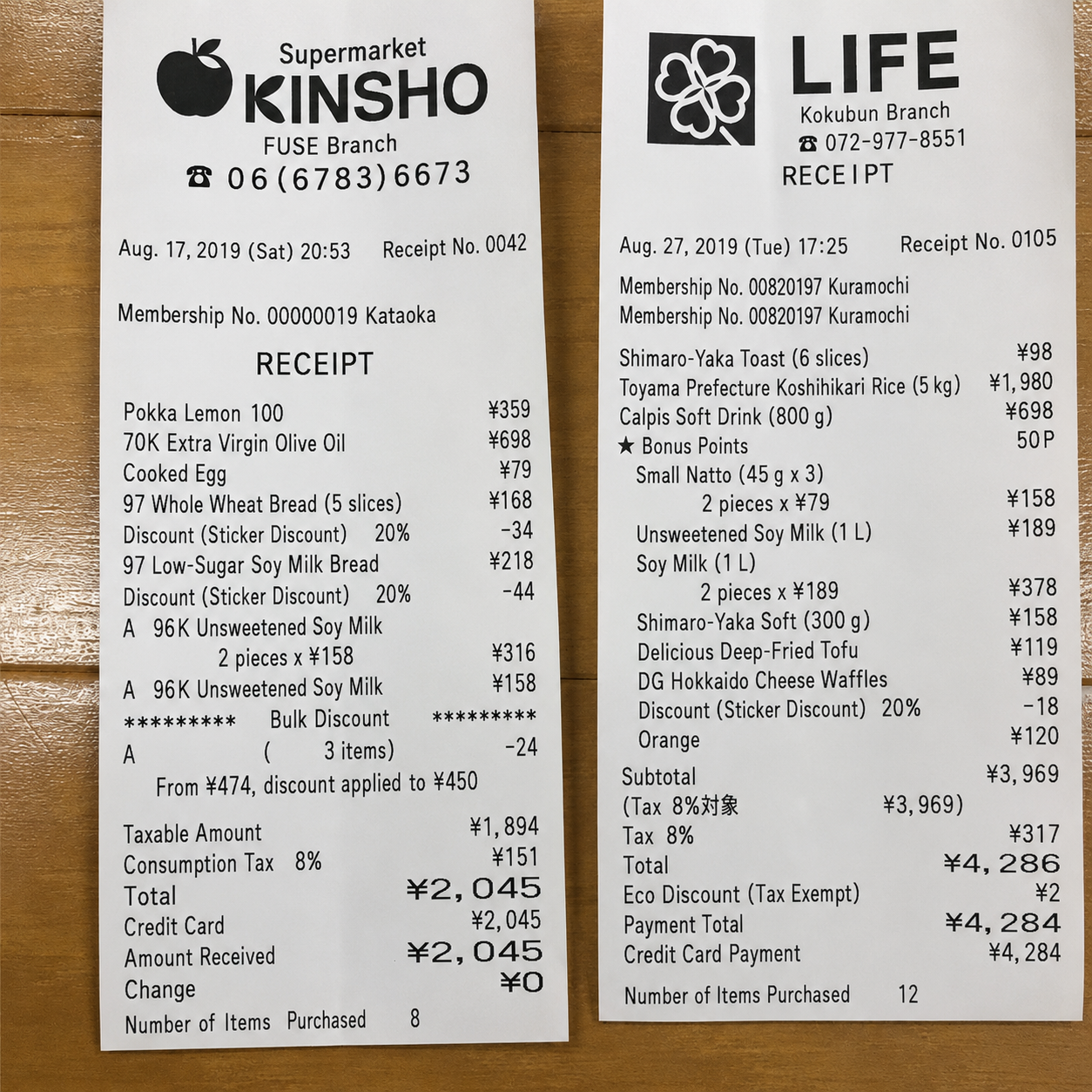
Item
Unit price
Shimaro-Yaka Toast (6 slices)
¥98
Toyama Preference Koshihikari Rice (5kg)
¥1,980
Calpis Soft Drink (800 g)
¥698
Get your API keyRead the docs→
Numbers measured on these photos
Measured on real field photos, not scans: dim light, tilted angles, uneven quality, no cleanup. Click one to see the vertices the engine returned.


22 / 0cells fixed by the verification stages, versus cells they broke
92.1%of returned coordinates have the page's own OCR spelling the value inside the box
6.4×a cell flagged text\_verified: false is 6.4× likelier than average to be a real problem — 3 out of 4 flags are right
Internal regression corpus of 333 hand-labelled cells from real field photos, cached replay, July 2026. Not a public benchmark. See how it was measured →
Verification you can see and touch
The same checked values the API returns, in a screen built to read them: point at a value and the photo answers.
Try it freeRead the guides→
Frequently asked questions
What kinds of documents can it read?
How is this different from regular OCR?
Can the AI make coordinates up?
What happens when it reads something wrong?
Can it handle line items and tables?
How does it fit into an existing system?
What happens to the original photo?
How much does it cost?
Services running on space ocr
CONNECTiON