


Learn languages while browsing the web
Your Vocabulary on Every page
Learn languages while browsing the web

Spot unfamiliar words, translate them, and build vocabulary on any website, PDF, or YouTube video — without leaving the page.
Install Free ExtensionSee how it works
Watch demo

Click a word to see how it works
https://wordbyword.io/demo
Nuances révélées par chaque mot
Apprendre des mots étrangers, c'est élargir délibérément son horizon intérieur. Chaque terme nouvellement acquis révèle une perspective insoupçonnée et transforme subtilement notre manière de percevoir le monde. À mesure que le lexique s'enrichit, la pensée gagne en justesse et en clairvoyance, en discernement, ouvrant la voie à une compréhension plus profonde et plus nuancée de la réalité qui nous entoure. Cette quête perpétuelle de savoir enrichit l' esprit...
Spotlight mode
63%
You understand this page
Step 1
Read what you love
Read websites and PDFs or watch YouTube in your target language. The extension works everywhere. Over 50 languages supported.
Step 2
Discover & save new words
Click any word or phrase to translate and save it in one tap. Spotlight mode reveals your knowledge gaps.
Step 3
Remember forever
Smart flashcards and AI trainer turn saved words into lasting knowledge.
Collections
Organize vocabulary from real content. Every article, video, or PDF becomes a source of new words grouped into collections.
Word status
Track learning progress for every word. From unknown to mastered — see how your vocabulary grows across all content.
Public collections
Learn from curated vocabulary lists created by the community. Start with ready-made sets for any topic or level.
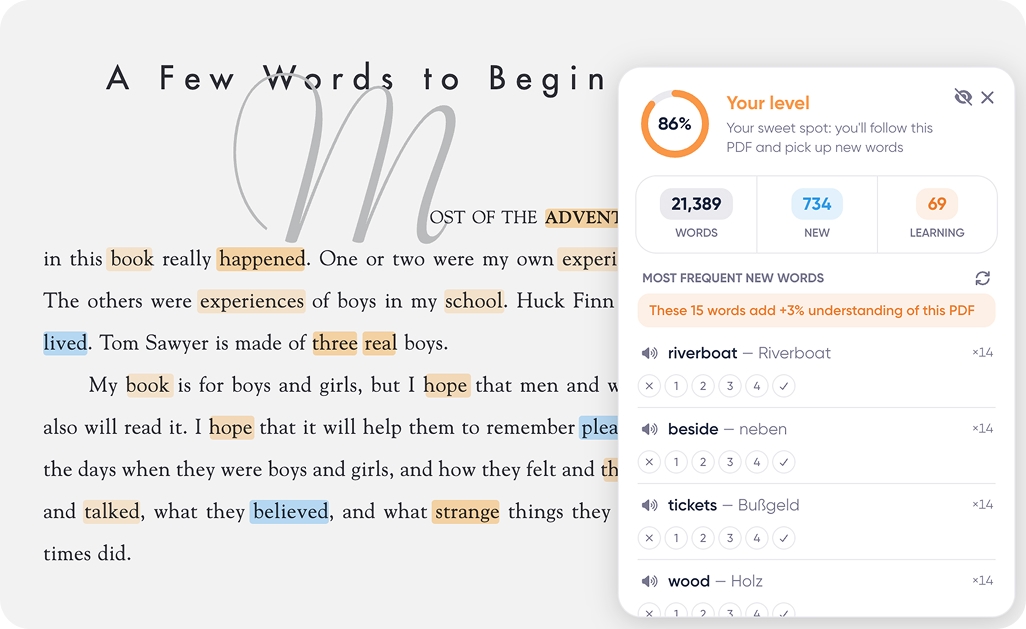
See if you can handle it
We show what share of the words on a page you already know. It is based on your own vocabulary, not on an abstract difficulty label.
- ### Four zones Easy / Your level / Challenging / Too hard — you see at a glance whether to start.
- ### Where to start We show which words buy the most understanding: “these 15 words add +3%”. How the score is calculated →
- Hover translations on any page
- Voiceover & pronunciation
- Collections & word saving
- 5 AI training sessions
- 10 AI term & example generations
- Vocabulary export (Anki, CSV, PDF)
- Public & private collections
- 50+ languages
- Everything in Free
- Unlimited AI training sessions
- Unlimited AI generation
- Enhanced voiceover quality
- Priority support
Subscription Plans
Start free and increase limits as needed
MonthlyYearly
$0
/ month
Most popular
$5.99
/ month
Questions?
Is WordByWord free?
Yes. The core features — translations, vocabulary tracking, and flashcards — are completely free with no limits. A Premium plan unlocks unlimited training sessions, unlimited AI generation, and enhanced voiceover.
How do I get started?
Install the Chrome extension, sign in with your Google account — it takes just a few seconds. Then open any website and start highlighting words to translate and save them.
Does it work with YouTube?
Yes! WordByWord integrates with YouTube subtitles. You can hover over words in subtitles to translate them, save to collections, and the video auto-pauses so you don't miss anything.
What languages are supported?
WordByWord supports 50+ languages including English, Spanish, French, German, Japanese, Chinese, Korean, and many more. You can learn multiple languages at the same time. See the full list of supported languages.
Is my data safe?
Yes. We store your vocabulary and learning progress to power the app. For full details, see our Privacy Policy. We never sell your data to third parties.
Does it slow down my browser?
No. The extension activates only when you interact with it. It processes content efficiently and has no noticeable impact on page load times or browsing speed.
Can I import and export my words?
Yes! You can import words from CSV files and export your collections to Anki, CSV, or PDF — so your vocabulary is always portable.
Can I share my collections?
Yes! You can make any collection public so others can learn from your word sets. Browse community collections to find ready-made vocabulary for any topic.
Ready to start?
Create an account and download the extension — it takes just a few seconds and is completely free!
Start freeDownload the extension
Your message
0 / 4000
Email for our reply