
Give your board a date you can defend.
LearnCompareSolutionsPricingArchitectureFAQAboutSign in
SCHEDULE-RISK PLATFORM FOR R&D PROGRAMS
Give your board a date you can defend.
CritPath AI runs real schedule math over your actual plan — so you know how solid every date is, see trouble weeks early, and the plan reschedules itself when a vendor slips. Built for biotech, deep-tech, and federally funded R&D.
Join the waitlistSee how it re-plans a slip
$10/user/month — every feature. AI employees metered at cost + margin. No credits.
Built for Biotech program leaders · Deep-tech founders / CTOs · Federally-funded PIs · Grant program managers
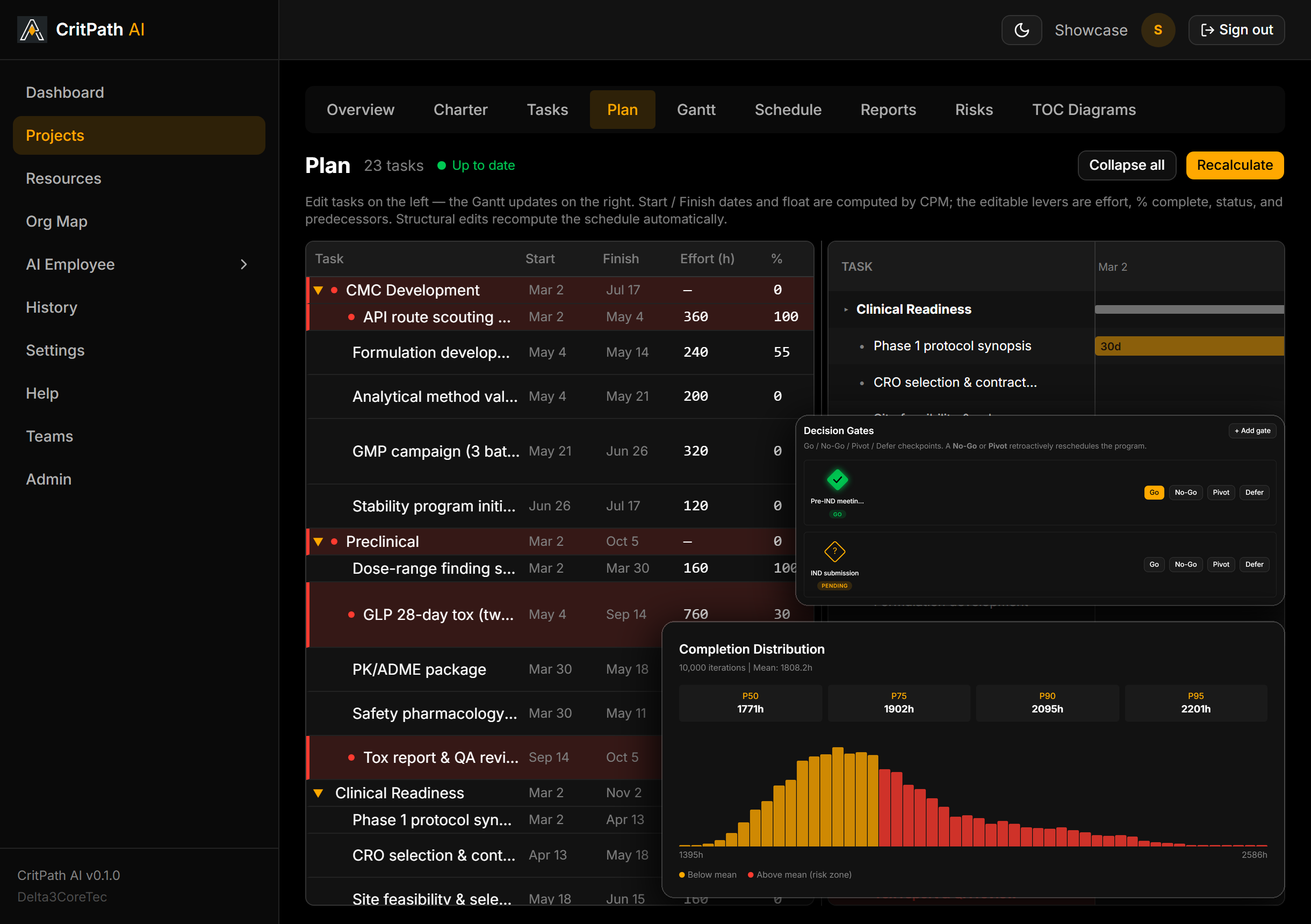
A vendor slips. Your plan re-plans itself.
The re-plan that used to cost your PMO a day happens before the meeting ends.
65 seconds, no cuts: a tox-study risk is marked Occurred → the schedule re-plans retroactively → the buffer fever chart and the P90 date move.
Sound familiar?
The engine R&D actually needs
Built from the first line for the uncertainty and decision density of research programs — not retrofitted from construction or IT delivery.
AI employees. Proposes. You approve.
Build AI employees — an Estimator, a Risk Analyst, a sub-PM — with skills you define. They read your live schedule, run grounded analysis, and return typed proposals — you review the proposed change, not pages of prose, and accepting takes seconds. Nothing lands until a named human accepts; every acceptance is audited, and when you enable the adversarial reviewer on a persona, a separate, isolated review pass — blind to the generation context — grades every run against your own quality rubrics, and blocking failures prevent acceptance. Autonomous AI-employee runs activate at general availability.
Billed per completed job at its estimated token cost plus a stated margin — no credits, no black-box meter. An AI employee holds no seat and no subscription of its own: you pay for the work it actually finishes, and nothing when it is idle. See how AI usage is billed.
- ✓Decision gates as first-class schedule objects — owned, co-signed, audited — no PMO tool ships this
- ✓CPM + CCPM/TOC + Monte Carlo in one engine — incumbents have at most one
- ✓Every AI-employee change lands as a human-approved, audited proposal against the plan
- ✓AI usage metered per completed job at estimated cost + a stated margin — no credits, no seats, no black-box meter
- ✓WSJF + Cost of Delay wired into the simulation and the staffing optimizer
- ✓TOC Thinking Tools — Goal Trees, Conflict Clouds — generated from the live schedule
The gap no one else fills
Risk-math depth →Modern, self-serve UX →
The empty quadrant
Legacy risk tools
Primavera · Deltek · Pertmaster — \~$10K+/seat, Windows desktop
Spreadsheets & trackers
manual Gantts — no probabilistic math
Generic PM
Monday · Asana · Smartsheet · Linear — $7–25/mo
 CritPath AI
Real risk math + modern UX + a schedule-aware copilot
$10/user/mo · all features
Schedule-risk tools have the math but not the UX. Generic PM tools have the UX but not the math. CritPath AI is the only one in both.
How we compare
Rigor you can check
No borrowed logos, no invented percentages — claims you can verify in the product and the literature.
Pricing
One simple seat — $10/user/month, every feature. The market’s own alternatives are a $149 desktop add-in or a $10,000-a-seat analyst tool; this is the engine in between.
Pro
Most teams
$10 /user/mo
Everything: CPM, TOC/DBR, Monte Carlo, decision gates, WSJF, portfolio dashboard, 2FA/MFA, audit log, API. Unlimited projects.
Enterprise
Custom
Dedicated CSM, training, custom integrations; on-prem, SOC 2, SAML, HIPAA BAA, and 21 CFR Part 11 on the Enterprise roadmap.
Build your own organization of AI employees — configurable agents with custom skill sets that work alongside your team. Billed separately by usage, metered per completed job: the estimated token cost of that job plus a stated platform margin. No credits to buy, no hourly minimum, no surprise burn — and a run that fails bills nothing.
See full pricing, seat rules, and how AI usage is metered →
Model your next milestone.
Spin up a project, import your task list from CSV or Excel, and see how solid your dates really are — in under five minutes.