Online Sound Meter
Shared measurement
— · — · —
Leq—
L10—
L90—
MIN—
MAX—
Unit—
Someone shared this measurement with you. Nothing was uploaded — it all travels in the link. Measure your own below to compare.
READY TO LISTEN
20 120
—
dB(A)
Uncalibrated estimate i
MIN—
AVERAGE · Leq—
MAX—
Start measuring
Allow your microphone to get started.
History Spectrum Octave Spectrogram
STANDBY Report
SOUND LEVEL / dB(A)
Peak hold 1/3 octave
1 min 5 min 10 min All Elapsed
Your sound, over time.
Leq—
L10—
L90—
Session00:00
A-weighted · Fast
Finish & save
What does it sound like?
Everyday sounds at each level. Every 10 dB sounds about twice as loud.
- 0–40 dB Quiet Whispering, a refrigerator
- 40–70 dB Everyday Normal conversation, a dishwasher
- 70–85 dB Getting loud A movie theater, a lawnmower
- 85–100 dB Loud Power tools, a motorcycle
- 100–120 dB Very loud Concerts, sirens
- 120+ dB Extremely loud Sirens up close, fireworks
Approximate levels. The real number depends on the source and how close you are.
Time per day
How long a day NIOSH's recommended limit for workplace noise allows at each A-weighted level. Drag the slider or tap a row.
Noise level in dB(A)
dB
NIOSH limit per day 8 h
1. 80 dB Over 24 hLawnmower, motorcycle 2. 85 dB 8 hVacuum, lawnmower, power tools 3. 90 dB 2 h 31 minPower tools, printing press 4. 95 dB 47 min 37 sChain saw, bulldozer, nightclub 5. 100 dB 15 minMotorcycle, concert, sports event 6. 110 dB 1 min 29 sConcert, siren 7. 120 dB 9 sSiren
General guidance, not a safety or medical assessment. Readings from phone and laptop microphones are estimates. Source: NIOSH.
Your microphone. Your privacy. No audio recorded or uploaded.
What is a sound meter?
A sound meter tells you how loud it is where you are, in decibels (dB). This one uses the microphone in your phone or computer, so there is nothing to install and no account to make.
How to use it
1. 1 Press Start measuring. Your browser asks to use the microphone. Tap Allow. 2. 2 Hold still. Hold it still, with the microphone uncovered. The average steadies the longer you measure. 3. 3 Read the result. The big number is the level right now. Average is the best single number for the whole time you measured. 4. 4 Save it if you need to. Report saves the session as a PDF, a spreadsheet or a picture. Finish & save keeps a short summary on this device.

What everything means

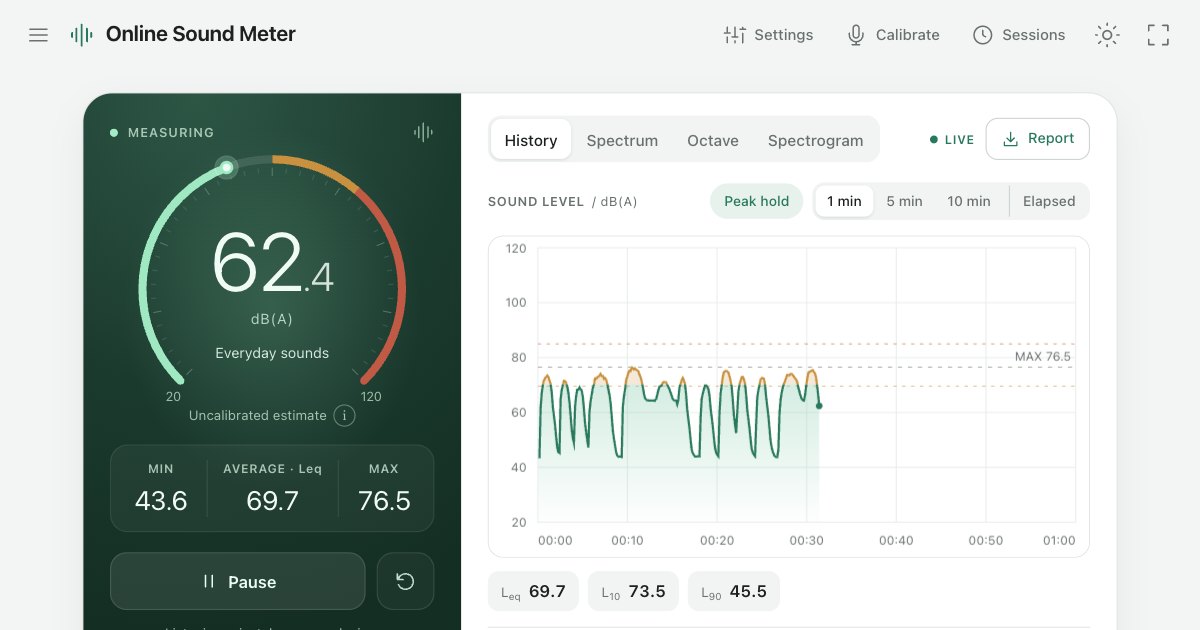
1. 1 The number. How loud it is right now. The ring fills up as it gets louder; amber and red mark your warning levels. 2. 2 MIN, AVERAGE and MAX. The quietest moment, the average of the whole session, and the loudest moment. 3. 3 Start and reset. Start or pause measuring. The round arrow clears the numbers and begins again. 4. 4 The chart. History shows the level over time. Spectrum and Octave show which pitches the sound is made of, low on the left and high on the right. Spectrogram shows pitch going up and time going across. 5. 5 Leq, L10 and L90. Leq is the average again. L10 is how loud the loud moments are, and L90 is the steady background underneath. 6. 6 Report. Download the session as a PDF, a CSV file or a picture.
Calibrate for closer readings
Every microphone hears a little differently, so the first readings are rough estimates. If you have a sound level meter you trust, put it next to your device, open Calibrate and tap + or − until both show the same number. That brings it closer, and it is remembered for that microphone.

Why does it need my microphone?
It is the only way the page can hear the room. The sound is measured inside your browser and thrown away straight after — nothing is recorded, saved or uploaded.
Is it accurate?
It gives an estimate. Every phone and laptop microphone is different, so without calibration the reading can be several decibels off, or more. Calibrating against a sound level meter you trust brings it closer.
Why does my friend's phone show a different number?
Each microphone has its own sensitivity. Calibrating both devices against the same meter brings them much closer together.
What does dB(A) mean?
Decibels weighted to roughly match how sensitive our ears are to different pitches. It is the most common way to measure everyday noise.
Does it work on a phone?
It is built for current Safari and Chrome on phones. Keep the screen on: phones often pause the microphone when the screen locks.
Can I use it for an official complaint?
It is good for checking and comparing, but it is not a certified instrument. Official measurements usually call for a certified sound level meter.