

Type an MPN.Get a usable part.
KIDEX 0.1component library manager for KiCad
Type an MPN.
Get a usable part.One curated KiCad library with a SQLite catalog behind it. Every part arrives with its MPN, distributor numbers, JLCPCB assembly class, feeder slot and equivalents — and nothing is written until you have seen it.
Install KiDex Watch it work with Claude ↓
GPL-3.0Python 3.11+KiCad 9 IPC API200+ tests, no network
zsh — kidexacquisition ladder
$ kidex add AP63205WU-7 identity DigiKey Diodes Incorporated · AP63205WU-7 cross-ref LCSC C-code · JLCPCB extended rung 1 catalog nothing to reuse rung 2 official TSOT-23-6 — referenced, not copied rung 3 EasyEDA symbol ✓ 3D model ✓ fields cleaned ────────────────────────────────────────── ? Write to the catalog? [y/N]
01THE ACQUISITION LADDERZONE B
It climbs until it finds CAD you can trust.
DigiKey resolves who made the part and what it is really called. LCSC and JLCPCB cross-reference the C-code. Then KiDex walks four rungs, stopping at the first one that works.
1. RUNG 1
Reuse
A matching footprint is already in the catalog? Fingerprinting finds it, and the new part reuses it instead of adding a duplicate. 2. RUNG 2Reference
KiCad already ships the footprint or a generic symbol? KiDex points at the official library and never copies it. 3. RUNG 3Pull
Has an LCSC code? Symbol, footprint and 3D model come from EasyEDA, cleaned to the standard field set. 4. RUNG 4Park & watch
No CAD anywhere? The part waits in Pending while KiDex watches your downloads for the Samacsys, UltraLibrarian or SnapEDA zip.Re-running an add is always safe: ingest is idempotent, and vendor zips are treated as untrusted input — zip-slip guarded, nothing inside is ever executed.
02ONE LIBRARY, ONE CATALOGZONE C
Every part carries the same eight fields.
KiDex.kicad\_sym, KiDex.pretty and one shared 3D directory — plus a SQLite catalog that KiCad browses as a database library. Vendor junk fields are recorded, then removed. 3D paths always go through `${KIDEX_3D}`, never an absolute path.
Blanks get filled from the distributors with `enrich --missing`, which never overwrites what you set.
- DigiKey · identity
- LCSC · C-code, stock
- JLCPCB · basic / extended
- Mouser · price
- EasyEDA · CAD
- \[drop-in\] Fits the same footprint and circuit as it is.
- \[caveat\] Fits, with the differences spelled out in `changes`.
- \[redesign\] Does the same job but needs a footprint or circuit change. Said plainly, every time.
- \[unverified\]
Every API key is optional. A missing key just switches that source off.
Symbol fields — U3KiDex:RP2040
ValueRP2040 FootprintKiDex:QFN-56-1EP\_7x7mm\_P0.4mm Datasheetdatasheets.raspberrypi.com/rp2040/… MPNRP2040 ManufacturerRaspberry Pi DigiKey\_PN— filled by enrich --missing LCSC\_PNC2040 DescriptionDual-core Cortex-M0+ MCU, 264 kB SRAM, QFN-56
JLCPCBextended
feederslot 14
equivalentsgroup MCU-RP
03AGENT MODEZONE D–E
Hand it to an agent.
It still has to ask you.Every command also runs as `kidex --json`. `kidex install-skill` teaches Claude Code the protocol, and the review gate survives as a question an agent has to bring back to you.
one envelope
One JSON object on stdout per command: status, data, messages, and the question if there is one.
exit 3 = a question
A write always stops before touching anything. Piping `yes` into stdin does nothing; only an explicit `--answer` goes through.
no stale approvals
If the footprint match or stock changes before the rerun, the question id changes and the old yes no longer applies.
claude\~/hw/sensor-psu
kidex skill↻ Replay
Replayed session, illustrative. The commands, the JSON protocol and the stop-before-write gate are KiDex’s real behaviour; part data is abbreviated.
04EQUIVALENTS BY TIERZONE F
Out of stock? You’ll know what a swap really costs.
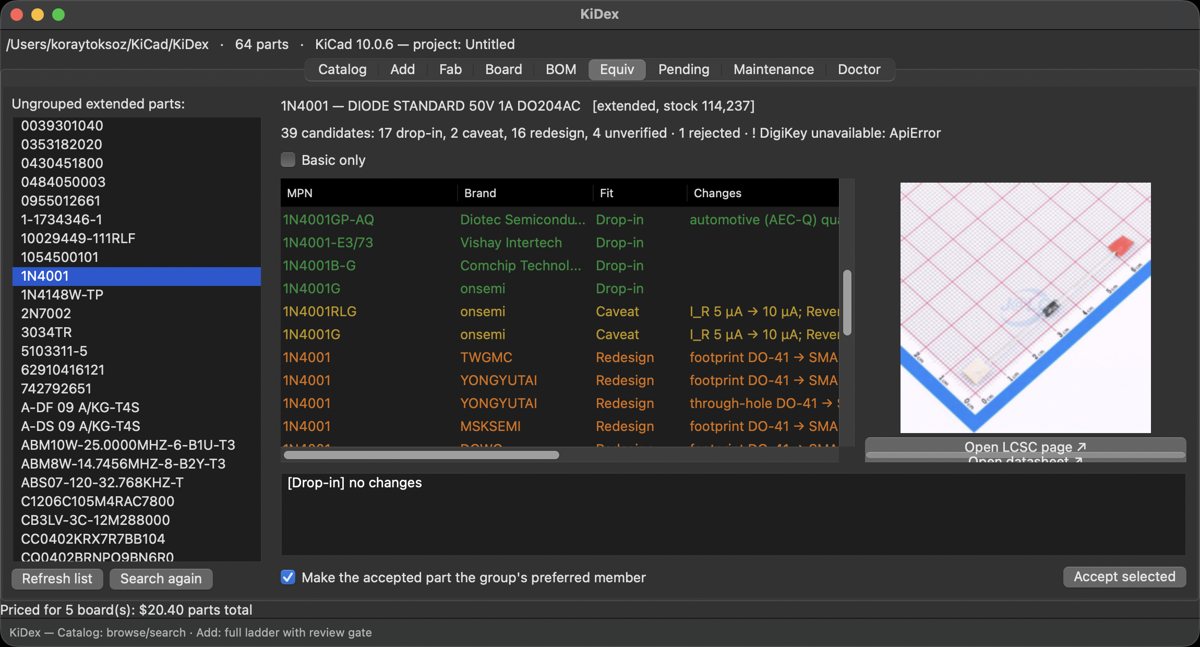
`equiv find` checks real JLCPCB, DigiKey and Mouser candidates by rule first. An LLM only looks at the uncertain rest — and it works with no LLM key at all.
05TO THE FABZONE F–G
Three files, checked before you upload.
`fab make` builds the JLCPCB order package and runs a preflight: DRC, missing C-codes, live stock and extended-part fees.
Teach a pick-and-place rotation once with `fab rot`; every future CPL applies it.
$ kidex fab make sensor-psu --boards 20 ✓ gerbers.zip (9 files) ✓ bom_jlcpcb.csv (5 lines) ✓ cpl_jlcpcb.csv (7 placements, rotations learned)
Preflight: DRC: clean ⚠ 2 extended parts — setup fee applies
Package: fab/sensor-psu/ — upload these three files
06THE WINDOWZONE G–H
Prefer clicking? Open it from the PCB editor.
`kidex install-plugin` adds an Open KiDex button to KiCad. The window is a thin shell: every button calls the same core function as the CLI.
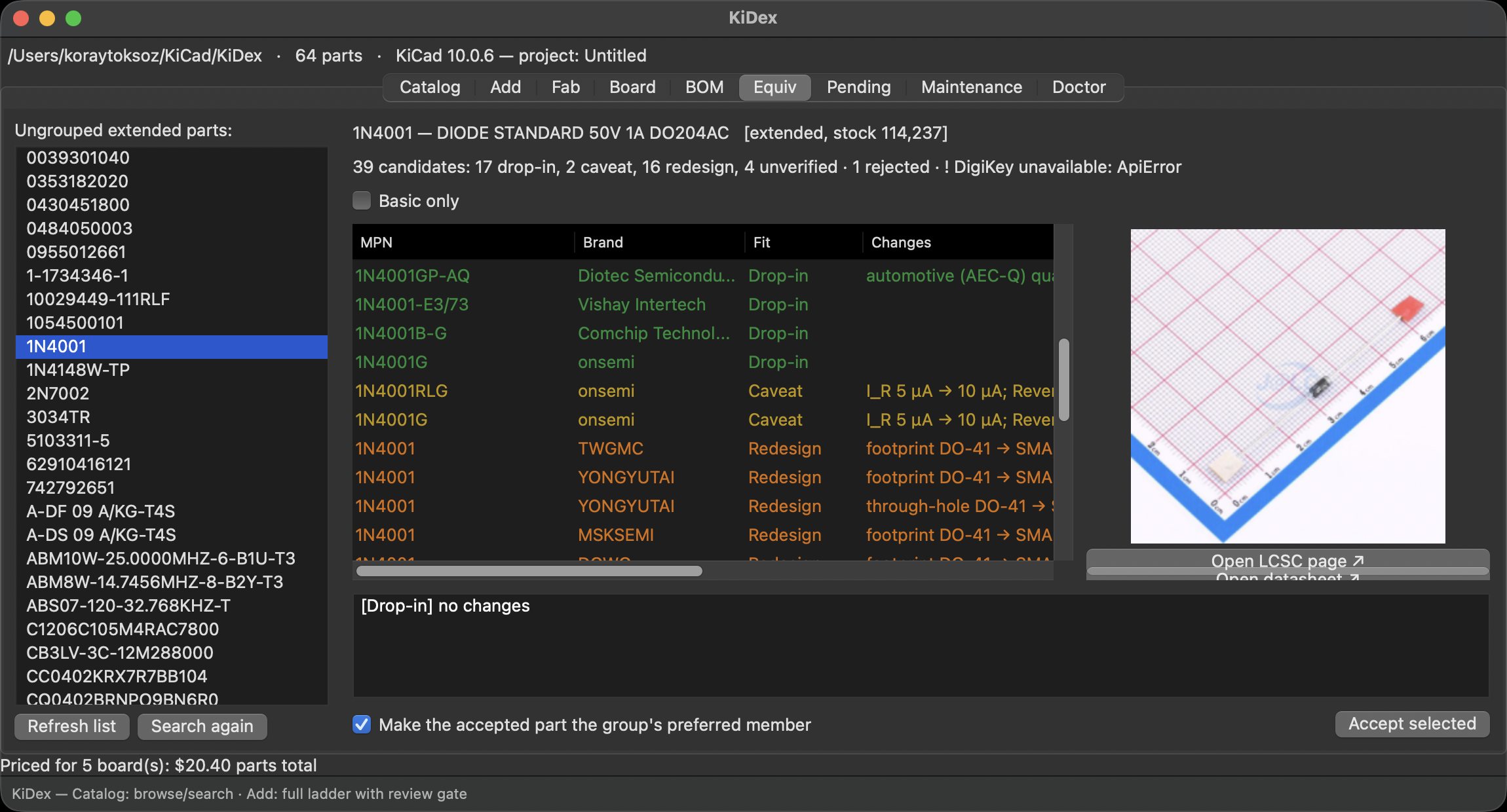
FIG. 1Equiv — 39 candidates for 1N4001, sorted by tier. Every row says what would change: leakage current, a new footprint, through-hole to SMA.
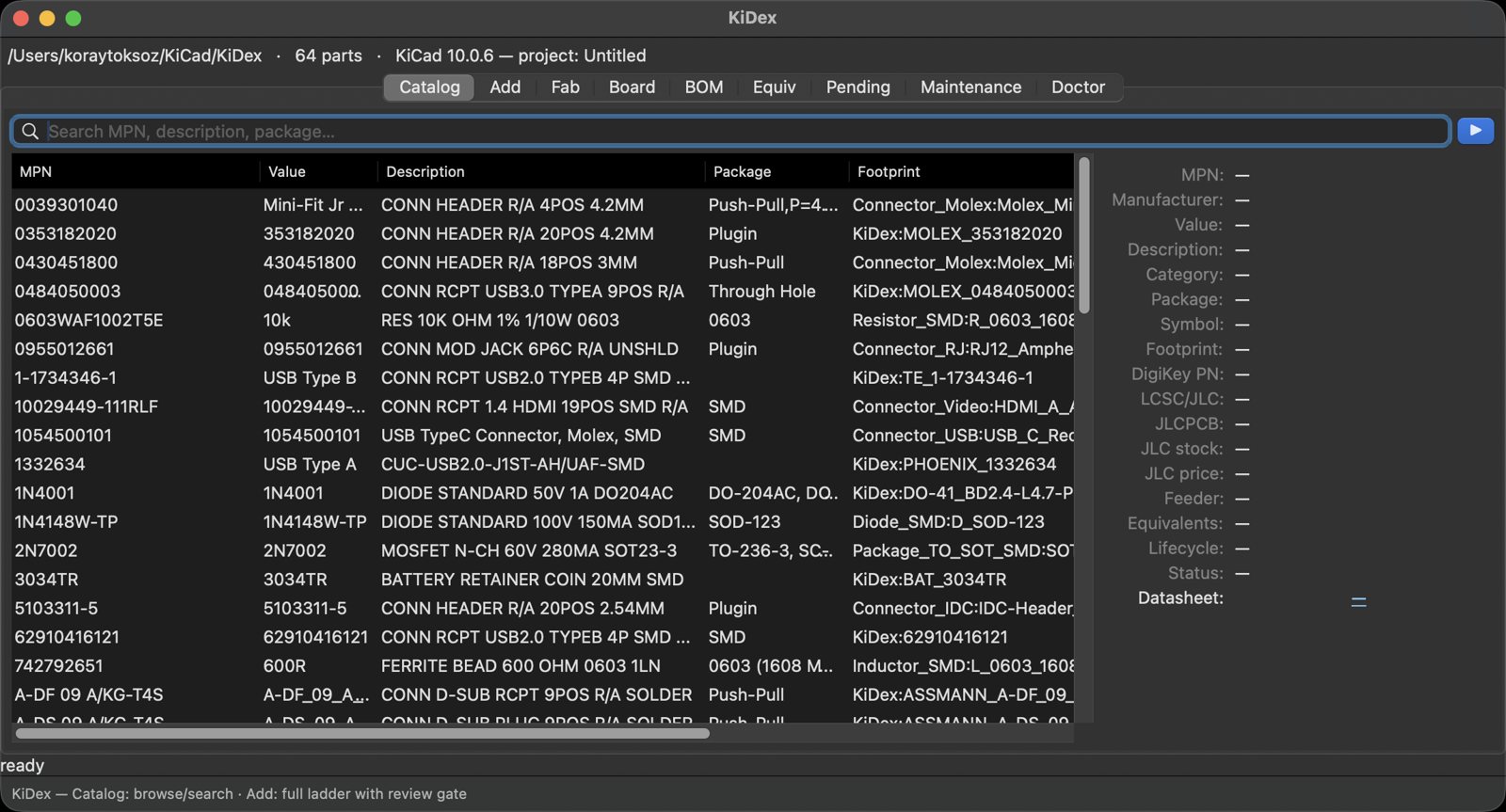
FIG. 2Catalog — 64 parts, every field searchable.
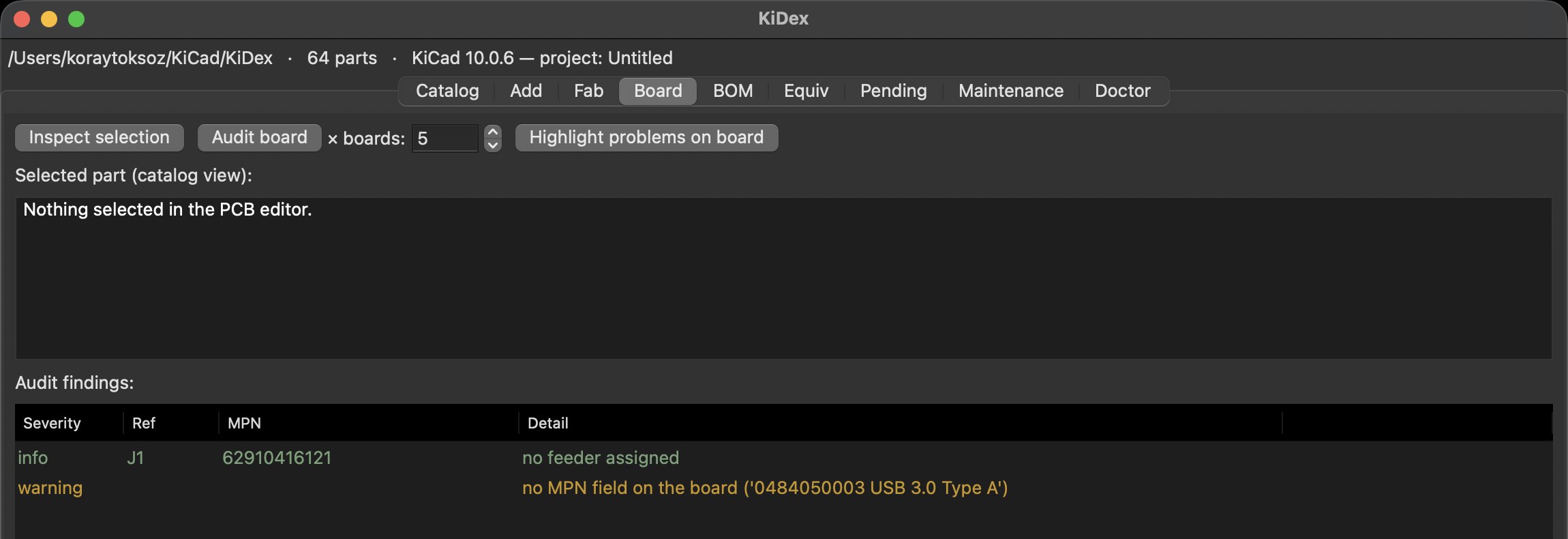
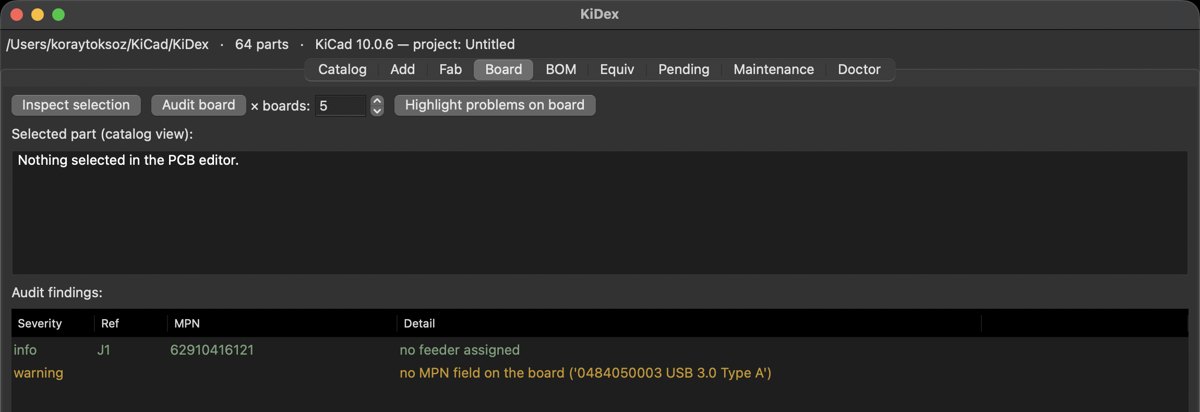
FIG. 3Board — audits the open PCB over the IPC API: parts without a feeder, footprints without an MPN.
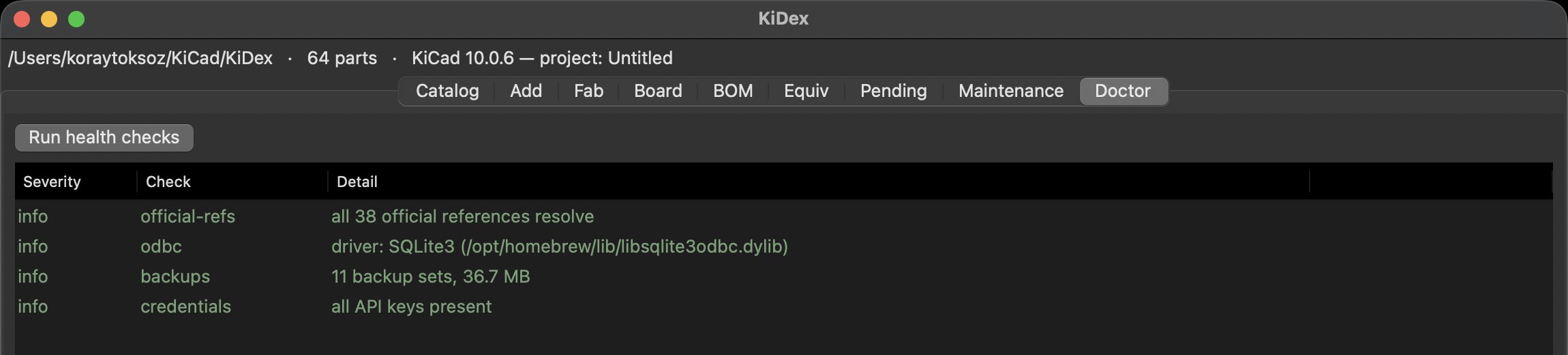
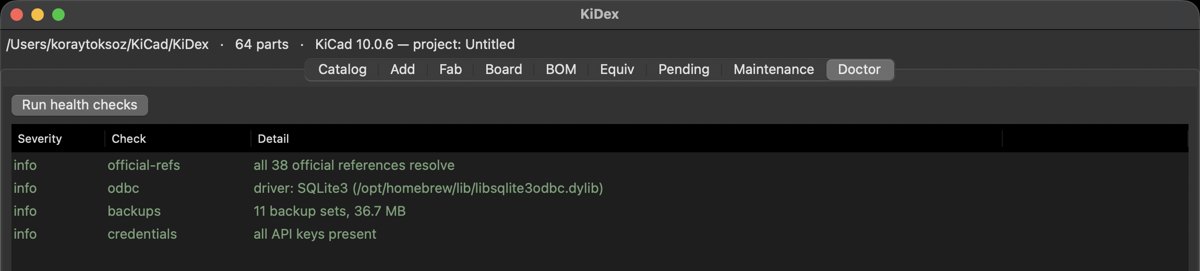
FIG. 4Doctor — official references, ODBC driver, backups, API keys.
07BILL OF COMMANDSZONE H
| REF | COMMAND | FUNCTION | | --- | ----------------------- | ----------------------------------------------------------------------------------------------------------- | | C1 | add <MPN\|C-code> | Full acquisition ladder with a review gate | | C2 | search --online <term> | Catalog search, or MPN / C-code / free text across the distributors | | C3 | bom <project> --prices | Project BOM against the catalog: feeders, JLCPCB class, equivalents, obsolete warnings, prices side by side | | C4 | fab make <project> | JLCPCB package: gerbers, BOM, CPL with learned rotations, preflight | | C5 | enrich --stale 90d | Re-check lifecycle, stock and price for parts not confirmed recently; obsolete alarms | | C6 | equiv find <MPN> | Tiered equivalents with evidence and what changes — read-only | | C7 | pnp scan / set | Pick-and-place feeder slots, harvested from your schematics | | C8 | ingest / resume / watch | Vendor-zip pipeline for parked parts | | C9 | dedup / normalize | Merge duplicate footprints (pinout-aware) and re-apply the field policy — dry run first | | C10 | migrate scan / apply | One-way migration of a legacy library, dry run first | | C11 | doctor | Health checks: official refs, file ↔ database consistency, ODBC, dbl | | C12 | db rebuild | Disaster recovery from the git-tracked catalog.csv / catalog.json |
08NOTES
Unless otherwise specified.
1. Never import pcbnew. Library files are edited directly; live KiCad is reached only through the IPC API. Everything works with KiCad closed. 2. MPN is the key. An empty value means “not known yet”, never an empty string. 3. Suggest, never auto-apply. Every API or LLM inference passes a human gate. 4. Nothing is lost. Every write is atomic with a kept backup, and catalog.csv / .json rebuild the database byte-identically. 5. Vendor zips are untrusted. Filenames are data, extraction is zip-slip guarded, nothing inside is executed.
09INSTALL
Five minutes to your first part.
You need Python 3.11+, uv and KiCad 9. `kidex dbl` prints the exact KiCad registration steps and tells you how to get the SQLite ODBC driver if it is missing.