


Karpenter Troubleshooting: Pending Pods, Failed Launches, and Nodes That Never Join
Engineering·September 5, 2026· 12 min read
Karpenter Troubleshooting: Pending Pods, Failed Launches, and Nodes That Never Join
A field guide to Karpenter failures: pending pods, LaunchFailed, VCPULimitExceeded, NodeRegistrationHealthy, and DisruptionBlocked - what each one means and where the evidence lives.
Eyal Dulberg
CTO, Skyhook

Karpenter changes how you debug a Pending pod.
A Karpenter NodePool can report `Ready=True` while the nodes it launches repeatedly fail to register. And that is only one reason these incidents can be confusing: the scheduler, NodePool, NodeClaim, NodeClass, and controller logs each hold a different part of the answer.
On a fixed set of nodes, Pending usually means the nodes you already have cannot take the pod. With Karpenter, there is another question: did Karpenter rule out every NodePool, or did it try to create capacity and fail?
This guide maps the failures we run into most often to the place I would look next. The screenshots come from Radar's Capacity view, the open-source tool we maintain, which assembles the same evidence from the cluster itself.
Karpenter pending pods: symptom, cause, where to look
Scheduler messages usually arrive as `0/N nodes are available:` followed by a reason. That message is useful, but with Karpenter it is often only the first step.
| Symptom or message | Usual cause | Where to look | | ----------------------------------------- | -------------------------------------------------------------------------- | ---------------------------------------------------------------------------------------------------- | | didn't match Pod's node affinity/selector | Pod requires a label no NodePool declares | NodePool requirements and spec.template.metadata.labels | | had untolerated taint {key: value} | NodePool template taints the node, pod has no toleration | NodePool spec.template.spec.taints vs pod tolerations | | Insufficient cpu / Insufficient memory | Existing nodes are full. Says nothing about what Karpenter could provision | Node allocatable vs scheduled requests, then Karpenter's scheduling event | | Pod pending, no NodeClaim created | Every pool ruled the pod out, or NodePool limits are reached | Karpenter FailedScheduling event; status.resources vs spec.limits | | NodeClaim created, no node appears | Launch failed, or instance launched and never registered | NodeClaim conditions for launch failures; NodeRegistrationHealthy for repeated registration failures | | Nodes launch then disappear | Registration timeout | NodePool NodeRegistrationHealthy | | Pod stuck with no scheduler attempt | Scheduling gate still present | spec.schedulingGates | | Nodes not consolidating | Disruption blocked or budgets exhausted | DisruptionBlocked / Unconsolidatable events |
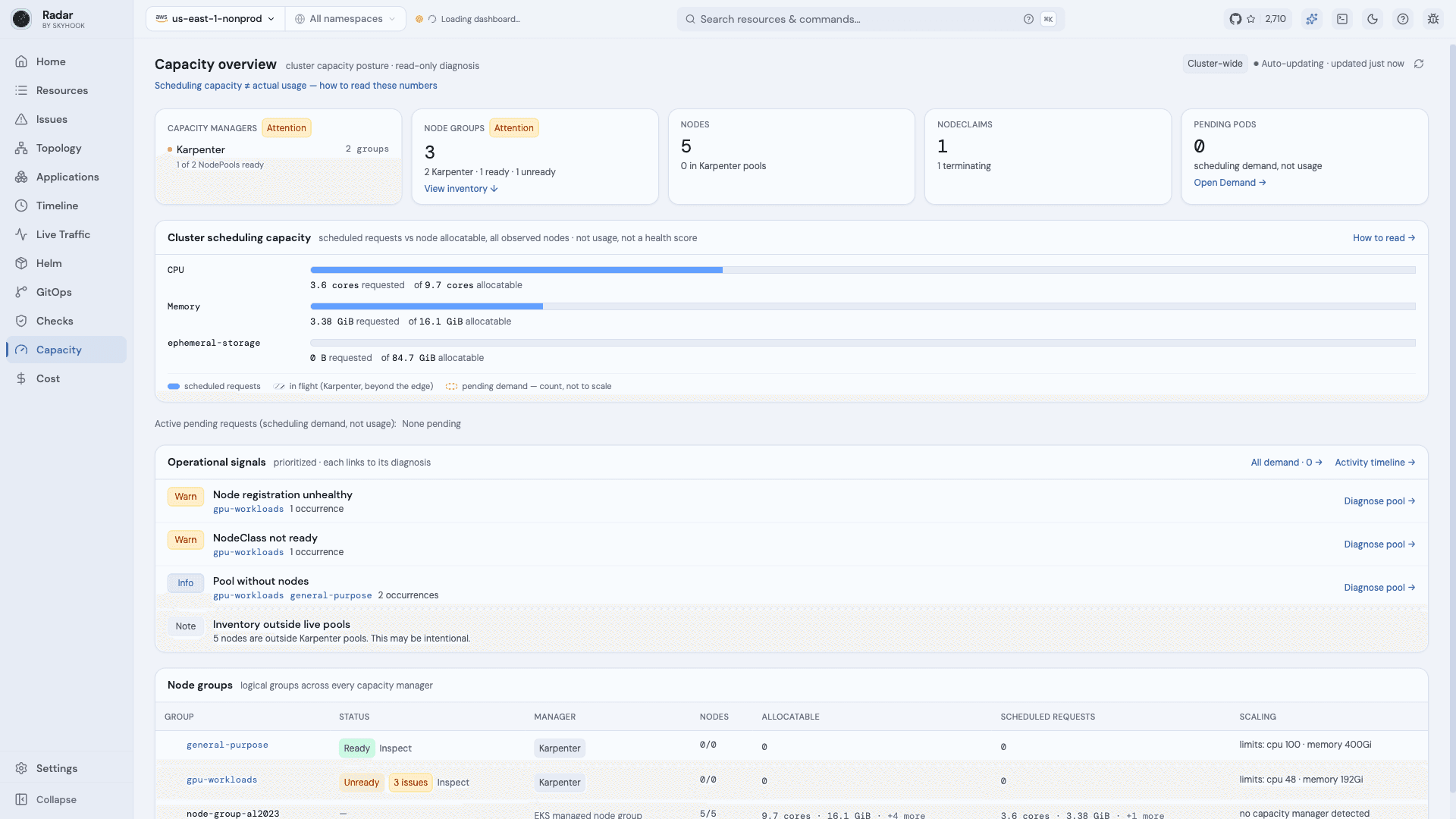
The important part is that these failures do not all live on the same object. A scheduling event can tell you why a pool was rejected, while a NodeClaim or NodePool condition tells you why capacity that should have appeared never did.
"didn't match Pod's node affinity/selector"
This is a common Karpenter misconfiguration and one of the easier ones to identify from configuration alone.
Karpenter only applies labels that come from a NodePool's `requirements` or its template labels. If a pod requires a custom label that no NodePool declares, no node Karpenter builds will ever carry it.
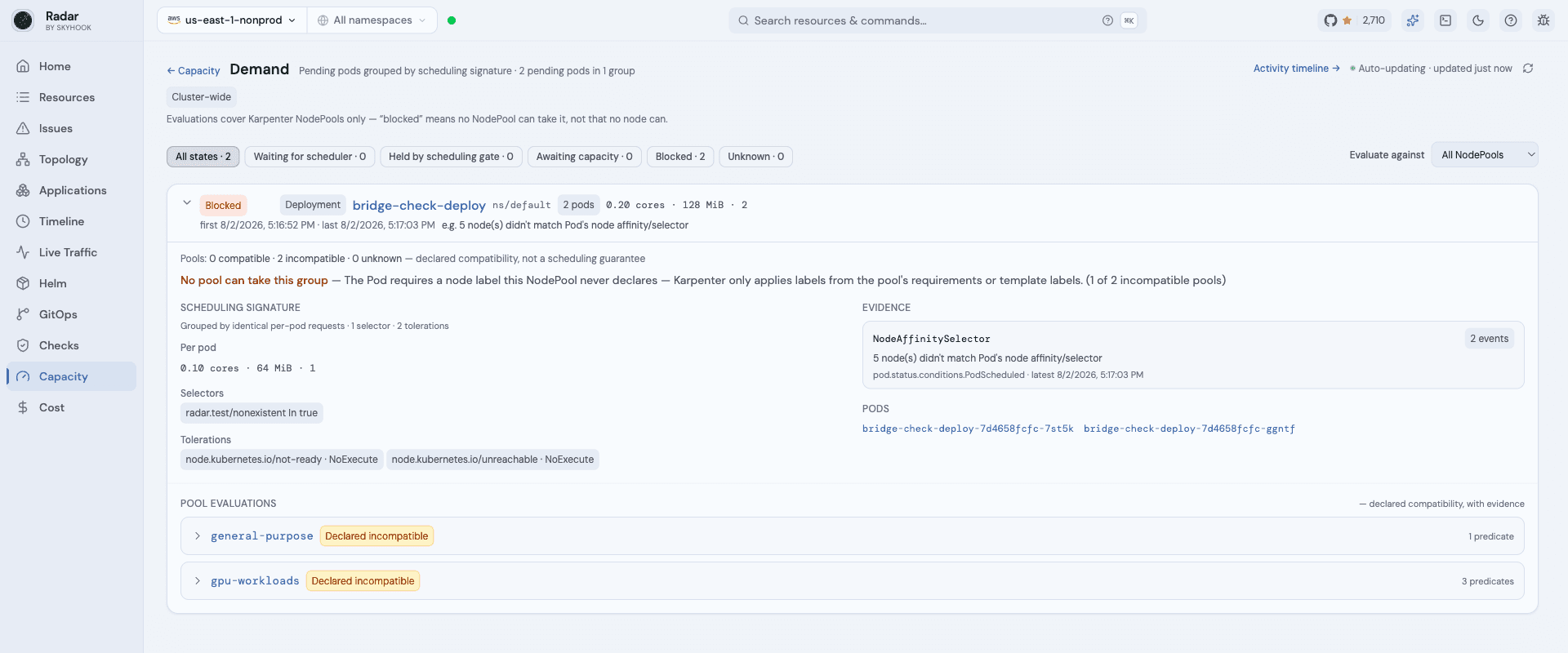
In production this is often a stale label: a `workload-type` renamed during a migration, or a `nodeSelector` copied from another cluster.
Start with:
kubectl describe pod <pod>Then compare the pod's selectors and required affinity against each NodePool's:
spec.requirements
spec.template.metadata.labels
If the label the pod requires is never declared by any NodePool, Karpenter has nowhere to place it.
Radar's Demand view does this comparison across all NodePools and groups pods with the same scheduling constraints together, but the underlying check is the same one you can do manually.
"had untolerated taint" on a Karpenter cluster
Karpenter taints nodes from `spec.template.spec.taints` on the NodePool.
A pod without a matching toleration cannot land on anything that pool creates, so Karpenter can rule the pool out before provisioning even starts.
Compare:
NodePool.spec.template.spec.taintsagainst the pod's:
spec.tolerationsOne thing to watch: startup taints are different from permanent taints.
Startup taints, along with the well-known unreachable/not-ready taints, are expected during parts of a node's lifecycle. They should not automatically be treated as evidence that the NodePool can never run the workload.
LaunchFailed, VCPULimitExceeded, and InsufficientInstanceCapacity
If Karpenter creates a NodeClaim and the cloud provider refuses it, the useful evidence moves away from the pod.
Look at the NodeClaim lifecycle conditions.
Common AWS examples include:
- `VCPULimitExceeded` \- the account's vCPU quota for that instance family is exhausted.
- `InsufficientInstanceCapacity` \- AWS does not currently have capacity for that instance type in the requested region or zone.
- `Unauthorized` \- the instance profile or IAM configuration is wrong.
- `LaunchFailed` \- Karpenter reached the launch stage but could not create the instance successfully.
A detail that makes these annoying to debug: failed NodeClaims do not necessarily stay around forever.
Timed-out NodeClaims are deleted, and the conditions attached to them disappear too. Karpenter can surface repeated launch or registration trouble at the NodePool level through `NodeRegistrationHealthy`, but the individual history - which claims failed, how many, and in what order - can be harder to reconstruct afterward.
That is why events and controller logs matter for intermittent failures.
Radar's Activity view keeps a longer provisioning history, but even without Radar, the practical rule is simple: if you see a NodeClaim, inspect it before assuming the pod event contains the answer.
Why aren't my Karpenter nodes joining the cluster?
This is one of the more confusing failure modes because the NodePool itself can still report `Ready=True`.
Karpenter tracks `NodeRegistrationHealthy` separately from the NodePool's top-level `Ready` condition.
That means the NodePool can be valid for provisioning, successfully launch instances, and still fail to produce usable nodes because those instances never register with the cluster.
The pattern looks roughly like this:
1. Karpenter decides the NodePool can satisfy the workload. 2. A NodeClaim is created. 3. The cloud instance launches. 4. The node never registers successfully. 5. The registration timeout is reached. 6. The instance is deleted. 7. Karpenter tries again.
From the workload side, the result is simple: the pod stays Pending and capacity never arrives.
From the NodePool side, `Ready=True` alone does not tell the whole story.
This is different from a broken NodeClass.
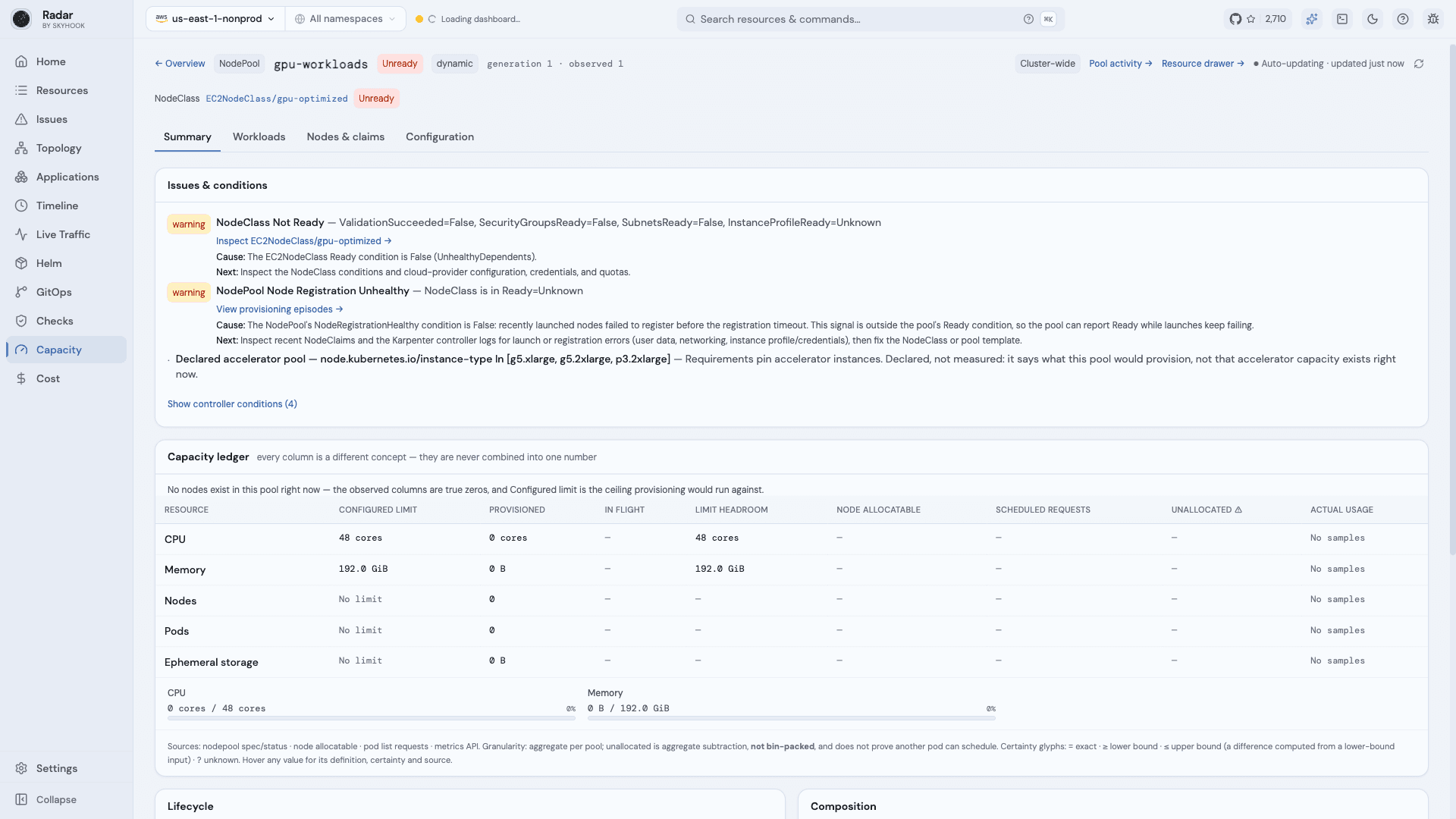
For example, if an EC2NodeClass looks like this:
ValidationSucceeded=False
SecurityGroupsReady=False
SubnetsReady=False
InstanceProfileReady=Unknown
then the NodeClass itself is not ready. That propagates through `NodeClassReady`, so this is not a case where the NodePool remains happily `Ready` while nodes fail to register.
Typical NodeClass problems include selectors that resolve to no subnets or security groups, a missing instance profile, or another prerequisite that cannot be resolved before launch.
A `Ready=True` plus `NodeRegistrationHealthy=False` problem happens later: the NodeClass was valid enough to provision, but the resulting node never successfully joined the cluster.
Those two failures can look nearly identical from the pod's point of view, but they require looking in different places.
Am I about to hit a NodePool limit?
Karpenter stops provisioning when a NodePool reaches `spec.limits`.
The pods that would have triggered more capacity stay Pending, and no NodeClaim is created for them.
Karpenter does tell you when this happens. Look for a `FailedScheduling` event containing messages such as:
node limits have been exhausted for nodepool
all available instance types exceed limits for nodepool
The number Karpenter checks is `status.resources`.
That matters because `status.resources` includes resources represented by in-flight NodeClaims. So:
headroom = limit - provisionednot:
headroom = limit - allocatableA NodePool can therefore be close to or at its limit even when relatively little capacity has successfully registered with Kubernetes.
The event tells you which pool hit its limit. To understand how much room is left elsewhere, compare `spec.limits` and `status.resources` across the other pools.
Provisioned, allocatable, requests, usage: which number means what
These numbers answer different questions:
| Number | Source | What it tells you | | ------------------ | ---------------- | -------------------------------------------------------------------- | | Provisioned | status.resources | What counts against NodePool spec.limits, including in-flight claims | | Node allocatable | Registered nodes | What Kubernetes can actually schedule onto now | | Scheduled requests | Pod specs | What the scheduler has already committed | | Actual usage | Metrics API | What workloads are consuming, not what can still be scheduled |
Karpenter and Kubernetes schedule based on requests, not current CPU or memory usage.
A node can be using 20% CPU and still be completely full from the scheduler's point of view if all of its CPU has already been requested.
That is why Radar keeps eight capacity values separate instead of reducing them to a single utilization percentage.
There is another subtlety: `unallocated` is only an aggregate subtraction.
If a cluster has 4 CPUs and 8 GiB of memory unallocated in total, that does not prove a pod requesting 4 CPUs and 8 GiB can fit. Those resources still need to exist together on a single node that also satisfies the pod's other constraints.
What does DisruptionBlocked mean in Karpenter?
`DisruptionBlocked` and `Unconsolidatable` do not mean Karpenter disrupted a node.
They mean disruption was prevented.
Read either as disruption happening and the timeline reads backwards.
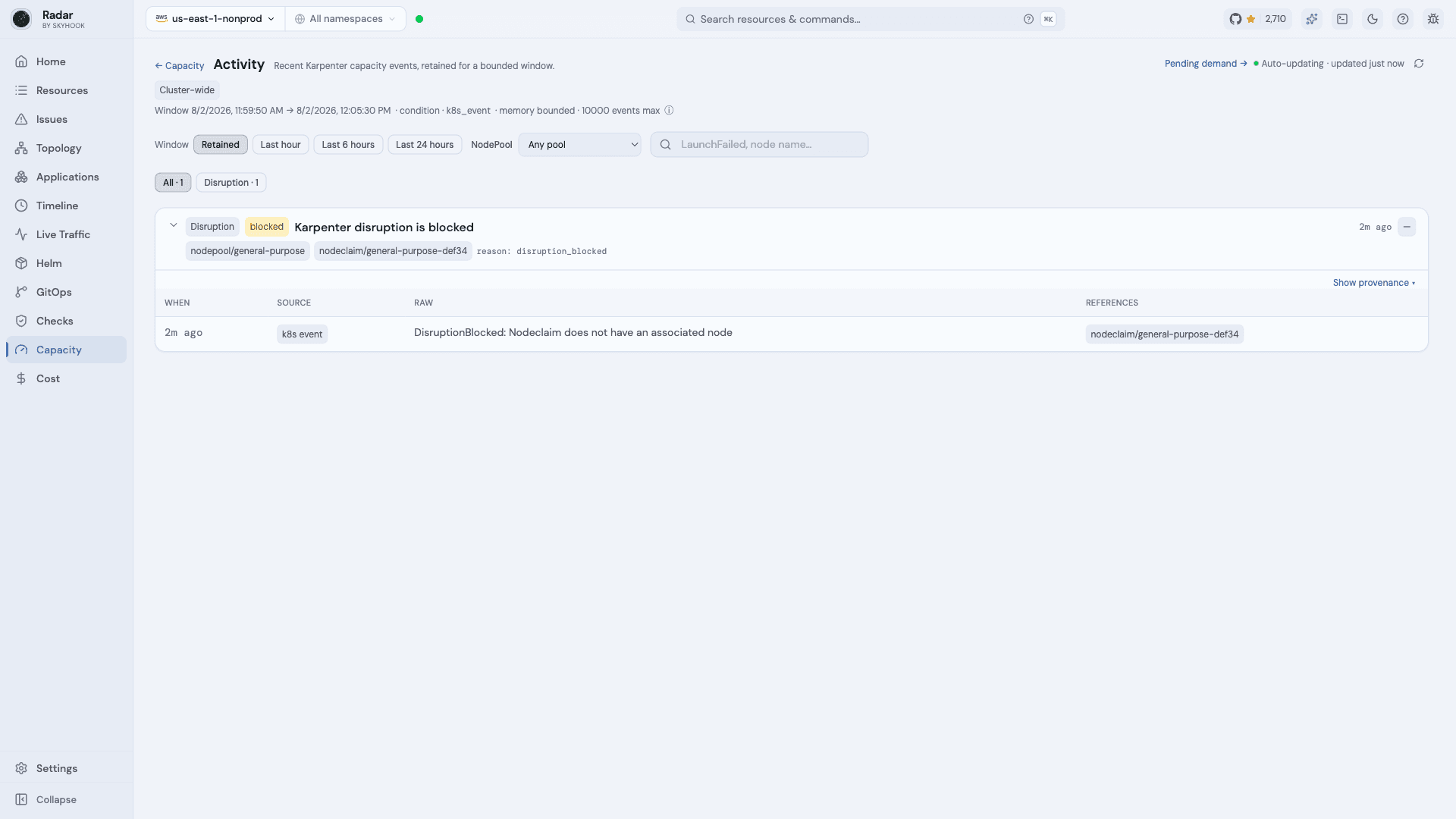
Common causes include:
The raw event is usually the best place to start:
DisruptionBlocked: Nodeclaim does not have an associated nodeDo not treat these events as evidence that Karpenter removed capacity. They are evidence that Karpenter considered a disruption and could not proceed.
Why a pod evaluates as "unknown" instead of incompatible
When we built this evaluation into Radar, we found it useful to separate three cases:
The difference matters because configuration can prove some scheduling failures, but not all of them.
A required custom label that no NodePool declares is incompatible. Nothing the cloud provider does can fix that.
Provider-controlled labels such as zone, instance type, capacity type, and architecture are different. If the NodePool leaves them open, the provider's actual offerings may still satisfy the pod.
Requests are similar. Observed nodes can tell you whether a known machine shape is large enough, but they do not prove which instance types the provider could create next.
Radar therefore does not simulate provider offerings or claim that a compatible pod will schedule. It only says that the declared constraints do not rule it out.
If the available information cannot prove either outcome, the result is `unknown` instead of a guess.
Why some numbers show ≥ or ?
Capacity information is not always complete.
For example, RBAC may prevent access to one source, or metrics may only be available for part of the fleet.
Radar marks that distinction explicitly:
| Glyph | Meaning | | ------ | -------------------------------------------------- | | (none) | Exact - the source was fully observed | | ≥ | Lower bound - only part of the source was observed | | ≤ | Upper bound - derived from a lower-bound input | | ? | Unknown - the source was not observed |
Missing data is never shown as zero, and partial data is never shown as exact.
This matters during an incident because "0" and "I could not read it" are very different answers.
What this doesn't cover
Clusters without Karpenter can still be inspected through the normal node and node-group views. The Karpenter-specific Demand and Activity analysis depends on NodePools and NodeClaims being present.
Running it
Radar is Apache-2.0, runs as a single binary, and does not install anything in the cluster:
brew install skyhook-io/tap/radar
radar
Capacity requires Radar v1.9.0 or newer.
You can open it from the sidebar or jump there directly from a stuck pod using "Evaluate against Karpenter NodePools".
If Radar reaches a verdict you can prove wrong, that's worth an issue on GitHub.
Related reading: Five Questions You Can't Answer With kubectl, Everything Is Green and Nothing Works: Network Reachability in Radar, and Kubernetes 1.37 Breaking Changes.
kuberneteskarpenterautoscalingschedulingtroubleshooting
Get the next issue in your inbox
Kubernetes deep-dives, new Radar releases, and what we learned shipping them.
Email addressSubscribe
One or two emails a month. No sales sequences. Unsubscribe anytime.
Keep reading
EngineeringEverything Is Green and Nothing Works: Network Reachability in RadarPods Ready, Service green, curl times out. Radar's Reachability tab traces the declared network path and live-probes it, naming the first hop that breaks.Read EngineeringKubernetes 1.37 Breaking Changes: What to Check Before You UpgradeKubernetes 1.37 removes 25 feature gates, an alpha scheduling API, and 18 kubelet flags, and starts the nftables transition. What breaks, and how to check your cluster.Read EngineeringKubernetes Events Expire in an Hour. Your Incidents Don't.Kubernetes events expire after one hour by default, and many of the changes that cause incidents never become events at all. How to keep history that survives.Read
Try Radar OSS in 30 seconds.
Single Go binary, Apache 2.0. Or use hosted Radar Cloud free for 3 clusters.
Star on GitHubRead the docsor try hosted free →
Apache 2.0 · Run Radar OSS forever · Cloud for fleet, alerts, SSO