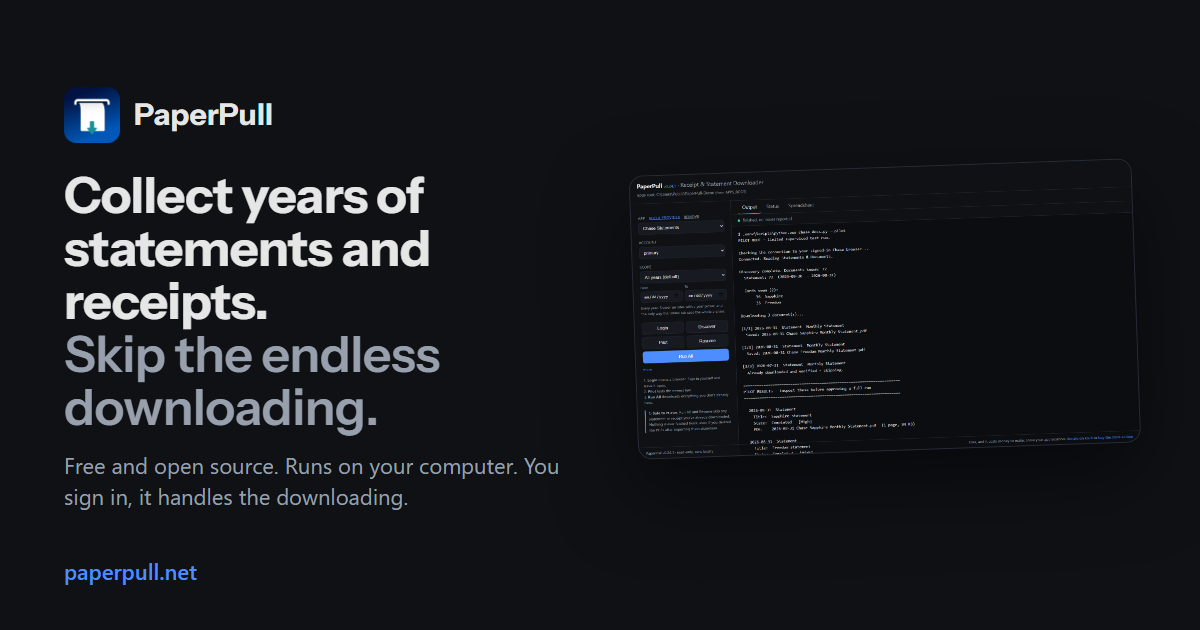

Collect years of statements and receipts. Skip the endless downloading.
Collect years of statements and receipts. Skip the endless downloading.
PaperPull retrieves the statement and receipt history your banks, cards, stores and utilities already hold, organizes it as PDFs on your computer, and turns your purchases and transactions into spreadsheets.
You sign in. PaperPull handles the downloading.
Download for Windowsfree, from GitHub Download for Macfree, Apple Silicon Watch the demo75 seconds, no sound needed
Latest release on GitHub. Windows 10 or 11 and macOS on Apple Silicon. Also a portable zip, and from source on Linux. Checksums and notes.
Free and open source. If it saves you time, you can support the work. GitHub Sponsors Ko-fi Microsoft Store edition, $9.99
Free and open source Runs on your computer No PaperPull account You control every sign-in Your documents stay yours
 The control panel, on a sample archive. Every name and amount is made up.
The problem
Your records are scattered across a dozen websites. Getting them out is a chore.
Every provider keeps a few years of history behind its own login, its own menus and its own download button, one document at a time.
Before
BankCardStore UtilityBrokerPhone sign in · 2FAStatements ▸ 2024 ▸ Aug↓ download · rename · file sign in · 2FAAccount ▸ Documents↓ download · rename · file sign in · captchaOrders ▸ page 1 of 23no PDF at all · print sign inBilling ▸ History↓ one bill per click sign in · 2FAStatements ▸ pick a year↓ download · rename · file sign inBills ▸ pick a month↓ download · rename · file Downloads/ statement\_20260831.pdf · 1234567.pdf · eStatement(3).pdf · Invoice.pdf · bill.pdf …
Six logins, six layouts, one download per month per account, and a Downloads folder full of files named by nobody. Then again next month.
→
After
PaperPull/ Chase Statements/Statements/ 2026-08-31 Chase Sapphire Monthly Statement.pdf 2026-07-31 Chase Sapphire Monthly Statement.pdf 2026-06-30 Chase Freedom Monthly Statement.pdf … 69 more, back to 2023 Amazon Receipts/Online/ 2026-09-16 Amazon Electronics Receipt.pdf 2026-09-08 Amazon Household Receipt.pdf … 138 more, back to the first order USAA Statements/Statements/ … 92 PDFs All Purchases.xlsx All Transactions.xlsx status: 11 archives current, 1 overdue, 1 gap found
One folder tree, every file named by date, provider, account and kind, a status view that knows what is due, and two spreadsheets built from all of it.
What it does
Three things, and each one is a chore you stop doing.
Recover years of records without downloading them one by one.
Point PaperPull at a provider once and it walks every account, every year and every page the site offers, saving each document as it goes. A bank with two cards and seven years of statements is 168 downloads and 168 renames by hand. Here it is one run, while you do something else.
- Every document is named `2026-08-31 Chase Sapphire Monthly Statement.pdf`, by date, provider, account and kind, so a filing system or a search finds it.
- Stores that offer no PDF at all (Amazon, Target, Walmart) get their order pages printed to one, with every line item recorded on the way past.
- How far back it reaches is up to the provider. Most banks keep several years online, some utilities keep one. The directory says what each one offers.
- The Status tab shows every archive, when its newest document is from, how often that provider issues one, and which archive is due for a run.
- Where a provider issues documents on a schedule, it also spots a month missing from the middle of a run, the kind of gap nobody notices until they need that statement.
- Runs are yours to start. PaperPull does not run in the background and does not need to be left open. Open it when you want the archive brought up to date.
- Purchases: provider, account, date, order number, item, quantity, unit price, line total, order total, category, and the receipt file.
- Transactions: provider, account, date, description, amount, running balance, and which statement it came from, with a Statements sheet saying whether each reconciled.
- Which spreadsheet a provider feeds is marked in the directory. Scanned or image-only statements have no text to read.
- The complete application, every provider, both spreadsheets
- Windows installer, portable zip, macOS on Apple Silicon
- Update by running the new installer over the old one
- Checksums and build logs on every release
- The same complete application, from the same build
- Signed by the Store, installs with no warning
- Updates through the Store
- Supports the project
#### One statement at a time
1. statement.pdf 2. sign in again next month …
#### One run with PaperPull
1. 2026-08-31 Chase Sapphire Monthly Statement.pdf 2. 2026-08-31 Chase Freedom Monthly Statement.pdf 3. 2026-07-31 Chase Sapphire Monthly Statement.pdf 4. 2026-07-31 Chase Freedom Monthly Statement.pdf 5. 2026-06-30 Chase Sapphire Monthly Statement.pdf 6. 2026-06-30 Chase Freedom Monthly Statement.pdf 7. 2026-05-31 Chase Sapphire Monthly Statement.pdf 8. 2026-05-31 Chase Freedom Monthly Statement.pdf 9. … 64 more, back to 2023-09-30
Sample archive. A real run takes minutes, not seconds, since every page is fetched with the polite pauses a person would leave.
Keep your archive current without starting over.
PaperPull remembers every document it has saved, by what it is rather than where the file went. Run it again next month and it fetches only what is new, even if you moved last month's PDFs into your filing system or deleted them after importing.
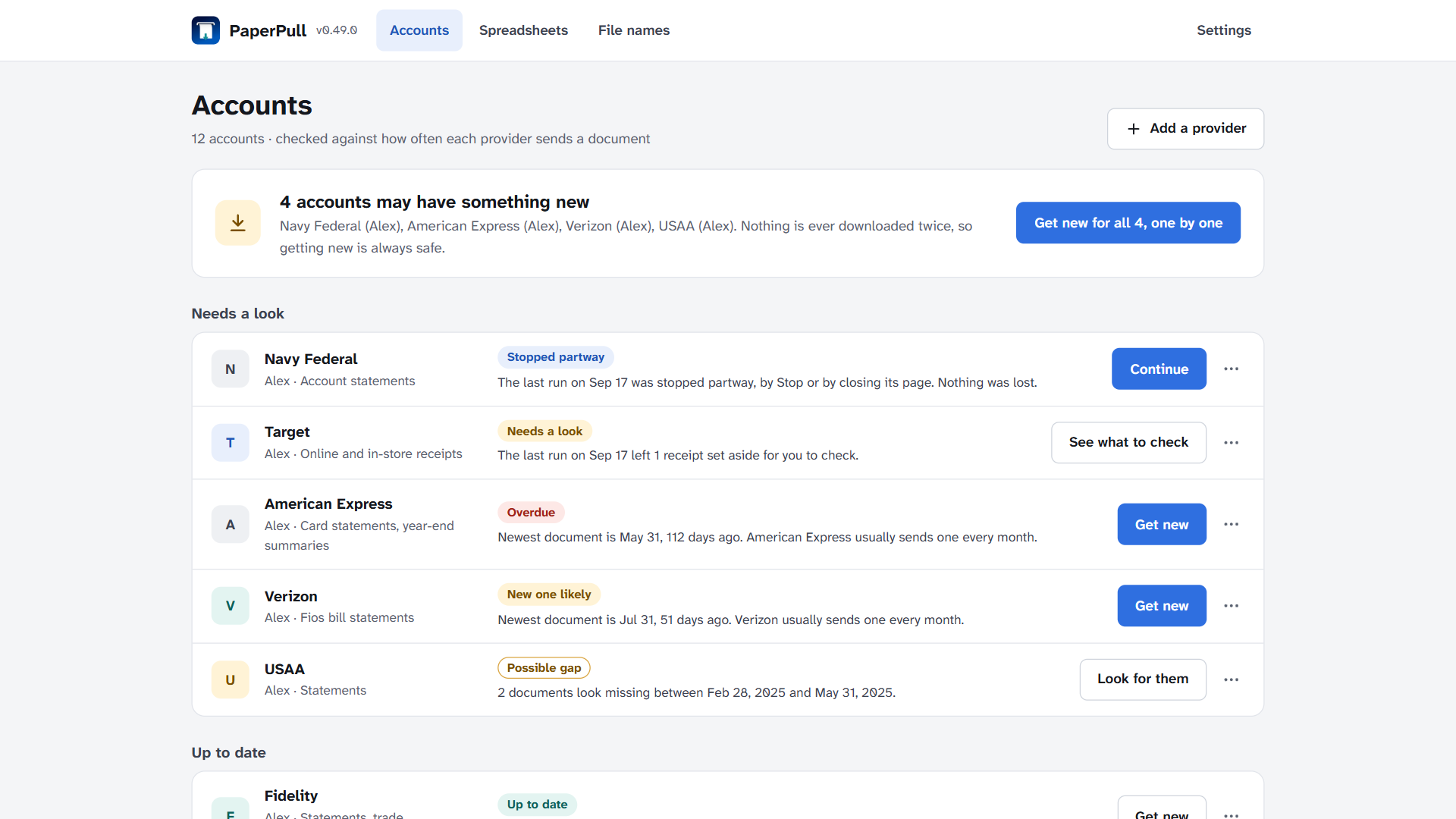
The Status tab on a sample archive, one provider overdue, one gap found.
Turn your documents into information you can actually use.
Every purchase in one table. The receipt providers (Amazon, Target, Walmart, Gap) record each line item as they save the receipt, and one button turns all of it into a workbook, one row per item across every store and every account, with an Orders sheet and a Summary of spend by store and year. Excel can sum it, filter it and answer what you spent on groceries last year.
Every transaction, out of the statements. For statement providers whose PDFs carry text, the transactions are read out of the PDFs into a second workbook, one row each, and every statement is checked against its own printed beginning and ending balances. One that does not add up is still exported, with the difference shown, so you know which rows to doubt.
| Five rows of a Purchases sheet | Provider | Date | Item | Qty | Line total | Category | | ------------------------------ | ---------- | ------------------------------ | ---- | ----- | ------------ | -------- | | Amazon | 2026-09-16 | Anker 65W USB-C Charger | 1 | 39.99 | Electronics | | | Target | 2026-09-14 | Good & Gather Whole Milk 1 gal | 2 | 7.98 | Groceries | | | Walmart | 2026-09-11 | Dog Food 30 lb | 1 | 38.98 | Pet Supplies | | | Amazon | 2026-09-08 | Air Filter 16x25x1, 4 pack | 1 | 31.96 | Household | | | Target | 2026-09-02 | Kids Sneakers | 1 | 24.99 | Kids | |
Five rows of a Purchases sheet built from the sample archive. The real one runs to every order you ever placed.
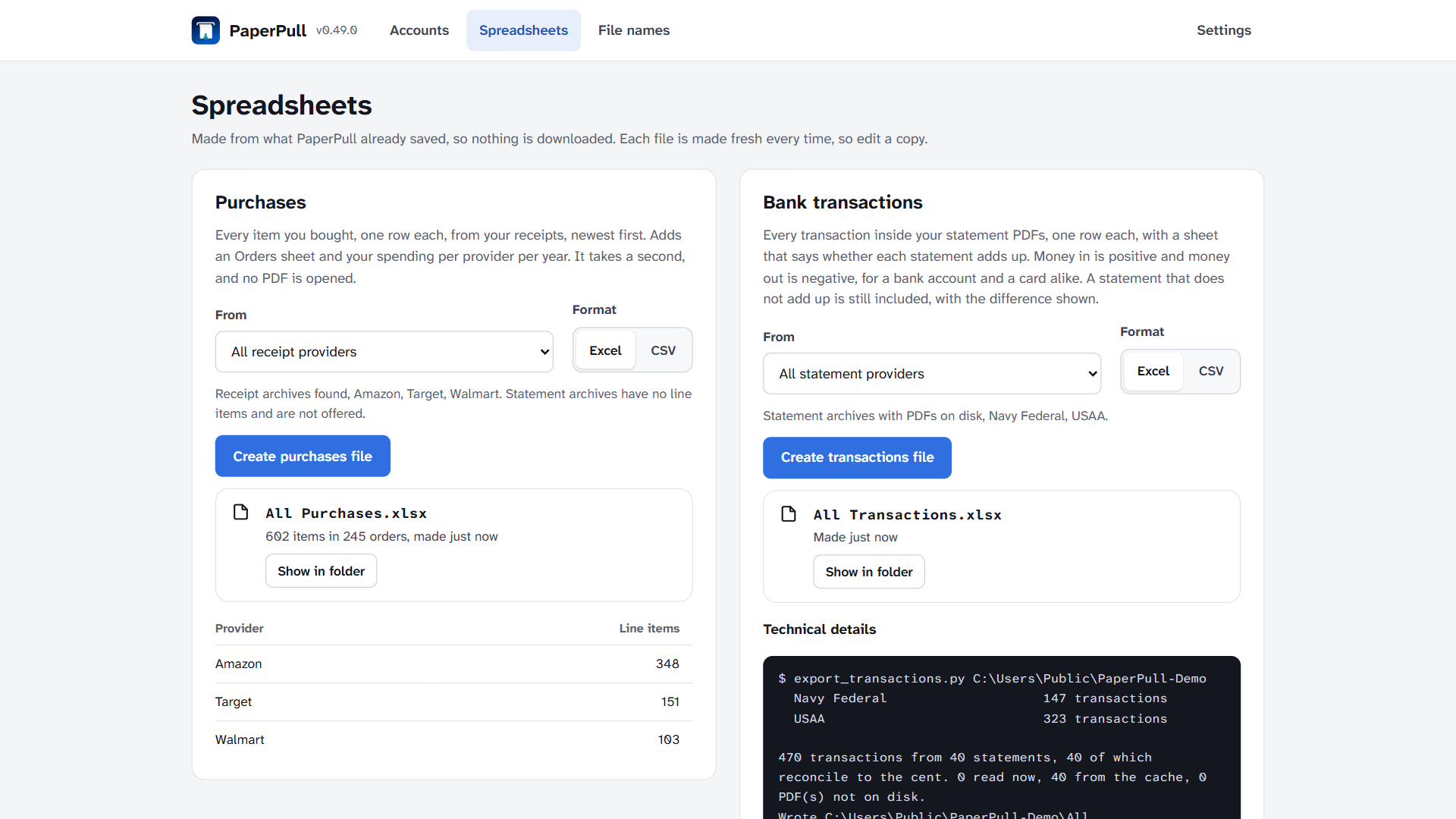
The Spreadsheet tab after both builds, on the sample archive.
Demo
See a run, start to finish.
Seventy-five seconds, captions on, no sound. Everything on screen is the real program on a folder of made-up installs.
Your browser cannot play this video. Download it instead.
Watch on YouTube Follow along with the getting-started guide Download and try it on one provider
Providers
Does it do my bank? My card? My Amazon?
47 providers work today, 9 more are built and waiting for someone with an account to test them. Each is a small, separate app, so when a site changes only that one needs repairing. Every card says what the app collects and which of the two spreadsheets those documents feed, Purchases (every line item from receipts) or Transactions (every row read out of statement PDFs).
Search providers
Banks and credit unions Credit cards Investing and retirement Mortgages and loans Pay and benefits Insurance Utilities and phone Stores Other
supported run against a real account known issue works with a caveat needs a tester built without an account, waiting for one
Banks and credit unions
Ally Banksupported
Account statements, tax forms
Statement PDFs feed the Transactions spreadsheet.
Capital Onesupported
Bank and card statements, tax forms, letters
Statement PDFs feed the Transactions spreadsheet.
Golden 1 Credit Unionknown issue
Statements, tax forms
Statement PDFs feed the Transactions spreadsheet.
Built without an account and run against @watling777's (#35). A Pilot saved five checking statements, with a repair being tested for the older ones and the credit card
Navy Federal CUsupported
Account statements
Statement PDFs feed the Transactions spreadsheet.
USAAsupported
Statements
Statement PDFs feed the Transactions spreadsheet.
Wells Fargoneeds a tester
Account statements, tax documents
Statement PDFs feed the Transactions spreadsheet.
Built without an account, waiting for someone with one to test it. Follow #27.
Credit cards
American Expresssupported
Statements, year-end summary
Statement PDFs feed the Transactions spreadsheet.
Apple Card and Apple Savingssupported
Apple Card statements, Savings statements, tax forms
Statement PDFs feed the Transactions spreadsheet.
Confirmed by @watling777, whose Pilot and full run saved every statement and the 1099-INT forms (#52)
Chase (credit cards)supported
Card statements
Statement PDFs feed the Transactions spreadsheet.
Citi (credit cards)supported
Monthly card statements, the roughly two years the site lists online
Statement PDFs feed the Transactions spreadsheet.
Discover (credit cards)known issue
Card statements
Statement PDFs feed the Transactions spreadsheet.
Discover is moving these accounts onto Capital One's site. Once yours has moved, use the Capital One app instead. Follow #13.
MILITARY STAR card (MyECP, Exchange Credit Program)supported
Monthly card statements, the three and a half years MyECP keeps online
Statement PDFs feed the Transactions spreadsheet.
Built on the maintainer's own account, 25 statements
Target RedCard / Circle Card (TD Bank)supported
Billing statements
Statement PDFs feed the Transactions spreadsheet.
U.S. Banksupported
Credit-card statements
Statement PDFs feed the Transactions spreadsheet.
Investing and retirement
Charles Schwabsupported
Statements, tax forms, letters, trade confirmations
Statement PDFs feed the Transactions spreadsheet.
E\*TRADEsupported
Statements, trade confirmations, tax forms
Statement PDFs feed the Transactions spreadsheet.
Confirmed by @watling777, whose Pilot and full run saved every statement (#36). No tax form seen yet, his account has none
Fidelity Investmentssupported
Statements, trade confirmations, tax forms
Statement PDFs feed the Transactions spreadsheet.
Fidelity NetBenefitssupported
Quarterly or monthly 401(k) statements, made to order and rendered
Statement PDFs feed the Transactions spreadsheet.
Robinhoodsupported
Account statements, tax docs
Statement PDFs feed the Transactions spreadsheet.
Thrift Savings Plan (tsp.gov)supported
Participant statements, 1099-R
Statement PDFs feed the Transactions spreadsheet.
Wealthfrontsupported
Statements, tax docs
Statement PDFs feed the Transactions spreadsheet.
Mortgages and loans
Affirmsupported
Loan agreements, one per loan
Statement PDFs feed the Transactions spreadsheet.
Affirm Money and Card statements not covered
M&T Banksupported
Mortgage statements, escrow, 1098
Statement PDFs feed the Transactions spreadsheet.
Newrezknown issue
Mortgage statements, escrow analysis, 1098
Statement PDFs feed the Transactions spreadsheet.
Built without an account and run against @watling777's (#38). This year's statements and the 1098s download, with a repair being tested for earlier years
SBA (MySBA Loan Portal)needs a tester
Loan statements, 1098
Statement PDFs feed the Transactions spreadsheet.
Built without an account, waiting for someone with one to test it. Follow #28.
Pay and benefits
ADP Workforce Nowsupported
Pay statements and W-2s, everything the statement services list
Statement PDFs feed the Transactions spreadsheet.
DFAS myPaysupported
eRAS, CRSC, 1099-R, 1095
Statement PDFs feed the Transactions spreadsheet.
Paylocitysupported
Pay statements
Statement PDFs feed the Transactions spreadsheet.
UKG Pro / UltiProsupported
Pay statements
Statement PDFs feed the Transactions spreadsheet.
Insurance
AAFMAA (Armed Forces Mutual)supported
Annual statements, policy & insurance documents
Statement PDFs feed the Transactions spreadsheet.
American Family Insuranceneeds a tester
Billing statements, policy documents, declarations, ID cards
Statement PDFs feed the Transactions spreadsheet.
Built without an account, waiting for someone with one to test it. Follow #45.
Anthem BCBS (Elevance, 14 Blue states)supported
EOBs, member/plan documents (all coverage years), digital ID cards, secure-message letters
Statement PDFs feed the Transactions spreadsheet.
State Farmneeds a tester
Bills, renewal notices, ID cards, receipts, policy documents
Statement PDFs feed the Transactions spreadsheet.
Built without an account, waiting for someone with one to test it. Follow #37.
Utilities and phone
AT&T (Mobility, Fiber, Internet)supported
Monthly bills
Statement PDFs feed the Transactions spreadsheet.
Confirmed by @watling777 on two accounts, wireless and internet, with a full run on each (#26)
Dominion Energy (VA)supported
Billing statements
Statement PDFs feed the Transactions spreadsheet.
Fairfax Water (VA)supported
Water bills, the last year's, from the FW Customer portal
Statement PDFs feed the Transactions spreadsheet.
PG&E (Pacific Gas and Electric)supported
Billing statements
Statement PDFs feed the Transactions spreadsheet.
Repaired in 0.37.1 and confirmed on a real account by @watling777 (#33)
SMUD (Sacramento Municipal Utility District)supported
Monthly bills
Statement PDFs feed the Transactions spreadsheet.
Confirmed by @watling777 on issue #34, whose Pilot took the newest five and whose full run took the rest of the history
T-Mobilesupported
Bill statements
Statement PDFs feed the Transactions spreadsheet.
Verizon (Fios)supported
Bill statements
Statement PDFs feed the Transactions spreadsheet.
Verizon Mobile (wireless)needs a tester
Monthly bills
Statement PDFs feed the Transactions spreadsheet.
Built without an account, waiting for someone with one to test it. Follow #31.
Stores
Amazonsupported
Order invoices (full history)
Receipts are printed to PDF. Line items from every receipt feed the Purchases spreadsheet.
Apple (App Store and Apple Store)supported
Receipts for everything paid for, App Store subscriptions such as Apple One and iCloud+, in-app purchases anywhere in Family Sharing and paid apps, each saved from Apple's own emailed receipt with free downloads skipped, and Apple Store orders, each order's invoice saved and a canceled one recorded without a receipt
Receipts are printed to PDF. Line items from every receipt feed the Purchases spreadsheet.
Built and run on the maintainer's own account
Best Buysupported
Receipts for online orders, orders placed in a store and store purchases, and returns, each purchase's details page saved as the receipt, back to 2015
Receipts are printed to PDF. Line items from every receipt feed the Purchases spreadsheet.
Built on the maintainer's own account, 35 purchases found and all 35 saved. Best Buy's bot protection stops answering if asked too quickly, so it is paced, and a blocked run says to wait an hour
Costco Wholesalesupported
Receipts, in-warehouse, gas, pharmacy and costco.com orders
Receipts are printed to PDF. Line items from every receipt feed the Purchases spreadsheet.
Written from a member's recording and run against their account. One membership so far, a second Pilot is welcome, see issue #47
eBaysupported
Order receipts, ten years of purchase history
Receipts are printed to PDF. Line items from every receipt feed the Purchases spreadsheet.
Confirmed by @jpfieber on issue #44, every order back to 2017
Gap Inc. (Gap, Old Navy, Banana Republic, Athleta)supported
Order receipts
Receipts are printed to PDF. Line items from every receipt feed the Purchases spreadsheet.
Kroger (Pick 'n Save, Metro Market, Fred Meyer, Ralphs and the rest)needs a tester
Receipts, in-store, fuel, pickup and delivery
Receipts are printed to PDF. Line items from every receipt feed the Purchases spreadsheet.
UNTESTED, built against an account with no purchases. Follow #41.
Lowe's Home Improvementsupported
Receipts for store purchases and online orders, and returns, from the purchase history back to 2023, each purchase's details page saved as the receipt
Receipts are printed to PDF. Line items from every receipt feed the Purchases spreadsheet.
Built on the maintainer's own account, 41 purchases found and 6 saved in the first pilot
Meijerneeds a tester
Order receipts, and in-store digital receipts where mPerks lists them
Receipts are printed to PDF. Line items from every receipt feed the Purchases spreadsheet.
Built without an account, waiting for someone with one to test it. Follow #42.
Targetsupported
Receipts (online + in-store)
Receipts are printed to PDF. Line items from every receipt feed the Purchases spreadsheet.
The Home Depotsupported
Receipts for online orders, and store purchases where the history lists them, Home Depot's own print receipt with model and store SKU numbers
Receipts are printed to PDF. Line items from every receipt feed the Purchases spreadsheet.
Home Depot keeps two years online, so run it every few months. Built on the maintainer's own account, 8 orders found and 6 receipts saved
Walmartsupported
Receipts
Receipts are printed to PDF. Line items from every receipt feed the Purchases spreadsheet.
Other
E-ZPass Virginiasupported
Monthly and quarterly statements, the roughly one year of each the portal keeps online, so run it at least once a year
Statement PDFs feed the Transactions spreadsheet.
Built on the maintainer's own account
FedEx (Billing Online)needs a tester
Shipping invoices
Statement PDFs feed the Transactions spreadsheet.
UNTESTED, built from a login not connected to Billing Online, no invoice seen. Use it? Run Diagnose and attach the file to issue #54. Follow #54.
GitHubsupported
Payment receipts for Pro, Copilot, Actions, Sponsors and anything else GitHub charged
Receipts are printed to PDF. Line items from every receipt feed the Purchases spreadsheet.
Confirmed by @jpfieber on issue #43, whose Pilot saved five of the twenty-three receipts his account holds
PayPalsupported
Monthly statements, the three years the site keeps online
Statement PDFs feed the Transactions spreadsheet.
Tax forms not yet covered. Built on the maintainer's own account, 25 statements
Stripe (merchant Dashboard)needs a tester
Fee invoices and tax forms such as the 1099-K
Statement PDFs feed the Transactions spreadsheet.
UNTESTED, built on an account with no documents yet. Have some? Run Diagnose and attach the file to issue #53. Follow #53.
UPS (Billing Center)supported
Shipping invoices from billing.ups.com, every invoice My Invoices lists
Statement PDFs feed the Transactions spreadsheet.
Built on the maintainer's own account
Nothing here by that name. Request it, and if you hold an account with it you are the ideal person to build it.
Missing yours? Request a provider, or report one that broke. Provider names belong to their owners, and PaperPull is not affiliated with any of them. The full list with notes is on its own page.
Privacy and security
Your accounts stay yours. Your documents stay under your control.
A tool that reads your bank has to earn that. Here is how it is built, and every claim below can be checked in the source.
It never has your password
Login opens a real browser window on the provider's own site, in a profile PaperPull keeps for that provider. You type your password and answer the two-factor prompt there. PaperPull attaches to that window afterward and reads what you can see. There is no field in PaperPull for a password, so there is nothing for it to store or send.
Read-only by construction
Every provider app carries a blocklist of the words a dangerous control would use, pay, transfer, buy, sell, change, and refuses to activate anything that matches. Most providers are read through the site's own data feed with nothing clicked at all. SECURITY.md says which app does what, and a repository-wide test checks every guard.
Everything stays on your computer
No PaperPull account, no PaperPull server, no telemetry in the program. The control panel is a local page on 127.0.0.1 that only your own browser can reach. The whole privacy policy is one sentence, with the details beneath it.
Open source, built in the open
AGPL-3.0. Every release is built by GitHub Actions from a tagged commit on a clean runner, with checksums published by the same run, so the file you download is the code you can read.
What to know before you trust it with a bank. The signed-in session lives in a browser profile folder beside that provider's downloads. Treat that folder like a signed-in browser, because it is one. Nothing is risk-free, and a tool that can read your accounts deserves the same care as the browser you already use for them. Windows installs are code-signed, and while the certificate is new SmartScreen may still ask once. The code-signing policy says how the signing works and how to check the file. Never turn off antivirus or SmartScreen to install anything, PaperPull included.
Getting started
Three steps to your first archive.
STEP 1
Install, pick a folder, tick a provider
Run the installer. The first screen asks where your downloads should live and which providers you have accounts with. Tick one to start.
STEP 2
Login, then Pilot
Login opens the provider's site in its own window. Sign in there, leave it open. Pilot downloads the newest few documents so you can check they look right.
STEP 3
Run All
Collects everything the provider offers. Come back next month, press it again, and it fetches only what is new.
The getting-started guide, with screenshots
Paperless-ngx
Paperless-ngx organizes your documents. PaperPull collects the ones still inside your accounts.
PaperPull writes ordinary PDFs into ordinary folders. Point Paperless-ngx at those folders, or copy the files into its consume directory, and it indexes them the way it indexes everything else. There is no special integration to configure, and none is needed.
Because PaperPull remembers what it has already saved by document rather than by file, Paperless can move or delete the PDFs after it imports them and the next run still fetches only what is new.
How to collect statements for Paperless-ngx
Banks · Cards · Stores · Utilities the sites you already sign in to PaperPull signs in beside you, reads, saves Organized PDFs in folders 2026-08-31 Chase Sapphire Monthly Statement.pdf Paperless-ngx consumes, OCRs, tags, searches
Where it came from
Built for one filing cabinet, then for everyone who asked.
I used a service called FileThis to pull my statements into my own archive. When it went away there was nothing to replace it, no tool that would sign in as me, download years of statements and receipts in one go, and hand them over as plain PDFs I could keep. So I wrote one, for my own accounts, one provider at a time.
As it grew, other people turned out to want the same thing. The pile of scripts got a name, a control panel and a public repository, and it has grown from there, mostly through people who hold accounts I do not. Every provider on this page exists because someone with that account tested it.
It stays local-first and read-only because that is the only design I would trust with my own bank, and open source because that is the only way you can check that it is.
Bryan Rhee
Report a problemSomething broke or looks wrong. A screenshot and the run's output are enough. No programming needed. Test a providerNine apps are built and waiting for someone with an account. Run Diagnose, attach the file, and a working provider comes back to you. No programming needed either. Build a providerClone the closest app, rewrite one file, keep it read-only. Most take an evening. The guide walks through it.
When you attach a file to an issue, never include passwords, a browser profile folder, tokens, or an unredacted statement. The Diagnose file masks numbers for exactly this reason.
Get it
Free software. Your choice to support it.
PaperPull is free and open source. If it saves you time, you can support continued development, and nothing is held back if you do not.
Free edition
$0
Download for Windowsfrom GitHub Download for MacApple Silicon
Microsoft Store edition
$9.99 one time

Both editions are the same program. The Store edition adds convenient installation and updates, and the price supports the work. It does not unlock anything.
You can also support development directly, on GitHub Sponsors or Ko-fi. What it costs to make, a server and domains, developer accounts for the signed Mac build and the Store, the tools it is built with, and evenings on every provider, is on the Support page. A bug report or a test of a waiting provider is worth as much.
Stop downloading statements one at a time.
Download for Windows Download for Mac
Source on GitHub · Getting started · Provider directory · Paperless-ngx guide