Anonymise first. Share confidently.
Local processing · Private by design
Anonymise first. Share confidently.
Remove personal and confidential details from text, documents and images before sharing with third-party tools. Everything is processed on your device, ready for you to review and use.
No uploads · Works offline · Restore original values locally
chatgpt.com
Your content is never sent to our servers
01 · The desktop app
Share the useful parts. Keep the private details.
Bring in text, documents or images. Replace names, emails, IDs and confidential terms with consistent placeholders, review the result, then copy it into the tools you use. Scan folders to find sensitive data before sharing.
- Text, PDFs, Office documents and images
- Review replacements before you copy
- Restore original values within your session
- Live alerts on supported websites
- Anonymise selected text on any page
- Powered by your local desktop app
- Central policies and findings triage
- Endpoint coverage and connected sources
- Hosted on infrastructure you control
- DataAnonymiser88.6%
- OpenAI Privacy Filter1.5B · Apr 202671.1%
- Microsoft Presidio2.2.364 · spaCy 3.854.0%
- DataAnonymiser15
- OpenAI Privacy Filter1.5B · Apr 202679
- Microsoft Presidio2.2.364 · spaCy 3.8531
- Your documents
- The app doing the work
- The list for putting details back
- What it found
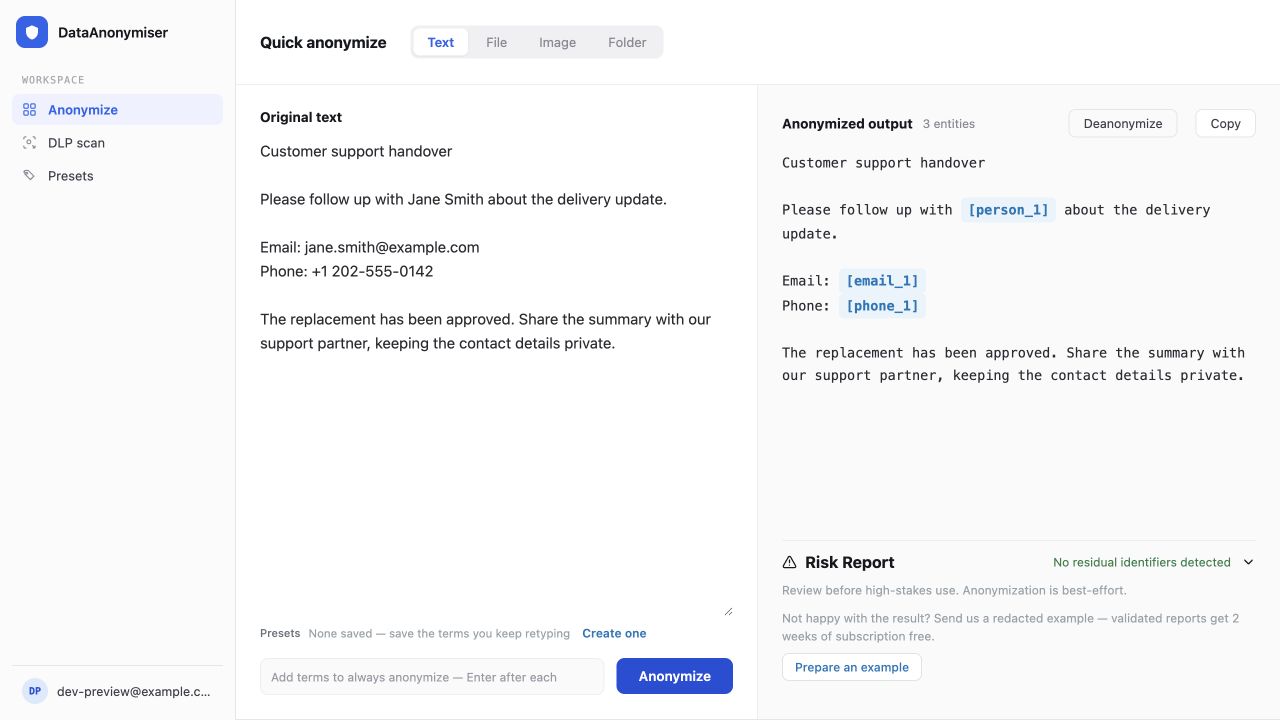
Actual product interface · Synthetic demo dataView full screenshot: The desktop app ↗
Actual product interface · Synthetic demo data
Close ×
02 · The browser extension
A privacy check, before you hit send.
Spot personal details as you type in supported tools, including Gmail and Outlook. Anonymise selected text on any page through the app on your computer. See the extension in action in ChatGPT.
chatgpt.com
Your content is never sent to our servers
03 · The enterprise console
A clear view of sensitive data across your organisation.
Set policy once, roll it out to the whole company, and see findings across every device, from a console your IT team runs on its own infrastructure.
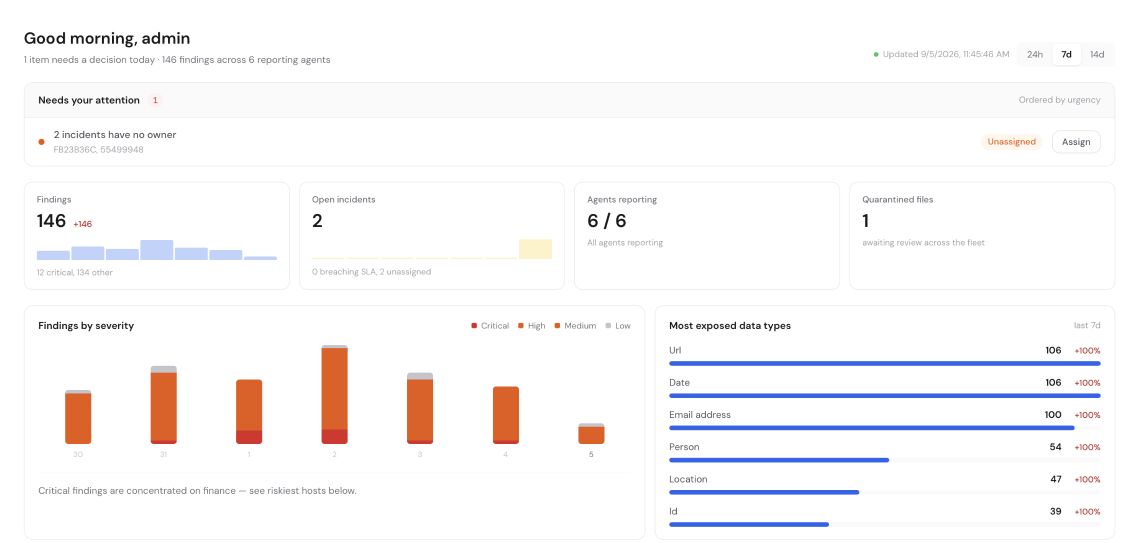
The enterprise consoleView full screenshot: The enterprise console ↗
The enterprise console
Close ×
Benchmark performance
Measured against the open alternatives
Every figure below comes from our established benchmark suite. The same documents, scored the same way, for every tool.
Personal data detected
higher is better↑
False alarms
lower is better↓
What crosses the line
Your content stays where it already is.
On the desktop, detection, replacement and restoration happen on your own computer. Your documents, images and original values are never sent to our servers.
Your device
Only this goes out
Account and licence checks, signed updates and model downloads. Optional diagnostics exclude your content.
Individual: processing stays on your device. Enterprise: processing stays within your organisation’s infrastructure. Neither sends your content to us.
Feedback rewards
14days added to your plan
Find a miss. Get two weeks on us.
Help us improve detection. Send a safely redacted example of something the app missed. Every new case we confirm earns two weeks of subscription time.
01
Take your own details out first
Swap every real name and number for a made-up one. Never send us real personal data.
02
Send us the wording
Paste the text that came out badly, keeping the wording that caused it.
03
Two weeks, once we confirm it
If it is a genuine miss we have not seen before, we add 14 days to your plan.
Open to anyone on a paid plan. One reward per confirmed example. Sending the same text again with different fake names does not count.
Frequently asked questions
The questions people actually ask.
Do my documents leave my computer?
In the Individual edition, processing stays on your device. Enterprise can process content on infrastructure operated by your organisation. Neither edition sends your content to us.
Which third-party tools can I use?
You can copy the reviewed text into any tool that accepts it: email, support platforms, collaboration software or AI assistants. Live browser alerts work on supported websites; selected-text anonymization is available on any page.
Can I restore the original values?
Yes, within the active session. The replacement map stays in local memory and is discarded when the session ends.
Will it catch every sensitive detail?
Detection is best-effort. Review the output and risk report before sharing, especially when context could still identify a person. Anonymization is not guaranteed.
Privacy that stays on your device
Work with any tool. Share less sensitive data.
Get started on your own, or talk to us about setting it up for your whole team.