Every bug/quirk of the Windows resource compiler (rc.exe), probably
---
Every bug/quirk of the Windows resource compiler (rc.exe), probably
2024-10-11 - Programming\- Fuzzing\- Windows
- `7 NOT NOT 4 NOT 2 NOT NOT 1` is a valid expression
- `०००` is a number that gets parsed into the decimal value 65130
- A < 1 MiB icon file can get compiled into 127 TiB of data
- A completely clean-room implementation of a Windows resource compiler (not even any decompilation of `rc.exe` involved in the process)
- A high degree of compatibility with the `rc.exe` implementation, including byte-for-byte identical outputs for a sizable corpus of Microsoft-provided sample `.rc` files (\~500 files)
- A large list of strange/interesting/baffling behaviors of the Windows resource compiler
- If you work at Microsoft, consider this a large list of bug reports (of particular note, see everything labeled 'miscompilation') * If you're Raymond Chen, then consider this an extension of/homage to all the (fantastic, very helpful) blog posts about Windows resources in The Old New Thing
- If you are a contributor to `llvm-rc`, `windres`, or `wrc`, consider this a long list of behaviors to test for (if strict compatibility is a goal)
- If you are someone that managed to endure the bad audio of this talk I gave about my resource compiler and wanted more, consider this an extension of that talk
- If you are none of the above, consider this an entertaining list of bizarre bugs/edge cases * If you'd like to skip around and check out the strangest bugs/quirks, `Ctrl+F` for 'utterly baffling'
The above is just a small sampling of a few of the strange behaviors of the Windows RC compiler (`rc.exe`). All of the above bugs/quirks, and many, many more, will be detailed and explained (to the best of my ability) in this post.
Context🔗
Inspired by an accepted proposal for Zig to include support for compiling Windows resource script (`.rc`) files, I set out on what I thought at the time would be a somewhat straightforward side-project of writing a Windows resource compiler in Zig. Microsoft's RC compiler (`rc.exe`) is closed source, but alternative implementations are nothing new—there are multiple existing projects that tackle the same goal of an open source and cross-platform Windows resource compiler (in particular, `windres` and `llvm-rc`). I figured that I could use them as a reference, and that the syntax of `.rc` files didn't look too complicated.
I was wrong on both counts.
While the `.rc` syntax in theory is not complicated, there are edge cases hiding around every corner, and each of the existing alternative Windows resource compilers handle each edge case very differently from the canonical Microsoft implementation.
With a goal of byte-for-byte-identical-outputs (and possible bug-for-bug compatibility) for my implementation, I had to effectively start from scratch, as even the Windows documentation couldn't be fully trusted to be accurate. Ultimately, I went with fuzz testing (with `rc.exe` as the source of truth/oracle) as my method of choice for deciphering the behavior of the Windows resource compiler (this approach is similar to something I did with Lua a while back).
This process led to a few things:
My resource compiler implementation, resinator, has now reached relative maturity and has been merged into the Zig compiler (but is also maintained as a standalone project), so I thought it might be interesting to write about all the weird stuff I found along the way.
Who is this article for?🔗
A brief intro to resource compilers🔗
`.rc` files (resource definition-script files) are scripts that contain both C/C++ preprocessor commands and resource definitions. We'll ignore the preprocessor for now and focus on resource definitions. One possible resource definition might look like this:
id1 typeFOO { data"bar" }The `1` is the ID of the resource, which can be a number (ordinal) or literal (name). The `FOO` is the type of the resource, and in this case it's a user-defined type with the name `FOO`. The `{ "bar" }` is a block that contains the data of the resource, which in this case is the string literal `"bar"`. Not all resource definitions look exactly like this, but the `<id> <type>` part is fairly common.
Resource compilers take `.rc` files and compile them into binary `.res` files:
`1 RCDATA { "abc" }` `00 00 00 00 20 00 00 00 .... ... FF FF 00 00 FF FF 00 00 ........ 00 00 00 00 00 00 00 00 ........ 00 00 00 00 00 00 00 00 ........ 03 00 00 00 20 00 00 00 .... ... FF FF 0A 00The predefined RCDATA resource type has ID 0x0A FF FF 01 00 ........ 00 00 00 00 30 00 09 04 ....0... 00 00 00 00 00 00 00 00 ........ 61 62 63 00 abc.` A simple `.rc` file and a hexdump of the relevant part of the resulting `.res` file
The `.res` file can then be handed off to the linker in order to include the resources in the resource table of a PE/COFF binary (`.exe`/`.dll`). The resources in the PE/COFF binary can be used for various things, like:
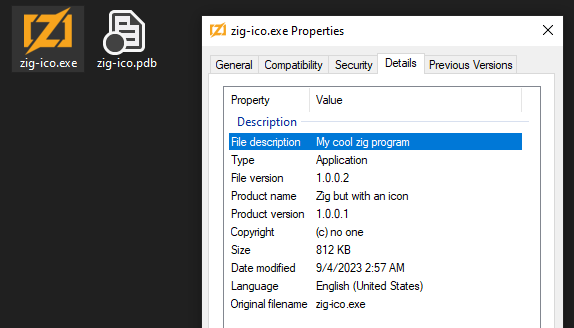 Both the executable's icon and the version information in the Properties window come from a compiled `.rc` file
So, in general, a resource is a blob of data that can be referenced by an ID, plus a type that determines how that data should be interpreted. The resource(s) are embedded into compiled binaries (`.exe`/`.dll`) and can then be loaded at runtime, and/or can be loaded by the operating system for certain Windows-specific integrations.
An additional bit of context worth knowing is that `.rc` files were/are very often generated by Visual Studio rather than manually written-by-hand, which could explain why many of the bugs/quirks detailed here have gone undetected/unfixed for so long (i.e. the Visual Studio generator just so happened not to trigger these edge cases).
With that out of the way, we're ready to get into it.
The list of bugs/quirks🔗
tokenizer quirk
Special tokenization rules for names/IDs🔗
Here's a resource definition with a user-defined type of `FOO` ("user-defined" means that it's not one of the predefined resource types):
1 FOO { "bar" }For user-defined types, the (uppercased) resource type name is written as UTF-16 into the resulting `.res` file, so in this case `FOO` is written as the type of the resource, and the bytes of the string `bar` are written as the resource's data.
So, following from this, let's try wrapping the resource type name in double quotes:
1 "FOO" { "bar" }Intuitively, you might expect that this doesn't change anything (i.e. it'll still get parsed into `FOO`), but in fact the Windows RC compiler will now include the quotes in the user-defined type name. That is, `"FOO"` will be written as the resource type name in the `.res` file, not `FOO`.
This is because both resource IDs and resource types use special tokenization rules—they are basically only terminated by whitespace and nothing else (well, not exactly whitespace, it's actually any ASCII character from `0x05` to `0x20` \[inclusive\]). As an example:
L"\r\n"123abc error{OutOfMemory}!?u8 { "bar" }In this case, the ID would be `L"\R\N"123ABC` (uppercased) and the resource type would be `ERROR{OUTOFMEMORY}!?U8` (again, uppercased).
---
I've started with this particular quirk because it is actually demonstrative of the level of `rc.exe`\-compatibility of the existing cross-platform resource compiler projects:
`resinator` matches the resource ID/type tokenization behavior of `rc.exe` in all known cases.
parser bug/quirk
Non-ASCII digits in number literals🔗
The Windows RC compiler allows non-ASCII digit codepoints within number literals, but the resulting numeric value is arbitrary.
For ASCII digit characters, the standard procedure for calculating the numeric value of an integer literal is the following:
For example, for the integer literal `123`:
123'1' - '0' = 1
'2' - '0' = 2
'3' - '0' = 31 * 100 = 100
2 * 10 = 20
3 * 1 = 3
⎯⎯⎯⎯⎯⎯⎯⎯⎯⎯⎯⎯
123integer literal
numeric value of each digit
numeric value of the integer literal
So, how about the integer literal `1²3`? The Windows RC compiler accepts it, but the resulting numeric value ends up being 1403.
The problem is that the exact same procedure outlined above is erroneously followed for all allowed digits, so things go haywire for non-ASCII digits since the relationship between the non-ASCII digit's codepoint value and the ASCII value of `'0'` is arbitrary:
1²3'²' - '0' = 1301 * 100 = 100
130 * 10 = 1300
3 * 1 = 3
⎯⎯⎯⎯⎯⎯⎯⎯⎯⎯⎯⎯⎯
1403integer literal
numeric value of the ² "digit"
numeric value of the integer literal
In other words, the `²` is treated as a base-10 "digit" with the value 130 (and `³` would be a base-10 "digit" with the value 131, `၅` (U+1045) would be a base-10 "digit" with the value 4117, etc).
This particular bug/quirk is (presumably) due to the use of the iswdigit function, and the [same sort of bug/quirk exists with special COM\[1-9\] device names](https://googleprojectzero.blogspot.com/2016/02/the-definitive-guide-on-win32-to-nt.html).
#### `resinator`'s behavior🔗
test.rc:2:3: error: non-ASCII digit characters are not allowed in number literals
 1²3
 ^~
parser bug/quirk
`BEGIN` or `{` as filename🔗
Many resource types can get their data from a file, in which case their resource definition will look something like:
1 ICON "file.ico"Additionally, some resource types (like `ICON`) must get their data from a file. When attempting to define an `ICON` resource with a raw data block like so:
1 ICON BEGIN "foo" ENDand then trying to compile that `ICON`, `rc.exe` has a confusing error:
test.rc(1) : error RC2135 : file not found: BEGINtest.rc(2) : error RC2135 : file not found: END
That is, the Windows RC compiler will try to interpret `BEGIN` as a filename, which is extremely likely to fail and (if it succeeds) is almost certainly not what the user intended. It will then move on and continue trying to parse the file as if the first resource definition is `1 ICON BEGIN` and almost certainly hit more errors, since everything afterwards will be misinterpreted just as badly.
This is even worse when using `{` and `}` to open/close the block, as it triggers a separate bug:
1 ICON { "foo" }test.rc(1) : error RC2135 : file not found: ICONtest.rc(2) : error RC2135 : file not found: }
Somehow, the filename `{` causes `rc.exe` to think the filename token is actually the preceding token, so it's trying to interpret `ICON` as both the resource type and the file path of the resource. Who knows what's going on there.
#### `resinator`'s behavior🔗
In `resinator`, trying to use a raw data block with resource types that don't support raw data is an error, noting that if `{` or `BEGIN` is intended as a filename, it should use a quoted string literal.
test.rc:1:8: error: expected '<filename>', found 'BEGIN' (resource type 'icon' can't use raw data)
1 ICON BEGIN
       ^~~~~
test.rc:1:8: note: if 'BEGIN' is intended to be a filename, it must be specified as a quoted string literal
parser bug/quirk
Number expressions as filenames🔗
There are multiple valid ways to specify the filename of a resource:
// Quoted string, reads from the file: bar.txt
1 FOO "bar.txt"// Unquoted literal, reads from the file: bar.txt
2 FOO bar.txt
// Number literal, reads from the file: 123
3 FOO 123
But that's not all, as you can also specify the filename as an arbitrarily complex number expression, like so:
1 FOO (1 | 2)+(2-1 & 0xFF)The entire `(1 | 2)+(2-1 & 0xFF)` expression, spaces and all, is interpreted as the filename of the resource. Want to take a guess as to which file path it tries to read the data from?
Yes, that's right, `0xFF`!
For whatever reason, `rc.exe` will just take the last number literal in the expression and try to read from a file with that name, e.g. `(1+2)` will try to read from the path `2`, and `1+-1` will try to read from the path `-1` (the `-` sign is part of the number literal token, this will be detailed later in "Unary operators are an illusion").
#### `resinator`'s behavior🔗
In `resinator`, trying to use a number expression as a filename is an error, noting that a quoted string literal should be used instead. Singular number literals are allowed, though (e.g. `-1`).
test.rc:1:7: error: filename cannot be specified using a number expression, consider using a quoted string instead
1 FOO (1 | 2)+(2-1 & 0xFF)
      ^~~~~~~~~~~~~~~~~~~~
test.rc:1:7: note: the Win32 RC compiler would evaluate this number expression as the filename '0xFF'
parser bug/quirk
Incomplete resource at EOF🔗
The incomplete resource definition in the following example is an error:
// A complete resource definition
1 FOO { "bar" }// An incomplete resource definition
2 FOO
But it's not the error you might be expecting:
test.rc(6) : error RC2135 : file not found: FOOStrangely, `rc.exe` will treat `FOO` as both the type of the resource and as a filename (similar to what we saw earlier in "BEGIN or { as filename"). If you create a file with the name `FOO` it will then successfully compile, and the `.res` will have a resource with type `FOO` and its data will be that of the file `FOO`.
#### `resinator`'s behavior🔗
`resinator` does not match the `rc.exe` behavior and instead always errors on this type of incomplete resource definition at the end of a file:
test.rc:5:6: error: expected quoted string literal or unquoted literal; got '<eof>'
2 FOO
     ^
However...
parser bug/quirk
Dangling literal at EOF🔗
If we change the previous example to only have one dangling literal for its incomplete resource definition like so:
// A complete resource definition
1 FOO { "bar" }// An incomplete resource definition
FOO
Then `rc.exe` will always successfully compile it, and it won't try to read from the file `FOO`. That is, a single dangling literal at the end of a file is fully allowed, and it is just treated as if it doesn't exist (there's no corresponding resource in the resulting `.res` file).
It also turns out that there are three `.rc` files in Windows-classic-samples that (accidentally, presumably) rely on this behavior (1, 2, 3), so in order to fully pass win32-samples-rc-tests, it is necessary to allow a dangling literal at the end of a file.
#### `resinator`'s behavior🔗
`resinator` allows a single dangling literal at the end of a file, but emits a warning:
test.rc:5:1: warning: dangling literal at end-of-file; this is not a problem, but it is likely a mistake
FOO
^~~
parser bug/quirk, miscompilation
Yes, that `MENU` over there (vague gesturing)🔗
As established in the intro, resource definitions typically have an `id`, like so:
id1 FOO { "bar" }The `id` can be either a number ("ordinal") or a string ("name"), and the type of the `id` is inferred by its contents. This mostly works as you'd expect:
Here's a few examples:
123    ───►  Ordinal: 123
 ABC    ───►  Name: ABC
123ABC  ───►  Name: 123ABC
This is relevant, because when defining `DIALOG`/`DIALOGEX` resources, there is an optional `MENU` statement that can specify the `id` of a separately defined `MENU`/`MENUEX` resource to use. From the DIALOGEX docs:
| Statement | Description |
| ------------------- | ------------------------------------------------------------------------------------- |
| MENU menuname | Menu to be used. This value is either the name of the menu or its integer identifier. |
Here's an example of that in action, where the `DIALOGEX` is attempting to specify that the `MENUEX` with the `id` of `1ABC` should be used:
1ABC MENUEX  ◄╍╍╍╍╍╍╍╍╍╍╍╍╍╍┓
{                           ┇
  // ...                    ┇
}                           ┇
                            ┇
1 DIALOGEX 0, 0, 640, 480   ┇
  MENU 1ABC  ╍╍╍╍╍╍╍╍╍╍╍╍╍╍╍┛
{
  // ...
}
However, this is not what actually occurs, as for some reason, the `MENU` statement has different rules around inferring the type of the `id`. For the `MENU` statement, whenever the first character is a number, then the whole `id` is interpreted as a number no matter what.
The value of this "number" is determined using the same bogus methodology detailed in "Non-ASCII digits in number literals", so in the case of `1ABC`, the value works out to 2899:
1ABC'1' - '0' = 1
'A' - '0' = 17
'B' - '0' = 18
'C' - '0' = 191 * 1000 = 1000
17 * 100 = 1700
18 * 10 = 180
19 * 1 = 19
⎯⎯⎯⎯⎯⎯⎯⎯⎯⎯⎯⎯⎯⎯
2899"numeric" id
numeric value of each "digit"
numeric value of the id
Unlike "Non-ASCII digits in number literals", though, it's now also possible to include characters in a "number" literal that have a lower ASCII value than the `'0'` character, meaning that attempting to get the numeric value for such a 'digit' will induce wrapping `u16` overflow:
1!'1' - '0' = 1
'!' - '0' = -15
-15 = 655211 * 10 = 10
65521 * 1 = 65521
⎯⎯⎯⎯⎯⎯⎯⎯⎯⎯⎯⎯⎯⎯⎯⎯
65531"numeric" id
numeric value of each "digit"
numeric value of the id
#### This is always a miscompilation🔗
In the following example using the same `1ABC` ID as above:
// In foo.rc
1ABC MENU
BEGIN
  POPUP "Menu from .rc"
  BEGIN
    MENUITEM "Open File", 1
  END
END1 DIALOGEX 0, 0, 275, 280
  CAPTION "Dialog from .rc"
  MENU 1ABC
BEGIN
END
// In main.c
// ...
    HWND result = CreateDialogParamW(g_hInst, MAKEINTRESOURCE(1), hwnd, DialogProc, (LPARAM)NULL);
// ...
This `CreateDialogParamW` call will fail with `The specified resource name cannot be found in the image file` because, when loading the dialog, it will attempt to look for a menu resource with an integer ID of `2899`.
If we add such a `MENU` to the `.rc` file:
2899 MENU
BEGIN
  POPUP "Wrong menu from .rc"
  BEGIN
    MENUITEM "Destroy File", 1
  END
END
then the dialog will successfully load with this new menu, but it's pretty obvious this is not what was intended:
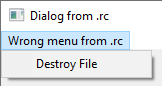 The misinterpretation of the ID can (at best) lead to an unexpected menu being loaded
#### A related, but inconsequential, inconsistency🔗
As mentioned in "Special tokenization rules for names/IDs", when the `id` of a resource is a string/name, it is uppercased before being written to the `.res` file. This uppercasing is not done for the `MENU` statement of a `DIALOG`/`DIALOGEX` resource, so in this example:
abc MENUEX
{
  // ...
}1 DIALOGEX 0, 0, 640, 480
  MENU abc
{
  // ...
}
The `id` of the `MENUEX` resource would be compiled as `ABC`, but the `DIALOGEX` would write the `id` of its menu as `abc`. This ends up not mattering, though, because it appears that `LoadMenu` uses a case-insensitive lookup.
#### `resinator`'s behavior🔗
`resinator` avoids the miscompilation and treats the `id` parameter of `MENU` statements in `DIALOG`/`DIALOGEX` resources exactly the same as the `id` of `MENU` resources.
test.rc:3:8: warning: the id of this menu would be miscompiled by the Win32 RC compiler
  MENU 1ABC
       ^~~~
test.rc:3:8: note: the Win32 RC compiler would evaluate the id as the ordinal/number value 2899test.rc:3:8: note: to avoid the potential miscompilation, the first character of the id should not be a digit
parser bug/quirk
If you're not last, you're irrelevant🔗
Many resource types have optional statements that can be specified between the resource type and the beginning of its body, e.g.
1 ACCELERATORS
  LANGUAGE 0x09, 0x01
  CHARACTERISTICS 0x1234
  VERSION 1
{
  // ...
}
Specifying multiple statements of the same type within a single resource definition is allowed, and the last occurrence of each statement type is the one that takes precedence, so the following would compile to the exact same `.res` as the example above:
1 ACCELERATORS
  CHARACTERISTICS 1
  LANGUAGE 0xFF, 0xFF
  LANGUAGE 0x09, 0x01
  CHARACTERISTICS 999
  CHARACTERISTICS 0x1234
  VERSION 999
  VERSION 1
{
  // ...
}
This is not necessarily a problem on its own (although I think it should at least be a warning), but it can inadvertently lead to some bizarre behavior, as we'll see in the next bug/quirk.
#### `resinator`'s behavior🔗
`resinator` matches the Windows RC compiler behavior, but emits a warning for each ignored statement:
test.rc:2:3: warning: this statement was ignored; when multiple statements of the same type are specified, only the last takes precedence
  CHARACTERISTICS 1
  ^~~~~~~~~~~~~~~~~
test.rc:3:3: warning: this statement was ignored; when multiple statements of the same type are specified, only the last takes precedence
  LANGUAGE 0xFF, 0xFF
  ^~~~~~~~~~~~~~~~~~~
test.rc:5:3: warning: this statement was ignored; when multiple statements of the same type are specified, only the last takes precedence
  CHARACTERISTICS 999
  ^~~~~~~~~~~~~~~~~~~
test.rc:7:3: warning: this statement was ignored; when multiple statements of the same type are specified, only the last takes precedence
  VERSION 999
  ^~~~~~~~~~~
parser bug/quirk, miscompilation
Once a number, always a number🔗
The behavior described in "Yes, that MENU over there (vague gesturing)" can also be induced in both `CLASS` and `MENU` statements of `DIALOG`/`DIALOGEX` resources via redundant statements. As seen in "If you're not last, you're irrelevant", multiple statements of the same type are allowed to be specified without much issue, but in the case of `CLASS` and `MENU`, if any of the duplicate statements are interpreted as a number, then the value of last statement of its type (the only one that matters) is always interpreted as a number no matter what it contains.
1 DIALOGEX 0, 0, 640, 480
  MENU 123 // ignored, but causes the string below to be evaluated as a number
  MENU IM_A_STRING_I_SWEAR  ────►  8360
  CLASS 123 // ignored, but causes the string below to be evaluated as a number
  CLASS "Seriously, I'm a string"  ────►  55127
{
  // ...
}
The algorithm for coercing the strings to a number is the same as the one outlined in "Yes, that MENU over there (vague gesturing)", and, for the same reasons discussed there, this too is always a miscompilation.
#### `resinator`'s behavior🔗
`resinator` avoids the miscompilation and emits warnings:
test.rc:2:3: warning: this statement was ignored; when multiple statements of the same type are specified, only the last takes precedence
MENU 123
^~~~~~~~
test.rc:4:3: warning: this statement was ignored; when multiple statements of the same type are specified, only the last takes precedence
CLASS 123
^~~~~~~~~
test.rc:5:9: warning: this class would be miscompiled by the Win32 RC compiler
CLASS "Seriously, I'm a string"
^~~~~~~~~~~~~~~~~~~~~~~~~
test.rc:5:9: note: the Win32 RC compiler would evaluate it as the ordinal/number value 55127test.rc:5:9: note: to avoid the potential miscompilation, only specify one class per dialog resource
test.rc:3:8: warning: the id of this menu would be miscompiled by the Win32 RC compiler
MENU IM_A_STRING_I_SWEAR
^~~~~~~~~~~~~~~~~~~
test.rc:3:8: note: the Win32 RC compiler would evaluate the id as the ordinal/number value 8360
test.rc:3:8: note: to avoid the potential miscompilation, only specify one menu per dialog resource
parser bug/quirk
L is not allowed there🔗
Like in C, an integer literal can be suffixed with `L` to signify that it is a 'long' integer literal. In the case of the Windows RC compiler, integer literals are typically 16 bits wide, and suffixing an integer literal with `L` will instead make it 32 bits wide.
`1 RCDATA { 1, 2L } `
`01 00 02 00 00 00`
An `RCDATA` resource definition and a hexdump of the resulting data in the `.res` file
However, outside of raw data blocks like the `RCDATA` example above, the `L` suffix is typically meaningless, as it has no bearing on the size of the integer used. For example, `DIALOG` resources have `x`, `y`, `width`, and `height` parameters, and they are each encoded in the data as a `u16` regardless of the integer literal used. If the value would overflow a `u16`, then the value is truncated back down to a `u16`, meaning in the following example all 4 parameters after `DIALOG` get compiled down to `1` as a `u16`:
1 DIALOG 1, 1L, 65537, 65537L {}The maximum value of a `u16` is 65535
A few particular parameters, though, fully disallow integer literals with the `L` suffix from being used:
LANGUAGE 1L, 2test.rc(1) : error RC2145 : PRIMARY LANGUAGE ID too large1 VERSIONINFO
FILEVERSION 1L, 2, 3, 4
BEGIN
// ...
ENDtest.rc(2) : error RC2127 : version WORDs separated by commas expectedIt is true that these parameters are limited to `u16`, so using an `L` suffix is likely a mistake, but that is also true of many other parameters for which the Windows RC compiler happily allows `L` suffixed numbers for. It's unclear why these particular parameters are singled out, and even more unclear given the fact that specifying these parameters using an integer literal that would overflow a `u16` does not actually trigger an error (and instead it truncates the values to a `u16`):
1 VERSIONINFO
  FILEVERSION 65537, 65538, 65539, 65540
BEGIN
END
The compiled `FILEVERSION` in this case will be `1`, `2`, `3`, `4`:
65537 = 0x10001; truncated to u16 = 0x0001
65538 = 0x10002; truncated to u16 = 0x0002
65539 = 0x10003; truncated to u16 = 0x0003
65540 = 0x10004; truncated to u16 = 0x0004
#### `resinator`'s behavior🔗
`resinator` allows `L` suffixed integer literals everywhere and truncates the value down to the appropriate number of bits when necessary.
test.rc:1:10: warning: this language parameter would be an error in the Win32 RC compiler
LANGUAGE 1L, 2
         ^~
test.rc:1:10: note: to avoid the error, remove any L suffixes from numbers within the parameter
parser bug/quirk
Unary operators are an illusion🔗
Typically, unary `+`, `-`, etc. operators are just that—operators; they are separate tokens that act on other tokens (number literals, variables, etc). However, in the Windows RC compiler, they are not real operators.
#### Unary `-`🔗
The unary `-` is included as part of a number literal, not as a distinct operator. This behavior can be confirmed in a rather strange way, taking advantage of a separate quirk described in "Number expressions as filenames". When a resource's filename is specified as a number expression, the file path it ultimately looks for is the last number literal in the expression, so for example:
1 FOO (567 + 123)test.rc(1) : error RC2135 : file not found: 123And if we throw in a unary `-` like so, then it gets included as part of the filename:
1 FOO (567 + -123)test.rc(1) : error RC2135 : file not found: -123This quirk leads to a few unexpected valid patterns, since `-` on its own is also considered a valid number literal (and it resolves to `0`), so:
1 FOO { 1-- }evaluates to `1-0` and results in `1` being written to the resource's data, while:
1 FOO { "str" - 1 }looks like a string literal minus 1, but it's actually interpreted as 3 separate raw data values (`str`, `-` \[which evaluates to 0\], and `1`), since commas between data values in a raw data block are optional.
Additionally, it means that otherwise valid looking expressions may not actually be considered valid:
1 FOO { (-(123)) }test.rc(1) : error RC1013 : mismatched parentheses#### Unary `~`🔗
The unary NOT (`~`) works exactly the same as the unary `-` and has all the same quirks. For example, a `~` on its own is also a valid number literal:
1 FOO { ~ }Data is a `u16` with the value `0xFFFF`
And `~L` (to turn the integer into a `u32`) is valid in the same way that `-L` would be valid:
1 FOO { ~L }Data is a `u32` with the value `0xFFFFFFFF`
#### Unary `+`🔗
The unary `+` is almost entirely a hallucination; it can be used in some places, but not others, without any discernible rhyme or reason.
This is valid (and the parameters evaluate to `1`, `2`, `3`, `4` as expected):
1 DIALOG +1, +2, +3, +4 {}but this is an error:
1 FOO { +123 }test.rc(1) : error RC2164 : unexpected value in RCDATAand so is this:
1 DIALOG (+1), 2, 3, 4 {}test.rc(1) : error RC2237 : numeric value expected at DIALOGBecause the rules around the unary `+` are so opaque, I am unsure if it shares many of the same properties as the unary `-`. I do know, though, that `+` on its own does not seem to be an accepted number literal in any case I've seen so far.
#### `resinator`'s behavior🔗
`resinator` matches the Windows RC compiler's behavior around unary `-`/`~`, but disallows unary `+` entirely:
test.rc:1:10: error: expected number or number expression; got '+'
1 DIALOG +1, +2, +3, +4 {}
         ^
test.rc:1:10: note: the Win32 RC compiler may accept '+' as a unary operator here, but it is not supported in this implementation; consider omitting the unary +
miscompilation
Your fate will be determined by a comma🔗
Version information is specified using key/value pairs within `VERSIONINFO` resources. In the compiled `.res` file, the value data should always start at a 4-byte boundary, so after the key data is written, a variable number of padding bytes are written to get back to 4-byte alignment:
`1 VERSIONINFO { VALUE "key", "value" }` `......k.e.y..... v.a.l.u.e.......` Two padding bytes are inserted after the `key` to get back to 4-byte alignment
However, if the comma between the key and value is omitted, then for whatever reason the padding bytes are also omitted:
`1 VERSIONINFO { VALUE "key" "value" }` `......k.e.y...v. a.l.u.e.........` Without the comma between `"key"` and `"value"`, the padding bytes are not written
The problem here is that consumers of the `VERSIONINFO` resource (e.g. VerQueryValue) will expect the padding bytes, so it will try to read the value as if the padding bytes were there. For example, with the simple `"key" "value"` example:
VerQueryValueW(verbuf, L"\\key", &querybuf, &querysize);
wprintf(L"%s\n", querybuf);
Which will print:
aluePlus, depending on the length of the key string, it can end up being even worse, since the value could end up being written over the top of the null terminator of the key. Here's an example:
`1 VERSIONINFO { VALUE "ke" "value" }` `......k.e.v.a.l. u.e.............` And the problems don't end there—`VERSIONINFO` is compiled into a tree structure, meaning the misreading of one node affects the reading of future nodes. Here's a (simplified) real-world `VERSIONINFO` resource definition from a random `.rc` file in Windows-classic-samples:
VS_VERSION_INFO VERSIONINFO
BEGIN
    BLOCK "StringFileInfo"
    BEGIN
        BLOCK "040904e4"
        BEGIN
            VALUE "CompanyName", "Microsoft"
            VALUE "FileDescription", "AmbientLightAware"
            VALUE "FileVersion", "1.0.0.1"
            VALUE "InternalName", "AmbientLightAware.exe"
            VALUE "LegalCopyright", "(c) Microsoft.  All rights reserved."
            VALUE "OriginalFilename", "AmbientLightAware.exe"
            VALUE "ProductName", "AmbientLightAware"
            VALUE "ProductVersion", "1.0.0.1"
        END
    END
    BLOCK "VarFileInfo"
    BEGIN
        VALUE "Translation", 0x409, 1252
    END
END
and here's the Properties window of an `.exe` compiled with and without commas between all the key/value pairs:
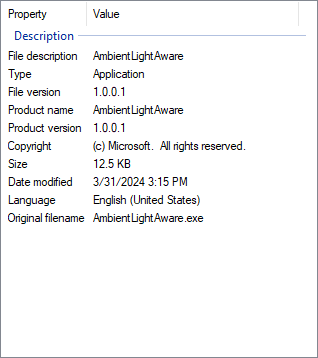 Correct version information with commas included...
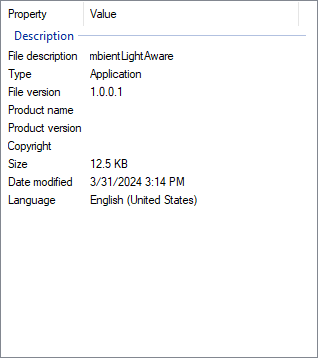 ...but completely broken if the commas are omitted
#### `resinator`'s behavior🔗
`resinator` avoids the miscompilation (always inserts the necessary padding bytes) and emits a warning.
test.rc:2:15: warning: the padding before this quoted string value would be miscompiled by the Win32 RC compiler
  VALUE "key" "value"
              ^~~~~~~
test.rc:2:15: note: to avoid the potential miscompilation, consider adding a comma between the key and the quoted string
miscompilation
Mismatch in length units in `VERSIONINFO` nodes🔗
A `VALUE` within a `VERSIONINFO` resource is specified using this syntax:
VALUE <name>, <value(s)>The `value(s)` can be specified as either number literals or quoted string literals, like so:
1 VERSIONINFO {
  VALUE "numbers", 123, 456
  VALUE "strings", "foo", "bar"
}
Each `VALUE` is compiled into a structure that contains the length of its value data, but the unit used for the length varies:
So, for the above example, the `"numbers"` value would be compiled into a node with:
and the `"strings"` value would be compiled into a node with:
This is a bit bizarre, but when separated out like this it works fine. The problem is that there is nothing stopping you from mixing strings and numbers in one value, in which case the Windows RC compiler freaks out and writes the type as "binary" (meaning the length should be interpreted as a byte count), but the length as a mixture of byte count and UTF-16 code unit count. For example, with this resource:
1 VERSIONINFO {
  VALUE "something", "foo", 123
}
Its value's data will get compiled into these bytes: `66 00 6F 00 6F 00 00 00 7B 00`, where `66 00 6F 00 6F 00 00 00` is `"foo"` (as `NUL`\-terminated little-endian UTF-16) and `7B 00` is `123` (as a little-endian `u16`). This makes for a total of 10 bytes (8 for `"foo"`, 2 for `123`), but the Windows RC compiler erroneously reports the value's data length as 6 (4 for `"foo"` \[counted as UTF-16 code units\], and 2 for `123` \[counted as bytes\]).
This miscompilation has similar results as those detailed in "Your fate will be determined by a comma":
#### The return of the meaningful comma🔗
Before, I said that string values were compiled as `NUL`\-terminated UTF-16 strings, but this is only the case when either:
So, this:
1 VERSIONINFO {
  VALUE "strings", "foo", "bar"
}
will be compiled with a `NUL` terminator after both `foo` and `bar`, but this:
1 VERSIONINFO {
  VALUE "strings", "foo" "bar"
}
will be compiled only with a `NUL` terminator after `bar`. This is also similar to "Your fate will be determined by a comma", but unlike that comma quirk, I don't consider this one a miscompilation because the result is not invalid/mangled, and there is a possible use-case for this behavior (concatenating two or more string literals together). However, this behavior is not mentioned in the documentation, so it's unclear if it's actually intended.
#### `resinator`'s behavior🔗
`resinator` avoids the length-related miscompilation and emits a warning:
test.rc:2:22: warning: the byte count of this value would be miscompiled by the Win32 RC compiler
  VALUE "something", "foo", 123
                     ^~~~~~~~~~
test.rc:2:22: note: to avoid the potential miscompilation, do not mix numbers and strings within a value
but matches the "meaningful comma" behavior of the Windows RC compiler.
fundamental concept
Turning off flags with `NOT` expressions🔗
Let's say you wanted to define a dialog resource with a button, but you wanted the button to start invisible. You'd do this with a `NOT` expression in the "style" parameter of the button like so:
`1 DIALOGEX 0, 0, 282, 239 { PUSHBUTTON "Cancel",1,129,212,50,14, NOT WS_VISIBLE }`
Since `WS_VISIBLE` is set by default, this will unset it and make the button invisible. If there are any other flags that should be applied, they can be bitwise OR'd like so:
`1 DIALOGEX 0, 0, 282, 239 { PUSHBUTTON "Cancel",1,129,212,50,14, NOT WS_VISIBLE | BS_VCENTER }`
`WS_VISIBLE` and `BS_VCENTER` are just numbers under-the-hood. For simplicity's sake, let's pretend their values are `0x1` for `WS_VISIBLE` and `0x2` for `BS_VCENTER` and then focus on this simplified `NOT` expression:
`NOT 0x1 | 0x2`
Since `WS_VISIBLE` is on by default, the default value of these flags is `0x1`, and so the resulting value is evaluated like this:
operation
binary representation of the result
hex representation of the result
Default value: `0x1`
0000 0001`0x1`
`NOT 0x1`
0000 0000`0x0`
`| 0x2`
0000 0010`0x2`
Ordering matters as well. If we switch the expression to:
NOT 0x1 | 0x1then we end up with `0x1` as the result:
operation
binary representation of the result
hex representation of the result
Default value: `0x1`
0000 0001`0x1`
`NOT 0x1`
0000 0000`0x0`
`| 0x1`
0000 0001`0x1`
If, instead, the ordering was reversed like so:
0x1 | NOT 0x1then the value at the end would be `0x0`:
operation
binary representation of the result
hex representation of the result
Default value: `0x1`
0000 0001`0x1`
`0x1`
0000 0001`0x1`
`| NOT 0x1`
0000 0000`0x0`
With these basic examples, `NOT` seems pretty straightforward, however...
utterly baffling
`NOT` is incomprehensible🔗
Practically any deviation outside the simple examples outlined in Turning off flags with NOT expressions leads to bizarre and inexplicable results. For example, these expressions are all accepted by the Windows RC compiler:
The first one looks like it makes sense, as intuitively the `(1 | 2)` would be evaluated first so in theory it should be equivalent to `NOT 3`. However, if the default value of the flags is `0`, then the expression `NOT (1 | 2)` (somehow) evaluates to `2`, whereas `NOT 3` would evaluate to `0`.
`NOT () 2` seems like it should obviously be a syntax error, but for whatever reason it's accepted by the Windows RC compiler and also evaluates to `2`.
`7 NOT NOT 4 NOT 2 NOT NOT 1` is entirely incomprehensible, and just as incomprehensibly, it also results in `2` (if the default value is `0`).
This behavior is so bizarre and obviously incorrect that I didn't even try to understand what's going on here, so your guess is as good as mine on this one.
#### `resinator`'s behavior🔗
`resinator` only accepts `NOT <number>`, anything else is an error:
test.rc:2:13: error: expected '<number>', got '('
  STYLE NOT () 2
            ^
All 3 of the above examples lead to compile errors in `resinator`.
parser bug/quirk
`NOT` can be used in places it makes no sense🔗
The strangeness of `NOT` doesn't end there, as the Windows RC compiler also allows it to be used in many (but not all) places that a number expression can be used.
As an example, here are `NOT` expressions used in the `x`, `y`, `width`, and `height` arguments of a `DIALOGEX` resource:
1 DIALOGEX NOT 1, NOT 2, NOT 3, NOT 4
{
  // ...
}
This doesn't necessarily cause problems, but since `NOT` is only useful in the context of turning off enabled-by-default flags of a bit flag parameter, there's no reason to allow `NOT` expressions outside of that context.
However, there is an extra bit of weirdness involved here, since certain `NOT` expressions cause errors in some places but not others. For example, the expression `1 | NOT 2` is an error if it's used in the `type` parameter of a `MENUEX`'s `MENUITEM`, but `NOT 2 | 1` is totally accepted.
1 MENUEX {
  // Error: numeric value expected at NOT
  MENUITEM "bar", 101, 1 | NOT 2
  // No error if the NOT is moved to the left of the bitwise OR
  MENUITEM "foo", 100, NOT 2 | 1
}
#### `resinator`'s behavior🔗
`resinator` errors if `NOT` expressions are attempted to be used outside of bit flag parameters:
test.rc:1:12: error: expected number or number expression; got 'NOT'
1 DIALOGEX NOT 1, NOT 2, NOT 3, NOT 4
           ^~~
miscompilation, crash
No one has thought about `FONT` resources for decades🔗
As far as I can tell, the `FONT` resource has exactly one purpose: creating `.fon` files, which are resource-only `.dll`s (i.e. a `.dll` with resources, but no entry point) renamed to have a `.fon` extension. Such `.fon` files contain a collection of fonts in the obsolete `.fnt` font format.
The `.fon` format is mostly obsolete, but is still supported in modern Windows, and Windows still ships with some `.fon` files included:
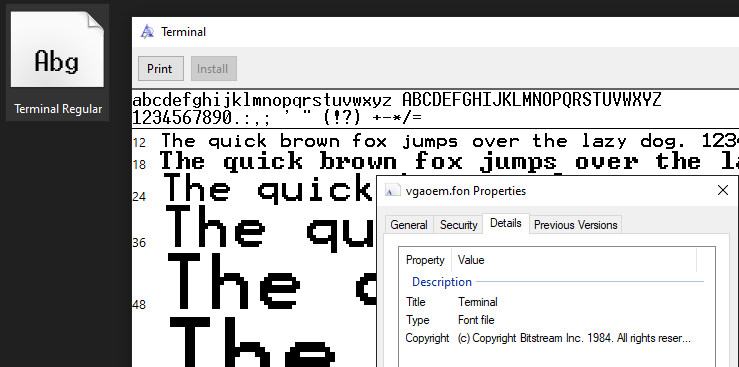
The `Terminal` font included in Windows 10 is a `.fon` file
This `.fon`\-related purpose for the `FONT` resource, however, has been irrelevant for decades, and, as far as I can tell, has not worked fully correctly since the 16-bit version of the Windows RC compiler. To understand why, though, we have to understand a little bit about the `.fnt` format.
In version 1 of the `.fnt` format, specified by the Windows 1.03 SDK from 1986, the total size of all the static fields in the header was 117 bytes, with a few fields containing offsets to variable-length data elsewhere in the file. Here's a (truncated) visualization, with some relevant 'offset' fields expanded:
....version....
......size.....
...copyright...
......type.....
. . . etc . . .
. . . etc . . .
.device_offset. ───► NUL-terminated device name.
..face_offset.. ───► NUL-terminated font face name.
....bits_ptr...
..bits_offset..
In version 3 of the .fnt format (and presumably version 2, but I can't find much info about version 2), all of the fields up to and including `bits_offset` are the same, but there are an additional 31 bytes of new fields, making for a total size of 148 bytes:
....version....
. . . etc . . .
. . . etc . . .
.device_offset.
..face_offset..
....bits_ptr...
..bits_offset..
....reserved... ◄─┐
.....flags..... ◄─┤
.....aspace.... ◄─┤
.....bspace.... ◄─┼── new fields
.....cspace.... ◄─┤
...color_ptr... ◄─┤
...reserved1...   │
............... ◄─┘
...............
Getting back to resource compilation, `FONT` resources within `.rc` files are collected and compiled into the following resources:
Within the `FONTDIR` resource, there is a FONTDIRENTRY for each font, containing much of the information in the `.fnt` header. In fact, the data actually matches the version 1 `.fnt` header almost exactly, with only a few differences at the end:
.fnt version 1      FONTDIRENTRY....version.... == ...dfVersion...
......size..... == .....dfSize....
...copyright... == ..dfCopyright..
......type..... == .....dfType....
. . . etc . . . == . . . etc . . .
. . . etc . . . == . . . etc . . .
.device_offset. == ....dfDevice...
..face_offset.. == .....dfFace....
....bits_ptr... =? ...dfReserved..
..bits_offset..    NUL-terminated device name.
                   NUL-terminated font face name.
The formats match, except `FONTDIRENTRY` does not include `bitsoffset` and instead it has trailing variable-length strings
This documented `FONTDIRENTRY` is what the obsolete 16-bit version of `rc.exe` outputs: 113 bytes plus two variable-length `NUL`\-terminated strings at the end. However, starting with the 32-bit resource compiler, contrary to the documentation, `rc.exe` now outputs `FONTDIRENTRY` as 148 bytes plus the two variable-length `NUL`\-terminated strings.
You might notice that this 148 number has come up before; it's the size of the `.fnt` version 3 header. So, starting with the 32-bit `rc.exe`, `FONTDIRENTRY` as-written-by-the-resource-compiler is effectively the first 148 bytes of the `.fnt` file, plus the two strings located at the positions given by the `device_offset` and `face_offset` fields. Or, at least, that's clearly the intention, but this is labeled 'miscompilation' for a reason.
Let's take this example `.fnt` file for instance:
....version....
. . . etc . . .
. . . etc . . .
.device_offset. ───► some device.
..face_offset.. ───► some font face.
. . . etc . . .
. . . etc . . .
...reserved1...
...............
...............
When compiled with the old 16-bit Windows RC compiler, `some device` and `some font face` are written as trailing strings in the `FONTDIRENTRY` (as expected), but when compiled with the modern `rc.exe`, both strings get written as 0-length (only a `NUL` terminator). The reason why is rather silly, so let's go through it. Here's the documented `FONTDIRENTRY` format again, this time with some annotations:
FONTDIRENTRY-113 ...dfVersion... (2 bytes)
-111 .....dfSize.... (4 bytes)
-107 ..dfCopyright.. (60 bytes)
 -47 .....dfType.... (2 bytes)
     . . . etc . . .
     . . . etc . . .
 -12 ....dfDevice... (4 bytes)
  -8 .....dfFace.... (4 bytes)
  -4 ...dfReserved.. (4 bytes)
The numbers on the left represent the offset from the end of the `FONTDIRENTRY` data to the start of the field
It turns out that the Windows RC compiler uses the offset from the end of `FONTDIRENTRY` to get the values of the `dfDevice` and `dfFace` fields. This works fine when those offsets are unchanging, but, as we've seen, the Windows RC compiler now uses an undocumented `FONTDIRENTRY` definition that is is 35 bytes longer, but these hardcoded offsets were never updated accordingly. This means that the Windows RC compiler is actually attempting to read the `dfDevice` and `dfFace` fields from this part of the `.fnt` version 3 header:
....version....
    . . . etc . . .
    . . . etc . . .
    .device_offset.
    ..face_offset..
    . . . etc . . .
    . . . etc . . .
-12 ...reserved1... ───► ???
 -8 ............... ───► ???
 -4 ...............
The Windows RC compiler reads data from the `reserved1` field and interprets it as `dfDevice` and `dfFace`
Because this bug happens to end up reading data from a reserved field, it's very likely for that data to just contain zeroes, which means it will try to read the `NUL`\-terminated strings starting at offset `0` from the start of the file. As a second coincidence, the first field of a `.fnt` file is a `u16` containing the version, and the only versions I'm aware of are:
In all three cases, the first byte is `0x00`, meaning attempting to read a `NUL` terminated string from offset `0` always ends up with a 0-length string for all known/valid `.fnt` versions. So, in practice, the Windows RC compiler almost always writes the trailing `szDeviceName` and `szFaceName` strings as 0-length strings.
This behavior can be confirmed by crafting a `.fnt` file with actual offsets to `NUL`\-terminated strings within the reserved data field that the Windows RC compiler erroneously reads from:
....version....
. . . etc . . .
. . . etc . . .
.device_offset. ───► some device.
..face_offset.. ───► some font face.
. . . etc . . .
. . . etc . . .
...reserved1... ───► i dare you to read me.
............... ───► you wouldn't.
...............
Compiling such a `FONT` resource, we do indeed see that the strings `i dare you to read me` and `you wouldn't` are written to the `FONTDIRENTRY` for this `FONT` rather than `some device` and `some font face`.
#### Does any of this even matter?🔗
Well, no, not really. The whole concept of the `FONTDIR` containing information about all the `RT_FONT` resources is something of a historical relic, likely only relevant when resources were constrained enough that having an overview of the font data all in once place allowed for optimization opportunities that made a difference.
From what I can tell, though, on modern Windows, the `FONTDIR` resource is ignored entirely:
However, there are a few caveats...
#### Misuse of the `FONT` resource for non-`.fnt` fonts🔗
I'm not sure how prevalent this is, but it can be forgiven that someone might not realize that `FONT` is only intended to be used with a font format that has been obsolete for multiple decades, and try to use the `FONT` resource with a modern font format.
In fact, there is one Microsoft-provided Windows-classic-samples example program that uses `FONT` resources with `.ttf` files to include custom fonts in a program: Win7Samples/multimedia/DirectWrite/CustomFont. This is meant to be an example of using the DirectWrite APIs described here, but this is almost certainly a misuse of the `FONT` resource. Other examples, however, use user-defined resource types for including `.ttf` font files, which seems like the correct choice.
When using non-`.fnt` files with the `FONT` resource, the resulting `FONTDIRENTRY` will be made up of garbage, since it effectively just takes the first 148 bytes of the file and stuffs it into the `FONTDIRENTRY` format. An additional complication with this is that the Windows RC compiler will still try to read `NUL`\-terminated strings using the offsets from the `dfDevice` and `dfFace` fields (or at least, where it thinks they are). These offset values, in turn, will have much more variance since the format of `.fnt` and `.ttf` are so different.
This means that using `FONT` with `.ttf` files may lead to errors, since...
#### "Negative" offsets lead to errors🔗
For who knows what reason, the `dfDevice` and `dfFace` values are seemingly treated as signed integers, even though they ostensibly contain an offset from the beginning of the `.fnt` file, so a negative value makes no sense. When the sign bit is set in either of these fields, the Windows RC compiler will error with:
fatal error RW1023: I/O error seeking in fileThis means that, for some subset of valid `.ttf` files (or other non-`.fnt` font formats), the Windows RC compiler will fail with this error.
#### Other oddities and crashes🔗
#### `resinator`'s behavior🔗
I'm still not quite sure what the best course of action is here. I've written up what I see as the possibilities here, and for now I've gone with what I'm calling the "semi-compatibility while avoiding the sharp edges" approach:
Do something similar enough to the Win32 compiler in the common case, but avoid emulating the buggy behavior where it makes sense. That would look like a `FONTDIRENTRY` with the following format:>
* The first 148 bytes from the file verbatim, with no interpretation whatsoever, followed by two `NUL` bytes (corresponding to 'device name' and 'face name' both being zero length strings)>
This would allow the `FONTDIR` to match byte-for-byte with the Win32 RC compiler in the common case (since very often the misinterpreted `dfDevice`/`dfFace` will be `0` or point somewhere outside the bounds of the file and therefore will be written as a zero-length string anyway), and only differ in the case where the Win32 RC compiler writes some bogus string(s) to the `szDeviceName`/`szFaceName`.>
This also enables the use-case of non-`.FNT` files without any loose ends.
In short: write the new/undocumented `FONTDIRENTRY` format, but avoid the crashes, avoid the negative integer-related errors, and always write `szDeviceName` and `szFaceName` as 0-length.
fundamental concept
The involvement of a C/C++ preprocessor🔗
In the intro, I said:
`.rc` files are scripts that contain both C/C++ preprocessor commands and resource definitions.
So far, I've only focused on resource definitions, but the involvement of the C/C++ preprocessor cannot be ignored. From the About Resource Files documentation:
The syntax and semantics for the RC preprocessor are similar to those of the Microsoft C/C++ compiler. However, RC supports a subset of the preprocessor directives, defines, and pragmas in a script.
The primary use-case for this is two-fold:
Here's some snippets that demonstrate both use-cases:
// in resource.h
#define DIALOG_ID 123
#define BUTTON_ID 234
// in resource.rc
#include <windows.h>
#include "resource.h"// DIALOG_ID comes from resource.h
DIALOG_ID DIALOGEX 0, 0, 282, 239
// These style constants come from windows.h
STYLE DS_SETFONT | DS_MODALFRAME | DS_CENTER | WS_POPUP | WS_CAPTION | WS_SYSMENU
CAPTION "Dialog"
{
// BUTTON_ID comes from resource.h
PUSHBUTTON "Button", BUTTON_ID, 129, 182, 50, 14
}
// in main.c
#include <windows.h>
#include "resource.h"// ...
// DIALOG_ID comes from resource.h
HWND result = CreateDialogParamW(hInst, MAKEINTRESOURCEW(DIALOG_ID), hwnd, DialogProc, (LPARAM)NULL);
// ...
// ...
// BUTTON_ID comes from resource.h
HWND button = GetDlgItem(hwnd, BUTTON_ID);
// ...
With this setup, changing `DIALOG_ID`/`BUTTON_ID` in `resource.h` affects both `resource.rc` and `main.c`, so they are always kept in sync.
preprocessor bug/quirk, parser bug/quirk
Multiline strings don't behave as expected/documented🔗
Within the STRINGTABLE resource documentation we see this statement:
The string \[...\] must occupy a single line in the source file (unless a '\\' is used as a line continuation).
This is similar to the rules around C strings:
char *my_string = "Line 1
Line 2";
multilinestring.c:1:19: error: missing terminating '"' character
char *my_string = "Line 1
^Splitting a string across multiple lines without using `\` is an error in C
char *my_string = "Line 1 \
Line 2";
`printf("%s\n", my_string);` results in:
Line 1 Line 2And yet, contrary to the documentation, splitting a string across multiple lines without `\` continuations is not an error in the Windows RC compiler. Here's an example:
1 RCDATA {"foo
bar"
}
This will successfully compile, and the data of the `RCDATA` resource will end up as
66 6F 6F 20 0A 62 61 72 foo space.\nbarI'm not sure why this is allowed, and I also don't have an explanation for why a space character sneaks into the resulting data out of nowhere. It's also worth noting that whitespace is collapsed in these should-be-invalid multiline strings. For example, this:
"foo bar"
will get compiled into exactly the same data as above (with only a space and a newline between `foo` and `bar`).
But, this on its own is only a minor nuisance from the perspective of implementing a resource compiler—it is undocumented behavior, but it's pretty easy to account for. The real problems start when someone actually uses `\` as intended.
#### The collapse of whitespace is imminent🔗
C pop quiz: what will get printed in this example (i.e. what will `my_string` evaluate to)?
char *my_string = "Line 1 \
Line 2";#include <stdio.h>
int main() {
printf("%s\n", my_string);
return 0;
}
Let's compile it with a few different compilers to find out:
> zig run multilinestring.c -lc
Line 1                    Line 2clang multilinestring.c
a.exe
Line 1                    Line 2cl.exe multilinestring.c
multilinestring.exe
Line 1                    Line 2
That is, the whitespace preceding "Line 2" is included in the string literal.
However, the Windows RC compiler behaves differently here. If we pass the same example through its preprocessor, we end up with:
#line 1 "multilinestring.c"
char *my_string = "Line 1 \
Line 2";
1. The `\` remains (similar to the MSVC compiler, see the note above) 2. The whitespace before "Line 2" is removed
So the value of `my_string` would be `Line 1 Line 2` (well, not really, since `char *my_string = ` doesn't have a meaning in `.rc` files, but you get the idea). This divergence in behavior from C has practical consequences: in this .rc file from one of the Windows-classic-samples example programs, we see the following, which takes advantage of the `rc.exe`\-preprocessor-specific-whitespace-collapsing behavior:
STRINGTABLE
BEGIN
    // ...
    IDS_MESSAGETEMPLATEFS   "The drop target is %s.\n\
                            %d files/directories in HDROP\n\
                            The path to the first object is\n\
                            \t%s."
    // ...
END
Plus, in certain circumstances, this difference between `rc.exe` and C (like other differences to C) can lead to bugs. This is a rather contrived example, but here's one way things could go wrong:
// In foo.h
#define FOO_TEXT "foo \
                  bar"
#define IDC_BUTTON_FOO 1001
// In foo.rc
#include "foo.h"1 DIALOGEX 0, 0, 275, 280
BEGIN
PUSHBUTTON FOO_TEXT, IDC_BUTTON_FOO, 7, 73, 93, 14
END
// In main.c
#include "foo.h"// ...
    HWND hFooBtn = GetDlgItem(hDlg, IDC_BUTTON_FOO);
    // Let's say the button text was changed while it was hovered
    // and now we want to set it back to the default
    SendMessage(hFooBtn, WM_SETTEXT, 0, (LPARAM) _T(FOO_TEXT));
// ...
In this example, the button defined in the `DIALOGEX` would start with the text `foo bar`, since that is the value that the Windows RC compiler resolves `FOO_TEXT` to be, but the `SendMessage` call would then set the text to `foo bar`, since that's what the C compiler resolves `FOO_TEXT` to be.
#### `resinator`'s behavior🔗
`resinator` uses the Aro preprocessor, which means it acts like a C compiler. In the future, `resinator` will likely fork Aro (mostly to support UTF-16 encoded files), which could allow matching the behavior of `rc.exe` in this case as well.
parser bug/quirk, utterly baffling
Escaping quotes is fraught🔗
Again from the STRINGTABLE resource docs:
To embed quotes in the string, use the following sequence: `""`. For example, `"""Line three"""` defines a string that is displayed as follows:>
> >> "Line three"
This is different from C, where `\"` is used to escape quotes within a string literal, so in C to get `"Line three"` you'd do `"\"Line three\""`.
This difference, though, can lead to some really bizarre results, since the preprocessor still uses the C escaping rules. Take this simple example:
"\""BLAH"Here's how that is seen from the perspective of the preprocessor:
string"\""identifierBLAHstring (unfinished)"And from the perspective of the compiler:
string"\""BLAH"So, following from this, say you had this `.rc` file:
#define BLAH "hello"1 RCDATA { "\""BLAH" }
Since we know the preprocessor sees `BLAH` as an identifier and we've done `#define BLAH "hello"`, it will replace `BLAH` with `"hello"`, leading to this result:
1 RCDATA { "\"""hello"" }which would now be parsed by the compiler as:
string"\"""identifierhellostring""and lead to a compile error:
test.rc(3) : error RC2104 : undefined keyword or key name: helloThis is just one example, but the general disagreement around escaped quotes between the preprocessor and the compiler can lead to some really unexpected error messages.
#### Wait, but what actually happens to the backslash?🔗
Backing up a bit, I said that the compiler sees `"\""BLAH"` as one string literal token, so:
1 RCDATA { string"\""BLAH" }If we compile this, then the data of this `RCDATA` resource ends up as:
"BLAHThat is, the `\` fully drops out and the `""` is treated as an escaped quote. This seems to some sort of special case, as this behavior is not present for other unrecognized escape sequences, e.g. `"\k"` will end up as `\k` when compiled, and `"\"` will end up as `\`.
#### `resinator`'s behavior🔗
Using `\"` within string literals is always an error, since (as mentioned) it can lead to things like unexpected macro expansions and hard-to-understand errors when the preprocessor and the compiler disagree.
test.rc:1:13: error: escaping quotes with \" is not allowed (use "" instead)
1 RCDATA { "\""BLAH" }
            ^~
This may change if it turns out `\"` is commonly used in the wild, but that seems unlikely to be the case.
parser bug/quirk
The column of a tab character matters🔗
Literal tab characters (`U+009`) within an `.rc` file get transformed by the preprocessor into a variable number of spaces (1-8), depending on the column of the tab character in the source file. This means that whitespace can affect the output of the compiler. Here's a few examples, where `────` denotes a tab character:
1 RCDATA {
"────"
}
the tab gets compiled to 7 spaces:
·······1 RCDATA {
"────"
}the tab gets compiled to 4 spaces:
····1 RCDATA {
"────"
}the tab gets compiled to 1 space:
·#### `resinator`'s behavior🔗
`resinator` matches the Windows RC compiler behavior, but emits a warning
test.rc:2:4: warning: the tab character(s) in this string will be converted into a variable number of spaces (determined by the column of the tab character in the .rc file)
   " "
   ^~~
test.rc:2:4: note: to include the tab character itself in a string, the escape sequence \t should be used
fundamental concept
The Windows RC compiler 'speaks' UTF-16🔗
As mentioned before, `.rc` files are compiled in two distinct steps:
1. First, they are run through a C/C++ preprocessor (`rc.exe` has a preprocessor implementation built-in) 2. The result of the preprocessing step is then compiled into a `.res` file
In addition to a subset of the normal C/C++ preprocessor directives, there is one resource-compiler-specific #pragma code\page directive that allows changing which code page is active mid-file. This means that `.rc` files can _have a mixture of encodings within a single file:
#pragma code_page(1252) // 1252 = Windows-1252
1 RCDATA { "This is interpreted as Windows-1252: €" }#pragma code_page(65001) // 65001 = UTF-8
2 RCDATA { "This is interpreted as UTF-8: €" }
If the above example file is saved as Windows-1252, each `€` is encoded as the byte `0x80`, meaning:
So, if we run the Windows-1252-encoded file through only the `rc.exe` preprocessor (using the undocumented rc.exe /p option), the result is a file with the following contents:
#pragma code_page 1252
1 RCDATA { "This is interpreted as Windows-1252: €" }#pragma code_page 65001
2 RCDATA { "This is interpreted as UTF-8: �" }
If, instead, the example file is saved as UTF-8, each `€` is encoded as the byte sequence `0xE2 0x82 0xAC`, meaning:
So, if we run the UTF-8-encoded version through the `rc.exe` preprocessor, the result looks like this:
#pragma code_page 1252
1 RCDATA { "This is interpreted as Windows-1252: €" }#pragma code_page 65001
2 RCDATA { "This is interpreted as UTF-8: €" }
In both of these examples, the result of the `rc.exe` preprocessor is encoded as UTF-16. This is because, in the Windows RC compiler, the relevant code page interpretation is done during preprocessing, and the output of the preprocessor is always UTF-16. This, in turn, means that the parser/compiler of the Windows RC compiler always ingests UTF-16, as there's no option to skip the preprocessing step.
This will be relevant for future bugs/quirks, so just file this knowledge away for now.
preprocessor bug/quirk
Extreme `#pragma code_page` values🔗
As seen above, the resource-compiler-specific preprocessor directive `#pragma code_page` can be used to alter the current code page mid-file. It's used like so:
#pragma code_page(1252) // Windows-1252
// ... bytes from now on are interpreted as Windows-1252 ...#pragma code_page(65001) // UTF-8
// ... bytes from now on are interpreted as UTF-8 ...
The list of possible code pages can be found here. If you try to use one that is not valid, `rc.exe` will error with:
fatal error RC4214: Codepage not valid: ignoredBut what happens if you try to use an extremely large code page value (greater or equal to the max of a `u32`)? Most of the time it errors in the same way as above, but occasionally there's a strange / inexplicable error. Here's a selection of a few:
#pragma code_page(4294967296)error RC4212: Codepage not integer: )
fatal error RC1116: RC terminating after preprocessor errors#pragma code_page(4295032296)fatal error RC22105: MultiByteToWideChar failed.#pragma code_page(4295032297)test.rc(2) : error RC2177: constant too big
test.rc(2) : error RC4212: Codepage not integer: 4
fatal error RC1116: RC terminating after preprocessor errorsI don't have an explanation for this behavior, especially with regards to why only certian extreme values induce an error at all.
#### `resinator`'s behavior🔗
`resinator` treats code pages exceeding the max of a `u32` as a fatal error.
test.rc:1:1: error: code page too large in #pragma code_page
#pragma code_page ( 4294967296 )
^~~~~~~~~~~~~~~~~~~~~~~~~~~~~~~~
This is a separate error from the one caused by invalid/unsupported code pages:
test.rc:1:1: error: invalid or unknown code page in #pragma code_page
#pragma code_page ( 64999 )
^~~~~~~~~~~~~~~~~~~~~~~~~~~
test.rc:1:1: error: unsupported code page 'utf7 (id=65000)' in #pragma code_page
#pragma code_page ( 65000 )
^~~~~~~~~~~~~~~~~~~~~~~~~~~preprocessor/parser bug/quirk
Escaping in wide string literals🔗
In regular string literals, invalid escape sequences get compiled into their literal characters. For example:
1 RCDATA {
   "abc\k"  ────►  abc\k
}
However, for reasons unknown, invalid escape characters within wide string literals disappear from the compiled result entirely:
1 RCDATA {
  L"abc\k"  ────►  a.b.c.
}
On its own, this is just an inexplicable quirk, but when combined with other quirks, it gets elevated to the level of a (potential) bug.
#### In combination with tab characters🔗
As detailed in "The column of a tab character matters", an embedded tab character gets converted to a variable number of spaces depending on which column it's at in the file. This happens during preprocesing, which means that by the time a string literal is parsed, the tab character will have been replaced with space character(s). This, in turn, means that "escaping" an embedded tab character will actually end up escaping a space character.
Here's an example where the tab character (denoted by `────`) will get converted to 6 space characters:
1 RCDATA {
L"\────"
}
And here's what that example looks like after preprocessing (note that the escape sequence now applies to a single space character).
1 RCDATA {
L"\······"
}
With the quirk around invalid escape sequences in wide string literals, this means that the "escaped space" gets skipped over/ignored when parsing the string, meaning that the compiled data in this case will have 5 space characters instead of 6.
#### In combination with codepoints represented by a surrogate pair🔗
As detailed in "The Windows RC compiler 'speaks' UTF-16", the output of the Windows RC preprocessor is always encoded as UTF-16. In UTF-16, codepoints >= `U+10000` are encoded as a surrogate pair (two `u16` code units). For example, the codepoint for 𐐷 (`U+10437`) is encoded in UTF-16 as `<0xD801><0xDC37>`.
So, let's say we have this `.rc` file:
#pragma code_page(65001)
1 RCDATA {
  L"\𐐷"
}
The file is encoded as UTF-8, meaning the 𐐷 is encoded as 4 bytes like so:
#pragma code_page(65001)
1 RCDATA {
  L"\<0xF0><0x90><0x90><0xB7>"
}
When run through the Windows RC preprocessor, it parses the file successfully and outputs the correct UTF-16 encoding of the 𐐷 codepoint (remember that the Windows RC preprocessor always outputs UTF-16):
1 RCDATA {
L"\𐐷"
}
However, the Windows RC parser does not seem to be aware of surrogate pairs, and therefore treats the escape sequence as only pertaining to the first `u16` surrogate code unit (the "high surrogate"):
1 RCDATA {
L"\<0xD801><0xDC37>"
}
This means that the `\<0xD801>` is treated as an invalid escape sequence and skipped, and only `<0xDC37>` makes it into the compiled resource data. This will essentially always end up being invalid UTF-16, since an unpaired surrogate code unit is ill-formed (the only way it wouldn't end up as ill-formed is if an intentionally unpaired high surrogate code unit was included before the escape sequence, e.g. `L"\xD801\𐐷"`).
#### `resinator`'s behavior🔗
`resinator` currently attempts to match the Windows RC compiler's behavior exactly, and emulates the interaction between the preprocessor and wide string escape sequences in its string parser.
The reasoning for emulating the Windows RC compiler for escaped tabs/escaped surrogate pairs seems rather dubious, though, so this may change in the future.
miscompilation
`STRINGTABLE` semantics bypass🔗
The STRINGTABLE resource is intended for embedding string data, which can then be loaded at runtime with LoadString. A `STRINGTABLE` resource definition looks something like this:
STRINGTABLE {
  0, "Hello"
  1, "Goodbye"
}
Notice that there is no `id` before the `STRINGTABLE` resource type. This is because all strings within `STRINGTABLE` resources are bundled together in groups of 16 based on their ID and language (we can ignore the language part for now, though). So, if we have this example `.rc` file:
STRINGTABLE {
  1, "Goodbye"
}STRINGTABLE {
  0, "Hello"
  23, "Hm"
}
The `"Hello"` and `"Goodbye"` strings will be grouped together into one resource, and the `"Hm"` will be put into another. Each group is written as a series of 16 length integers (one for each string within the group), and each length is immediately followed by a UTF-16 encoded string of that length (if the length is non-zero). So, for example, the first group contains the strings with IDs 0-15, meaning, for the `.rc` file above, the first group would be compiled as:
05 00 48 00 65 00 6C 00  ..H.e.l.
6C 00 6F 00 07 00 47 00  l.o...G.
6F 00 6F 00 64 00 62 00  o.o.d.b.
79 00 65 00 00 00 00 00  y.e.....
00 00 00 00 00 00 00 00  ........
00 00 00 00 00 00 00 00  ........
00 00 00 00 00 00 00 00  ........
Internally, `STRINGTABLE` resources get compiled as the integer resource type `RT_STRING`, which is 6. The ID of the resource is based on the grouping, so strings with IDs 0-15 go into a `RT_STRING` resource with ID 1, 16-31 go into a resource with ID 2, etc.
The above is all well and good, but what happens if you manually define a resource with the `RT_STRING` type of 6? The Windows RC compiler has no qualms with that at all, and compiles it similarly to a user-defined resource, so the data of the resource below will be 3 bytes long, containing `foo`:
1 6 {
  "foo"
}
In the compiled resource, though, the resource type and ID are indistinguishable from a properly defined `STRINGTABLE`. This means that compiling the above resource and then trying to use `LoadString` will succeed, even though the resource's data does not conform at all to the intended structure of a `RT_STRING` resource:
UINT string_id = 0;
WCHAR buf[1024];
int len = LoadStringW(NULL, string_id, buf, 1024);
if (len != 0) {
    printf("len: %d\n", len);
    wprintf(L"%s\n", buf);
}
That code will output:
len: 1023
o
Let's think about what's going on here. We compiled a resource with three bytes of data: `foo`. We have no real control over what follows that data in the compiled binary, so we can think about how this resource is interpreted by `LoadString` like this:
66 6F 6F ?? ?? ?? ?? ??  foo?????
?? ?? ?? ?? ?? ?? ?? ??  ????????
          ...               ...
The first two bytes, `66 6F`, are treated as a little-endian `u16` containing the length of the string that follows it. `66 6F` as a little-endian `u16` is 28518, so `LoadString` thinks that the string with ID `0` is 28 thousand UTF-16 code units long. All of the `??` bytes are those that happen to follow the resource data—they could in theory be anything. So, `LoadString` will erroneously attempt to read this gargantuan string into `buf`, but since we only provided a buffer of 1024, it only fills up to that size and stops.
In the actual compiled binary of my test program, the bytes following `foo` happen to look like this:
66 6F 6F 00 00 00 00 00  foo.....
3C 3F 78 6D 6C 20 76 65  <?xml ve
          ...               ...
This means that the last `o` in `foo` happens to be followed by `00`, and `6F 00` is interpreted as a UTF-16 `o` character, and that happens to be followed by `00 00` which is treated as a `NUL` terminator by `wprintf`. This explains the `o` we got earlier from `wprintf(L"%s\n", buf);`. However, if we print the full 1023 `wchar`'s of the buf like so:
for (int i = 0; i < len; i++) {
    const char* bytes = &buf[i];
    printf("%d: %02X %02X\n", i, bytes[0], bytes[1]);
}
Then it shows more clearly that `LoadString` did indeed read past our resource data and started loading bytes from totally unrelated areas of the compiled binary (note that these bytes match the hexdump above):
0: 6F 00
1: 00 00
2: 00 00
3: 3C 3F
4: 78 6D
5: 6C 20
6: 76 65
...
If we then modify our program to try to load a string with an ID of 1, then the `LoadStringW` call will crash within `RtlLoadString` (and it would do the same for any ID from 1-15):
Exception thrown at 0x00007FFA63623C88 (ntdll.dll) in stringtabletest.exe: 0xC0000005: Access violation reading location 0x00007FF7A80A2F6E.  ntdll.dll!RtlLoadString()
  KernelBase.dll!LoadStringBaseExW()
  user32.dll!LoadStringW()
stringtabletest.exe!main(...)
This is because, in order to load a string with ID 1, the bytes of the string with ID 0 need to be skipped past. That is, `LoadString` will determine that the string with ID 0 has a length of 28 thousand, and then try to skip ahead in the file 56 thousand bytes (since the length is in UTF-16 code units), which in our case is well past the end of the file.
#### `resinator`'s behavior🔗
test.rc:1:3: error: the number 6 (RT_STRING) cannot be used as a resource type
1 6 {
  ^
test.rc:1:3: note: using RT_STRING directly likely results in an invalid .res file, use a STRINGTABLE instead
parser bug/quirk, utterly baffling
`CONTROL`: "I'm just going to pretend I didn't see that"🔗
Within `DIALOG`/`DIALOGEX` resources, there are predefined controls like `PUSHBUTTON`, `CHECKBOX`, etc, which are actually just syntactic sugar for generic `CONTROL` statements with particular default values for the "class name" and "style" parameters.
For example, these two statements are equivalent:
classCHECKBOX, text"foo", id1, x2, y3, w4, h5classCONTROL, "foo", 1, class nameBUTTON, styleBS_CHECKBOX | WS_TABSTOP, 2, 3, 4, 5There is something bizarre about the "style" parameter of a generic control statement, though. For whatever reason, it allows an extra token within it and will act as if it doesn't exist.
CONTROL, "text", 1, BUTTON, BS_CHECKBOX | WS_TABSTOP "why is this allowed"style, 2, 3, 4, 5The `"why is this allowed"` string is completely ignored, and this `CONTROL` will be compiled exactly the same as the previous `CONTROL` statement shown above.
The extra token can be many things (string, number, `=`, etc), but not anything. For example, if the extra token is `;`, then it will error with `expected numerical dialog constant`.
#### `CONTROL`: "Okay, I see that expression, but I don't understand it"🔗
Instead of a single extra token in the `style` parameter of a `CONTROL`, it's also possible to sneak an extra number expression in there like so:
CONTROL, "text", 1, BUTTON, BS_CHECKBOX | WS_TABSTOP (7+8)style, 2, 3, 4, 5In this case, the Windows RC compiler no longer ignores the expression, but still behaves strangely. Instead of the entire `(7+8)` expression being treated as the `x` parameter like one might expect, in this case only the `8` in the expression is treated as the `x` parameter, so it ends up interpreted like this:
CONTROL, "text", 1, BUTTON, styleBS_CHECKBOX | WS_TABSTOP (7+x8), y2, w3, h4, exstyle5My guess is that the similarity between this number-expression-related-behavior and "Number expressions as filenames" is not a coincidence, but beyond that I couldn't tell you what's going on here.
#### `resinator`'s behavior🔗
Such extra tokens/expressions are never ignored by `resinator`; they are always treated as the `x` parameter, and a warning is emitted if there is no comma between the `style` and `x` parameters.
test.rc:4:57: warning: this token could be erroneously skipped over by the Win32 RC compiler
  CONTROL, "text", 1, BUTTON, 0x00000002L | 0x00010000L "why is this allowed", 2, 3, 4, 5
                                                        ^~~~~~~~~~~~~~~~~~~~~
test.rc:4:57: note: this line originated from line 4 of file 'test.rc'
  CONTROL, "text", 1, BUTTON, BS_CHECKBOX | WS_TABSTOP "why is this allowed", 2, 3, 4, 5test.rc:4:31: note: to avoid the potential miscompilation, consider adding a comma after the style parameter
  CONTROL, "text", 1, BUTTON, 0x00000002L | 0x00010000L "why is this allowed", 2, 3, 4, 5
                              ^~~~~~~~~~~~~~~~~~~~~~~~~
test.rc:4:57: error: expected number or number expression; got '"why is this allowed"'
  CONTROL, "text", 1, BUTTON, 0x00000002L | 0x00010000L "why is this allowed", 2, 3, 4, 5
                                                        ^~~~~~~~~~~~~~~~~~~~~
miscompilation
That's odd, I thought you needed more padding🔗
In `DIALOGEX` resources, a control statement is documented to have the following syntax:
> control [[text,]] id, x, y, width, height[[, style[[, extended-style]]]][, helpId]
[{ data-element-1 [, data-element-2 [, . . . ]]}]> >
For now, we can ignore everything except the `[{ data-element-1 [, data-element-2 [, . . . ]]}]` part, which is documented like so:
controlData>
Control-specific data for the control. When a dialog is created, and a control in that dialog which has control-specific data is created, a pointer to that data is passed into the control's window procedure through the lParam of the WM\_CREATE message for that control.
Here's an example, where the string `"foo"` is the control data:
`1 DIALOGEX 0, 0, 282, 239 { PUSHBUTTON "Cancel",1,129,212,50,14 { "foo" } }`
After a very long time of having no idea how to retrieve this data from a Win32 program, I finally figured it out while writing this article. As far as I know, the `WM_CREATE` event can only be received for custom controls or by superclassing a predefined control.
So, let's say in our program we register a class named `CustomControl`. We can then use it in a `DIALOGEX` resource like this:
`1 DIALOGEX 0, 0, 282, 239 { CONTROL "text", 901, "CustomControl", 0, 129,212,50,14 { "foo" } }`
The control data (`"foo"`) will get compiled as `03 00` `66 6F 6F`, where `03 00` is the length of the control data in bytes (3 as a little-endian `u16`) and `66 6F 6F` are the bytes of `foo`.
If we load this dialog, then our custom control's `WNDPROC` callback will receive a `WM_CREATE` event where the `LPARAM` parameter is a pointer to a `CREATESTRUCT` and `((CREATESTRUCT*)lParam)->lpCreateParams` will be a pointer to the control data (if any exists). So, in our case, the `lpCreateParams` pointer points to memory that looks the same as the bytes shown above: a `u16` length first, and the specified number of bytes following it. If we handle the event like this:
// ...
    case WM_CREATE:
      if (lParam) {
        CREATESTRUCT* create_params = (CREATESTRUCT*)lParam;
        const BYTE* data = create_params->lpCreateParams;
        if (data) {
          WORD len = ((WORD)data);
          printf("control data len: %d\n", len);
          for (WORD i = 0; i < len; i++) {
              printf("%02X ", data[2 + i]);
          }
          printf("\n");
        }
      }
      break;
// ...
then we get this output (with some additional printing of the callback parameters):
CustomProc hwnd: 00000000022C0A8A msg: WM_CREATE wParam: 0000000000000000 lParam: 000000D7624FE730
control data len: 3
66 6F 6F
Nice! Now let's try to add a second `CONTROL`:
`1 DIALOGEX 0, 0, 282, 239 { CONTROL "text", 901, "CustomControl", 0, 129,212,50,14 { "foo" } CONTROL "text", 902, "CustomControl", 0, 189,212,50,14 { "bar" } }`
With this, the `CreateDialogParamW` call starts failing with:
Cannot find window class.Why would that be? Well, it turns out that the Windows RC compiler miscompiles the padding bytes following a control if its control data has an odd number of bytes. This is similar to what's described in "Your fate will be determined by a comma", but in the opposite direction: instead of adding too few padding bytes, the Windows RC compiler in this case will add too many.
Each control within a dialog resource is expected to be 4-byte aligned (meaning its memory starts at an offset that is a multiple of 4). So, if the bytes at the end of one control looks like this, where the dotted boxes represent 4-byte boundaries:
`........foo `
then we only need one byte of padding after `foo` to ensure the next control is 4-byte aligned:
`........foo.........`
However, the Windows RC compiler erroneously inserts two additional padding bytes in this case, meaning the control afterwards is misaligned by two bytes:
`........foo.........`
This causes every field of the misaligned control to be misread, leading to a malformed dialog that can't be loaded. As mentioned, this is only the case with odd control data byte counts; if we add or remove a byte from the control data, then this miscompilation does not happen and the correct amount of padding is written. Here's what it looks like if `"foo"` is changed to `"fo"`:
`........fo..........`
This is a miscompilation that seems very easy to accidentally hit, but it has gone undetected/unfixed for so long presumably because this 'control data' syntax is very seldom used. For example, there's not a single usage of this feature anywhere within Windows-classic-samples.
#### `resinator`'s behavior🔗
`resinator` will avoid the miscompilation and will emit a warning when it detects that the Windows RC compiler would miscompile:
test.rc:3:3: warning: the padding before this control would be miscompiled by the Win32 RC compiler (it would insert 2 extra bytes of padding)
  CONTROL "text", 902, "CustomControl", 1, 189,212,50,14,2,3 { "bar" }
  ^~~~~~~
test.rc:3:3: note: to avoid the potential miscompilation, consider adding one more byte to the control data of the control preceding this one
miscompilation, utterly baffling
`CONTROL` class specified as a number🔗
A generic `CONTROL` within a `DIALOG`/`DIALOGEX` resource is specified like this:
classCONTROL, "foo", 1, class nameBUTTON, 1, 2, 3, 4, 5The `class name` can be a string literal (`"CustomControlClass"`) or one of `BUTTON`, `EDIT`, `STATIC`, `LISTBOX`, `SCROLLBAR`, or `COMBOBOX`. Internally, those unquoted literals are just predefined values that compile down to numeric integers:
BUTTON    ──► 0x80
EDIT      ──► 0x81
STATIC    ──► 0x82
LISTBOX   ──► 0x83
SCROLLBAR ──► 0x84
COMBOBOX  ──► 0x85
There's plenty of precedence within the Windows RC compiler that you can swap out a predefined type for its underlying integer and get the same result, and indeed the Windows RC compiler does not complain if you try to do so in this case:
CONTROL, "foo", 1, class name0x80, 1, 2, 3, 4, 5Before we look at what happens, though, we need to understand how values that can be either a string or a number get compiled. For such values, if it is a string, it is always compiled as `NUL`\-terminated UTF-16:
66 00 6F 00 6F 00 00 00 f.o.o...If such a value is a number, then it's compiled as a pair of `u16` values: `0xFFFF` and then the actual number value following that, where the `0xFFFF` acts as a indicator that the ambiguous string/number value is a number. So, if the number is `0x80`, it would get compiled into:
FF FF 80 00 ....The above (`FF FF 80 00`) is what `BUTTON` gets compiled into, since `BUTTON` gets translated to the integer `0x80` under-the-hood. However, getting back to this example:
CONTROL, "foo", 1, class name0x80, 1, 2, 3, 4, 5We should expect the `0x80` also gets compiled into `FF FF 80 00`, but instead the Windows RC compiler compiles it into:
80 FF 00 00As far as I can tell, the behavior here is to:
Some examples:
0x00 ──► 00 00
 0x01 ──► 01 00 00 00
 0x7F ──► 7F 00 00 00
 0x80 ──► 80 FF 00 00
 0xFF ──► FF FF 00 00
0x100 ──► 00 00
0x101 ──► 01 00 00 00
0x17F ──► 7F 00 00 00
0x180 ──► 80 FF 00 00
0x1FF ──► FF FF 00 00
      etc
I only have the faintest idea of what could be going on here. My guess is that this is some sort of half-baked leftover behavior from the 16-bit resource compiler that never got properly updated in the move to the 32-bit compiler, since in the 16-bit version of `rc.exe`, numbers were compiled as `FF <number as u8>` instead of `FF FF <number as u16>`. However, the results we see don't fully match what we'd expect if that were the case—instead of `FF 80`, we get `80 FF`, so I don't think this explanation holds up.
#### `resinator`'s behavior🔗
`resinator` will avoid the miscompilation and will emit a warning:
test.rc:2:22: warning: the control class of this CONTROL would be miscompiled by the Win32 RC compiler
  CONTROL, "foo", 1, 0x80, 1, 2, 3, 4, 5
                     ^~~~
test.rc:2:22: note: to avoid the potential miscompilation, consider specifying the control class using a string (BUTTON, EDIT, etc) instead of a number
compiler bug/quirk
`CONTROL` class specified as a string literal🔗
I said in "CONTROL class specified as a number" that `class name` can be specified as a particular set of unquoted identifiers (`BUTTON`, `EDIT`, `STATIC`, etc). I left out that it's also possible to specify them as quoted string literals—these are equivalent to the unquoted `BUTTON` class name:
CONTROL, "foo", 1, "BUTTON", 1, 2, 3, 4, 5
CONTROL, "foo", 1, L"BUTTON", 1, 2, 3, 4, 5
Additionally, this equivalence is determined after parsing, so these are also equivalent, since `\x42` parses to the ASCII character `B`:
CONTROL, "foo", 1, "\x42UTTON", 1, 2, 3, 4, 5
CONTROL, "foo", 1, L"\x42UTTON", 1, 2, 3, 4, 5
All of the above examples get treated the same as the unquoted literal `BUTTON`, which gets compiled to `FF FF 80 00` as mentioned in the previous section.
#### A string masquerading as a number🔗
For class name strings that do not parse into one of the predefined classes (`BUTTON`, `EDIT`, `STATIC`, etc), the class name typically gets written as `NUL`\-terminated UTF-16. For example:
"abc"gets compiled to:
61 00 62 00 63 00 00 00 a.b.c...However, if you use an `L` prefixed string that starts with a `\xFFFF` escape, then the value is written as if it were a number (i.e. the value is always 32-bits long and has the format `FF FF <number as u16>`). Here's an example:
L"\xFFFFzzzzzzzz"gets compiled to:
FF FF 7A 00 ..z.All but the first `z` drop out, as seemingly the first character value after the `\xFFFF` escape is written as a `u16`. Here's another example using a 4-digit hex escape after the `\xFFFF`:
L"\xFFFF\xABCD"gets compiled to:
FF FF CD AB ....So, with this bug/quirk, this:
L"\xFFFF\x80"gets compiled to:
FF FF 80 00 ....which is indistinguisable from the compiled form of the class name specified as either an unquoted literal (`BUTTON`) or quoted string (`"BUTTON"`). I want to say that this edge case is so specific that it has to have been intentional, but I'm not sure I can rule out the idea that some very strange confluence of quirks is coming together to produce this behavior unintentionally.
#### `resinator`'s behavior🔗
`resinator` matches the behavior of the Windows RC compiler for the `"BUTTON"`/`"\x42UTTON"` examples, but the `L"\xFFFF..."` edge case has not yet been decided on as of now.
missing error, miscompilation
Cursor posing as an icon and vice versa🔗
The `ICON` and `CURSOR` resource types expect a `.ico` file and a `.cur` file, respectively. The format of `.ico` and `.cur` is identical, but there is an 'image type' field that denotes the type of the file (`1` for icon, `2` for cursor).
The Windows RC compiler does not discriminate on what type is used for which resource. If we have `foo.ico` with the 'icon' type, and `foo.cur` with the 'cursor' type, then the Windows RC compiler will happily accept all of the following resources:
1 ICON "foo.ico"
2 ICON "foo.cur"
3 CURSOR "foo.ico"
4 CURSOR "foo.cur"
However, the resources with the mismatched types becomes a problem in the resulting `.res` file because `ICON` and `CURSOR` have different formats for their resource data. When the type is 'cursor', a LOCALHEADER consisting of two cursor-specific `u16` fields is written at the start of the resource data. This means that:
So, such a mismatch always leads to incorrect/invalid resources in the `.res` file.
#### `resinator`'s behavior🔗
`resinator` errors if the resource type (`ICON`/`CURSOR`) doesn't match the type specified in the `.ico`/`.cur` file:
test.rc:1:10: error: resource type 'cursor' does not match type 'icon' specified in the file
1 CURSOR "foo.ico"
         ^~~~~~~~~
unnecessary limitation
PNG encoded cursors are erroneously rejected🔗
`.ico`/`.cur` files are a 'directory' of multiple icons/cursors, used for different resolutions. Historically, each image was a device-independent bitmap (DIB), but nowadays they can also be encoded as PNG.
The Windows RC compiler is fine with `.ico` files that have PNG encoded images, but for whatever reason rejects `.cur` files with PNG encoded images.
// No error, compiles and loads just fine
1 ICON "png.ico"
// error RC2176 : old DIB in png.cur; pass it through SDKPAINT
2 CURSOR "png.cur"
This limitation is provably artificial, though. If a `.res` file contains a `CURSOR` resource with PNG encoded image(s), then LoadCursor works correctly and the cursor displays correctly.
#### `resinator`'s behavior🔗
`resinator` allows PNG encoded cursor images, and warns about the Windows RC compiler behavior:
test.rc:2:10: warning: the resource at index 0 of this cursor has the format 'png'; this would be an error in the Win32 RC compiler
2 CURSOR png.cur
         ^~~~~~~
miscompilation, utterly baffling
Adversarial icons/cursors can lead to arbitrarily large `.res` files🔗
Each image in a `.ico`/`.cur` file has a corresponding header entry which contains (a) the size of the image in bytes, and (b) the offset of the image's data within the file. The Windows RC file fully trusts that this information is accurate; it will never error regardless of how malformed these two pieces of information are.
If the reported size of an image is larger than the size of the `.ico`/`.cur` file itself, the Windows RC compiler will:
Because a `.ico`/`.cur` can contain up to 65535 images, and each image within can report its size as up to 2 GiB (more on this in the next bug/quirk), this means that a small (< 1 MiB) maliciously constructed `.ico`/`.cur` could cause the Windows RC compiler to attempt to write up to 127 TiB of data to the `.res` file.
#### `resinator`'s behavior🔗
`resinator` errors if the reported file size of an image is larger than the size of the `.ico`/`.cur` file:
test.rc:1:8: error: unable to read icon file 'test.ico': ImpossibleDataSize
1 ICON test.ico
       ^~~~~~~~
miscompilation, utterly baffling
Adversarial icons/cursors can lead to infinitely large `.res` files🔗
As mentioned in Adversarial icons/cursors can lead to arbitrarily large .res files, each image within an icon/cursor can report its size as up to 2 GiB. However, the field for the image size is actually 4 bytes wide, meaning the maximum should technically be 4 GiB.
The 2 GiB limit comes from the fact that the Windows RC compiler actually interprets this field as a signed integer, so if you try to define an image with a size larger than 2 GiB, it'll get interpreted as negative. We can somewhat confirm this by compiling with the verbose flag (`/v`):
Writing ICON:1, lang:0x409, size -6000000When this happens, the Windows RC compiler seemingly enters into an infinite loop when writing the icon data to the `.res` file, meaning it will continue trying to write garbage until (presumably) all the space of the hard drive has been used up.
#### `resinator`'s behavior🔗
`resinator` avoids misinterpreting the image size as signed, and allows images of up to 4 GiB to be specified if the `.ico`/`.cur` file actually is large enough to contain them.
miscompilation
Icon/cursor images with impossibly small sizes lead to bogus `.res` files🔗
Similar to Adversarial icons/cursors can lead to arbitrarily large .res files, it's also possible for images to specify their size as impossibly small:
#### `resinator`'s behavior🔗
`resinator` errors if the reported size of an image within a `.ico`/`.cur` is too small to contain a valid image header:
test.rc:1:8: error: unable to read icon file 'test.ico': ImpossibleDataSize
1 ICON test.ico
       ^~~~~~~~
miscompilation
Bitmaps with missing bytes in their color table🔗
`BITMAP` resources expect `.bmp` files, which are roughly structured something like this:
`..BITMAPFILEHEADER.. ..BITMAPINFOHEADER.. .................... ....color table..... .................... ....pixel data...... .................... ....................` The color table has a variable number of entries, dictated by either the `biClrUsed` field of the `BITMAPINFOHEADER`, or, if `biClrUsed` is zero, 2n where `n` is the number of bits per pixel (`biBitCount`). When the number of bits per pixel is 8 or fewer, this color table is used as a color palette for the pixels in the image:
0
179
127
46
\-
1
44
96
167
\-
2
154
60
177
\-
color index
color rgb
color
Example color table (above) and some pixel data that references the color table (below)
...
1
0
2
0
1
...
This is relevant because the Windows resource compiler does not just write the bitmap data to the `.res` verbatim. Instead, it strips the `BITMAPFILEHEADER` and will always write the expected number of color table bytes, even if the number of color table bytes in the file doesn't match expectations.
`..BITMAPFILEHEADER.. ..BITMAPINFOHEADER.. .................... ....pixel data...... .................... ....................` `..BITMAPINFOHEADER.. .................... ....color table..... .................... ....pixel data...... .................... ....................` A bitmap file that omits the color table even though a color table is expected, and the data written to the `.res` for that bitmap
Typically, a bitmap with a shorter-than-expected color table is considered invalid (or, at least, Windows and Firefox fail to render them), but the Windows RC compiler does not error on such files. Instead, it will completely ignore the bounds of the color table and just read into the following pixel data if necessary, treating it as color data.
`..BITMAPFILEHEADER.. ..BITMAPINFOHEADER.. .................... ....pixel data...... ........................................` `..BITMAPINFOHEADER.. .................... ..."color table".... ........................pixel data...... .................... ....................` When compiled with the Windows RC compiler, the bytes of the color table in the `.res` will consist of the bytes in the outlined region of the pixel data in the original bitmap file.
Further, if it runs out of pixel data to read (i.e. the inferred size of the color table extends beyond the end of the file), it will start filling in the remaining missing color table bytes with zeroes.
#### From invalid to valid🔗
Interestingly, the behavior with regards to smaller-than-expected color tables means that an invalid bitmap compiled as a resource can end up becoming a valid bitmap. For example, if you have a bitmap with 12 actual entries in the color table, but `BITMAPFILEHEADER.biClrUsed` says there are 13, Windows considers that an invalid bitmap and won't render it. If you take that bitmap and compile it as a resource, though:
1 BITMAP "invalid.bmp"The resulting `.res` will pad the color table of the bitmap to get up to the expected number of entries (13 in this case), and therefore the resulting resource will render fine when using `LoadBitmap` to load it.
#### Maliciously constructed bitmaps🔗
The dark side of this bug/quirk is that the Windows RC compiler does not have any limit as to how many missing color palette bytes it allows, and this is even the case when there are possible hard limits available (e.g. a bitmap with 4-bits-per-pixel can only have 24 (16) colors, but the Windows RC compiler doesn't mind if a bitmap says it has more than that).
The `biClrUsed` field (which contains the number of color table entries) is a `u32`, meaning a bitmap can specify it contains up to 4.29 billion entries in its color table, where each color entry is 4 bytes long (or 3 bytes for old Windows 2.0 bitmaps). This means that a maliciously constructed bitmap can induce the Windows RC compiler to write up to 16 GiB of color table data when writing its resource, even if the file itself doesn't contain any color table at all.
#### `resinator`'s behavior🔗
`resinator` errors if there are any missing palette bytes:
test.rc:1:10: error: bitmap has 16 missing color palette bytes
1 BITMAP missing_palette_bytes.bmp
         ^~~~~~~~~~~~~~~~~~~~~~~~~
test.rc:1:10: note: the Win32 RC compiler would erroneously pad out the missing bytes (and the added padding bytes would include 6 bytes of the pixel data)
For a maliciously constructed bitmap, that error might look like:
test.rc:1:10: error: bitmap has 17179869180 missing color palette bytes
1 BITMAP trust_me.bmp
         ^~~~~~~~~~~~
test.rc:1:10: note: the Win32 RC compiler would erroneously pad out the missing bytes
There's also a warning for extra bytes between the color table and the pixel data:
test.rc:2:10: warning: bitmap has 4 extra bytes preceding the pixel data which will be ignored
2 BITMAP extra_palette_bytes.bmp
         ^~~~~~~~~~~~~~~~~~~~~~~
miscompilation
Bitmaps with BITFIELDS and a color palette🔗
When testing things using the bitmaps from bmpsuite, there is one well-formed `.bmp` file that `rc.exe` and `resinator` handle differently:
`g/rgb16-565pal.bmp`: A 16-bit image with both a BITFIELDS segment and a palette.
The details aren't too important here, so just know that the file is structured like this:
`..BITMAPFILEHEADER.. ..BITMAPINFOHEADER.. .................... .....bitfields...... ....color table..... .................... ....pixel data...... .................... ....................` As mentioned earlier, the `BITMAPFILEHEADER` is dropped when compiling a `BITMAP` resource, but for whatever reason, `rc.exe` also drops the color table when compiling this `.bmp`, so it ends up like this in the compiled `.res`:
`..BITMAPINFOHEADER.. .................... .....bitfields...... ....pixel data...... .................... ....................` Note, though, that within the `BITMAPINFOHEADER`, it still says that there is a color table present (specifically, that there are 256 entries in the color table), so this is likely a miscompilation. One possibility here is that it's not intended to be valid for a `.bmp` to contain both color masks and a color table, but that seems dubious because Windows renders the original `.bmp` file just fine in Explorer/Photos.
#### `resinator`'s behavior🔗
`resinator` does not drop the color table, so in the compiled `.res` the bitmap resource data looks like this:
`..BITMAPINFOHEADER.. .................... .....bitfields...... ....color table..... .................... ....pixel data...... .................... ....................` and while I think this is correct, it turns out that...
#### `LoadBitmap` mangles both versions anyway🔗
When the compiled resources are loaded with `LoadBitmap` and drawn using BitBlt, neither the `rc.exe`\-compiled version, nor the `resinator`\-compiled version are drawn correctly:



intended image
bitmap resource from `rc.exe`
bitmap resource from `resinator`
My guess/hope is that this a bug in `LoadBitmap`, as I believe the `resinator`\-compiled resource should be correct/valid.
parser bug/quirk, utterly baffling
The strange power of the lonely close parenthesis🔗
Likely due to some number expression parsing code gone haywire, a single close parenthesis `)` is occasionally treated as a 'valid' expression, with bizarre consequences.
Similar to what was detailed in "BEGIN or { as filename", using `)` as a filename has the same interaction as `{` where the preceding token is treated as both the resource type and the filename.
1 RCDATA )test.rc(2) : error RC2135 : file not found: RCDATABut that's not all; take this, for example, where we define an `RCDATA` resource using a raw data block:
1 RCDATA { 1, ), ), ), 2 }This should very clearly be a syntax error, but it's actually accepted by the Windows RC compiler. What does the RC compiler do, you ask? Well, it just skips right over all the `)`, of course, and the data of this resource ends up as:
`the 1 (u16 little endian) → 01 00 02 00 ← the 2 (u16 little endian)`
I said 'skip' because that's truly what seems to happen. For example, for resource definitions that take positional parameters like so:
`1 DIALOGEX 1, 2, 3, 4 { // <text> <id> <x> <y> <w> <h> <style> CHECKBOX "test", 1, 2, 3, 4, 5, 6 }`
If you replace the `<id>` parameter of `1` with `)`, then all the parameters shift over and they get interpreted like this instead:
`1 DIALOGEX 1, 2, 3, 4 { // <text> <id> <x> <y> <w> <h> CHECKBOX "test", ), 2, 3, 4, 5, 6 }`
Note also that all of this is only true of the close parenthesis. The open parenthesis was not deemed worthy of the same power:
1 RCDATA { 1, (, 2 }test.rc(1) : error RC2237 : numeric value expected at 1
test.rc(1) : error RC1013 : mismatched parenthesesInstead, `(` was bestowed a different power, which we'll see next.
#### `resinator`'s behavior🔗
A single close parenthesis is never a valid expression in `resinator`:
test.rc:2:20: error: expected number or number expression; got ')'
  CHECKBOX "test", ), 2, 3, 4, 5, 6
                   ^
test.rc:2:20: note: the Win32 RC compiler would accept ')' as a valid expression, but it would be skipped over and potentially lead to unexpected outcomes
parser bug/quirk, utterly baffling
The strange power of the sociable open parenthesis🔗
While the close parenthesis has a bug/quirk involving being isolated, the open parenthesis has a bug/quirk regarding being snug up against another token.
This is (somehow) allowed:
1 DIALOGEX 1(, (2, (3(, ((((4(((( {}In the above case, the parameters are interpreted as if the `(` characters don't exist, e.g. they compile to the values `1`, `2`, `3`, and `4`.
This power of `(` does not have infinite reach, though—in other places a `(` leads to an mismatched parentheses error as you might expect:
1 RCDATA { 1, (2, 3, 4 }test.rc(1) : error RC1013 : mismatched parenthesesThere's no chance I'm interested in bug-for-bug compatibility with this behavior, so I haven't investigated it beyond the shallow examples above. I'm sure there are more strange implications of this bug lurking for those willing to dive deeper.
#### `resinator`'s behavior🔗
An unclosed open parenthesis is always an error `resinator`:
test.rc:1:14: error: expected number or number expression; got ','
1 DIALOGEX 1(, (2, (3(, ((((4(((( {}
             ^
parser bug/quirk
General comma-related inconsistencies🔗
The rules around commas within statements can be one of the following depending on the context:
And these rules can be mixed and matched within statements. I've tried to codify my understanding of the rules around commas in a test .rc file I wrote. Here's an example statement that contains all 3 rules:
AUTO3STATE,, "mytext",, 900,, 1/,/ 2/,/ 3/,/ 4, 3 | NOT 1L, NOT 1 | 3L`,,` indicates "zero or any number of commas", `/,/` indicates "zero or one comma", and `,` indicates "exactly 1 comma"
#### Empty parameters🔗
In most places where parameters cannot have any number of commas separating them, `,,` will lead to a compile error. For example:
1 ACCELERATORS {
  "^b",, 1
}
test.rc(2) : error RC2107 : expected numeric command valueHowever, there are a few places where empty parameters are accepted, and therefore `,,` is not a compile error, e.g. in the `MENUITEM` of a `MENUEX` resource:
1 MENUEX {
  // The three statements below are equivalent
  MENUITEM "foo", 0, 0, 0,
  MENUITEM "foo", /id/, /type/, /state/,
  MENUITEM "foo",,,,
  // The parameters are optional, so this is also equivalent
  MENUITEM "foo"
}
Adding one more comma will cause a compile error:
1 MENUEX {
  MENUITEM "foo",,,,,
}
test.rc(2) : error RC2235 : too many arguments supplied#### Italic is singled out🔗
`DIALOGEX` resources can specify a font to use using a `FONT` optional statement like so:
1 DIALOGEX 1, 2, 3, 4
  FONT 16, "Foo"
{
  // ...
}
The full syntax of the `FONT` statement in this context is:
FONT pointsize16, typeface"Foo", weight1, italic2, charset3`weight`, `italic`, and `charset` are optional
For whatever reason, while `weight` and `charset` can be empty parameters, `italic` seemingly cannot, since this fails:
1 DIALOGEX 1, 2, 3, 4
  FONT 16, "Foo", /weight/, /italic/, /charset/
{
  // ...
}
test.rc(2) : error RC2112 : BEGIN expected in dialogtest.rc(6) : error RC2135 : file not found: }
but this succeeds:
1 DIALOGEX 1, 2, 3, 4
  FONT 16, "Foo", /weight/, 0, /charset/
{
  // ...
}
Due to the strangeness of the error, I'm assuming that this `italic`\-parameter-specific-behavior is unintended.
#### Further weirdness🔗
Continuing on with the `FONT` statement of `DIALOGEX` resources: as we saw in "If you're not last, you're irrelevant", if there are duplicate statements of the same type, all but the last one is ignored:
1 DIALOGEX 1, 2, 3, 4
  FONT 16, "Foo", 1, 2, 3 // Ignored
  FONT 32, "Bar", 4, 5, 6
{
  // ...
}
In the above example, the values-as-compiled will all come from this `FONT` statement:
FONT 32, "Bar", 4, 5, 6However, given that the `weight`, `italic`, and `charset` parameters are optional, if you don't specify them, then their values from the previous `FONT` statement(s) do actually carry over, with the exception of the `charset` parameter:
1 DIALOGEX 1, 2, 3, 4
  FONT 16, "Foo", 1, 2, 3
  FONT 32, "Bar"
{
  // ...
}
With the above, the `FONT` statement that ends up being compiled will effectively be:
FONT 32, "Bar", 1, 2, 1where the last `1` is the `charset` parameter's default value (`DEFAULT_CHARSET`) rather than the `3` we might expect from the duplicate `FONT` statement.
#### `resinator`'s behavior🔗
`resinator` matches the Windows RC compiler behavior, but has better error messages/additonal warnings where appropriate:
test.rc:2:21: error: expected number or number expression; got ','
  FONT 16, "Foo", , ,
                    ^
test.rc:2:21: note: this line originated from line 2 of file 'test.rc'
  FONT 16, "Foo", /weight/, /italic/, /charset/
test.rc:2:3: warning: this statement was ignored; when multiple statements of the same type are specified, only the last takes precedence
FONT 16, "Foo", 1, 2, 3
^~~~~~~~~~~~~~~~~~~~~~~parser bug/quirk
`NUL` in filenames🔗
If a filename evaluates to a string that contains a `NUL` (`0x00`) character, the Windows RC compiler treats it as a terminator. For example,
1 RCDATA "hello\x00world"will try to read from the file `hello`. This is understandable considering how C handles strings, but doesn't exactly seem like desirable behavior since it happens silently.
#### `resinator`'s behavior🔗
Any evaluated filename string containing a `NUL` is an error:
test.rc:1:10: error: evaluated filename contains a disallowed codepoint: <U+0000>
1 RCDATA "hello\x00world"
         ^~~~~~~~~~~~~~~~
parser bug/quirk, utterly baffling
Subtracting zero can lead to bizarre results🔗
This compiles:
1 DIALOGEX 1, 2, 3, 4 - 0 {}This doesn't:
1 DIALOGEX 1, 2, 3, 4-0 {}test.rc(1) : error RC2112 : BEGIN expected in dialogI don't have a complete understanding as to why, but it seems to be related to subtracting the value zero within certain contexts.
Resource definitions that compile:
Resource definitions that error:
The only additional information I have is that the following:
1 DIALOGEX 1, 2, 3, 10-0x0+5 {} hellowill error, and with the `/v` flag (meaning 'verbose') set, `rc.exe` will output:
test.rc.
test.rc(1) : error RC2112 : BEGIN expected in dialogWriting DIALOG:1, lang:0x409, size 0.
test.rc(1) : error RC2135 : file not found: hello
Writing {}:+5, lang:0x409, size 0
The verbose output gives us a hint that the Windows RC compiler is interpreting the `+5 {} hello` as a new resource definition like so:
id+5 type{} filenamehelloSo, somehow, the subtraction of the zero caused the `BEGIN expected in dialog` error, and then the Windows RC compiler immediately restarted its parser state and began parsing a new resource definition from scratch. This doesn't give much insight into why subtracting zero causes an error in the first place, but I thought it was a slightly interesting additional wrinkle.
#### `resinator`'s behavior🔗
`resinator` does not treat subtracting zero as special, and therefore never errors on any expressions that subtract zero.
Ideally, a warning would be emitted in cases where the Windows RC compiler would error, but detecting when that would be the case is not something I'm capable of doing currently due to my lack of understanding of this bug/quirk.
parser bug/quirk
All operators have equal precedence🔗
In the Windows RC compiler, all operators have equal precedence, which is not the case in C. This means that there is a mismatch between the precedence used by the preprocessor (C/C++ operator precedence) and the precedence used by the compiler.
Instead of detailing this bug/quirk, though, I'm just going to link to Raymond Chen's excellent description (complete with the potential consequences):
#### `resinator`'s behavior🔗
`resinator` matches the behavior of the Windows RC compiler with regards to operator precedence (i.e. it also contains an operator-precedence-mismatch between the preprocessor and the compiler)
parser bug/quirk
That's not my `\a`🔗
The Windows RC compiler supports some (but not all) C escape sequences within string literals.
Supported
(side note: In the Windows RC compiler, `\a` and `\t` are case-insensitive, while `\n` and `\r` are case-sensitive)
Unsupported
All of the supported escape sequences behave similarly to how they do in C, with the exception of `\a`. In C, `\a` is translated to the hex value `0x07` (aka the "Alert (Beep, Bell)" control character), while the Windows RC compiler translates `\a` to `0x08` (aka the "Backspace" control character).
On first glance, this seems like a bug, but there may be some historical reason for this that I'm missing the context for.
#### `resinator`'s behavior🔗
`resinator` matches the behavior of the Windows RC compiler, translating `\a` to `0x08`.
undocumented, cli bug/quirk
Undocumented/strange command-line options🔗
#### `/sl`: Maximum string length, with a twist🔗
From the help text of the Windows RC compiler (`rc.exe /?`):
/sl Specify the resource string length limit in percentageNo further information is given, and the CLI documentation doesn't even mention the option. It turns out that the `/sl` option expects a number between 1 and 100:
rc.exe /sl foo test.rcfatal error RC1235: invalid option - string length limit percentage should be between 1 and 100 inclusiveWhat this option controls is the maximum number of characters within a string literal. For example, 4098 `a` characters within a string literal will fail with `string literal too long`:
1 RCDATA { "aaaa<...>aaaa" }So, what are the actual limits here? What does 100% of the maximum string literal length limit get you?
And to top it all off, `rc.exe` will crash if `/sl 100` is set and there is a string literal with exactly 8193 characters in it. If one more character is added to the string literal, it errors with 'string literal too long'.
##### `resinator`'s behavior🔗
`resinator` uses codepoint count as the limiting factor and avoids the crash when `/sl 100` is set.
string-literal-8193.rc:2:2: error: string literal too long (max is currently 8192 characters)
 "aaaaaaaaaaaaaaaaaaaaaaaaaaaaaaaaaaaaaaaaaaaaaaaaaaaaaaaaaaaaaaaaaaaaaaaaaaaaaaaaaaaaaaaaaaaaaaaaaaaaaaaaaaaaaaaaaaaaaa<...truncated...>
 ^~~~~~~~~~~~~~~~~~~~~~~~~~~~~~~~~~~~~~~~~~~~~~~~~~~~~~~~~~~~~~~~~~~~~~~~~~~~~~~~~~~~~~~~~~~~~~~~~~~~~~~~~~~~~~~~~~~~~~~~~~~~~~~~~~~~~~~
#### `/a`: The unknown🔗
`/a` seems to be a recognized option but it's unclear what it does and the option is totally undocumented (and also was not an option in the 16-bit version of the compiler from what I can tell). I was unable to find anything that it affects about the output of `rc.exe`.
#### `resinator`'s behavior🔗
<cli>: warning: option /a has no effect (it is undocumented and its function is unknown in the Win32 RC compiler)
 ... /a ...
     ~^
#### `/?c` and friends: LCX/LCE hidden options🔗
Either one of `/?c` or `/hc` will add a normally hidden 'Comments extracting switches:' section to the help menu, with `/t` and `/t`\-prefixed options dealing with `.LCX` and `.LCE` files.
Comments extracting switches:
   /t           Generate .LCX output file
   /tp:<prefix> Extract only comments starting with <prefix>
   /tm          Do not save mnemonics into the output file
   /tc          Do not save comments into the output file
   /tw          Display warning if custom resources does not have LCX file
   /te          Treat all warnings as errors
   /ti          Save source file information for each resource
   /ta          Extract data for all resources
   /tn          Rename .LCE file
I can find zero info about any of this online. A generated `.LCE` file seems to be an XML file with some info about the comments and resources in the `.rc` file(s).
##### `resinator`'s behavior🔗
<cli>: error: the /t option is unsupported
 ... /t ...
     ~^
(and similar errors for all of the other related options)
#### `/p`: Okay, I'll only preprocess, but you're not going to like it🔗
The undocumented `/p` option will output the preprocessed version of the `.rc` file to `<filename>.rcpp` instead of outputting a `.res` file (i.e. it will only run the preprocessor). However, there are two slightly strange things about this option:
##### `resinator`'s behavior🔗
`resinator` recognizes the `/p` option, but (1) it allows `/fo` to control the file name of the preprocessed output file, and (2) it exits with 0 on success.
#### `/s`: What's HWB?🔗
The option `/s <unknown>` will insert a bunch of resources with name `HWB` into the `.res`. I can't find any info on this except a note on this page saying that `HWB` is a resource name that is reserved by Visual Studio. The option seems to need a value but the value doesn't seem to have any affect on the `.res` contents and it seems to accept any value without complaint.
##### `resinator`'s behavior🔗
<cli>: error: the /s option is unsupported
 ... /s ...
     ~^
#### `/z`: Mysterious font substitution🔗
The undocumented `/z` option almost always errors with
fatal error RC1212: invalid option - /z argument missing substitute font nameTo avoid this error, a value with `/` in it seems to do the trick (e.g. `rc.exe /z foo/bar test.rc`), but it's still unclear to me what purpose (if any) this option has. The title of "No one has thought about FONT resources for decades" is probably relevant here, too.
##### `resinator`'s behavior🔗
<cli>: error: the /z option is unsupported
 ... /z ...
     ~^
undocumented
Undocumented resource types🔗
Most predefined resource types have some level of documentation here (or are at least listed), but there are a few that are recognized but not documented.
#### `DLGINCLUDE`🔗
The tiny bit of available documentation I could find for `DLGINCLUDE` comes from Microsoft KB Archive/91697:
The dialog editor needs a way to know what include file is associated with a resource file that it opens. Rather than prompt the user for the name of the include file, the name of the include file is embedded in the resource file in most cases.
Here's an example from sdkdiff.rc in Windows-classic-samples:
1 DLGINCLUDE "wdiffrc.h"Further details from Microsoft KB Archive/91697:
In the Win32 SDK, changes were made so that this resource has its own resource type; it was changed from an RCDATA-type resource with the special name, DLGINCLUDE, to a DLGINCLUDE resource type whose name can be specified.
So, in the 16-bit Windows RC compiler, a DLGINCLUDE would have looked something like this:
DLGINCLUDE RCDATA DISCARDABLE
BEGIN
    "GUTILSRC.H\0"
END
`DLGINCLUDE` resources get compiled into the `.res`, but subsequently get ignored by `cvtres.exe` (the tool that turns the `.res` into a COFF object file) and therefore do not make it into the final linked binary. So, in practical terms, `DLGINCLUDE` is entirely meaningless outside of the Visual Studio dialog editor GUI as far as I know.
#### `DLGINIT`🔗
The purpose of this resource seems like it could be similar to `controlData` in `DIALOGEX` resources (as detailed in "That's odd, I thought you needed more padding")—that is, it is used to specify control-specific data that is loaded/utilized when initializing a particular control within a dialog.
Here's an example from bits\_ie.rc of Windows-classic-samples:
IDD_DIALOG DLGINIT
BEGIN
    IDC_PRIORITY, 0x403, 11, 0
0x6f46, 0x6572, 0x7267, 0x756f, 0x646e, "\000"
    IDC_PRIORITY, 0x403, 5, 0
0x6948, 0x6867, "\000"
    IDC_PRIORITY, 0x403, 7, 0
0x6f4e, 0x6d72, 0x6c61, "\000"
    IDC_PRIORITY, 0x403, 4, 0
0x6f4c, 0x0077,
    0
END
The resource itself is compiled the same way an `RCDATA` or User-defined resource would be when using a raw data block, so each number is compiled as a 16-bit little-endian integer. The expected structure of the data seems to be dependent on the type of control it's for (in this case, `IDC_PRIORITY` is the ID for a `COMBOBOX` control). In the above example, the format seems to be something like:
<control id>, <language id>, <data length in bytes>, <unknown>
<data ...>
The particular format is not very relevant, though, as it is (1) also entirely undocumented, and (2) generated by the Visual Studio dialog editor.
It is worth noting, though, that the `<data ...>` parts of the above example, when written as little-endian `u16` integers, correspond to the bytes for the ASCII string `Foreground`, `High`, `Normal`, and `Low`. These strings can also be seen in the Properties window of the dialog editor in Visual Studio (and the dialog editor is almost certainly how the `DLGINIT` was generated in the first place):
The `Data` section of Combo-box Controls in Visual Studio corresponds to the `DLGINIT` data
While it would make sense for these strings to be used to populate the initial options in the combo box, I couldn't actually get modifications to the `DLGINIT` to affect anything in the compiled program in my testing. I'm guessing that's due to a mistake on my part, though; my knowledge of the Visual Studio GUI side of `.rc` files is essentially zero.
#### `TOOLBAR`🔗
The undocumented `TOOLBAR` resource seems to be used in combination with CreateToolbarEx to create a toolbar of buttons from a bitmap. Here's the syntax:
<id> TOOLBAR <button width> <button height> {
  // Any number of
  BUTTON <id>
  // or
  SEPARATOR
  // statements
}
This resource is used in a few different `.rc` files within Windows-classic-samples. Here's one example from VCExplore.Rc:
IDR_TOOLBAR_MAIN TOOLBAR DISCARDABLE  16, 15
BEGIN
    BUTTON      ID_TBTN_CONNECT
    SEPARATOR
    BUTTON      ID_TBTN_REFRESH
    SEPARATOR
    BUTTON      ID_TBTN_NEW
    BUTTON      ID_TBTN_SAVE
    BUTTON      ID_TBTN_DELETE
    SEPARATOR
    BUTTON      ID_TBTN_START_APP
    BUTTON      ID_TBTN_STOP_APP
    BUTTON      ID_TBTN_INSTALL_APP
    BUTTON      ID_TBTN_EXPORT_APP
    SEPARATOR
    BUTTON      ID_TBTN_INSTALL_COMPONENT
    BUTTON      ID_TBTN_IMPORT_COMPONENT
    SEPARATOR
    BUTTON      ID_TBTN_UTILITY
    SEPARATOR
    BUTTON      ID_TBTN_ABOUT
END
Additionally, a `BITMAP` resource is defined with the same ID as the toolbar:
IDR_TOOLBAR_MAIN BITMAP DISCARDABLE "res\\toolbar1.bmp"
The example toolbar bitmap, each icon is 16x15
With the `TOOLBAR` and `BITMAP` resources together, and with a `CreateToolbarEx` call as mentioned above, we get a functional toolbar that looks like this:

The toolbar as displayed in the GUI; note the gaps between some of the buttons (the gaps were specified in the `.rc` file)
#### `resinator`'s behavior🔗
`resinator` supports these undocumented resource types, and attempts to match the behavior of the Windows RC compiler exactly.
utterly baffling
Certain `DLGINCLUDE` filenames break the preprocessor🔗
The following script, when encoded as Windows-1252, will cause the `rc.exe` preprocessor to freak out and output what seems to be garbage:
1 DLGINCLUDE "\001ýA\001\001\x1aý\xFF"If we run this through the preprocessor like so:
> rc.exe /p test.rcPreprocessed file created in: test.rcpp
Then, in this particular case, it outputs mostly CJK characters and `test.rcpp` ends up looking like this:
#line 1 "C:\\Users\\Ryan\\Programming\\Zig\\resinator\\tmp\\RCa18588"
#line 1 "test.rc"
#line 1 "test.rc"
‱䱄䥇䍎啌䕄∠ぜ䇽ぜぜ硜愱峽䙸≆The most minimal reproduction I've found is:
1 DLGINCLUDE "â"""which outputs:
#line 1 "C:\\Users\\Ryan\\Programming\\Zig\\resinator\\tmp\\RCa21256"
#line 1 "test.rc"
#line 1 "test.rc"
‱䱄䥇䍎啌䕄∠⋢∢
As mentioned in "The Windows RC compiler 'speaks' UTF-16", the result of the preprocessor is always encoded as UTF-16, and the above is the result of interpreting the preprocessed file as UTF-16. If, instead, we interpret the preprocessed file as UTF-8 (or ASCII), we would see something like this instead:
#<0x00>l<0x00>i<0x00>n<0x00>e<0x00> <0x00>1<0x00> <0x00>"<0x00>C<0x00>:<0x00>\<0x00>\<0x00>U<0x00>s<0x00>e<0x00>r<0x00>s<0x00>\<0x00>\<0x00>R<0x00>y<0x00>a<0x00>n<0x00>\<0x00>\<0x00>P<0x00>r<0x00>o<0x00>g<0x00>r<0x00>a<0x00>m<0x00>m<0x00>i<0x00>n<0x00>g<0x00>\<0x00>\<0x00>Z<0x00>i<0x00>g<0x00>\<0x00>\<0x00>r<0x00>e<0x00>s<0x00>i<0x00>n<0x00>a<0x00>t<0x00>o<0x00>r<0x00>\<0x00>\<0x00>t<0x00>m<0x00>p<0x00>\<0x00>\<0x00>R<0x00>C<0x00>a<0x00>2<0x00>2<0x00>9<0x00>4<0x00>0<0x00>"<0x00>
<0x00>
<0x00>#<0x00>l<0x00>i<0x00>n<0x00>e<0x00> <0x00>1<0x00> <0x00>"<0x00>t<0x00>e<0x00>s<0x00>t<0x00>.<0x00>r<0x00>c<0x00>"<0x00>
<0x00>
<0x00>#<0x00>l<0x00>i<0x00>n<0x00>e<0x00> <0x00>1<0x00> <0x00>"<0x00>t<0x00>e<0x00>s<0x00>t<0x00>.<0x00>r<0x00>c<0x00>"<0x00>
<0x00>
<0x00>1 DLGINCLUDE "?"""
<0x00>
<0x00>
With this interpretation, we can see that `1 DLGINCLUDE "â"""` actually did get emitted by the preprocessor (albeit with `â` replaced by `?`), but it was emitted as a single-byte-encoding (e.g. ASCII) while the rest of the file was emitted as UTF-16 (hence all the `<0x00>` bytes). The file mixing encodings like this means that it is completely unusable, but at least we know a little bit about what's going on. As to why or how this bug could manifest, that is completely unknowable. I can't even hazard a guess as to why certain `DLGINCLUDE` string literals would cause the preprocessor to output parts of the file with a single-byte-encoding.
Some commonalities between all the reproductions of this bug I've found so far:
#### `resinator`'s behavior🔗
`resinator` avoids this bug and handles the affected strings the same way that other `DLGINCLUDE` strings are handled by the Windows RC compiler
utterly baffling
Certain `DLGINCLUDE` filenames trigger `missing '=' in EXSTYLE=<flags>` errors🔗
Certain strings, when used with the `DLGINCLUDE` resource, will cause a seemingly entirely disconnected error. Here's one example (truncated, the full reproduction is just a longer sequence of random characters/escapes):
1 DLGINCLUDE "\06f\x2\x2b\445q\105ð\134\x90<...truncated...>"If we try to compile this, we get this error:
test.rc(2) : error RC2136 : missing '=' in EXSTYLE=<flags>Not only do I not know why this error would ever be triggered for `DLGINCLUDE` (`EXSTYLE` is specific to `DIALOG`/`DIALOGEX`), I'm not even sure what this error means or how it could be triggered normally, since [EXSTYLE doesn't use the syntax EXSTYLE=<flags> at all. If we actually try to use the `EXSTYLE=<flags>` syntax, it gives us an error, so this is not a case of an error message for an undocumented feature:
1 DIALOG 1, 2, 3, 4
  EXSTYLE=1
{
  // ...
}
test.rc(2) : error RC2112 : BEGIN expected in dialogtest.rc(4) : error RC2135 : file not found: END
I have two possible theories of what might be going on here:
1. The error is intended but the error message is wrong, i.e. it's using some internal code for an error message that never got its message updated accordingly 2. There's a lot of undefined behavior being invoked here, and it just so happens that some random (normally impossible?) error is the result
I'm leaning more towards option 2, since there's no obvious reason why the strings that reproduce the error would cause any error at all. One point against it, though, is that I've found quite a few different reproductions that all trigger the same error—the only real commonality in the reproductions is that they all have around 240 to 250 distinct characters/escape sequences within the `DLGINCLUDE` string literal.
#### `resinator`'s behavior🔗
`resinator` avoids the error and handles the affected strings the same way that other `DLGINCLUDE` strings are handled by the Windows RC compiler
undocumented
Various other undocumented/misdocumented things🔗
#### Predefined macros🔗
The documentation only mentions `RC_INVOKED`, but `_WIN32` is also defined by default by the Windows RC compiler. For example, this successfully compiles and the `.res` contains the `RCDATA` resource.
#ifdef _WIN32
1 RCDATA { "hello" }
#endif
#### Dialog controls🔗
In the "Edit Control Statements" documentation:
In the "GROUPBOX control" documentation, it says:
The GROUPBOX statement, which you can use only in a DIALOGEX statement, defines the text, identifier, dimensions, and attributes of a control window.
However, the "can use only in a `DIALOGEX` statement" (meaning it's not allowed in a `DIALOG` resource) is not actually true, since this compiles successfully:
1 DIALOG 0, 0, 640, 480 {
  GROUPBOX "text", 1, 2, 3, 4, 5
}
In the "Button Control Statements" documentation, `USERBUTTON` is listed (and is recognized by the Windows RC compiler), but contains no further documentation.
#### `HTML` can use a raw data block, too🔗
In the RCDATA and User-defined resource documentation, it mentions that they can use raw data blocks:
The data can have any format and can be defined \[...\] as a series of numbers and strings (if the raw-data block is specified).
The HTML resource documentation does not mention raw data blocks, even though it, too, can use them:
1 HTML { "foo" }#### `GRAYED` and `INACTIVE`🔗
In both the MENUITEM and POPUP documentation:
| Option | Description |
| ------------ | ----------------------------------------------------------------- |
| GRAYED | \[...\]. This option cannot be used with the INACTIVE option. |
| INACTIVE | \[...\]. This option cannot be used with the GRAYED option. |
However, there is no warning or error if they are used together:
1 MENU {
  POPUP "bar", GRAYED, INACTIVE {
    MENUITEM "foo", 1, GRAYED, INACTIVE
  }
}
It's not clear to me why the documentation says that they cannot be used together, and I haven't (yet) put in the effort to investigate if there are any practical consequences of doing so.
#### Semicolon comments🔗
From the Comments documentation:
RC supports C-style syntax for both single-line comments and block comments. Single-line comments begin with two forward slashes (//) and run to the end of the line.
What's not mentioned is that a semicolon (`;`) is treated roughly the same as `//`:
; this is treated as a comment
1 RCDATA { "foo" } ; this is also treated as a comment
There is one difference, though, and that's how each is treated within a resource ID/type. As mentioned in "Special tokenization rules for names/IDs", resource ID/type tokens are basically only terminated by whitespace. However, `//` within an ID/type is treated as the start of a comment, so this, for example, errors:
1 RC//DATA { "foo" }test.rc(2) : error RC2135 : file not found: RCSee "Incomplete resource at EOF" for an explanation of the error
This is not the case for semicolons, though, where the following example compiles into a resource with the type `RC;DATA`:
1 RC;DATA { "foo" }We can be reasonably sure that the semicolon comment is an intentional feature due to its presence in a file within Windows-classic-samples:
; Version stamping information:VS_VERSION_INFO VERSIONINFO
...
; String table
STRINGTABLE
...
but it is wholly undocumented.
#### `BLOCK` statements support values, too🔗
As detailed in "Mismatch in length units in VERSIONINFO nodes", `VALUE` statements within `VERSIONINFO` resources are specified like so:
VALUE <name>, <value(s)>Some examples:
1 VERSIONINFO {
  VALUE "numbers", 123, 456
  VALUE "strings", "foo", "bar"
}
There are also `BLOCK` statements, which themselves can contain `BLOCK`/`VALUE` statements:
1 VERSIONINFO {
  BLOCK "foo" {
    VALUE "child", "of", "foo"
    BLOCK "bar" {
      VALUE "nested", "value"
    }
  }
}
What is not mentioned anywhere that I've seen, though, is that `BLOCK` statements can also have `<value(s)>` after their name parameter like so:
1 VERSIONINFO {
  BLOCK "foo", "bar", "baz" {
    // ...
  }
}
In practice, this capability is almost entirely irrelevant. Even though `VERSIONINFO` allows you to specify any arbitrary tree structure that you'd like, consumers of the `VERSIONINFO` resource expect a very particular structure with certain `BLOCK` names. In fact, it's understandable that this is left out of the documentation, since the `VERSIONINFO` documentation doesn't document `BLOCK`/`VALUE` statements in general, but rather only StringFileInfo BLOCK and VarFileInfo BLOCK, specifically.
#### `resinator`'s behavior🔗
For all of the undocumented things detailed in this section, `resinator` attempts to match the behavior of the Windows RC compiler 1:1 (or, as closely as my current understanding of the Windows RC compiler's behavior allows).
parser bug/quirk, miscompilation
Non-ASCII accelerator characters🔗
The ACCELERATORS resource can be used to essentially define hotkeys for a program. In the message loop of a Win32 program, the `TranslateAccelerator` function can be used to automatically turn the relevant keystrokes into `WM_COMMAND` messages with the associated `idvalue` as the parameter (meaning it can be handled like any other message coming from a menu, button, etc).
Simplified example from Using Keyboard Accelerators:
1 ACCELERATORS {
  "B", 300, CONTROL, VIRTKEY
}
This associates the key combination `Ctrl + B` with the ID `300` which can then be handled in Win32 message loop processing code like this:
// ...
        case WM_COMMAND:
            switch (LOWORD(wParam))
            {
                case 300:
// ...
There are also a number of ways to specify the keys for an accelerator, but the relevant form here is specifying "control characters" using a string literal with a `^` character, e.g. `"^B"`.
When specifying a control character using `^` with an ASCII character that is outside of the range of `A-Z` (case insensitive), the Windows RC compiler will give the following error:
1 ACCELERATORS {
  "^!", 300
}
test.rc(2) : error RC2154 : control character out of range [^A - ^Z]However, contrary to what the error implies, many (but not all) non-ASCII characters outside the `A-Z` range are actually accepted. For example, this is not an error (when the file is encoded as UTF-8):
#pragma code_page(65001)
1 ACCELERATORS {
  "^Ξ", 300
}
When evaluating these `^` strings, the final 'control character' value is determined by subtracting `0x40` from the ASCII uppercased value of the character following the `^`, so in the case of `^b` that would look like:
b (0x62)B (0x42)0x42 - 0x40 = 0x02character (hex value)
uppercased (hex value)
control character value
The same process is used for any allowed codepoints outside the `A-Z` range, but the uppercasing is only done for ASCII values, so in the example above with `Ξ` (the codepoint `U+039E`; Greek Capital Letter Xi), the value is calculated like this:
Ξ (0x039E)0x039E - 0x40 = 0x035Ecodepoint (hex value)
control character value
I believe this is a bogus value, since the final value of a control character is meant to be in the range of `0x01` (`^A`) through `0x1A` (`^Z`), which are treated specially. My assumption is that a value of `0x035E` would just be treated as the Unicode codepoint `U+035E` (Combining Double Macron), but I'm unsure exactly how I would go about testing this assumption since all aspects of the interaction between accelerators and non-ASCII key values are still fully opaque to me.
#### `resinator`'s behavior🔗
In `resinator`, control characters specified as a quoted string with a `^` in an `ACCELERATORS` resource (e.g. `"^C"`) must be in the range of `A-Z` (case insensitive).
test.rc:3:3: error: invalid accelerator key '"^Ξ"': ControlCharacterOutOfRange
  "^Ξ", 1
  ^~~~~
fundamental concept
The entirely undocumented concept of the 'output' code page🔗
As mentioned in "The Windows RC compiler 'speaks' UTF-16", there are `#pragma code_page` preprocessor directives that can modify how each line of the input `.rc` file is interpreted. Additionally, the default code page for a file can also be set via the CLI `/c` option, e.g. `/c65001` to set the default code page to UTF-8.
What was not mentioned, however, is that the code page affects both how the input is interpreted and how the output is encoded. Take the following example:
1 RCDATA { "Ó" }When saved as Windows-1252 (the default code page for the Windows RC compiler), the `0xD3` byte in the string will be interpreted as `Ó` and written to the `.res` as its Windows-1252 representation (`0xD3`).
If the same Windows-1252-encoded file is compiled with the default code page set to UTF-8 (`rc.exe /c65001`), then the `0xD3` byte in the `.rc` file will be an invalid UTF-8 byte sequence and get replaced with � during preprocessing, and because the code page is UTF-8, the output in the `.res` file will also be encoded as UTF-8, so the bytes `0xEF 0xBF 0xBD` (the UTF-8 sequence for �) will be written.
This is all pretty reasonable, but things start to get truly bizarre when you add `#pragma code_page` into the mix:
#pragma code_page(1252)
1 RCDATA { "Ó" }
When saved as Windows-1252 and compiled with Windows-1252 as the default code page, this will work the same as described above. However, if we compile the same Windows-1252-encoded `.rc` file with the default code page set to UTF-8 (`rc.exe /c65001`), we see something rather strange:
That is, the `#pragma code_page` changed the input code page, but there is a distinct output code page that can be out-of-sync with the input code page. In this instance, the input code page for the `1 RCDATA ...` line is Windows-1252, but the output code page is still the default set from the CLI option (in this case, UTF-8).
Even more bizarrely, this disjointedness can only occur when a `#pragma code_page` is the first 'thing' in the file:
// For example, a comment before the #pragma code_page avoids the input/output code page desync
#pragma code_page(1252)
1 RCDATA { "Ó" }
With this, still saved as Windows-1252, the code page from the CLI option no longer matters—even when compiled with `/c65001`, the `0xD3` in the file is both interpreted as Windows-1252 (`Ó`) and outputted as Windows-1252 (`0xD3`).
I used the nebulous term 'thing' because the rules for what stops the disjoint code page phenomenon is equally nebulous. Here's what I currently know can come before the first `#pragma code_page` while still causing the input/output code page desync:
I have a feeling this list is incomplete, though, as I only recently figured out that it's not an inherent bug/quirk of the first `#pragma code_page` in the file. Here's a file containing all of the above elements:
#include "empty.h"
    #pragma code_page(123456789)
#pragma foo#pragma code_page(1252)
1 RCDATA { "Ó" }
When compiled with `rc.exe /c65001 /w`, the above still exhibits the input/output code page desync (i.e. the `Ó` is interpreted as Windows-1252 but compiled into UTF-8).
So, to summarize, this is how things seem to work:
This behavior is baffling and I've not seen it mentioned anywhere on the internet at any point in time. Even the concept of the code page affecting the encoding of the output is fully undocumented as far as I can tell.
#### `resinator`'s behavior🔗
`resinator` emulates the behavior of the Windows RC compiler, but emits a warning:
test.rc:1:1: warning: #pragma code_page as the first thing in the .rc script can cause the input and output code pages to become out-of-sync
#pragma code_page ( 1252 )
^~~~~~~~~~~~~~~~~~~~~~~~~~
test.rc:1:1: note: this line originated from line 1 of file 'test.rc'
#pragma code_page(1252)test.rc:1:1: note: to avoid unexpected behavior, add a comment (or anything else) above the #pragma code_page line
It's possible that `resinator` will not emulate the input/output code page desync in the future, but still emit a warning about the Windows RC compiler behavior when the situation is detected.
preprocessor bug/quirk
That's not whitespace, this is whitespace🔗
As touched on in "The collapse of whitespace is imminent", the preprocessor trims whitespace. What wasn't mentioned explicitly, though, is that this whitespace trimming happens for every line in the file (and it only trims leading whitespace). So, for example, if you run this simple example through the preprocessor:
1 RCDATA {
    "this was indented"
}
it becomes this after preprocessing:
1 RCDATA {
"this was indented"
}
Additionally, as briefly mentioned in "Special tokenization rules for names/IDs", the Windows RC compiler treats any ASCII character from `0x05` to `0x20` (inclusive) as whitespace for the purpose of tokenization. However, it turns out that this is not the set of characters that the preprocessor treats as whitespace.
To determine what the preprocessor considers to be whitespace, we can take advantage of its whitespace collapsing behavior. For example, if we run the following script through the preprocessor, we will see that it does not get collapsed, so therefore we know the preprocessor does not consider `<0x05>` to be whitespace:
1 RCDATA {
<0x05>   "this was indented"
}
If we iterate over every codepoint and check if they get collapsed, we can figure out exactly what the preprocessor sees as whitespace. These are the results:
This list almost matches exactly with the Windows implementation of iswspace, but `iswspace` returns `true` for U+0085 Next Line while the `rc.exe` preprocessor does not consider U+0085 to be whitespace. So, while I consider the `rc.exe` preprocessor using `iswspace` to be the most likely explanation for its whitespace handling, I don't have a reason for why U+0085 in particular is excluded.
In terms of practical consequences of this mismatch in whitespace characters between the preprocessor and the parser, I don't have much. This is mostly just another entry in the general "things you would expect some consistency on" category. The only thing I was able to come up with is related to the previous "The entirely undocumented concept of the 'output' code page" section, since the trimming of whitespace-that-only-the-preprocessor-considers-to-be-whitespace means that this example will exhibit the input/output code page desync:
<U+00A0><U+1680><U+180E>
#pragma code_page(1252)
1 RCDATA { "Ó" }
#### `resinator`'s behavior🔗
`resinator` does not currently handle this very well. There's some support for handling U+00A0 (No-Break Space) at the start of a line in the tokenizer due to a previously incomplete understanding of this bug/quirk, but I'm currently in the process of considering how this should best be handled.
parser bug/quirk, utterly baffling
String literals that are forced to be 'wide'🔗
There are two types of string literals in `.rc` files. For lack of better terminology, I'm going to call them normal (`"foo"`) and wide (`L"foo"`, note the `L` prefix). In the context of raw data blocks, this difference is meaningful with regards to the compiled result, since normal string literals are encoded using the current output code page (see "The entirely undocumented concept of the 'output' code page"), while wide string literals are encoded as UTF-16:
1 RCDATA {
  "foo",  ────►  66 6F 6F  foo
  L"foo"  ────►  66 00 6F 00 6F 00  f.o.o.
}
However, in other contexts, the result is always encoded as UTF-16, and, in that case, there are some special (and strange) rules for how strings are parsed/handled. The full list of contexts in which this occurs is not super relevant (see the usages of parseQuotedStringAsWideString in `resinator` if you're curious), so we'll focus on just one: `STRINGTABLE` strings. Within a `STRINGTABLE`, both `"foo"` and `L"foo"` will get compiled to the same result (encoded as UTF-16):
STRINGTABLE {
  1 "foo"   ────►  66 00 6F 00 6F 00  f.o.o.
  2 L"foo"  ────►  66 00 6F 00 6F 00  f.o.o.
}
We can also ignore `L` prefixed strings (wide strings) from here on out, since they aren't actually any different in this context than any other. The bug/quirk in question only manifests for "normal" strings that are parsed/compiled into UTF-16, so for the sake of clarity, I'm going to call such strings "forced-wide" strings. For all other strings except "forced-wide" strings, integer escape sequences (e.g. `\x80` \[hexadecimal\] or `\123` \[octal\]) are handled as you might expect—the number they encode is directly emitted, so e.g. the sequence `\x80` always gets compiled into the integer value `0x80`, and then either written as a `u8` or a `u16` as seen here:
1 RCDATA {
  "\x80",    ────►  80
  L"\x80"    ────►  80 00
}STRINGTABLE {
  1 L"\x80"  ────►  80 00
}
However, for "forced-wide" strings, this is not the case:
STRINGTABLE {
  1 "\x80"  ────►  AC 20
}
Why is the result `AC 20`? Well, for these "forced-wide" strings, the escape sequence is parsed, then that value is re-interpreted using the current code page, and then the resulting codepoint is written as UTF-16. In the above example, the current code page is Windows-1252 (the default), so this is what's going on:
This means that if we use a different code page, then the compiled result will also be different. If we use `rc.exe /c65001` to set the code page to UTF-8, then this is what we get:
STRINGTABLE {
  1 "\x80"  ────►  FD FF
}
`FD FF` is the little-endian UTF-16 encoding of the codepoint U+FFFD (� aka the Replacement Character). The explanation for this result is a bit more involved, so let's take a brief detour...
It is possible for string literals within `.rc` files to contain byte sequences that are considered invalid within their code page. The easiest way to demonstrate this is with UTF-8, where there are many ways to construct invalid sequences. One such way is just to include a byte that can never be part of a valid UTF-8 sequence, like `<0xFF>`. If we do so, this is the result:
1 RCDATA {
  "<0xFF>",  ────►  EF BF BD
  L"<0xFF>"  ────►  FD FF
}
Compiled using the UTF-8 code page via `rc.exe /c65001`
`EF BF BD` is U+FFFD (�) encoded as UTF-8, and (as mentioned before), `FD FF` is the little-endian UTF-16 encoding of the same codepoint. So, when encountering an invalid sequence within a string literal, the Windows RC compiler converts it to the Unicode Replacement Character and then encodes that as whatever encoding should be emitted in that context.
Okay, so getting back to the bug/quirk at hand, we now know that invalid sequences are converted to `�`, which is encoded as `FD FF`. We also know that `FD FF` is what we get after compiling the escaped integer `\x80` within a "forced-wide" string when using the UTF-8 code page. Further, we know that escaped integers in "forced-wide" strings are re-interpreted using the current code page.
In UTF-8, the byte value `0x80` is a continuation byte, so it makes sense that, when re-interpreted as UTF-8, it is considered an invalid sequence. However, that's actually irrelevant; parsed integer sequences seem to be re-interpreted in isolation, so any value between `0x80` and `0xFF` is treated as an invalid sequence, as those values can only be valid within a multi-byte UTF-8 sequence. This can be confirmed by attempting to construct a valid multi-byte UTF-8 sequence using an integer escape as at least one of the bytes, but seeing nothing but � in the result:
STRINGTABLE {
  1 "\xE2\x82\xAC"      ────►  FD FF FD FF FD FF
  2 "\xE2<0x82><0xAC>"  ────►  FD FF FD FF FD FF
}
`E2 82 AC` is the UTF-8 encoding of € (U+20AC)
An extra wrinkle comes when dealing with octal escapes. `0xFF` in octal is `0o377`, which means that octal escape sequences need to accept 3 digits in order to specify all possible values of a `u8`. However, this also means that octal escape sequences can encode values above the maximum `u8` value, e.g. `\777` (the maximum escaped octal integer) represents the value 511 in decimal or `0x1FF` in hexadecimal. This is handled by the Windows RC compiler by truncating the value down to a `u8`, so e.g. `\777` gets parsed into `0x1FF` but then gets truncated down to `0xFF` before then going through the steps mentioned before.
Here's an example where three different escaped integers end up compiling down to the same result, with the last one only being equal after truncation:
STRINGTABLE {
  1 "\x80"  ────► 0x80 ─► € ─► AC 20
  2 "\200"  ────► 0x80 ─► € ─► AC 20
  3 "\600"  ────► 0x180 ─► 0x80 ─► € ─► AC 20
}
Compiled using the Windows-1252 code page, so `0x80` is re-interpreted as € (`U+20AC`)
Finally, things get a little more bizarre when combined with "The entirely undocumented concept of the 'output' code page", as it turns out the re-interpretation of the escaped integers in "forced-wide" strings actually uses the output code page, not the input code page.
#### Why?🔗
This one is truly baffling to me. If this behavior is intentional, I don't understand the use-case at all. It effectively means that it's impossible to use escaped integers to specify certain values, and it also means that which values those are depends on the current code page. For example, if the code page is Windows-1252, it's impossible to use escaped integers for the values `0x80`, `0x82`\-`0x8C`, `0x8E`, `0x91`\-`0x9C`, and `0x9E`\-`0x9F` (each of these is mapped to a codepoint with a different value). If the code page is UTF-8, then it's impossible to use escaped integers for any of the values from `0x80`\-`0xFF` (all of these are treated as part of a invalid UTF-8 sequence and converted to �). This limitation seemingly defeats the entire purpose of escaped integer sequences.
This leads me to believe this is a bug, and even then, it's a very strange bug. There is absolutely no reason I can conceive of for the result of a parsed integer escape to be accidentally re-interpreted as if it were encoded as the current code page.
#### `resinator`'s behavior🔗
`resinator` currently matches the behavior of the Windows RC compiler exactly for "forced-wide" strings. However, using an escaped integer in a "forced-wide" string is likely to become a warning in the future.
utterly baffling, miscompilation
Codepoint misbehavior/miscompilation🔗
There are a few different ASCII control characters/Unicode codepoints that cause strange behavior in the Windows RC compiler if they are put certain places in a `.rc` file. Each case is sufficiently different that they might warrant their own section, but I'm just going to lump them together into one section here.
#### U+0000 Null🔗
The Windows RC compiler behaves very strangely when embedded `NUL` (`<0x00>`) characters are in a `.rc` file. Some examples with regards to string literals:
1 RCDATA { "a<0x00>" }will error with `unexpected end of file in string literal`
1 RCDATA { "<0x00>" }"succeeds" but results in an empty `.res` file (no `RCDATA` resource)
Even stranger is that the character count of the file seems to matter in some fashion for these examples. The first example has an odd character count, so it errors, but add one more character (or any odd number of characters; doesn't matter what/where they are, can even be whitespace) and it will not error. The second example has an even character count, so adding another character (again, anywhere) would induce the `unexpected end of file in string literal` error.
#### U+0004 End of Transmission🔗
The Windows RC compiler seemingly treats 'End of Transmission' (`<0x04>`) characters outside of string literals as a 'skip the next character' instruction when parsing. This means that:
1 RCDATA<0x04>! { "foo" }gets treated as if it were:
1 RCDATA { "foo" }while
1 RCDATA<0x04>!?! { "foo" }gets treated as if it were:
1 RCDATA?! { "foo" }#### U+007F Delete🔗
The Windows RC compiler seemingly treats 'Delete' (`<0x7F>`) characters as a terminator in some capacity. A few examples:
1 RC<0x7F>DATA {}gets parsed as `1 RC DATA {}`, leading to the compile error `file not found: DATA`
<0x7F>1 RCDATA {}"succeeds" but results in an empty `.res` file (no `RCDATA` resource)
1 RCDATA { "<0x7F>" }fails with `unexpected end of file in string literal`
#### U+001A Substitute🔗
The Windows RC compiler treats 'Substitute' (`<0x1A>`) characters as an 'end of file' marker:
1 RCDATA {}
<0x1A>
2 RCDATA {}
Only the `1 RCDATA {}` resource makes it into the `.res`, everything after the `<0x1A>` is ignored
but use of the `<0x1A>` character can also lead to a (presumed) infinite loop in certain scenarios, like this one:
1 MENUEX FIXED<0x1A>VERSION#### U+0900, U+0A00, U+0A0D, U+0D00, U+2000🔗
The Windows RC compiler will error and/or ignore these codepoints when used outside of string literals, but not always. When used within string literals, the Windows RC compiler will miscompile them in some very bizarre ways.
1 RCDATA { ऀഀ " }Encoded as UTF-8 and compiled with `rc /c65001 test.rc`, meaning both the input and output code pages are UTF-8 (see "The entirely undocumented concept of the 'output' code page")
The expected result is the resource's data to contain the UTF-8 encoding of each codepoint, one after another, but that is not at all what we get:
Expected bytes: E0 A4 80 E0 A8 80 E0 A8 8D E0 B4 80 E2 80 80 Actual bytes: 09 20 0A 20 0A 20
These are effectively the transformations that are being made in this case:
<U+0900>  ────►  09
<U+0A00>  ────►  20 0A
<U+0A0D>  ────►  20 0A
<U+0D00>  ────►  <omitted entirely>
<U+2000>  ────►  20
It turns out that all the codepoints have been turned into some combination of whitespace characters: `<0x09>` is `\t`, `<0x20>` is `<space>`, and `<0x0A>` is `\n`. My guess as to what's going on here is that there's some whitespace detection code going seriously haywire, in combination with some sort of endianness heuristic. If we run the example through the preprocessor only (`rc.exe /p /c65001 test.rc`), we can see that things have already gone wrong (note: I've emphasized some whitespace characters):
#line 1 "test.rc"
1 RCDATA { "────·" }
There's quite few bugs/quirks interacting here, so I'll do my best to explain.
As detailed in "The Windows RC compiler 'speaks' UTF-16", the preprocessor always outputs UTF-16, which means that the preprocessor will interpret the bytes of the file using the current code page and then write them back out as UTF-16. So, with that in mind, let's think about `U+0900`, which erroneously gets transformed to the character `<0x09>` (`\t`):
While integer endianness is irrelevant for UTF-8, it is relevant for UTF-16, since a code unit (`u16`) is 2 bytes wide. It seems possible that, because the Windows RC compiler is so UTF-16-centric, it has some heuristic to infer the endianness of a file, and that heuristic is being triggered for certain whitespace characters. That is, it might be that the Windows RC compiler sees the decoded `0x0900` codepoint and thinks it might be a byteswapped `0x0009`, and therefore treats it as `0x0009` (which is a tab character).
This sort of thing would explain some of the changes we see to the preprocessed file:
For `U+0A0D` and `U+0D00`, we need another piece of information: carriage returns (`<0x0D>`, `\r`) are completely ignored by the preprocessor (i.e. `RC<0x0D>DATA` gets interpreted as `RCDATA`). With this in mind:
Now that we have a theory about what might be going wrong in the preprocessor, we can examine the preprocessed version of the example:
#line 1 "test.rc"
1 RCDATA { "────·" }
From "Multiline strings don't behave as expected/documented", we know that this string literal—contrary to the documentation—is an accepted multiline string literal, and we also know that whitespace in these undocumented string literals is typically collapsed, so the two newlines and the trailing space should become one `20` `0A` sequence. In fact, if we take the output of the preprocessor and copy it into a new file and compile that, we get a completely different result that's more in line with what we expect:
1 RCDATA { " " }
Compiled data: 20 20 20 20 20 0AAs detailed in "The column of a tab character matters", an embedded tab character gets converted to a variable number of spaces depending on which column it's at in the file. It just so happens that it gets converted to 4 spaces in this case, and the remaining `20` `0A` is the collapsed whitespace following the tab character.
However, what we actually see when compiling the `1 RCDATA { "ऀഀ " }` example is:
09 20 0A 20 0A 20where these transformations are occurring:
<U+0900>  ────►  09
<U+0A00>  ────►  20 0A
<U+0A0D>  ────►  20 0A
<U+0D00>  ────►  <omitted entirely>
<U+2000>  ────►  20
So it seems that something about when this bug/quirk takes place in the compiler pipeline affects how the preprocessor/compiler treats the input/output.
So, to summarize, these codepoints likely confuse the Windows RC compiler into thinking they are whitespace, and the compiler treats them as the whitespace character in some ways, but introduces novel behavior for those characters in other ways. In any case, this is a miscompilation, because these codepoints have no real relationship to the whitespace characters the Windows RC compiler mistakes them for.
#### U+FEFF Byte Order Mark🔗
For the most part, the Windows RC compiler skips over `<U+FEFF>` (byte-order mark or BOM) everywhere, even within string literals, within names, etc. (e.g. `RC<U+FEFF>DATA` will compile as if it were `RCDATA`). However, there are edge cases where a BOM will cause cryptic and unexplained errors, like this:
#pragma code_page(65001)
1 RCDATA { 1<U+FEFF>1 }
test.rc(2) : fatal error RC1011: compiler limit : '1 }
': macro definition too big#### U+E000 Private Use Character🔗
This behaves similarly to the byte-order mark (it gets skipped/ignored wherever it is), although `<U+E000>` seems to avoid causing errors like the BOM does.
#### U+FFFE, U+FFFF Noncharacter🔗
The behavior of these codepoints on their own is strange, but it's not the most interesting part about them, so it's up to you if you want to expand this:
Behavior of U+FFFE and U+FFFF on their own
1 RCDATA { "<U+FFFE>" }Encoded as UTF-8 and compiled with `rc /c65001 test.rc`, meaning both the input and output code pages are UTF-8 (see "The entirely undocumented concept of the 'output' code page")
Expected bytes: EF BF BE Actual bytes: EF BF BD EF BF BD (UTF-8 encoding of �, twice)
`U+FFFF` behaves the same way.
1 RCDATA { L"<U+FFFE>" }Encoded as UTF-8 and compiled with `rc /c65001 test.rc`, meaning both the input and output code pages are UTF-8 (see "The entirely undocumented concept of the 'output' code page")
Expected bytes: FE FF Actual bytes: FD FF FD FF (UTF-16 LE encoding of �, twice)
`U+FFFF` behaves the same way.
#pragma code_page(65001)
1 RCDATA { "<U+FFFE>" }
Encoded as UTF-8 and compiled with `rc test.rc`, meaning the input code page is UTF-8, but the output code page is Windows-1252 (see "The entirely undocumented concept of the 'output' code page")
Expected bytes: 3F Actual bytes: FE FF
`U+FFFF` behaves the same way, but would get compiled to `FF FF`.
#pragma code_page(65001)
1 RCDATA { L"<U+FFFE>" }
Encoded as UTF-8 and compiled with `rc test.rc`, meaning the input code page is UTF-8, but the output code page is Windows-1252 (see "The entirely undocumented concept of the 'output' code page")
Expected bytes: FE FF Actual bytes: FE 00 FF 00
`U+FFFF` behaves the same way, but would get compiled to `FF 00 FF 00`.
The interesting part about `U+FFFE` and `U+FFFF` is that their presence affects how every non-ASCII codepoint in the file is interpreted/compiled. That is, if either one appears anywhere in a file, it affects the interpretation of the entire file. Let's start with this example and try to understand what might be happening with the `䄀` characters in the `RCD䄀T䄀` resource type:
1 RCD䄀T䄀 { "<U+FFFE>" }Encoded as UTF-8 and compiled with `rc /c65001 test.rc`, meaning both the input and output code pages are UTF-8 (see "The entirely undocumented concept of the 'output' code page")
If we run this through the preprocessor only (`rc /c65001 /p test.rc`), then it ends up as:
1 RCDATA { "��" }The interpretation of the `<U+FFFE>` codepoint itself is the same as described above, but we can also see that the following transformation is occurring for the `䄀` codepoint:
<U+4100> (䄀) ────► <U+0041> (A)And this transformation is not an illusion. If you compile this example `.rc` file, it will get compiled as the predefined `RCDATA` resource type. So, what's going on here?
Let's back up a bit and talk in a bit more detail about UTF-16 and endianness. Since UTF-16 uses 2 bytes per code unit, it can be encoded either as little-endian (least-significant byte first) or big-endian (most-significant byte first).
Codepoints:
<U+0041> <U+ABCD> <U+4100>Little-Endian UTF-16:
41 00 CD AB 00 41Big-Endian UTF-16:
00 41 AB CD 41 00In many cases, the endianness of the encoding can be inferred, but in order to make it unambiguous, a byte-order mark (BOM) can be included (usually at the start of a file). The codepoint of the BOM is U+FEFF, so that's either encoded as `FF FE` for little-endian or `FE FF` for big-endian.
With this in mind, consider how one might handle a big-endian UTF-16 byte-order mark in a file when starting with the assumption that the file is little-endian.
Big-endian UTF-16 encoded byte-order mark:
FE FFDecoded codepoint, assuming little-endian:
<U+FFFE>So, starting with the assumption that a file is little-endian, treating the decoded codepoint `<U+FFFE>` as a trigger for switching to interpreting the file as big-endian can make sense. However, it only makes sense when you are working with an encoding where endianness matters (e.g. UTF-16 or UTF-32). It appears, though, that the Windows RC compiler is using this "`<U+FFFE>`? Oh, the file is big-endian and I should byteswap every codepoint" heuristic even when it's dealing with UTF-8, which doesn't make any sense—endianness is irrelevant for UTF-8, since its code units are a single byte.
As mentioned in U+0900, U+0A00, etc, this endianness handling is likely happening in the wrong phase of the compiler pipeline; it's acting on already-decoded codepoints rather than affecting how the bytes of the file are decoded.
If I had to guess as to what's going on here, it would be something like:
This would explain the behavior with `䄀` we saw earlier, where this `.rc` file:
1 RCD䄀T䄀 { "<U+FFFE>" }gets preprocessed into:
1 RCDATA { "��" }which means the following (byteswapping) transformation occurred, even to the `䄀` characters preceding the `<U+FFFE>`:
<U+4100> (䄀) ────► <U+0041> (A)##### Wait, what about `U+FFFF`?🔗
`U+FFFF` works the exact same way as `U+FFFE`—it, too, causes all non-ACII codepoints in the file to be byteswapped—and I have no clue as to why that would be since `U+FFFF` has no apparent relationship to a BOM. My only guess is an errant `>= 0xFFFE` check on a `u16` value.
#### `resinator`'s behavior🔗
Any codepoints that cause misbehaviors are either a compile error:
test.rc:1:9: error: character '\x04' is not allowed outside of string literals
1 RCDATA�!?! { "foo" }
        ^
test.rc:1:1: error: character '\x7F' is not allowed
�1 RCDATA {}
^or the miscompilation is avoided and a warning is emitted:
test.rc:1:12: warning: codepoint U+0900 within a string literal would be miscompiled by the Win32 RC compiler (it would get treated as U+0009)
1 RCDATA { "ऀഀ " }
^~~~~~~test.rc:1:12: warning: codepoint U+FFFF within a string literal would cause the entire file to be miscompiled by the Win32 RC compiler
1 RCDATA { "" }
^~~
test.rc:1:12: note: the presence of this codepoint causes all non-ASCII codepoints to be byteswapped by the Win32 RC preprocessorpreprocessor bug/quirk
The sad state of the lonely forward slash🔗
If a line consists of nothing but a `/` character, then the `/` is ignored entirely (note: the line can have any amount of whitespace preceding the `/`, but nothing after the `/`). The following example compiles just fine:
/
1 RCDATA {
  /
  /
}
/
and is effectively equivalent to
1 RCDATA {}This seems to be a bug/quirk of the preprocessor of `rc.exe`; if we use `rc.exe /p` to only run the preprocessor, we see this output:
1 RCDATA {}
It is very like that this is a bug/quirk in the code responsible for parsing and removing comments. In fact, it's pretty easy to understand how such a bug could come about if we think about a state machine that parses and removes comments. In such a state machine, once you see a `/` character, there are three relevant possibilities:
So, for a parser that removes comments, it makes sense to hold off on emitting the `/` until we determine whether or not it's part of a comment. My guess is that the in-between state is not being handled fully correctly, and so instead of emitting the `/` when it is followed immediately by a line break, it is accidentally being treated as if it is part of a comment.
#### `resinator`'s behavior🔗
`resinator` does not currently attempt to emulate the behavior of the Windows RC compiler, so `/` is treated as any other character would be and the file is parsed accordingly. In the case of the above example, it ends up erroring with:
test.rc:6:2: error: expected quoted string literal or unquoted literal; got '<eof>'
/
 ^
What `resinator` should do in this instance is an open question.
Conclusion🔗
Well, that's all I've got. There's a few things I left out due to them being too insignificant, or because I have forgotten about some weird behavior I added support for at some point, or because I'm not (yet) aware of some bugs/quirks of the Windows RC compiler. If you got this far, thanks for reading. Like resinator itself, this ended up taking a lot more effort than I initially anticipated.
If there's anything to take away from this article, I hope it'd be something about the usefulness of fuzzing (or adjacent techniques) in exposing obscure bugs/behaviors. If you have written software that lends itself to fuzz testing in any way, I highly encourage you to consider trying it out. On `resinator`'s end, there's still a lot left to explore in terms of fuzz testing. I'm not fully happy with my current approach, and there are aspects of `resinator` that I know are not being properly fuzz tested yet.
I've just released an initial version of resinator as a standalone program if you'd like to try it out. If you're a Zig user, see this post for details on how to use the version of `resinator` included in the Zig compiler. My next steps will be adding support for converting .res files to COFF object files in order for Zig to be able to use its self-hosted linker for Windows resources. As always, I'm expecting this COFF object file stuff to be pretty straightforward to implement, but the precedence is definitely not in my favor for that assumption holding.