
Plugin Extensions
Copy Page
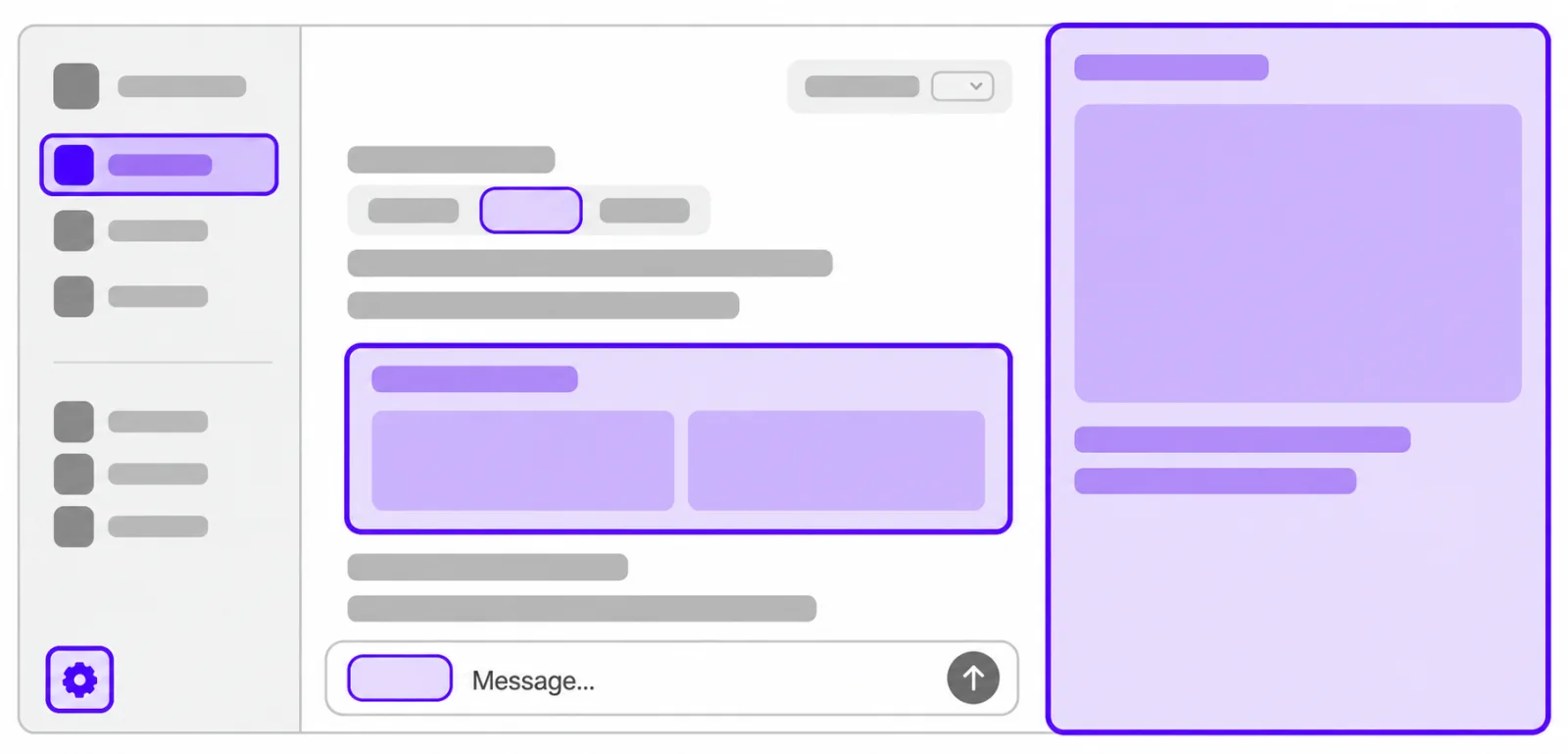
OpenAI MCP Extensions enables developers to hook their plugins into key surfaces of the ChatGPT user experience, including the sidebar, composer, and file viewers.
Plugin extensions on the web are coming soon to ChatGPT Free and Go users. Existing plugin functionality is unaffected. Composer mentions are available only in the ChatGPT desktop app.
Try it out
Get a feel for extensions with Bits & Bolts, our kitchen sink plugin. We’ll keep it up to date as new extensions roll out.
 Install Bits & Bolts Remote Try the examples in ChatGPT.
Start building
Use the GitHub repository for installation, SDK examples, and the full specification.
TypeScript SDK Add extensions to your MCP server and app UI. Python SDK Add server-side extensions with the MCP Python SDK. Protocol specification Defines the formal, language-agnostic API that extends the MCP and MCP Apps specifications.
Once your server is ready, connect and test your plugin, then package it for distribution.
Extension reference
Extensions give users new ways to interact with your plugin across ChatGPT. Declaring support for an extension takes just a few lines of SDK code.
| | Extension | What users can do | | | ---------------------------------------------------------------------------------------------------------------------- | ------------------------------------------------------------------------------------------------------------ | | | Sidebar apps | Give users a place to open your app from the sidebar and work in it fullscreen. | | | Conversation panels | Let users open your app beside a conversation, keeping their work and chat together. | | | Plugin settings | Let users configure your plugin’s product-specific settings from within ChatGPT. | | | File viewers and editors | Open supported files in your own interface, with reading, live updates, and saving changes handled together. | | | Display modes | Choose where and how your app appears in ChatGPT conversations. | | | Deep links | Take users directly to a specific page or item within your sidebar app. | | | Model-App Context | Keep ChatGPT and your MCP App in sync with bidirectional context sharing. | | | Composer mentions | Let users find and select content from your plugin in the ChatGPT desktop composer. | | | Rich forms | Ask users for structured input or let them choose from images, then return their response to your tool. |
Sidebar apps
Add an entry to the global sidebar that launches your MCP App fullscreen.
Your browser does not support the video tag.
Pass this metadata as `_meta` when registering your MCP App tool. Replace `ui://parts/library` with your registered UI resource URI:
import type { OpenAIUiToolMetadata } from "@openai/mcp-extensions/server";const toolMetadata = {
  ui: { resourceUri: "ui://parts/library" },
  "openai/ui": {
    entrypoints: [{ type: "global" }],
  } satisfies OpenAIUiToolMetadata,
};
Use `{ type: "thread" }` to add an entrypoint in a conversation’s side panel. See the entrypoint guidefor full registration examples.
File viewers and editors
Open your MCP App in the thread side panel when a user opens a file with a supported extension.
Your browser does not support the video tag.
Use a file entrypoint in your tool’s `_meta`, with the extensions your viewer supports:
import type { OpenAIUiToolMetadata } from "@openai/mcp-extensions/server";const toolMetadata = {
  ui: { resourceUri: "ui://parts/viewer" },
  "openai/ui": {
    entrypoints: [{ type: "file", extensions: ["stl"] }],
  } satisfies OpenAIUiToolMetadata,
};
Replace `ui://parts/viewer` with your registered UI resource. The app receives a resource URI for the opened file. Follow the file handler guideto receive that input and read the resource with the app SDK.
Rich forms
Extend standard MCP forms with richer components native to ChatGPT.
Your browser does not support the video tag.
import type {
  OpenAIForm,
  OpenAIFormOption,
} from "@openai/mcp-extensions/server";function partSelectionSchema(parts: OpenAIFormOption[]): OpenAIForm {
  return {
    type: "object",
    properties: {
      part: {
        type: "string",
        title: "Part",
        oneOf: parts,
      },
    },
    required: ["part"],
  };
}
Pass this schema as `requestedSchema` in your form request. Each option uses `const` and `title`, with an optional `x-openai-thumbnail` icon. OpenAI-registered MCP servers require multi-round-trip requests (MRTR). The SDK’s extended forms guideshows the legacy `elicitInput` helper for direct MCP connections.
Extensions in the wild
See how plugins you already know are building with extensions.

Canva
Sidebar Tabs enable Canva users to create designs and preview them as a native sidebar feature of ChatGPT.

Figma
Composer Mentions enable Figma users to search for and mention files directly in the ChatGPT desktop app.

Adobe
File Extension Handlers enable Adobe users to edit files with Acrobat and Photoshop directly in ChatGPT.