

Announcing Ubicloud Machine Images
All Blog Posts

Announcing Ubicloud Machine Images AI Safety Study for DeepSeek V4, Kimi K2.6, and Nemotron 3 Ultra PostgreSQL and the OOM Killer: Why We Use Strict Memory Overcommit Ubicloud Price AdjustmentClickHouse PostgreSQL powered by Ubicloud: Fast transactions and analytics Virtualizing NVIDIA HGX B200 GPUs with Open Source Keeping Documentation Up-To-Date via Automated Screenshot Generation End-to-End OCR with Vision Language Models Hardware Touch, Stronger SSH AI Coding: A Sober Review Does MHz still matter? Life of an inference request (vLLM V1): How LLMs are served efficiently at scale Ubicloud Premium Runners: 2x Faster Builds, 10x Larger Cache PostgreSQL Performance: Local vs. Network-Attached Storage Ubicloud PostgreSQL: New Features, Higher Performance Building Burstables: cpu slicing with cgroups Worry-free Kubernetes, with price-performance of bare metal Ubicloud's Thin CLIent approach to command line interfaces Dewey.py: Rebuilding Deep Research with Open Models Ubicloud Burstable VMs starting at $0.01 per hour Debugging Hetzner: Uncovering failures with powerstat, sensors, and dmidecode Cloud virtualization: Red Hat, AWS Firecracker, and Ubicloud internals OpenAI o1 vs. QwQ-32B: An Analysis Making GitHub Actions and Docker Layer Caching 4x Faster EuroGPT: Open source and privacy conscious alternative to ChatGPT Enterprise Private Network Peering under 200 LinesLantern on Ubicloud: Build AI applications with PostgreSQLElastic-Quality Full Text Search on Postgres: Fully managed ParadeDB on UbicloudUbicloud Load Balancer: Simple and Cost-Effective13 Years of Building Infrastructure Control Planes in RubyDifference between running Postgres for yourself and for othersUbicloud Block Storage: EncryptionAnnouncing New Ubicloud Compute FeaturesHow we enabled ARM64 VMsUbicloud Firewalls: How Linux Nftables Enables Flexible RulesImproving Network Performance with Linux FlowtablesEU's new cloud portability requirements - What do they mean?Ubicloud hosted Arm runners, 100x better price/performanceBuilding block storage for the cloud with SPDK (non-replicated)Open and portable Postgres-as-a-serviceLearnings from Building a Simple Authorization System (ABAC)vCPU, thread, core, node, socket. What do CPU terms mean these days?Introducing Ubicloud
Announcing Ubicloud Machine Images
August 12, 2026 · 2 min read

Hadi Moshayedi
Principal Software Engineer
Today, we are excited to introduce Ubicloud Machine Images (UMIs)! UMIs let you capture the disk of a configured VM and use it to create new VMs. Many workloads need more than a clean operating system. Before a VM is useful, you may need to install packages, deploy an application, and configure monitoring. Repeating those steps for every new VM slows down launches and can produce differences between machines. With machine images, you perform that setup once. Configure a VM, stop it, and capture its disk as an immutable image version. Future VMs can then start from the captured state.
Capture once, launch repeatedly
Machine images are useful whenever you need to launch multiple VMs with the same preconfigured environment. You might use one to package an application server with its dependencies, create standardized development or CI environments, launch prebuilt sandboxes for AI agents and other ephemeral workloads, or keep a known-good system image for quickly recreating a workload. Instead of repeating setup on every VM, you can prepare and test the environment once, then launch new VMs directly from that image. A managed database service is a good example of this pattern. Ubicloud operates a managed database service where each database runs on an isolated VM. Every VM needs the same database packages, backup tooling, monitoring, and platform configuration before it can serve a customer. This common environment is effectively a versioned release artifact. Instead of rebuilding it whenever a customer creates a database, the company prepares and validates it once, then captures it as a machine image version, like db-service@v1. When a customer creates a database, the control plane launches a VM from this image. Most of the preparation is already complete. First boot only needs to apply instance-specific configuration, such as credentials and backup settings, start the services and run health checks. Every new database therefore starts from the same tested foundation without repeating the complete image-building process. When Ubicloud updates the operating system, database packages, backup tooling, or monitoring agents, we prepare and validate a new image version: db-service@v2. Once v2 finishes capturing, it becomes the image's latest version, so new VMs created from db-service@latest pick it up automatically. v1 remains unchanged and can still be requested by label to reproduce earlier deployments.
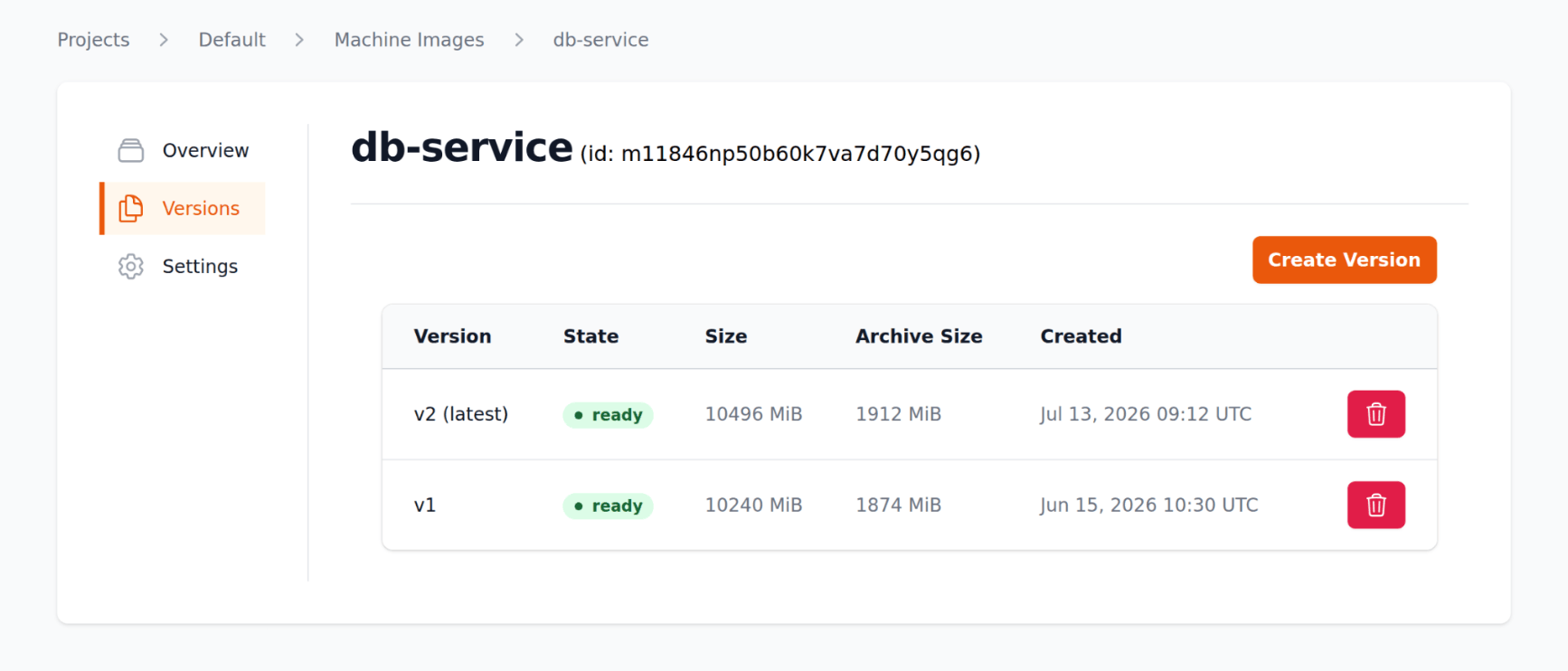
If any issues arise with db-service@v2, we can point db-service@latest back to db-service@v1. New VMs created from db-service@latest then use v1 again. Nothing has to be built or captured again.
Available today
Machine images are available today and you can start using them. You can create and manage them through the Ubicloud console, the CLI (ubi mi), or the API. A few things to keep in mind when capturing a version: the source VM must be stopped and have a single disk of at most 40 GiB, and a VM created from the image needs a boot disk at least as large as the captured disk. Because the new VM inherits everything on the source disk, generalize the source VM before capturing it. Machine images are billed according to the physical storage used by their archives. We omit unused disk regions and compress the remaining data, so the stored size can be significantly smaller than the source VM's disk. Machine images currently cost $0.15 per GiB per month. See the machine images documentation to get started.