
Connection allowlists: Secure your web application's network access
Stay organized with collections Save and categorize content based on your preferences.
Connection allowlists: Secure your web application's network access Stay organized with collections Save and categorize content based on your preferences.

Sebastian Benz

José Luis Zapata
GitHub LinkedIn Bluesky Homepage
Published: September 23, 2026
Modern web apps are increasingly complex, integrating third-party scripts and sometimes dynamically generated code from generative AI. While these integrations are powerful, they significantly increase the risk of data exfiltration. To address this risk, Chrome 152 introduces connection allowlists, a new security mechanism that lets you create a strict network sandbox for your documents and workers.
The challenge of securing network communication
You need explicit control over the endpoints your pages communicate with to manage dependencies and secure your site's architecture. Malicious scripts or hallucinated AI-generated code can bypass app-level checks to send sensitive information to unauthorized servers.
While Content Security Policy (CSP) is a powerful tool for controlling what a page can load and execute, it is not designed to restrict where a page communicates. CSP categorizes requests into specific types, which introduces excessive granularity when you just need a broad network boundary. Furthermore, CSP does not exhaustively cover all web platform APIs, omitting mechanisms like DNS prefetch, navigations, WebRTC, and more.
What are connection allowlists?
Connection allowlists address these risks by making the browser the gatekeeper of all network connections originating from your page. They provide a direct and streamlined approach to managing explicit network requests initiated using Fetch and other web platform APIs.
By sending a `Connection-Allowlist` HTTP response header, you specify the exact URL patterns permitted for all network communication. This enforces a framework-level deny-by-default firewall. Before establishing any connection, the browser verifies the destination against your allowlist and blocks it at the network level if there is no match.
How to use connection allowlists
The policy uses the standardized `URLPattern` syntax to define allowed endpoints. This policy is separate for each window or worker context.
Basic configuration
You can use the `response-origin` token to dynamically add the origin from which the response is served to your allowlist, alongside any specific API endpoints.
Connection-Allowlist: ("https://api.example.com/*" response-origin)Handling redirects and WebRTC
By default, connection allowlists block all redirects and WebRTC connections. If an allowlist is enforced, any request resulting in a redirect is blocked unless you explicitly opt in.
Connection-Allowlist: ("https://api.example.com/*"); redirects=allow; webrtc=allowReporting violations
To monitor potential breakages without interrupting service, you can deploy the feature in report-only mode. This parses the policy and sends violation reports to a specified Reporting API endpoint without blocking the connections. Ensure you also configure the `Reporting-Endpoints` HTTP response header to map your chosen endpoint name to an actual URL.
Connection-Allowlist-Report-Only: ("https://trusted.com/*"); report-to=security-endpointKey use cases
Connection allowlists are designed for high-security or dynamic environments. You'll find them particularly useful for:
- Securing generative AI: If your web app executes generated or untrusted code (like AI-generated UIs or development sandboxes), you can prevent that code from exfiltrating data to external domains.
- Third-party oversight: When embedding third-party scripts or web games, you can guarantee they won't send data to unauthorized servers, even if they become compromised.
- Architectural safeguards: You can enforce a strict network boundary around sensitive parts of your app, ensuring communication only ever happens with your approved backends.
- Connection Allowlists specification
- WICG GitHub repository
- ChromeStatus: Connection Allowlists
This feature can be used as a progressive enhancement to an existing Content Security Policy (CSP) based setup.
Test connection allowlists
The connection allowlists feature is officially available starting in Chrome 152. You can start protecting your web applications today by adding the header to your server's responses.
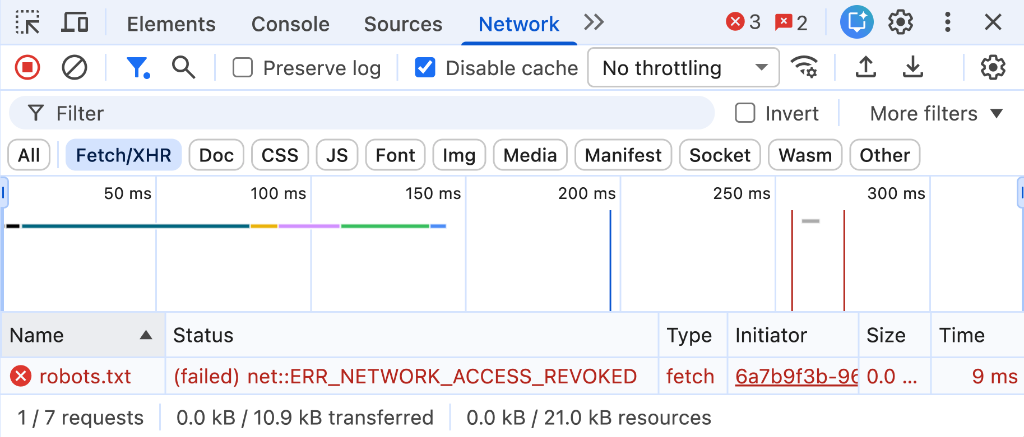
Blocked connection in the Chrome DevTools Network panel.
To test your configuration during development:
1. Configure your local development server to send the `Connection-Allowlist`HTTP response header. 2. Open Chrome DevTools and check the Network panel for requests that are blocked, or the Issues tab for detailed header parsing reports.
Additional resources
Except as otherwise noted, the content of this page is licensed under the Creative Commons Attribution 4.0 License, and code samples are licensed under the Apache 2.0 License. For details, see the Google Developers Site Policies. Java is a registered trademark of Oracle and/or its affiliates.
Last updated 2026-09-23 UTC.
\[\[\["Easy to understand","easyToUnderstand","thumb-up"\],\["Solved my problem","solvedMyProblem","thumb-up"\],\["Other","otherUp","thumb-up"\]\],\[\["Missing the information I need","missingTheInformationINeed","thumb-down"\],\["Too complicated / too many steps","tooComplicatedTooManySteps","thumb-down"\],\["Out of date","outOfDate","thumb-down"\],\["Samples / code issue","samplesCodeIssue","thumb-down"\],\["Other","otherDown","thumb-down"\]\],\["Last updated 2026-09-23 UTC."\],\[\],\[\]\]