


@itssayantan/swale
@itssayantan/swale

0.2.0 • Public • Published 4 days ago
- Readme
- Code Beta
- 14 Dependencies
- 0 Dependents
- 2 Versions
- Why Swale
- Requirements
- Installation
- Getting started
- Commands * swale todo * swale note * swale expense * swale github * swale leetcode * swale llm * swale chat * swale logout * Global options
- Connecting an LLM
- Data storage
- Configuration
- Roadmap
- Contributing
- License
- Local-first. Your records live in a single SQLite file on your machine. No account to create, no server, no sync, no telemetry.
- Bring your own model. Point Swale at Ollama on your laptop or at OpenAI, Anthropic or Groq. Nothing is hardcoded to one provider, and a local model costs nothing to run.
- Credentials stay out of the database. Your GitHub token and any API keys live in a separate `0600` config file, so exporting or copying your data never leaks them.
- Portable data. One file. Copy it, back it up, move it between machines.
- No native modules. Swale uses Node's built-in SQLite, so there is nothing to compile and nothing to break on upgrade.
Swale
A local-first command-line assistant for developers. Your tasks, notes, spending, GitHub activity and LeetCode progress in one place — with an LLM you can talk to, running locally or on a provider of your choice.

---
Contents
---
Why Swale
Swale keeps the things a developer accumulates during a working day — a task, a thought, a receipt, a pull request, a solved problem — in one place reachable from the terminal you already have open.
---
Requirements
Node.js 24 or later. Swale stores your data using Node's built-in `node:sqlite` module, which is why a recent Node release is required.
node --version
A GitHub account is needed for the one-time sign-in. A LeetCode account and an LLM are both optional.
---
Installation
Install globally to get the `swale` command on your `PATH`:
npm install -g @itssayantan/swale
Using another package manager:
pnpm add -g @itssayantan/swale yarn global add @itssayantan/swale
Or run it without installing:
npx @itssayantan/swale todo list
The package is published as `@itssayantan/swale`; the command it installs is `swale`.
---
Getting started
The first time you run any command, Swale signs you in with GitHub using the device flow — the same mechanism the `gh` CLI uses. You are never asked for a password, and Swale never sees one.
$ swale todo listOpen https://github.com/login/device
Enter code: WDJB-MJHT
Approve the code in your browser and Swale builds your profile from your GitHub account. Nothing else is asked of you up front.
It then offers to link LeetCode, which you can skip:
What is your leetcode username? It will be saved locally. [Press Enter to Skip]:That is the whole setup. Everything after this is optional and asked for only when a command needs it — a currency the first time you add an expense, an LLM the first time you chat.
Add your first todo:
$ swale todo add Enter todo: Review the authentication pull request Todo added successfully! To view the entire list use `swale todo list`
Signing in as someone else. Run `swale logout`, then any command. If you have signed in before, Swale offers a list of the accounts it knows and reuses the right records rather than starting fresh.
---
Commands
swale <command> [action] [id]Actions that create or modify a record prompt you for the details interactively rather than taking them as arguments.
Record IDs are UUIDs, shown in the output of every `list` and `read`. Copy the ID from there when using `read`, `update`, or `delete`.
`swale todo`
Track tasks.
| Command | Description | | -------------------------- | ------------------------------------------------- | | swale todo add | Prompts for the todo text and saves it | | swale todo list | Lists your todos, newest activity first | | swale todo read <todoId> | Shows a single todo in full | | swale todo update <todoId> | Prompts for replacement text and updates the todo | | swale todo delete <todoId> | Permanently deletes the todo |
$ swale todo list ID: 6f3c2b1e-9a44-4d0f-8c21-7e5b90a1d2c8 todo | Created by: Ada Lovelace <ada@example.com> | Created: 5 minutes ago
Review the authentication pull request
`swale note`
Capture short pieces of text you want to keep.
| Command | Description | | -------------------------- | ------------------------------------------------- | | swale note add | Prompts for the note text and saves it | | swale note list | Lists your notes | | swale note read <noteId> | Shows a single note in full | | swale note update <noteId> | Prompts for replacement text and updates the note | | swale note delete <noteId> | Permanently deletes the note |
`swale expense`
Record personal spending. Amounts are shown in the currency you pick the first time you add one.
| Command | Description | | -------------------------------- | --------------------------------------------------------------------------------- | | swale expense add | Prompts for a description and an amount | | swale expense list | Lists your expenses | | swale expense filter | Prompts for text and lists expenses whose description matches, in full or in part | | swale expense read <expenseId> | Shows a single expense in full | | swale expense update <expenseId> | Asks whether to change the amount, the description, or both | | swale expense delete <expenseId> | Permanently deletes the expense |
$ swale expense add What did you spend on? Team coffee How much did you spend (default currency: INR)? 240 Expense added successfully! To view the entire list use `swale expense list`
Supported currencies: `INR`, `USD`, `EUR`, `GBP`, and `Other`. Choosing `Other` displays raw amounts without a currency symbol.
`swale github`
Read your GitHub activity. Aliased to `swale gh`.
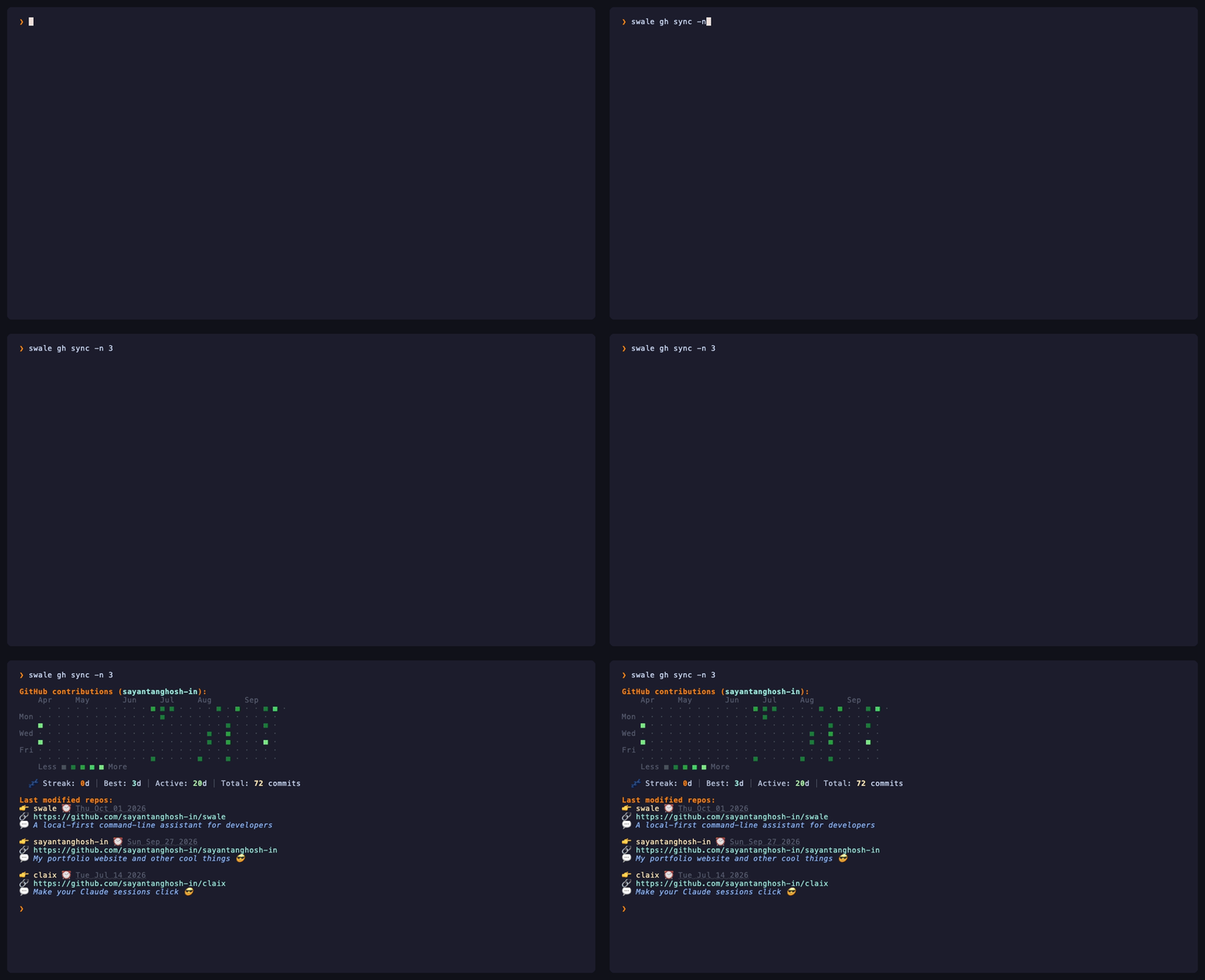
| Command | Description | | ------------------------ | ----------------------------------------------------- | | swale github sync | Your five most recently updated repositories | | swale gh sync | Same, shorter | | swale gh sync --limit 20 | Show more. \-n works too; GitHub caps the page at 100 |
$ swale gh sync Last modified repos: 👉 claix ⏰ Thu Sep 24 2026 🔗 https://github.com/sayantanghosh-in/claix 💬 Make your Claude sessions click 😎

The account read is the one you signed in with — Swale looks the login up from your stored connection rather than assuming it.
Swale requests only the `read:user` and `user:email` scopes, so it can read your public profile and nothing else. It cannot write to your repositories, and private repositories are not visible to it.
`swale leetcode`
Show LeetCode progress. Aliased to `swale lc`.
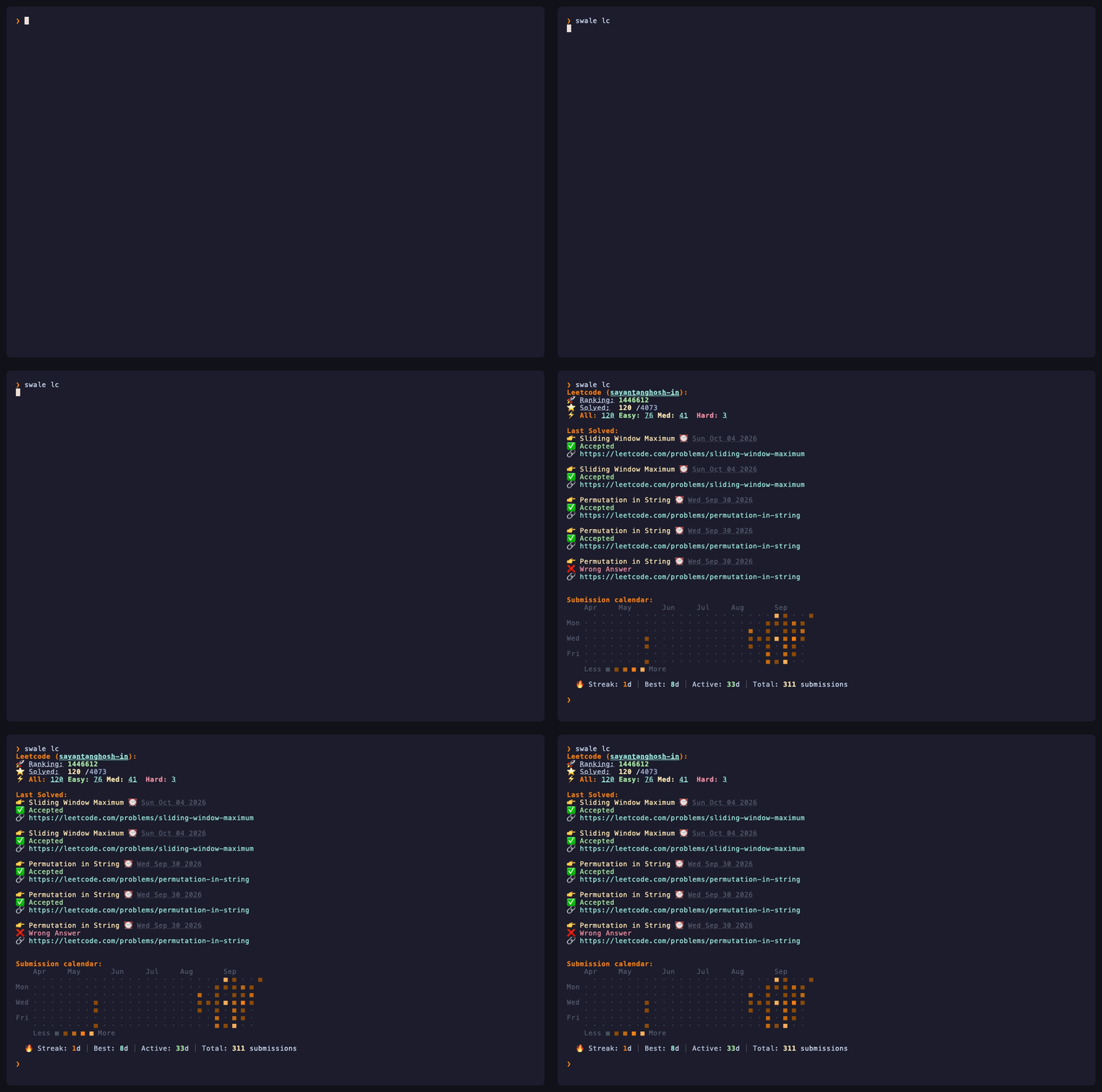
| Command | Description | | ------------------------- | --------------------------------------------- | | swale leetcode | Stats for the account you linked during setup | | swale leetcode <username> | Stats for any public LeetCode profile | | swale lc <username> | Same, shorter |
$ swale lc Leetcode (sayantanghosh-in): 🚀 Ranking: 1689492 ⭐️ Solved: 100 /4055 ⚡️ All: 234 Easy: 66 Med: 34 Hard: 0
Last Solved: 👉 Find First and Last Position of Element in Sorted Array ⏰ Thu Sep 24 2026 ✅ Accepted 🔗 https://leetcode.com/problems/find-first-and-last-position-of-element-in-sorted-array

Only public profile data is read, and no LeetCode credentials are involved — just the username.
`swale llm`
Connect a model. Swale asks whether it is local or remote and stores the answer in your config file.
$ swale llm ? Choose LLM Type? Local ? Local LLM base URL: http://localhost:11434 ? Local model name: llama3 🚀 LLM connected successfully...
Run it again at any time to switch models or providers. See Connecting an LLM.
`swale chat`
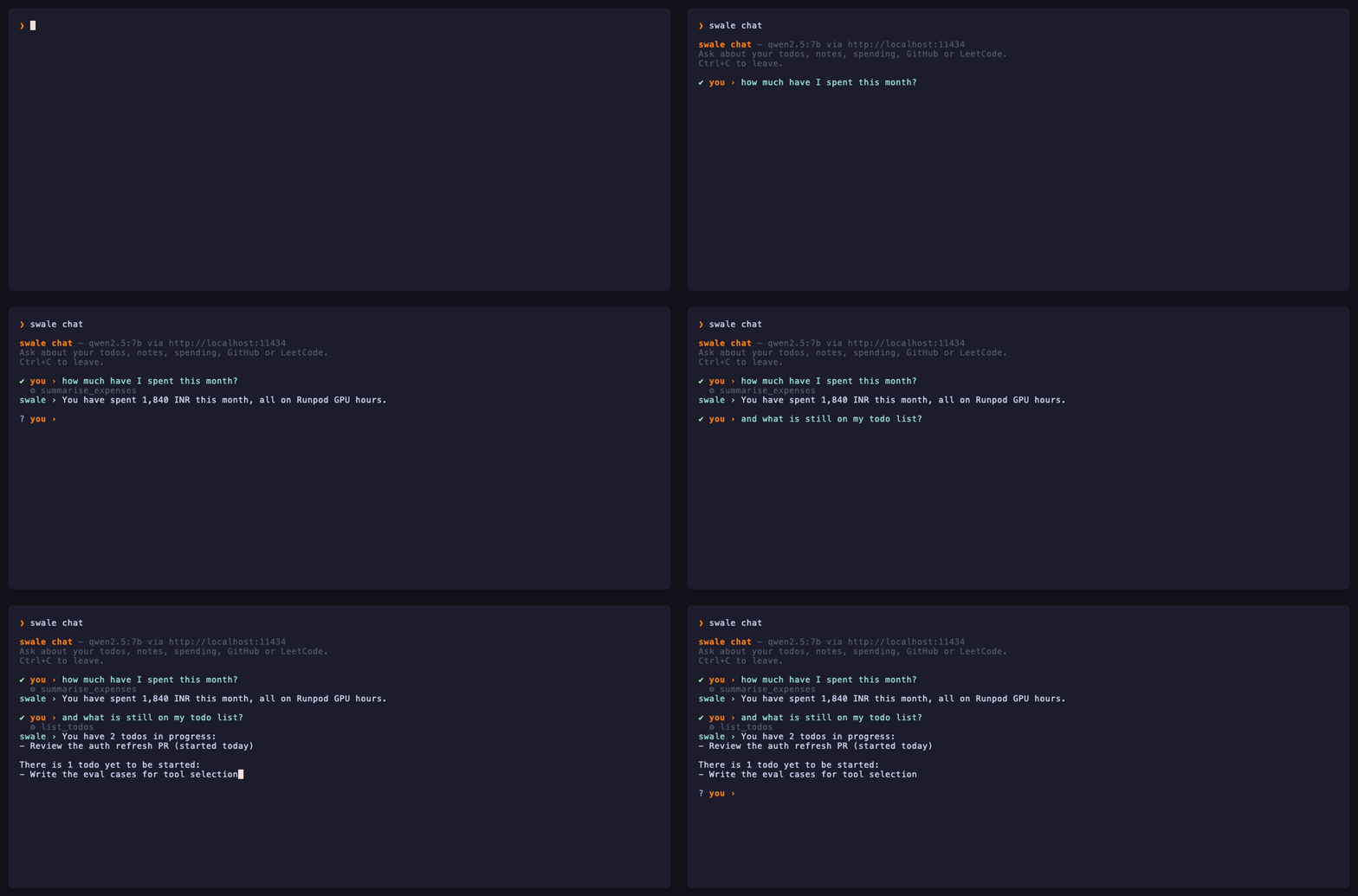
Ask the connected model a question. Aliased to `swale c`. The reply streams back as it is generated.
$ swale chat ? Ask something > Explain the difference between a rebase and a merge

The recording above is a real response from `qwen2.5:7b` running locally through Ollama — nothing left the machine.
If no model is configured yet, `swale chat` runs the `swale llm` setup first, then continues.
`swale logout`
Signs you out: clears the stored GitHub credentials and marks every local profile inactive. Aliased to `swale signout`.
Your records are not deleted. Sign back in with the same GitHub account and everything is where you left it.
Global options
| Option | Description | | --------------- | ------------------------------------------------------------- | | \-V, \--version | Print the installed version | | \-h, \--help | Show help. Also available per command, e.g. swale todo --help |
---
Connecting an LLM
Swale is built so a model on your own machine is a first-class option, not a fallback.
Local
Anything that speaks the Ollama API. Install Ollama, pull a model, and point Swale at it:
ollama pull llama3 swale llm # choose Local, accept the defaults
| Prompt | Default | | ------------------ | ---------------------- | | Local LLM base URL | http://localhost:11434 | | Local model name | llama3 |
Nothing leaves your machine, and there is nothing to pay for.
Remote
| Provider | Needs | | ------------- | ---------------------------------------------------------- | | OpenAI | API key, model name | | Anthropic | API key, model name | | Groq | API key, model name | | Other | API key, model name, base URL — anything OpenAI-compatible |
API keys are entered masked and written to `~/.swale/config.json` with `0600` permissions. They are never written to the database, so copying or exporting `data.db` cannot leak them.
---
Data storage
Swale keeps two files in a directory it creates on first run.
| File | Holds | | ----------- | ---------------------------------------------------------- | | data.db | Your todos, notes, expenses, profile and linked accounts | | config.json | Your GitHub token and LLM settings — 0600, never in the DB |
| Platform | Location | | ----------- | -------------------------------------------------------------------------- | | macOS | \~/.swale/ | | Linux | \~/.swale/ | | Windows | %APPDATA%\\swale\\ — typically C:\\Users\\<you>\\AppData\\Roaming\\swale\\ |
On Windows, in the unusual case that the `APPDATA` environment variable is not set, Swale falls back to `C:\Users\<you>\.swale\`.
On macOS and Linux the directory is created with `0700` permissions, so only your user account can read it.
Because the database is a single ordinary file, you can back it up by copying it, and inspect it with any SQLite client:
sqlite3 ~/.swale/data.db sqlite> .mode box sqlite> .tables sqlite> SELECT * FROM todos;
Timestamps are stored as ISO 8601 strings in UTC, so they sort correctly and compare reliably.
---
Configuration
`SWALE_DATA_DIR`
Overrides the directory Swale uses for its database and config. Useful for keeping separate sets of data, or for trying commands without touching your real records:
SWALE_DATA_DIR=/tmp/swale-scratch swale todo add
The path is resolved relative to your current directory if it isn't absolute, and the directory is created if it doesn't exist.
`SWALE_GITHUB_CLIENT_ID`
Overrides the OAuth app used for sign-in. Set this if your organisation will not authorise third-party apps and you want to point Swale at your own:
SWALE_GITHUB_CLIENT_ID=Ov23li... swale gh sync
The default client ID is public by design — the device flow uses no client secret.
---
Roadmap
v0.2.0 — this release. GitHub sign-in and sync, LeetCode stats, and a configurable LLM with a streaming chat command.
Next. Insights generated from your own data by the connected model: a morning digest, a summary of what you shipped, and answers to questions that span more than one source. After that, an agent loop with tools over the same data, so it can decide for itself what to read before it answers.
---
Contributing
Bug reports and feature requests are welcome at github.com/sayantanghosh-in/swale/issues.
To work on Swale locally:
git clone https://github.com/sayantanghosh-in/swale.git cd swale pnpm install
pnpm dev todo list # run from source pnpm typecheck # check types pnpm format # format with Prettier pnpm build # compile to dist/
Set `SWALE_DATA_DIR` while developing so you don't write to your real database:
SWALE_DATA_DIR=/tmp/swale-dev pnpm dev todo list
Re-recording the GIFs
The recordings in this README are generated from VHS tapes in `docs/tape/`, so they can be regenerated rather than re-recorded by hand.
brew install vhs pnpm demo:record
Each recording reseeds an isolated demo database first (`pnpm demo:seed`), because the commands genuinely mutate data — without it, a second run shows the first run's leftovers. Your own `~/.swale` is only ever read from.
---
License
MIT © Sayantan Ghosh