

Worktrunk
Worktrunk
Worktrunk is a CLI for Git worktree management, designed for parallel AI agent workflows.
Worktrunk’s three core commands make worktrees as easy as branches. Plus, Worktrunk has a bunch of quality-of-life features to simplify working with many parallel changes, including hooks to automate local workflows & copy-on-write build caches.
A quick demo:

Listing worktrees, switching, cleaning up
Context: git worktrees
Section titled “Context: git worktrees”
AI agents like Claude Code and Codex can handle longer tasks without supervision, such that it’s possible to manage 5-10+ in parallel. Git’s native worktree feature gives each agent its own working directory, so they don’t step on each other’s changes.
But the git worktree UX is clunky. Even a task as small as starting a new worktree requires typing the branch name three times: `git worktree add -b feat ../repo.feat`, then `cd ../repo.feat`.
Worktrunk makes git worktrees as easy as branches
Section titled “Worktrunk makes git worktrees as easy as branches”
Worktrees are addressed by branch name; paths are computed from a configurable template. Commands that take a branch also accept the path of the worktree it is checked out in.
Start with the core commands
Core commands:
| Task | Worktrunk | Plain git | | --------------------- | ----------------------------- | --------------------------------------------------------------------------- | | Switch worktrees | wt switch feat | cd ../repo.feat | | Create + start Claude | wt switch \-c \-x claude feat | git worktree add \-b feat ../repo.feat && \\ cd ../repo.feat && \\ claude | | Clean up | wt remove | cd ../repo && \\ git worktree remove ../repo.feat && \\ git branch \-d feat | | List with status | wt list | git worktree list (paths only) |
Expand into the more advanced commands as needed
Workflow automation:
- Hooks — run commands on create, pre-merge, post-merge, etc
- LLM commit messages — generate commit messages from diffs
- Merge workflow — squash, rebase, merge, clean up in one command
- Interactive picker — browse worktrees with streaming CI status and diff, log, PR and comment previews
- Share build caches — ten worktrees get `target/`, `node_modules/`, etc without building or copying them (on APFS, btrfs, and XFS)
- wt list --full — CI status and AI-generated summaries per branch
- PR checkout — `wt switch pr:123` to jump straight to a PR’s branch
- Dev server per worktree — `hash_port` template filter gives each worktree a unique port
- Aliases & per-branch variables — custom `wt <name>` commands and branch-scoped state for hook templates
- …and lots more
Multiple parallel agents, same simple commands:
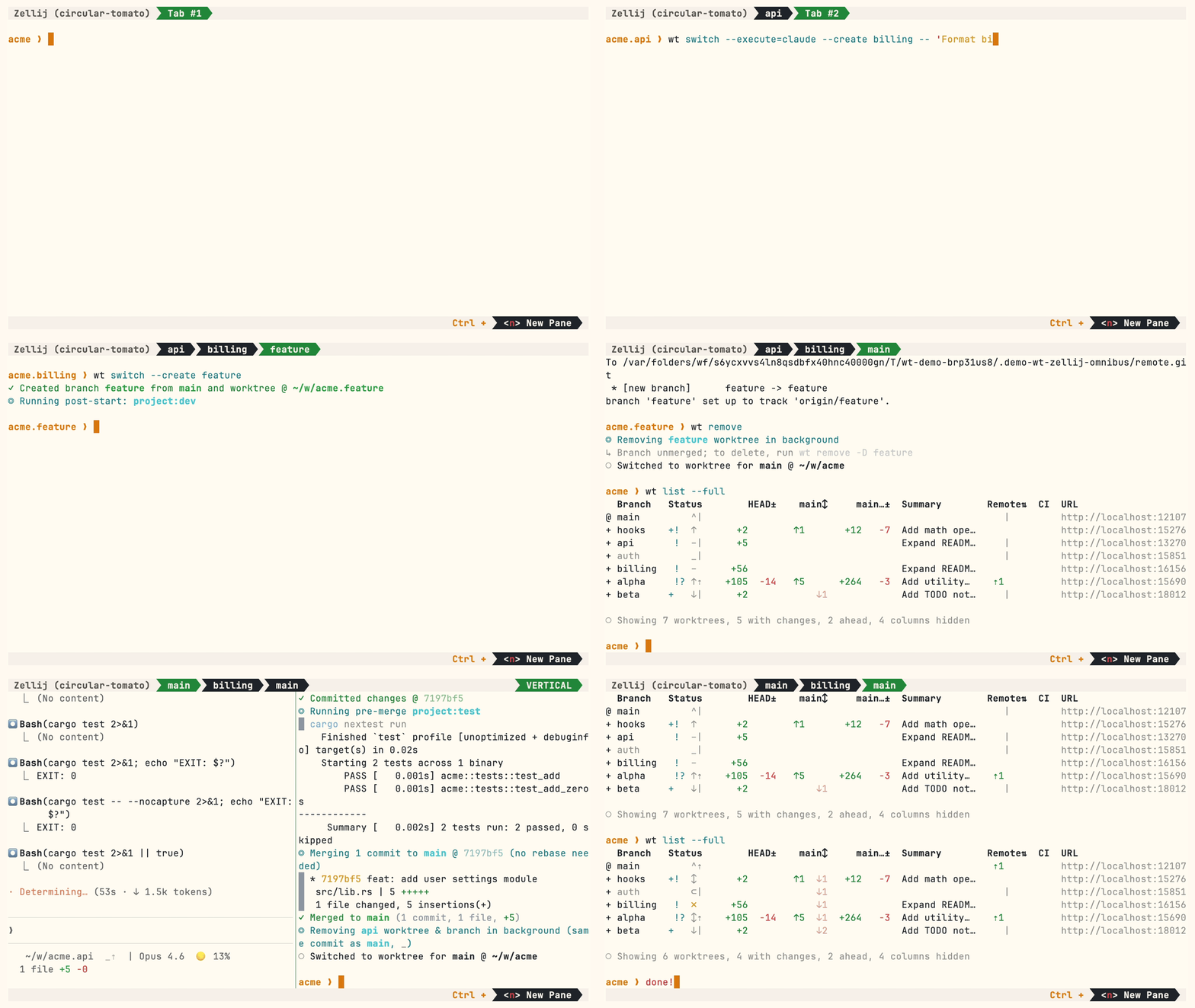
Multiple Claude agents in parallel with interactive picker, hooks, LLM commits, and merge
Install
Homebrew (macOS & Linux):
brew install worktrunk && wt config shell installShell integration allows commands to change directories.
Cargo:
cargo install worktrunk && wt config shell installWindows & other
Windows. `wt` defaults to Windows Terminal’s command, so Winget additionally installs Worktrunk as `git-wt` to avoid the conflict:
winget install max-sixty.worktrunkgit-wt config shell installAlternatively, disable Windows Terminal’s alias (Settings → Apps → Advanced app settings → App execution aliases → “Terminal”/“Terminal Preview”) to use `wt` directly.
Free code signing provided by SignPath.io, certificate by SignPath Foundation — policy.
Arch Linux:
sudo pacman -S worktrunk && wt config shell installConda / Pixi (community-maintained feedstock):
conda install -c conda-forge worktrunk && wt config shell installOr with Pixi: `pixi global install worktrunk && wt config shell install`.
Quick start
Create a worktree for a new feature:
wt switch --create feature-auth✓ Created branch feature-auth from main and worktree @ ~/repo.feature-authThis creates a new branch and worktree, then switches to it. Do your work, then check all worktrees with wt list:
wt list Branch Status HEAD± main↕ main…± Remote⇅ Commit Age Message@ feature-auth + ↑ +27 -8 ↑1 +31 4bc72dc 2h Add authenticatio…^ main ^⇡ ⇡1 0e631ad 1d Initial commit○ Showing 2 worktrees, 1 with changes, 1 ahead, hidden: PathThe `@` marks the current worktree. `+` means staged changes, `↑1` means 1 commit ahead of main, `⇡` means unpushed commits.
When done, either:
PR workflow — commit, push, open a PR, merge via GitHub/GitLab, then clean up:
wt step commit # commit staged changesgh pr create # or glab mr createwt remove # after PR is mergedLocal merge — squash, rebase onto main, fast-forward merge, clean up:
wt merge main◎ Generating commit message and committing changes... (2 files, +53, no squashing needed) Add authentication module✓ Committed changes @ a1b2c3d◎ Merging 1 commit to main @ a1b2c3d (no rebase needed) * a1b2c3d Add authentication module auth.rs | 51 +++++++++++++++++++++++++++++++++++++++++++++++++++ lib.rs | 2 ++ 2 files changed, 53 insertions(+)✓ Merged to main (1 commit, 2 files, +53)◎ Removing feature-auth worktree & branch in background (same commit as main, _)○ Switched to worktree for main @ ~/repoFor parallel agents, create multiple worktrees and launch an agent in each:
wt switch -x claude -c feature-a -- 'Add user authentication'wt switch -x claude -c feature-b -- 'Fix the pagination bug'wt switch -x claude -c feature-c -- 'Write tests for the API'The `-x` flag runs a command after switching; arguments after `--` are passed to it. Configure post-start hooks to automate setup (install deps, start dev servers).