Your agent setup. Wherever you run.
Your agent setup.
Wherever you run.Run agents on your laptop or a remote Linux box with the skills, instructions, MCP servers and supported settings you already use. Ferry keeps them in sync as you work, so every box gets your setup without you rebuilding it by hand.
Change a skill locally. Your remote agents get it too.
curl npm
`$ curl -fsSL https://raw.githubusercontent.com/dlhck/ferry/main/install.sh | sh` Copy
`$ npm i -g @dlhck/ferry` Copy
macOS or Linux, arm64 or x64. With npm, do not pass `--omit=optional`. Update later with `ferry self-update`.
Source on GitHubnpm packageReleases
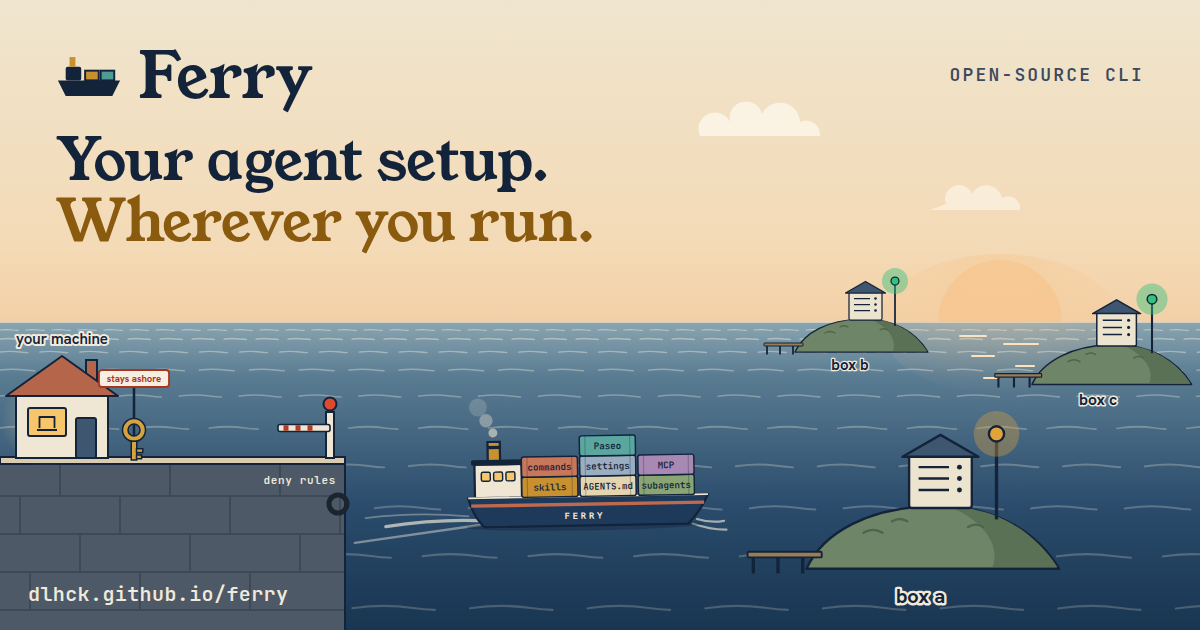
A ferry carries your agent setup from your machine to three boxes On the left is a harbor with a house labelled your machine. Crates labelled skills, AGENTS.md, subagents, commands, settings, MCP and Paseo pass a deny rules checkpoint and board a ferry. A key tries to board, the barrier stays down, and the key goes back to a sign that reads stays ashore. The ferry stops at a lighthouse labelled snapshot, private git repo, then visits box a, box b and box c. At each box it unloads a copy of the cargo and the box lamp turns from amber to green. box b box c snapshot private git repo FERRY box a your machine you change a skill stays ashore deny rules ferry sync, simplified
Pause Run ferry sync
$ ferry sync# check the carried files against the deny rules# the key stays ashore, logins never leave this machine# publish the snapshot to your private repo# box a pulls the snapshot and links it# box b pulls the snapshot and links it# box c pulls the snapshot and links it
Narration, not real output
What syncs Select an item
- skills
- AGENTS.md
- subagents
- commands
- settings
- MCP servers
- Paseo
- logins and keys
- ### Configure once. Keep every box in sync. Update your skills and instructions on your machine. Ferry's watcher sends those changes to your boxes automatically. ferry watch install
- ### Open remote previews in your local browser. Forward remote dev server ports to localhost, with automatic forwarding for servers announced through Ferry. ferry tunnel --follow
- ### Continue your project on another machine. Move a Git project to a box and back, with its untracked files and its Claude and Codex sessions, so you can resume the conversation there. ferry move
- ### Logins stay where they are. Ferry starts logins on the box and never copies a token. ferry auth
- ### Claude Code `claude` Carries Skills in `~/.claude/skills`, `~/.claude/CLAUDE.md`, subagents, custom commands, hook scripts in `~/.claude/hooks`, and the remote and stdio MCP servers in `~/.claude.json`. Settings `enabledPlugins`, `extraKnownMarketplaces`, `permissions`, `hooks`, `attribution`, `includeCoAuthoredBy`, `model`, `alwaysThinkingEnabled`. The box installs the plugins. `env` and `apiKeyHelper` stay on your machine. Login `ferry auth claude`, finished in a browser here. MCP logins with `ferry auth claude --mcp <server>`.
- ### Codex `codex` Carries `~/.codex/AGENTS.md` and the remote and stdio MCP servers in `mcp_servers`. Skills come from `~/.agents/skills`. Settings `model`, `model_reasoning_effort`, `model_reasoning_summary`, `model_verbosity`, `features`, `web_search`. Providers, profiles, `notify` and project trust stay on your machine. Login `ferry auth codex` with a device code.
- ### Pi `pi` Carries `~/.pi/agent/AGENTS.md`. Skills come from `~/.agents/skills`. Settings `defaultProvider`, `defaultModel`, `defaultThinkingLevel`, `enabledModels`, `thinkingBudgets`, `enableSkillCommands` in `~/.pi/agent/settings.json`. Packages, resource paths, the shell path, and the npm and shell commands stay on your machine. Install Ferry installs and updates Pi. It installs Node and npm first if the box has none, or a Node that is too old. Login By hand. Ferry cannot drive the Pi login. SSH to the box, run `pi`, then use `/login`.
- ### Cursor Agent `cursor-agent` Carries Remote and stdio MCP servers, merged into `~/.cursor/mcp.json`. Skills come from `~/.agents/skills`. Settings `model`, `maxMode`, `hasChangedDefaultModel`, `attribution` in `~/.cursor/cli-config.json`. Permissions, the status line and the login state stay on your machine. Login `ferry auth cursor`.
- Berth open
- Berth open
- Tailscale or plain OpenSSHThe link to each box.
- Any private git hostHolds the snapshot. An SSH URL needs an SSH agent with a key that can push.
- `npx skills add`Through `ferry skills add`, as a global copy that Ferry carries.
- launchd and systemdUser services for watch and tunnel, on macOS and Linux.
- The macOS menu bar and waybarThe Ferry menu bar app on macOS, and a waybar module on Linux.
- Skills
- Agent instructions in `~/AGENTS.md`, and your instructions for one box
- Subagents
- Custom commands
- Hook scripts
- Agent CLI settings, without the keys that can hold secrets
- Remote and stdio MCP servers, without env values
- ADE setup, such as agent profiles, plugins and providers, through an integration
- Logins
- Credential files
- Tokens and API keys
- `.env` files
- Env values of MCP servers
- A credential in the origin URL of a project
- Whole settings files
- A Linux box you can reach with SSHWith `curl` or `wget`. Debian and Ubuntu are tested.
- A way to reach itTailscale on both machines, or an OpenSSH destination like `user@box.example`.
- An empty private git repositoryThis becomes the snapshot. For an SSH URL, you also need an SSH agent with a key that can push to it.
Seven kinds of setup sync. Logins and keys never do.
One voyage of `ferry sync`. The picture simplifies three things. The ferry does not deliver to the boxes. Ferry connects to each box over SSH or Tailscale, and the box pulls the snapshot from your private repo. A file that matches a deny rule is not turned back while the rest sails on. The match stops the whole sync, and nothing is published. Paseo cargo does not go into the snapshot. Ferry writes it to each box directly.
Stop setting up the same workflow on every machine.
You've taught your agents how you work. Moving to a remote box should carry that work with you.
Your machine publishes. Each box pulls.
Your machine is the source of truth. The boxes follow it through a private git repository that Ferry calls the snapshot.
1. ### Your machine Your skills, `~/AGENTS.md`, Claude subagents, commands and hook scripts, some Claude, Codex, Pi and Cursor Agent settings, and remote and stdio MCP servers. 2. ferry sync 3. ### Private snapshot repo An empty private git repository you create. Ferry publishes the carried files to it. 4. pull and link over SSH or Tailscale 5. ### box a, box b, ... Each box clones the snapshot and links its harness directories to it.
It also sets up the box
Ferry installs and updates the agent CLIs on each box (`claude`, `codex`, `pi`, `cursor-agent`), plus `gh`, `jq` and the tools you list. It starts logins there. It never copies one.
See the plan first
`--dry-run` on `init`, `sync`, `update`, `move`, `revert` and `box remove` shows what Ferry will do. `--json` on any command gives output for scripts and agents.
Four agents, ready on every box
For each agent, Ferry installs and updates the CLI on the box and starts its login there. Codex, Pi and Cursor Agent read the shared skills in `~/.agents/skills`, and Claude Code reads its own in `~/.claude/skills`. The instruction files of Claude Code, Codex and Pi link to your `~/AGENTS.md`. On a box, a header that names the box and your instructions for that box come first.
GitHub CLI and jq
Ferry installs `gh` and `jq` on every box. `ferry auth gh` logs `gh` in on the box and sets up the box SSH key for GitHub. The box uses `jq` to merge the carried settings keys and MCP servers into its own files. It sends back only a status, never the file.
Your own tools
Add any other tool in a `[tools.<id>]` table with a version policy: `"operator"`, `"latest"` or an exact version. With `auth_status`, `auth_login` and `auth_hosts`, `ferry auth <id>` logs it in.
Integrations
Paseo
`ferry integrations enable paseo`
Runs the Paseo daemon on a box. Ferry carries your agent profiles, managed Git plugins at their installed commit, npm plugins at their installed version, the portable fields of provider definitions, metadata model preferences, shared system instructions, and portable terminal profiles. These go to the box directly, not through the snapshot.
With `paseo_auto_archive = true`, Ferry also carries the auto-archive-after-merge switch. When `ferry move` puts a project on a box with Paseo, Ferry registers the project and imports each carried session as a Paseo agent. A move back does the same in the Paseo on your machine.
Plugin settings, provider env blocks and commands, terminal env blocks and paths, and credentials stay on each host. When one agent process runs out of memory, the daemon and the other agents keep running. Set `paseo_relay = true` for relay pairing.
Sherlock
`ferry integrations enable sherlock`
With Sherlock on your machine, Ferry adds `ferry sherlock add <name> --box <box> --target <host:port> --type <type>`. It registers a Sherlock connection that tunnels through the box on the first query, so Sherlock can query a database on the box, or one that only the box can reach.
Sherlock keeps the password in the keychain of your machine. Ferry never stores it and never edits the Sherlock config. `ferry status` checks that each box can reach its target.
Berth open
`ferry integrations` lists the part of each integration: `box` for a service on the box, `operator` for commands and checks on your machine. More agents and integrations are planned. Request one on GitHub.
Works with
After setup, you keep working here
The commands you use after setup, with the details.
Terminal
4 Tue 9:41
4 items need action. Checked 12 seconds ago.
---
box-a ONLINE
claude/linear needs a login.
claude/postgres needs DATABASE\_URL on the box. Set it in the env of postgres in \~/.claude.json on the box.
gh is 2.80.0 on the box, and the target is 2.83.1.
Ports
web · shop → localhost:3000 api · shop → localhost:8787
---
box-b OFFLINE
Tailscale host box-b is offline
---
Sync now Refresh now ✓Notifications Quit⌘Q
Illustration
ferry menubar install
A macOS menu bar app that shows the report of `ferry status --brief` for each box, and the ports of running tunnels. It sends a notification when a box goes offline, a login or MCP login is needed, or a tool drifts. Sync now runs `ferry sync`. It reads the status that `ferry watch` writes. On Linux, a waybar module shows the same report.
Sample data. The count shows items that need action. An offline box counts as one, ports do not count. Click the ferry icon to open or close the menu.
1. ferry watch install Syncs each change after one second. It runs as a launchd or systemd user service. 2. ferry status --brief Shows only what needs action: offline boxes, low disk or memory on a box, logins, MCP logins, stdio MCP servers that lack something on the box, tool drift, and hooks that run a home file Ferry does not carry. Plain `ferry status` checks the link, the snapshot, the logins and the tools. 3. ferry doctor Checks the SSH agent, push access to the snapshot, SSH and Tailscale to each box, the box deploy key, linger and the installed services. It changes nothing and prints a fix for each failed check. 4. ferry revert <commit> Undoes one snapshot commit on your machine, including the carried settings keys, then syncs all boxes. `ferry history` lists the last 20 commits and the paths each one changed. `--no-sync` skips the sync. 5. ferry box add <name> Adds another box. `sync`, `status` and `update` act on all boxes, or on one with `--box`. 6. \~/.ferry/boxes/<name>/AGENTS.md Instructions for one box, for example "this box runs the staging database". On a box, each instruction file is a Ferry header that names the box, then this file, then your `~/AGENTS.md`. Agents run `ferry whoami` to check where they are. The file never goes into the snapshot. `ferry box add` creates it empty. For your first box, create it by hand. 7. ferry box remove <name> \--uninstall Removes Ferry from a box, then the box from your config. Ferry prints the plan and asks you to type the box name. Its services, links, checkout and binary go. Logins, SSH keys, projects and installed tools stay on the box. 8. ferry tunnel 3000 Opens a box port on 127.0.0.1 on your machine. `ferry tunnel db.example:5432:15432` opens port 5432 of a host that the box can reach, such as a database that only accepts connections from the box network, on local port 15432. Ferry checks first that the box can connect to it. Run `ferry expose` on the box and `ferry tunnel --follow` here, and each dev server port opens on its own. 9. ferry move <path> \--to-box <name> Carries a git project to a box, untracked files included, with the Claude and Codex sessions of the project and the Claude project memory, so `claude --resume` and `codex resume` find them there. `--from-box` brings the project back. A session that fails the deny rules stays on the source. The scan cannot find a password that you typed in free prose, so use `--no-sessions` when a session can hold one. 10. ferry adopt --from-box <name> <skill> Copies a skill that an agent wrote on a box to your machine. The Ferry on the box runs the deny rules first, and you see the diff or the file list before Ferry asks. Then `ferry sync` publishes it to every box. `ferry status` lists the box-only skills. 11. ferry skills add Installs skills with `npx skills add` as a global copy, so Ferry carries them. 12. \~/.agents/skills/ferry The Ferry skill. It tells your agents how to work with Ferry on both machines, for example not to edit a Ferry-managed file on the box. `ferry init` writes it here and the snapshot carries it to the boxes. `ferry self-update` refreshes it. `ferry init --no-skill` leaves it out. 13. \[tools.<id>\] Each tool in the config has a version policy: `"operator"`, `"latest"` or an exact version. The menu bar and `ferry status` report drift.
What boards, and what stays ashore
Ferry carries configuration. It does not carry anything that proves who you are.
Boards the ferry
Stays ashore
These never leave the machine that has them.
Checked before each publish
Deny rules catch secret files, private keys, tokens, secret config keys and executable binaries. Scripts, such as hook scripts, pass and keep their executable bit. A match stops the sync. The error names the file, never the value.
Stdio MCP servers carry no values
Ferry carries the command, the arguments and the names of the env keys. You set the values on the box, and Ferry keeps them. A token, a secret flag with a value, or a URL with a credential in the command or the arguments stops the sync. Ferry skips a server that runs an inline script, such as `sh -c` or `node -e`, because it cannot check the script, and a server that refers to a path in your home. It never installs a command.
What leaves a box is checked on that box
For `ferry move --from-box` and `ferry adopt --from-box`, the Ferry on the box runs the deny rules. It reads each file once and sends exactly the bytes that pass. A refused file sends no content and no hash, and a name that looks like a token arrives as `[token]`. Your machine then applies its own rules to the bytes that arrive.
Boxes do not trust each other
Ferry connects to each box from your machine. `ferry move` from one box to another goes through your machine too, and the same deny rules apply.
No new doors
Ferry opens no public port and never turns off SSH host-key checks. It forwards your SSH agent only for snapshot checks, updates and Claude plugin installs. A box with `git_auth = "box"` gets no agent and reads the snapshot with its own read-only deploy key.
The rule needs an honest box
No credential leaves the machine that has it. That holds for a box that runs an unchanged Ferry. The check on the box protects against mistakes and against files that change. It does not protect against a box account that an attacker controls, because that Ferry can give any answer and any bytes. Ferry runs commands as your SSH user, so use a box and a user that you trust with the agents that run there.
`ferry auth claude`
Starts a login on the box. You finish it in a browser on your machine. The token stays on the box.
Six commands to a synced box
Run them on your machine. Ferry reaches the box over SSH or Tailscale.
You need
Terminal, on your machineCopy
ferry init --ssh-destination user@box.example \ --snapshot-url git@github.com:you/ferry-snapshot.git ferry install # gh, jq, the agent CLIs, your tools, and Ferry on the box ferry sync # publish the snapshot and apply it on the box ferry auth claude # start a login on the box, finish it in a browser here ferry watch install # sync each change automatically, as a user service ferry status # check the link, the snapshot, the logins, and the tools
Add `--dry-run` to `init` or `sync` to see the plan before anything changes.