

A tiny OS for kids who code.
SmileyOS · bare-metal Rust · 32-bit x86
A tiny OS for kids who code.
Meet SmileyOS — a bare-metal operating system written from scratch in Rust. It turns old 32-bit PCs into safe, offline coding playgrounds with a real desktop, a real terminal, and Smilium, a tiny built-in language.
Not Linux, not a toy. Its own kernel, its own scheduler, its own shell — small enough to read end-to-end, real enough to boot on hardware you already have.
No ads. No accounts. No cloud. Works fully offline — but a whole classroom can connect over the local network. Boots in your browser in \~10 seconds.
Boot in your browserSee the screenshots
No ads, no trackers·Offline-first, LAN-ready·Indie-made
Hand-written in Rust Full shell userland Gamely2D engine Companion books
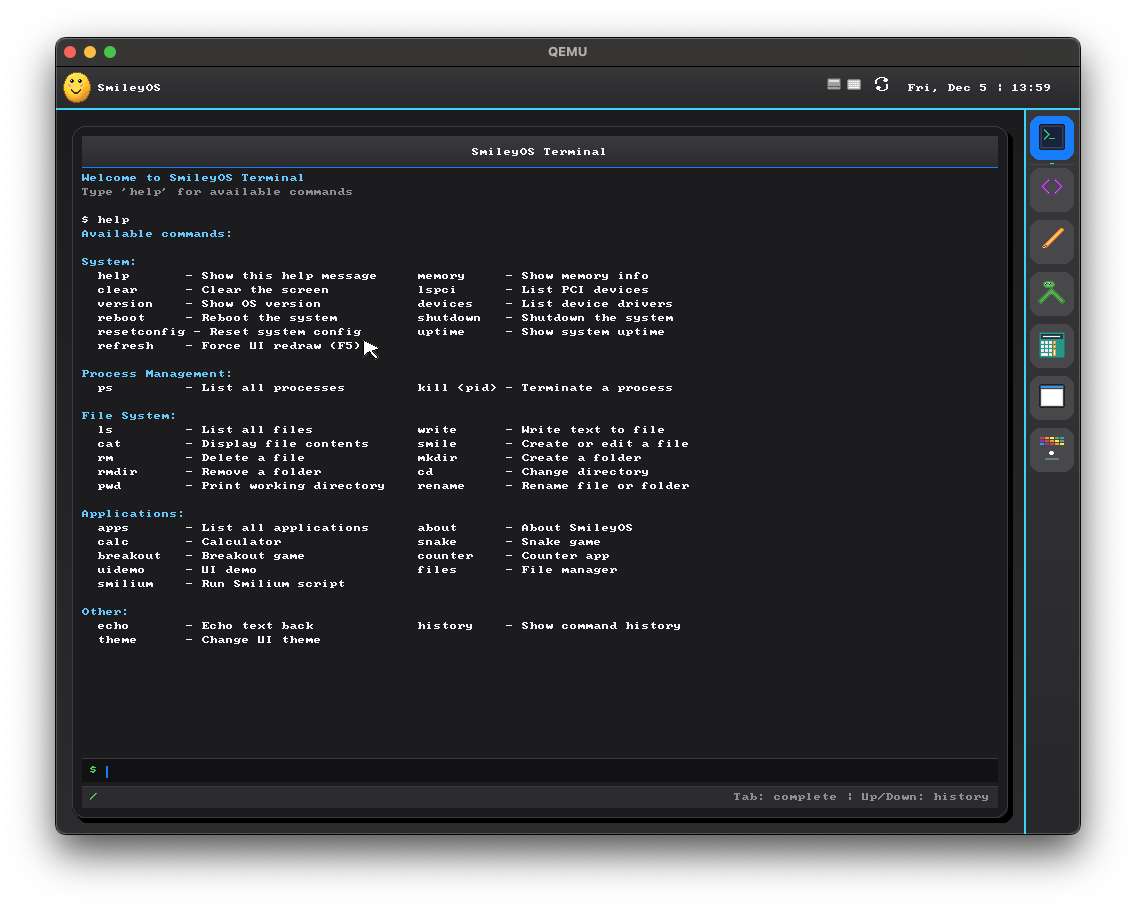
Shell
smilium -g snake
▸ starting Snake…
Smilium
@core @game fillRect(10,10,yellow);
Bare metal
POST → kernel · 3.2s
Try it right now
Boot SmileyOS in your browser.
The full ISO runs on a real x86 emulator in a single browser tab. No sign-ups, no installs — click boot and you're at the SmileyOS desktop in seconds.
Heads up — the live demo runs SmileyOS v1.7. The in-browser build is the older 1.7 release. The screenshots throughout this page are from v2.0, the version we're actively working on now.
Live demo · powered by v86
Boot SmileyOS in your browser
Runs entirely on your device. Nothing is uploaded. The ISO is \~10 MB plus a 2 MB WebAssembly emulator — after that the OS boots straight onto a virtual 32-bit PC.
Boot in browser
32-bit x86 · 256 MB RAM · VGA 640×480 · read-only CD-ROM
Six screens, one OS
Real desktop. Real IDE. Real games.
Click any screenshot to see it full-size. Every pixel is rendered by the SmileyOS kernel — no host OS, no fall-back to anything else.
View larger
The desktop
A real desktop. Not a textbook screenshot.
Menu bar, dock, windowed apps, Spotlight-style search and an Exposé grid of running apps — everything you'd expect from a desktop OS, rendered by the SmileyOS GUI stack on top of a hand-written kernel.
- Spotlight search + Exposé app switcher
- Hot-swap themes with Flat / Glass / Acrylic widgets
- Launch apps from the dock or the terminal
- Tab-completion for every keyword
- Friendly error messages, no segfaults
- Every lesson in plain text on disk
- Scenes, entities and attached scripts
- Components: Physics, Collider, CharacterController…
- Native Play mode — or drop to Smilium @game
- Built into the OS in Rust
- Fun breaks plus typing and mouse practice
- High scores save to the local filesystem
- Build apps with declarative widgets
- Same toolkit as the system apps
- Save and load files from the OS filesystem
- Real i686 hardware, QEMU, or v86 in the browser
- Custom bootloader, no GRUB chainloading
- \~10 MB ISO, fits on any old USB stick
- English + Macedonian out of the box
- In-menu language switcher
- Native Cyrillic font rendering
- Compile-time schema — no missing strings
- Hand-written IPv4 stack — ARP, ICMP, DNS, DHCP
- Working ping and real internet on actual hardware
- Intel e1000 + Realtek RTL8168 network drivers
- Peer-to-peer chat and file sharing over UDP
- Hundreds of menus, settings, daemons
- Updates, package managers, GPU drivers
- No built-in beginner programming language
- No "open the source for this app" button
- Live inside another OS — no kernel, no shell
- Block-based or single-purpose
- No real file system, no real terminal
- Can't teach what an OS actually is
- Needs internet, accounts, sometimes a card
- Trackers, ads, paywalled features
- Nothing to teach about the machine itself
- Kids never see "this is my computer"
 View larger
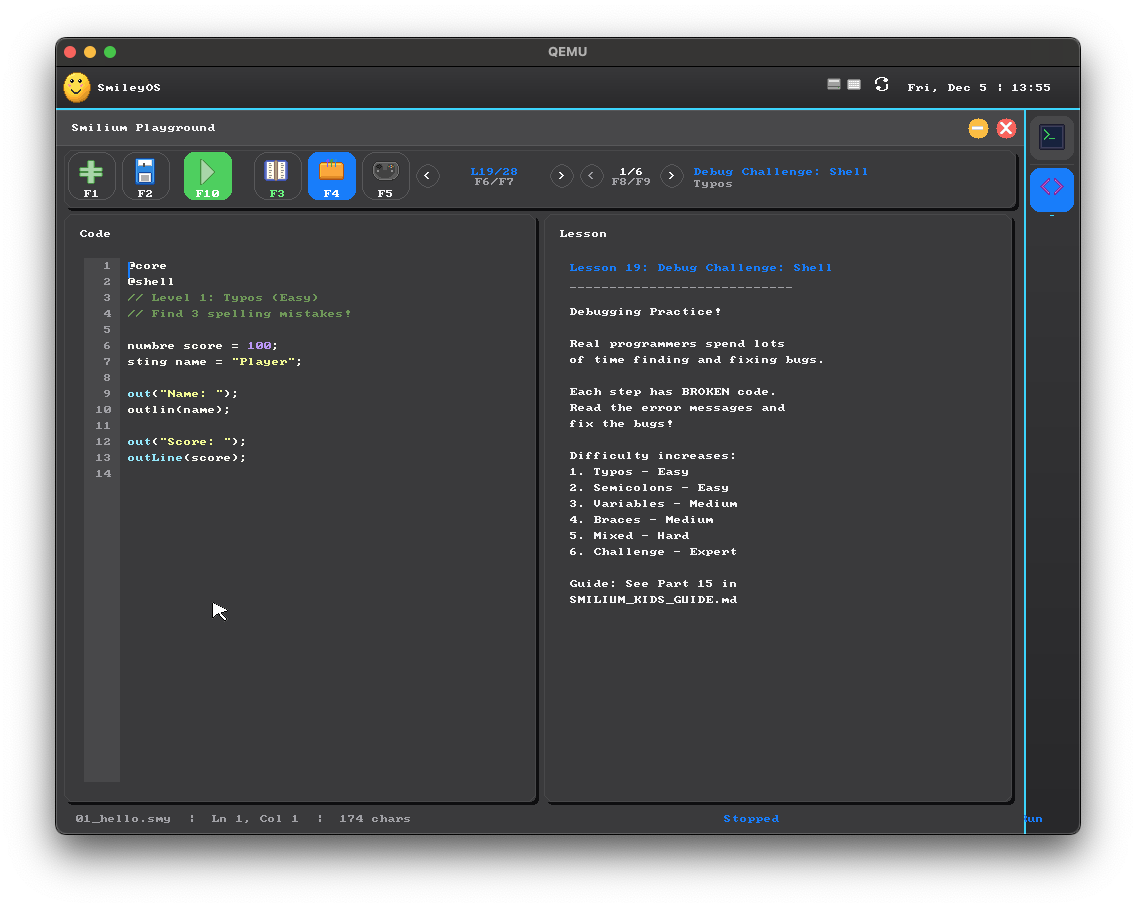
Smilium Playground
The built-in IDE for Smilium.
Syntax highlighting, a file browser, guided lessons. Press F5 to run, F4 to drop into the next lesson. Tab completion turns ten keystrokes into one.
 View larger
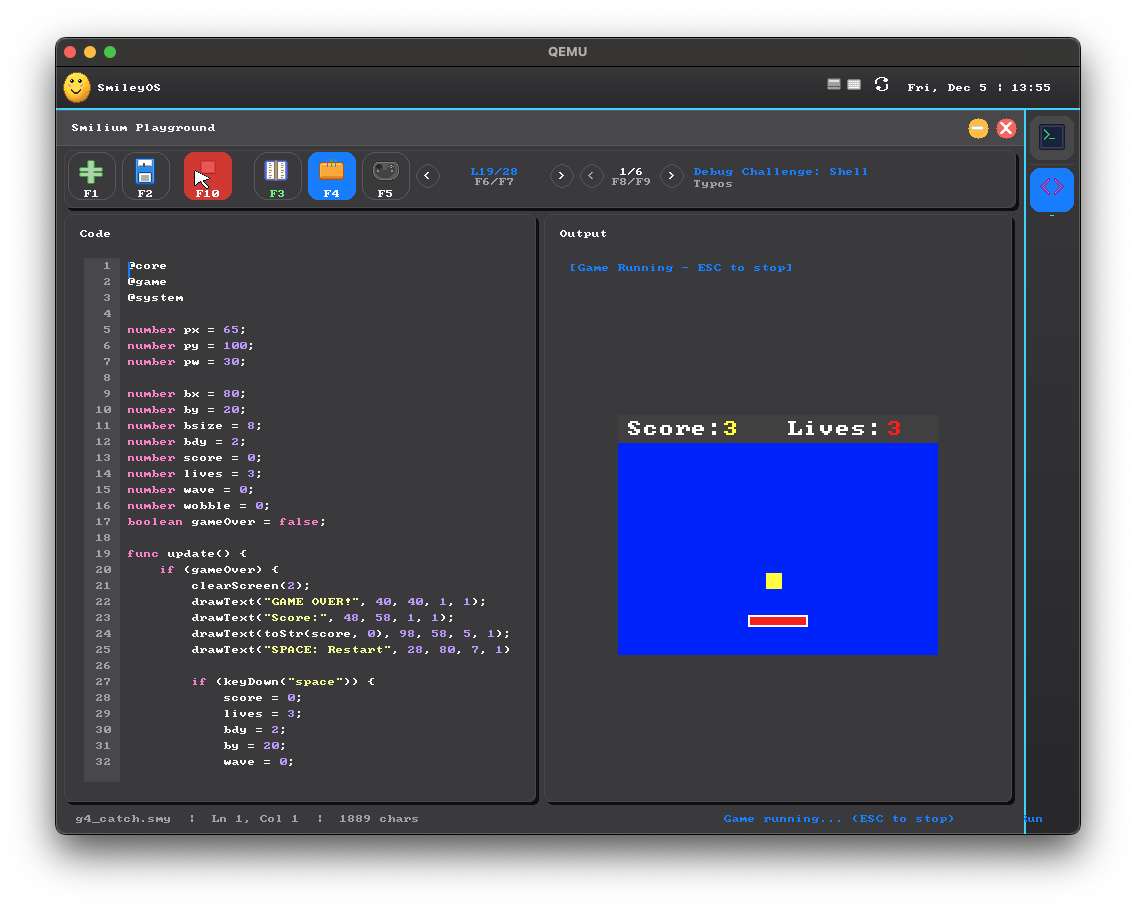
Gamely2D
Build a 2D game with a real engine.
Gamely2D turns SmileyOS into a little game studio — scenes, entities and a Unity-style component library, with Smilium @game scripts underneath. Wire it up, press Play, no toolchain or setup.
 View larger
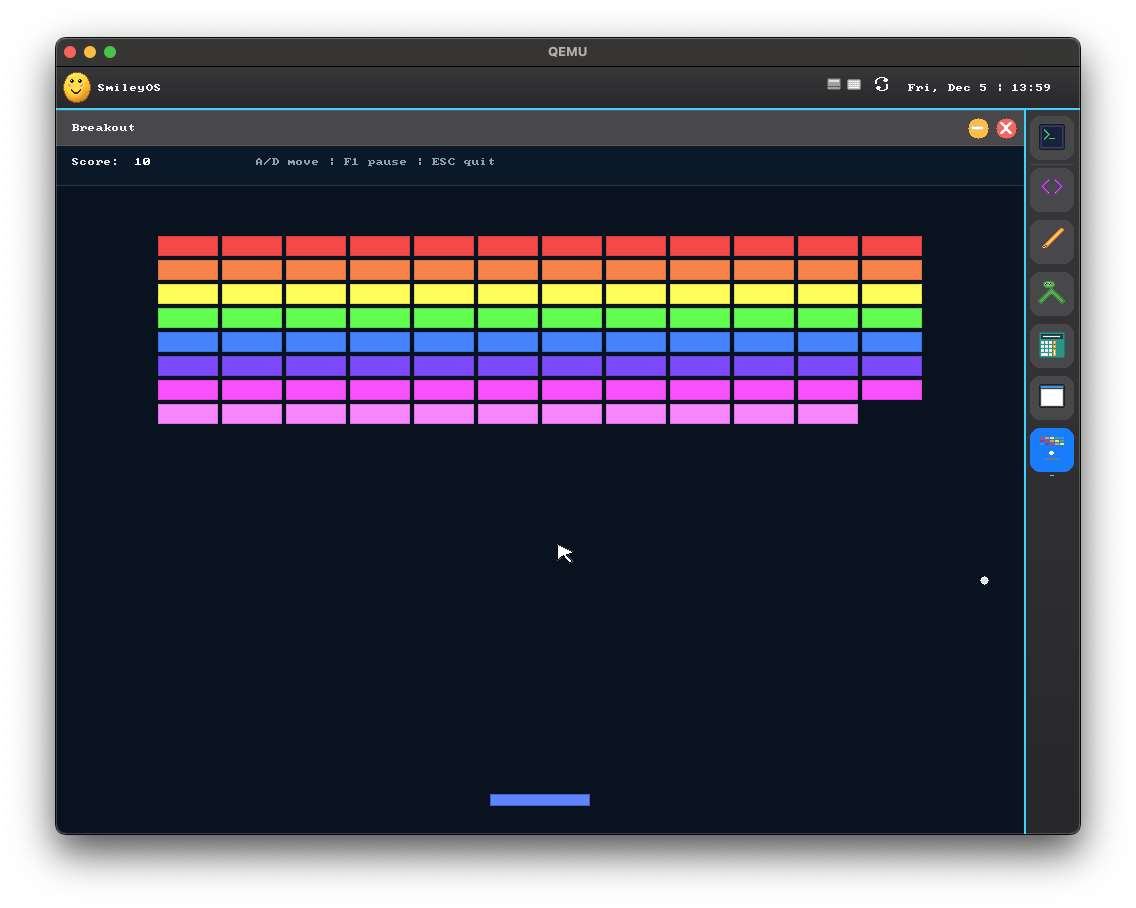
Built-in games
Snake, Breakout, Whack-a-Mole, Type Attack.
Games ship with the OS, built in Rust and fully playable on bare metal. Some are just for fun and a break — others build real skills, like Type Attack for faster typing and Whack-a-Mole for mouse control.
 View larger
GUI apps
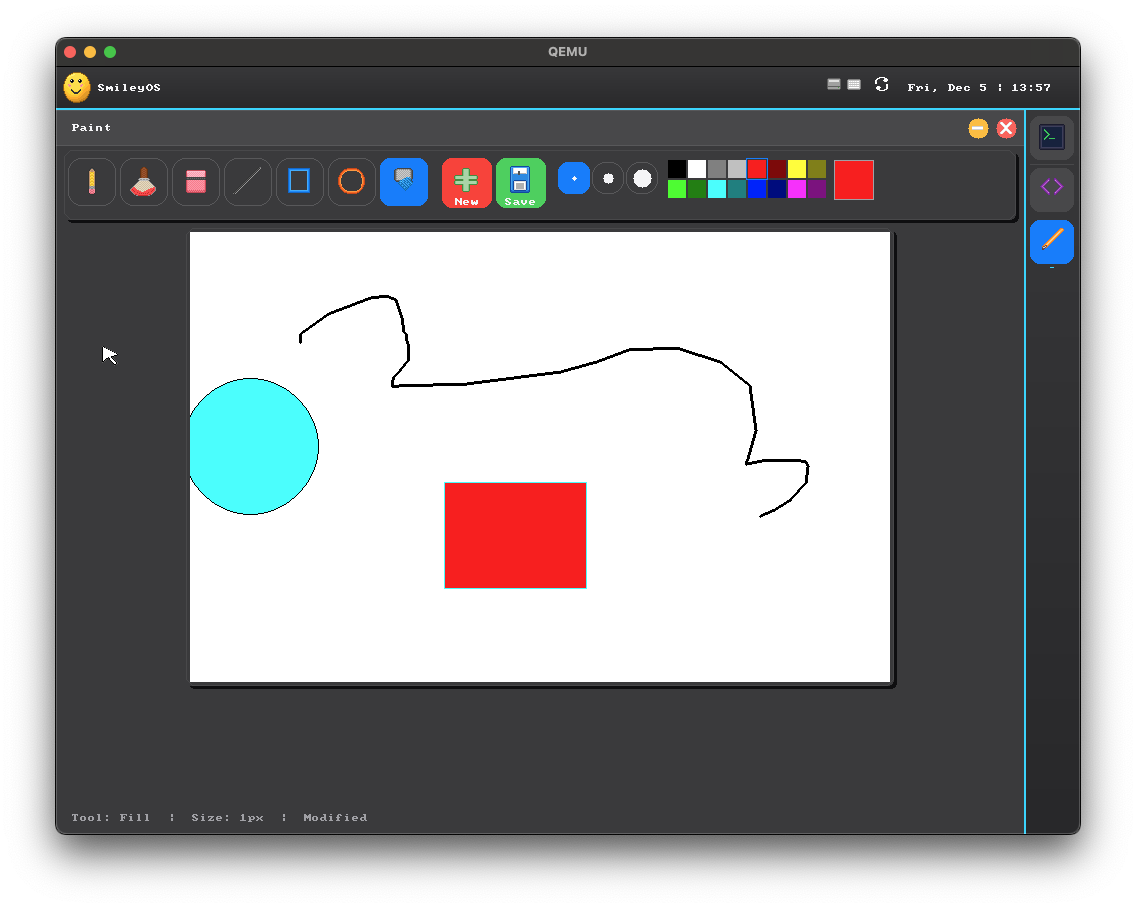
Paint, Calculator, Files — real graphical apps.
The same GUI primitives Smilium @ui programs use also power the bundled apps. Columns, Rows, Buttons and TextFields, all running through a real compositor.
 View larger
Bare metal
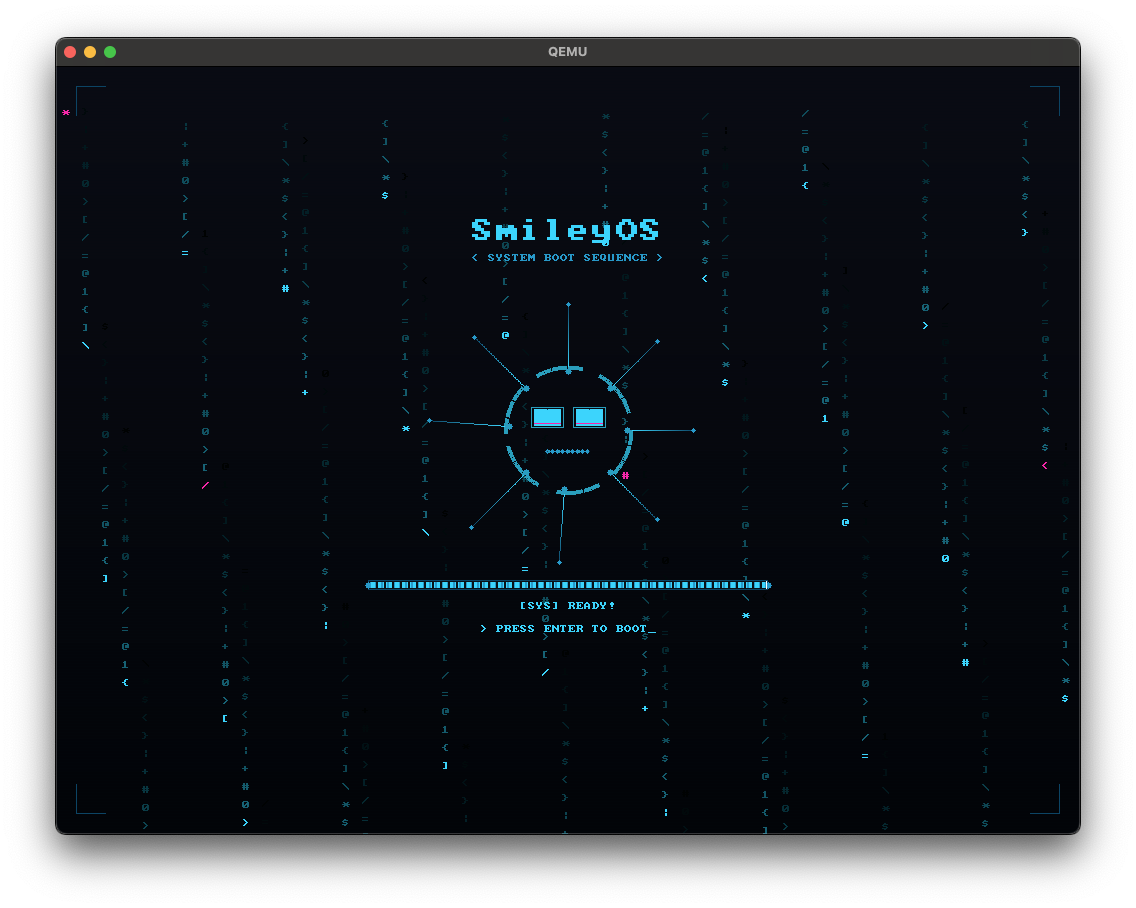
Boots on a real PC. No host OS underneath.
Flash the ISO to a USB stick, plug it into a 32-bit machine, and POST → SmileyOS kernel → desktop. No VM layer, no browser tab — just bare metal and a keyboard.
More than programming
Learn beyond code. A little educational suite.
v2.0 isn't just an IDE and a terminal. It ships a small suite of apps — explore the world, tour the solar system, draw, calculate, manage files, and make sprites — all rendered by the same GUI stack.
 View larger
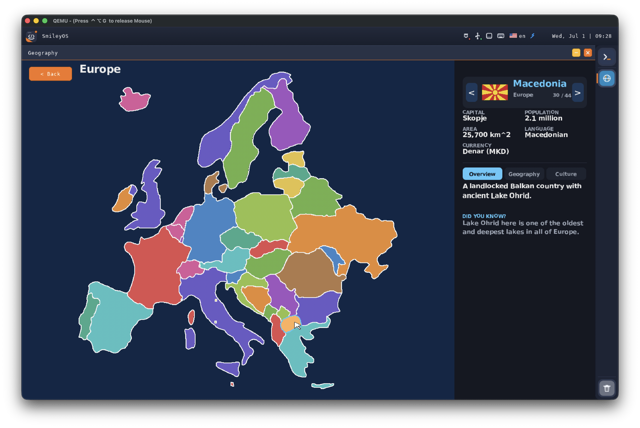
Geography
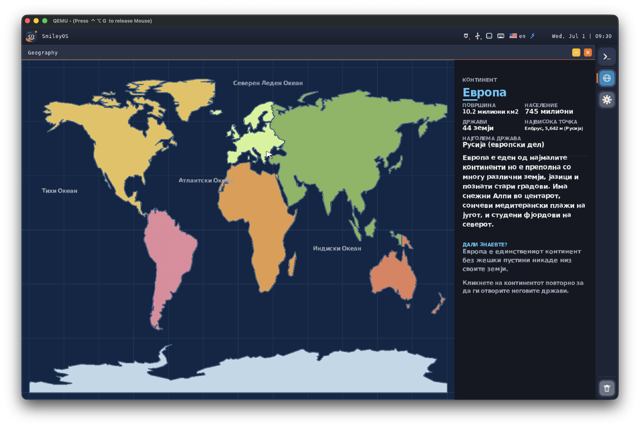
A schematic world map — pan across continents, drill into countries, and learn where things are.
 View larger
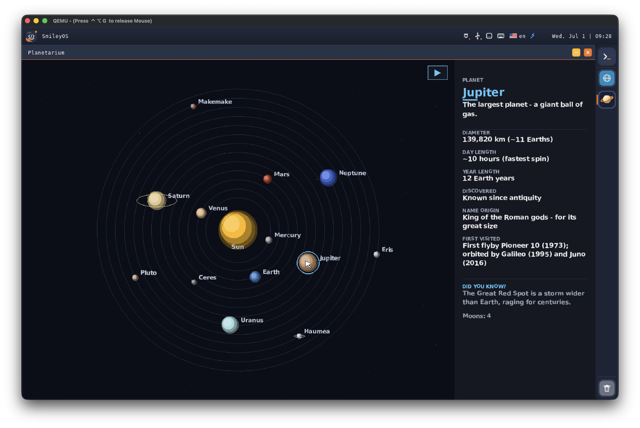
Planetarium
A solar-system orrery — the Sun, eight planets, dwarf planets and moons, each one you can drill into.
Geography
World map & countries
Planetarium
Solar-system orrery
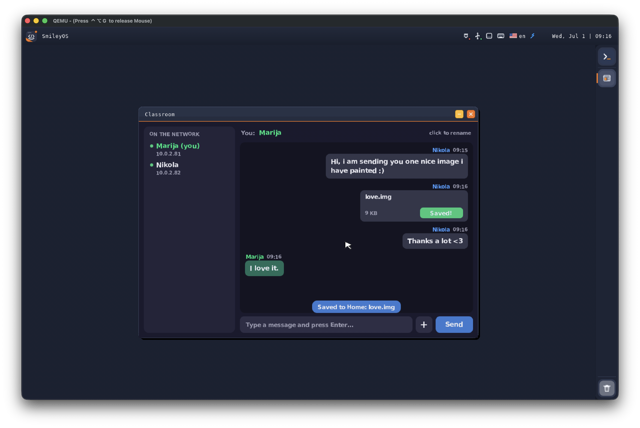
Classroom
LAN chat & file sharing
Paint
Draw and save images
Calculator
Everyday maths
Files
Browse the filesystem
Sprite Editor
Pixel-art for games
Counter
A tiny demo app
Multilingual · new in v2.0
Speaks their language — including Cyrillic.
Full multi-language support with a built-in language switcher. English and Macedonian ship today, with a Cyrillic font rendered by the OS — and a compile-time schema means no translation can ever go missing. A real differentiator for local classrooms.
 View larger
Who it's for
One OS. Three kinds of people.
SmileyOS is one OS, but it answers three different questions: "how do I get my kid to code?", "how do I teach a classroom?", and "how does an OS actually work?".
Self-paced
Kids, 8–14
Safe, offline, distraction-free.
From clicking a file to writing a game in a real language — at their own pace, with friendly error messages. No ads, no accounts, no cloud. Offline by default — and machines on the same local network can connect for classroom chat and file sharing.
Classroom-ready
Parents & teachers
A curriculum in a box.
One USB stick, an old PC, a set of companion books, guided in-IDE lessons. No cloud, no trackers — every byte lives on the machine in front of the student.
Open & hackable
Curious tinkerers
Peek under the hood.
A platform abstraction layer, drivers, a filesystem, a scheduler, a compositor and a tiny language — all in one small, readable Rust codebase you can fit in your head.
Networking · new in v2.0
A classroom that talks to itself.
SmileyOS is still offline-first — no cloud, no accounts, nothing phones home. But v2.0 adds a hand-written IPv4 network stack, so every machine on the same local network can find each other. No internet required — but a whole classroom can connect over the LAN.
 View larger
Classroom
Every machine in the room, in one shared chat.
Open Classroom and every SmileyOS computer on the LAN shows up in a peer list. Chat in a shared room and send files straight between machines — no server, no accounts, no internet. Perfect for a computer lab.
The honest question
Why a whole OS — when Linux already exists?
Fair question. Linux distros, kid-friendly toys and online editors are all great at one thing. SmileyOS exists for the part they all miss: a quiet, complete machine a child can fully understand.
A full Linux distro
Ubuntu · Mint · Fedora
"Powerful, modern and free. The right answer for grown-up Linux users."
But it can't…
A toy / kids OS
Scratch · Pico-8 · Tic-80
"Beautiful introductions to programming. Great in their own boxes."
But it can't…
An online code editor
Repl.it · CodePen · Glitch
"Zero-setup coding on whatever device you happen to have."
But it can't…
SmileyOS is the one OS a kid can read. Hundreds of small source files. One terminal. One IDE. One small language. Everything inside the machine — no cloud, no trackers, nothing they didn't ask for.
Under the hood
A real OS, not a demo.
Kernel, scheduler, filesystem, drivers, GUI stack and shell — all hand-written in Rust. The terminal below is the same muscle memory real developers use every day on Linux and macOS.
New · v2.0
The full v2.0 walkthrough. Everything, end to end.
A complete tour of the current SmileyOS 2.0 build — desktop, IDE, Gamely2D, the education apps, LAN networking and Classroom, multi-language support, and more. This is the version we're building now.
Caught on camera
Not a VM. Not a browser demo.
Booting on a real PC.SmileyOS flashed onto a USB stick, plugged into a 32-bit machine, POST → kernel → desktop. No host OS underneath, no browser tab — just bare metal, a keyboard, and a smile.
Recorded on an earlier build — v2.0 looks even better. See the full v2.0 demo above.
All Rust
kernel to GUI
Kernel, HAL, drivers, Smilium interpreter, GUI — all hand-written.
Hundreds
of small modules
Small, readable files. Open any one and understand it.
Full
shell userland
A complete userland: files, processes, themes, apps.
Companion
book series
An illustrated book series. Every snippet here comes from them.
SmileyOS Terminal
smiley@me > pwd/home/kiddosmiley@me > lsgames/ snake.smy sprites/ notes.txtsmiley@me > smilium -g snake.smy▸ starting Snake… press ESC to quitsmiley@me > theme listdark · light · blue · purple · greensmiley@me > helpA full userland of commands. Try: apps, playground, theme.smiley@me >A full shell userland, all hand-implemented.
Typed into a PS/2 keyboard, parsed by the SmileyOS shell, answered by real kernel syscalls. No cheating, no shelling out — this is the whole userland.
Navigation
Find your way around.
Files
Read, write, move, delete.
Folders
Shape your disk.
System
Real OS, real syscalls.
Apps & games
Launched via apps / smilium, not bare words.
Customize
Make it yours.
Type help in the booted OS for the live list — it stays in sync with the kernel.
Portable · new in v2.0
One codebase. Many targets.
It started as a 32-bit-x86 project — but v2.0 runs across architectures through a hardware abstraction layer. Great for tinkerers: the same small, readable Rust codebase boots on a desk PC or a Raspberry Pi.
i686
32-bit x86 — the original target
x86\_64
64-bit PCs
aarch64
ARM64 — incl. Raspberry Pi 3
riscv64
64-bit RISC-V
Ported through the SmileyOS HAL — one abstraction, several backends.
The Smilium language
A tiny language. Three modes. Endless projects.
Smilium programs start with directives — @core is always on, and you pick one of @shell, @game or @ui to say what kind of program you're building.
Read the full Smilium 2.0 docsevery feature, with copy-paste examples + the 2.1 roadmap
@core@shell print("Hello, World!");print("Welcome to Smilium!");@core@game func update() { clearScreen(Colors.black); fillRect(70, 50, 20, 20, Colors.yellow);}@core@ui Column main = Column();Button myButton = Button("Click me!");main.add(myButton);The whole language fits on one screen.
Directives, types, control flow, and the keys you'll press in Smilium Playground.
Directives
Pick a mode, opt into features.
Data types
Strict typing, friendly errors.
Control flow
Familiar C-like syntax.
IDE shortcuts
Playground does the typing for you.
Ready for the deep end?
Complete Smilium programs — loops, reactive listeners, lock & catch, timers and keys, pixel-art sprites and clickable UI. Paste any of them into Smilium Playground, press F5, and it runs.
@core@shell string name = ask("What's your name? ", false);print("Hi {name}!", Colors.green);print("Nice to meet you.");@core@shell@system number secret = random(1, 10);number guess = 0;while(guess isnt secret) { guess = ask("Guess 1-10: "); if(guess under secret) { print("Higher!"); } if(guess over secret) { print("Lower!"); }}print("You got it!", Colors.green);@core@shell catch(string err){ print("problem: {err}", Colors.red);} number score = 0;score.listen(number old, number new){ print("score: {old} -> {new}");} score = 100;score.lock();score = 5;print("still running!");@core@shell@system number ticks = 0; every(1000){ ticks = ticks + 1; print("tick {ticks}");} onKey(Key k){ if(k == Keys.space){ print("jump!", Colors.green); }}@core@shell@system struct Player { string name; number score; } Player marija = { name: "Marija", score: 61 };Player marin = { name: "Marin", score: 48 };Player[] team = [marija, marin];print("team of {team.length}"); number[] scores = [61, 48, 97];scores.sort();print(scores);print("best: {scores.max()}"); marija.save("marija.json");print("saved!", Colors.green);@core@shell string s = "smilium is fun";print(s.upper());print(s.capitalize());print("=".repeat(20), Colors.blue);print(s.contains("fun"));@core@game number x = 70; number y = 50; func update() { if(keyDown("Left")) x = x - 1; if(keyDown("Right")) x = x + 1; clearScreen(Colors.black); fillRect(x, y, 10, 10, Colors.yellow);}@core@ui number count = 0; Label display = Label("Count: 0");Button plus = Button("+1"); plus.onClick(func() { count = count + 1; display.setText("Count: " + toStr(count));});#### Press Tab. Finish the line.
Every keyword and built-in function is Tab-completable in Smilium Playground. Type fo → Tab and you get a full for loop skeleton. Kids ship more code because they type less of it.
#### Friendly errors, on purpose.
Strict types explained in plain English. Messages like "expected number, got string on line 7" — never a segfault, never a stack trace.
Gamely2D · new in v2.0
Make real games — not just scripts.
v2.0 adds Gamely2D, a dedicated lightweight 2D game engine. Build .g2d projects with scene files and entities, attach scripts per entity, and press Play. Smilium @game is the scripting layer underneath.
View larger
Engine, not a loop
A Unity-style workflow, sized for kids.
Drop entities into a scene, add components, wire up a script, and hit Play — no toolchain, no setup, all inside SmileyOS. When you want to go deeper, every script is plain Smilium you can read and edit.
App SDKDeveloper preview
Outgrown Smilium? Build native apps.
A SmileyOS app is one Rust file implementing a small trait, plus one entry in a central registry. The OS handles launching, menus, search, file types and deeplinks for you.
The SDK isn't released yet — the documentation is an early draft shared for feedback, with the SDK itself planned for 2027.
Read the SDK docsat /smileyos-sdk
UI apps Games Shell commands 20+ widgets
apps/registry.rs
// your app = one trait + one registry entryimpl AppContext for Counter { … } AppInfo { name: "Counter", command: "counter", file_extensions: &[".cnt"], deeplink_schemes: &["count"],} // launching, menus, search → automaticCurriculum · work in progress
Read the books. Run the lessons.
SmileyOS is a one-person project. The companion books and in-IDE lessons are in active development — every code snippet on this page comes straight from the current drafts.
Lesson book
#### Language Reference
The complete Smilium teacher's guide — directives, syntax rules, every built-in function with examples.
Beginner
#### Terminal Guide
Shell commands, file system, aliases, pipes — the same muscle memory real developers use every day.
Ages 8–12
#### Shell Programming
From "Hello, World!" to mini calculators and quizzes. Conditions, loops and functions explained story-first.
Ages 10–14
#### Game Development
Draw, animate, collide, and ship a full Snake-clone. Plus 10 complete annotated example games.
Ages 10–14
#### UI App Development
Columns, Rows, Buttons and TextFields. Build forms, dynamic lists, and a working TODO app that saves to disk.
In the IDE
#### Guided lessons
Press F4 anywhere in Smilium Playground. Each lesson is a few lines, a run button, and a small challenge.
FAQ
Common questions, honest answers.
What is SmileyOS, exactly?
A bare-metal operating system written from scratch in Rust for 32-bit x86 (i686) machines. It has its own kernel, scheduler, filesystem, drivers, compositor and shell — and it ships with Smilium, a tiny built-in language for shell scripts, 2D games and GUI apps. Boots on real hardware, in QEMU, or in your browser via v86.
Who is it for?
Do I need to install anything to try it?
Can it run on a real old PC?
Does it need the internet?
What is Smilium?
Can I see the source code?
How much does it cost?
How do I get my school involved?
The road ahead
From one line of Rust to every classroom.
Where SmileyOS has been, and where it's going. This is my plan and my wish — I'm a big dreamer, and I believe in this story.
1. Mid 2025Done
The first line of Rust
SmileyOS begins as one developer's nights-and-weekends project — a kernel written from scratch. 2. Early 2026DoneA working proof of concept
The pieces come together: kernel, shell, and the first Smilium programs running on bare metal. 3. Mid 2026We are hereSmileyOS 2.0 — polished
Networking and Classroom, Gamely2D, an education-app suite, multi-language support and a refined desktop. The version you see on this page. 4. End of 2026PlannedSmileyTech becomes a company
Formally registering SmileyTech to put the project on a real footing — books, pilots, and full-time work. 5. First half of 2027PlannedThe educational material
Full-time work on the companion books and curriculum, professionally produced and illustrated. 6. Second half of 2027PlannedA private academy for kids
Launch an educational academy with several courses — one for programming, others for general knowledge like geography, history, chemistry and maths. 7. 2027 and beyondThe dreamInto public education
The dream: SmileyOS in the public education system — used in every primary school in Macedonia, and hopefully further still.Help it grow
Three ways to help SmileyOS ship.
SmileyOS started as one developer's nights-and-weekends project — and it's growing up. Whether you want to fund the next release, back the mission, or run a pilot with real students, there's a path for you.
What's next
From passion project to company.
We're in the process of formally registering SmileyTech as a company to put SmileyOS on a real footing: professionally produced books, classroom pilots, and full-time work on the kernel and curriculum. If you back EdTech, open source, digital literacy, or reviving old hardware for schools, we'd love to talk.
Donors
Fuel the next release.
Community donations let me pay real illustrators and layout designers so the books get professionally produced — and eventually printed for classrooms. Every coffee goes straight into kernel work, Smilium features and new lessons.
Why we use donations and how it helps.
Teachers
Pilot it in your classroom.
SmileyOS is in active development. If you'd like to pilot it with a small group of students — or just watch it grow — reach out and we'll loop you in. No trackers, one USB stick per student.
info@smileytech.mkContact form
Investors & grant-makers
Back the mission.
A formal company is being registered now, and we're looking for funding, grants, and mission-aligned partners to fund professional books, classroom pilots, and full-time development. Grant program, angel, or institution — let's talk.