DeepSeek HarnessReady to use. Right now.
Preview
DeepSeek Harness
Ready to use. Right now.Everyday tasks, coding, or your own harness—it starts here.
DeepSeek Harness is now in public preview worldwide and open source, with composable plugins that extend what agents can do.
Meet DeepSeek Harness
Could you introduce yourself?
Thought for a while
I'm DeepSeek Harness, an open-source harness from DeepSeek built on Cordis's “everything is a plugin” architecture. Run me as a desktop app or launch the web UI from code.
I can help with:
1. Everyday work — Organize files, analyze data, draft docs, and create slides.Everyday work — Work with docs, data, and slides. 2. Coding — Explore repos, fix bugs, build features, and run tests.Coding — Fix bugs, build features, run tests. 3. Research — Find information, verify facts, and cite sources.Research — Find facts and cite sources. 4. Background tasks — Run scripts, batch-process files, and track progress.Background tasks — Run scripts and track progress. 5. Plugins — Add or build plugins to fit your workflow.Plugins — Add plugins or build your own.
And so much more...
Describe what you want to build, / commands, @ files or sessions
Workspace Write
DeepSeek-V41-Flash High
Expanding capabilities.
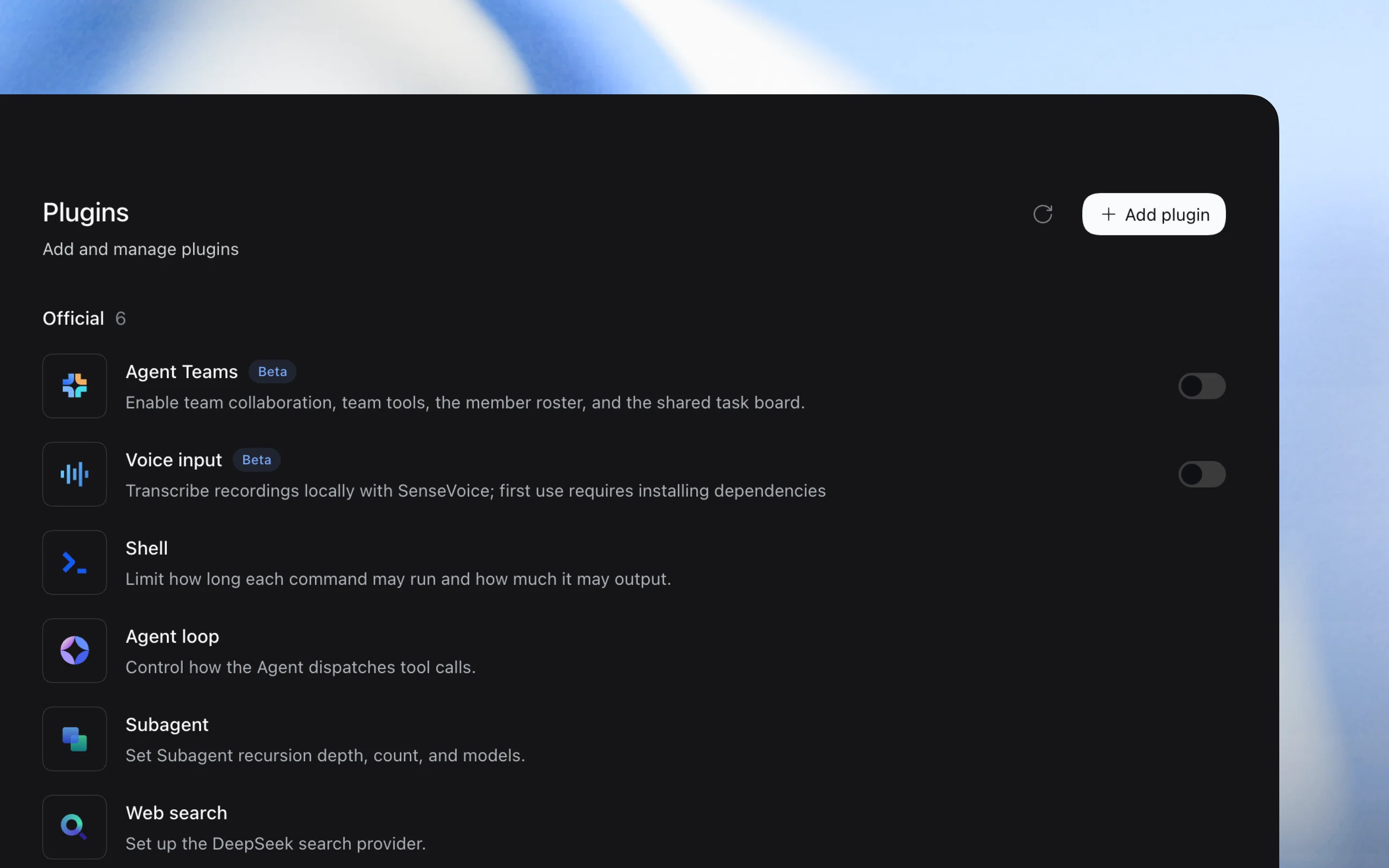
Work on your terms.Everything is a plugin
Install plugins, or create them through chat in “Creator mode”, to extend tools, skills, and the interface.
Creator mode
Write a Pomodoro timer plugin for me.
Write a Pomodoro timer plugin for me.
Deep diving...
Load skillcordis-plugin-development
Readskills/cordis-plugin-development/SKILL.md
Thinkingshell.overlay is a frame-wide floating layer — the right target for an always-on-top window.
Inspect providers9 inspect providers
Query runtimeSlots.listSubTree
Writedsh-plugin-pomodoro-float/package.json+35 −0
Writedsh-plugin-pomodoro-float/client.js+638 −0
Tool callplugin\_manager · install\_bundle
Editdsh-plugin-pomodoro-float/client.js+5 −3
BashVerify live plugin state
Took 5m 24s
The floating Pomodoro timer is built, installed, and verified.
Official
Agent teamsExperimental
Auto approval reviewExperimental
Scheduled tasksExperimental
Voice inputExperimental
Terminal
Agent loop
Subagents
Installed
Pomodoro timer
Pomodoro timer
FocusShort break
25:0024:5924:5824:5724:5624:5524:5424:5324:5224:5124:5024:4924:4824:4724:4624:4524:4424:4324:4224:4124:4024:3924:3824:3724:36
Start focus
25:0024:5924:5824:5724:5624:5524:5424:5324:5224:5124:5024:4924:4824:4724:4624:4524:4424:4324:4224:4124:4024:3924:3824:3724:36Focus
Complete a range of tasks
Organize documents, analyze spreadsheets, and write code. Preview the results directly and refine them through conversation.
 Brief.docxWord document
 Data.xlsxExcel spreadsheet
 index.htmlHTML page
 label.tsTypeScript code
 analyze.pyPython script
 Report.pdfPDF document
 README.mdMarkdown document
Brief.docxWord document
Data.xlsxExcel spreadsheet
index.htmlHTML page
Review · turn 1
@@ -8,3 +8,4 @@
88 `function label(name: string) {`
9−` return name;`
9+` const text = name.trim();`
10+` return text || 'Untitled';`
1011 `}`
Adapt to your workflow
Enable the Scheduled tasks plugin to start tasks anytime and run recurring work on schedule. Stay on top of progress and inspect tool call details when needed.
Every Friday at 17:00 Beijing time, summarize this week's project notes in a weekly report.
Deep diving...Worked
Create reminderSummarize this week's project notes in a weekly report.Weekly project report
IN`schedule_create`
{
  "prompt": "Summarize this week's project notes in a weekly report.",
  "title": "Weekly project report",
  "weekly": {"time":"17:00:00","time_zone":"Asia/Shanghai","weekdays":[5]}
}
Weekly project report
Scheduled forRepeatWeekly on Fri at 17:00 (Asia/Shanghai)StatusScheduled
Created “Weekly project report”, scheduled for Fridays at 17:00 Beijing time.
Weekly project reportWeekly on Fri at 17:00 (UTC+08:00 · China Standard Time)Open
Developer tools
Inspect execution traces and detailed runtime information to troubleshoot issues with tool calls and task execution.
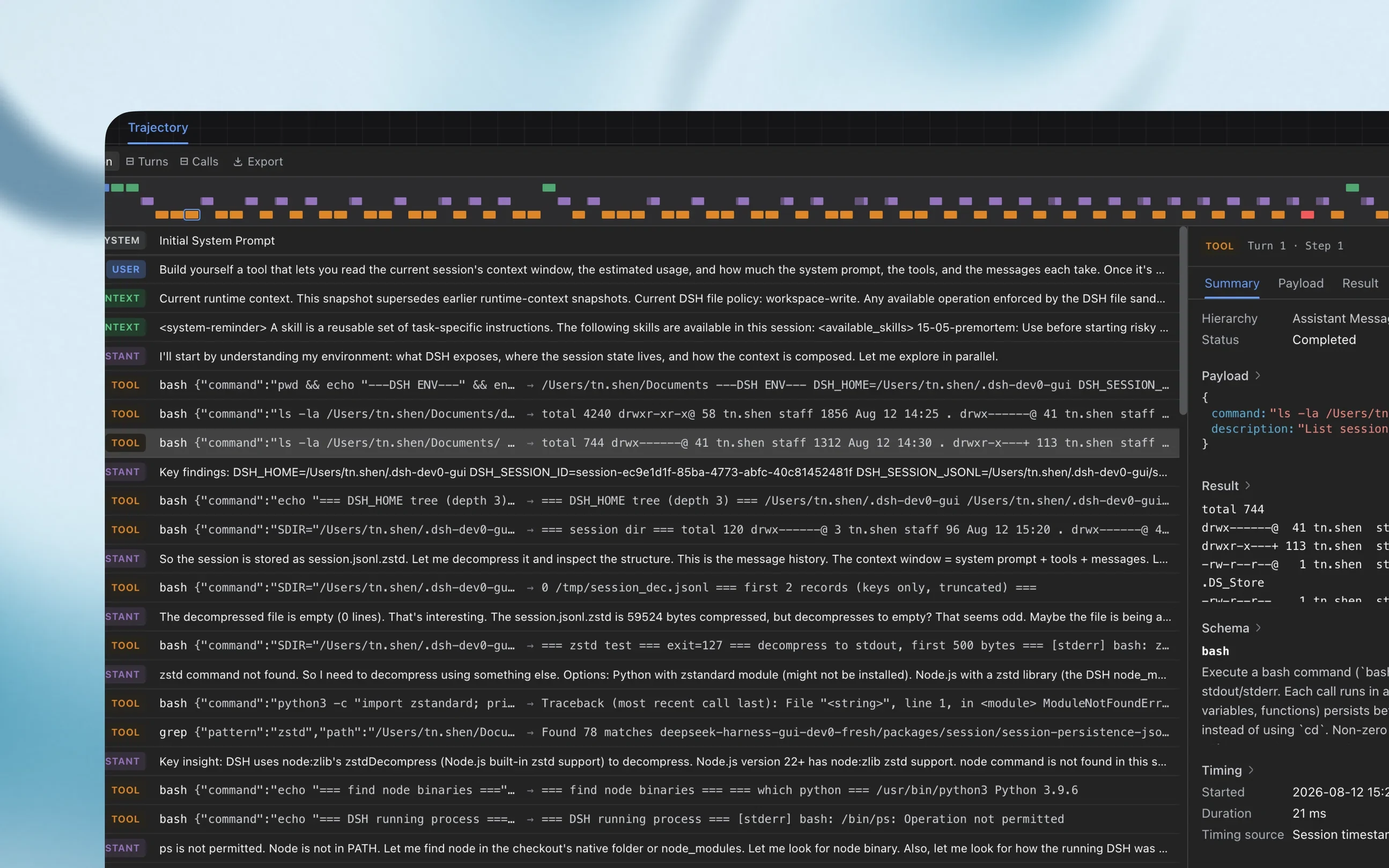
DurationTurns⊟Calls⊟Search
InputModelTools
SYSTEMInitial System Prompt
Turn 1USERFirst run bash to print exactly NAVIGATION\_OK, then read nav-a.md and nav-b.md with two read calls, then reply with the single word FIRST\_DONE.
CONTEXTCurrent runtime context: workspace policy, available skills, and this turn's environment snapshot.
ASSISTANTRun bash to confirm the output, then read both navigation files.
TOOLbash{"command": "echo NAVIGATION\_OK", "description": "Print NAVIGATION\_OK"}→NAVIGATION\_OK
TOOLread{"file\_path": "nav-a.md"}→nav-a.md
TOOLread{"file\_path": "nav-b.md"}→nav-b.md
ASSISTANTFIRST\_DONE
Turn 2USERReply in markdown with a level-2 heading “Navigation Summary” and summarize both files.
ASSISTANTNavigation summary: alpha nav, beta nav, and the NAVIGATION\_OK output.
TOOLbash{"command": "ls -la", "description": "List workspace files"}→nav-a.md nav-b.md README.md
TOOLgrep{"pattern": "NAVIGATION", "path": "."}→2 matches
TOOLread{"file\_path": "README.md"}→README.md
ASSISTANTVerified the workspace listing and grep results; the task is complete.
TOOLTurn 1 · Step 1×
SummaryPayloadResultSchemaTiming
NAVIGATION\_OK
Started2026-08-12 17:30:52.637Duration34 msTiming sourceSession timestampsHierarchyAssistant Message
Developer experience
Start with one command
Install Node.js, then launch the Web UI with npx.
`$ npx @deepseek-ai/dsh web`Copy
Install from source
Clone the full source and follow the setup instructions in the repository.
`$ git clone https://github.com/deepseek-ai/deepseek-harness`Copy
Join the DSH plugin ecosystem
DeepSeek Harness is in preview, with evolving core plugins and APIs. We invite users and developers worldwide to explore the limits of intelligence together through open-source, reusable, and composable infrastructure.