


@electric-sql/pglite
@electric-sql/pglite

0.5.8 • Public • Published a month ago
- Readme
- Code Beta
- 0 Dependencies
- 383 Dependents
- 78 Versions
- PGlite is single user/connection.
- postgres
- sql
- database
- wasm
- client
- pglite
PGlite \- the WASM build of Postgres from Electric. Build reactive, realtime, local-first apps directly on Postgres.
PGlite - Postgres in WASM
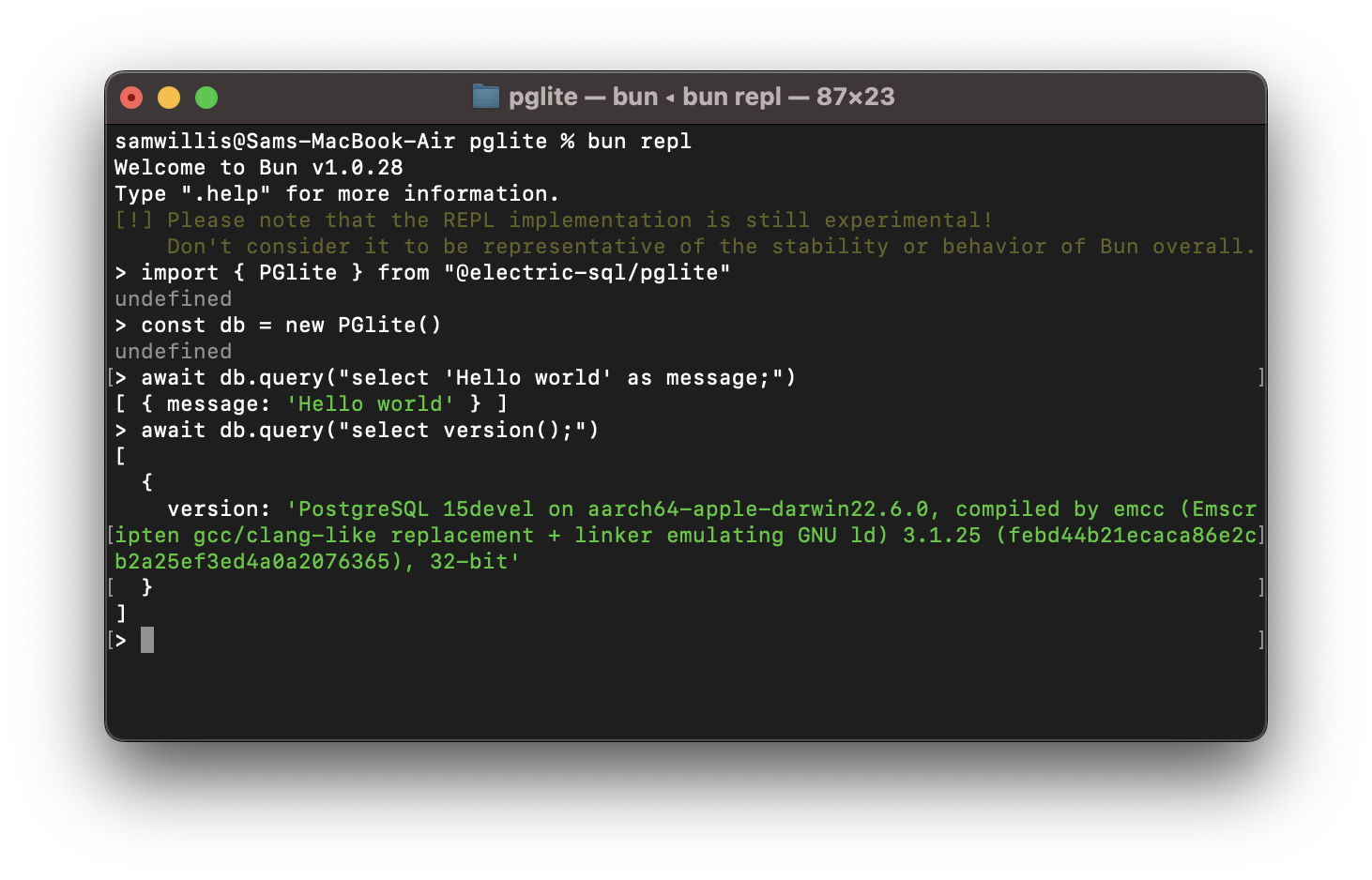
PGlite is a WASM Postgres build packaged into a TypeScript client library that enables you to run Postgres in the browser, Node.js, Bun and Deno, with no need to install any other dependencies. It is only 3mb gzipped and has support for many Postgres extensions, including pgvector and PostGIS.
import { PGlite } from '@electric-sql/pglite'
const db = new PGlite() await db.query("select 'Hello world' as message;") // -> { rows: [ { message: "Hello world" } ] }
It can be used as an ephemeral in-memory database, or with persistence either to the file system (Node/Bun/Deno) or indexedDB (Browser).
Unlike previous "Postgres in the browser" projects, PGlite does not use a Linux virtual machine - it is simply Postgres in WASM.
For full documentation and user guides see pglite.dev.
Browser
It can be installed and imported using your usual package manager:
import { PGlite } from '@electric-sql/pglite'
or using a CDN such as JSDeliver:
import { PGlite } from 'https://cdn.jsdelivr.net/npm/@electric-sql/pglite/dist/index.js'
Then for an in-memory Postgres:
const db = new PGlite() await db.query("select 'Hello world' as message;") // -> { rows: [ { message: "Hello world" } ] }
or to persist the database to indexedDB:
const db = new PGlite('idb://my-pgdata')
Node/Bun/Deno
Install into your project:
NodeJS
npm install @electric-sql/pglite
Bun
bun install @electric-sql/pglite
Deno
deno add npm:@electric-sql/pglite
To use the in-memory Postgres:
import { PGlite } from '@electric-sql/pglite'
const db = new PGlite() await db.query("select 'Hello world' as message;") // -> { rows: [ { message: "Hello world" } ] }
or to persist to the filesystem:
const db = new PGlite('./path/to/pgdata')
How it works
PostgreSQL typically operates using a process forking model; whenever a client initiates a connection, a new process is forked to manage that connection. However, programs compiled with Emscripten - a C to WebAssembly (WASM) compiler - cannot fork new processes, and operates strictly in a single-process mode. As a result, PostgreSQL cannot be directly compiled to WASM for conventional operation.
Fortunately, PostgreSQL includes a "single user mode" primarily intended for command-line usage during bootstrapping and recovery procedures. Building upon this capability, PGlite introduces a input/output pathway that facilitates interaction with PostgreSQL when it is compiled to WASM within a JavaScript environment.
Limitations
How to build PGlite and contribute
The build process of PGlite is split into two parts:
1. Building the Postgres WASM module. 2. Building the PGlite client library and other TypeScript packages.
Docker is required to build the WASM module, along with Node (v20 or above) and pnpm for package management and building the TypeScript packages.
To start checkout the repository and install dependencies:
git clone https://github.com/electric-sql/pglite cd pglite pnpm install
To build everything, we have the convenient `pnpm build:all` command in the root of the repository. This command will:
1. Use Docker to build the Postgres WASM module. The artifacts from this are then copied to `/packages/pglite/release`. 2. Build the PGlite client library and other TypeScript packages.
To only build the Postgres WASM module (i.e. point 1 above), run
pnpm wasm:build
If you don't want to build the WASM module and assorted WASM binaries from scratch, you can download them from a comment under the most recently merged PR, labeled as interim build files, and place them under `packages/pglite/release`.
To build all TypeScript packages (i.e. point 2 of the above), run:
pnpm ts:build
This will build all packages in the correct order based on their dependency relationships. You can now develop any individual package using the `build` and `test` scripts, as well as the `stylecheck` and `typecheck` scripts to ensure style and type validity.
Or alternatively to build a single package, move into the package directory and run:
cd packages/pglite pnpm build
When ready to open a PR, run the following command at the root of the repository:
pnpm changeset
And follow the instructions to create an appropriate changeset. Please ensure any contributions that touch code are accompanied by a changeset.
Acknowledgments
PGlite builds on the work of Stas Kelvich of Neon in this Postgres fork.
License
PGlite is dual-licensed under the terms of the Apache License 2.0 and the PostgreSQL License, you can choose which you prefer.
Changes to the Postgres source are licensed under the PostgreSQL License.