based
Local-first database client
based
The database client your whole team can commit to git.
Version-controlled connections and queries. Native Rust and GPUI. Postgres, SQLite, and MongoDB — no accounts, no backend.
v2026.8.1
Download for free Star on GitHub 59
The problem
Your database setup isn't in version control.
Database clients treat connections and queries as private, machine-local state. So teams keep re-sharing the same things by hand.
Connections trapped on one laptop
Every teammate re-enters the same hosts, ports, and databases by hand. Onboarding a new dev means a Slack thread of screenshots.
Secrets pasted into app settings
Passwords live inside a GUI's private config, never reviewed, never rotated together, impossible to audit.
Queries that never leave your machine
The useful report you wrote last week is stuck in your client's history. Nobody else can find it, run it, or improve it.
based puts all of it in a .based/folder you commit to git — and keeps the secrets out.
How it works
One folder. Plain files. Committed to git.
based reads a .based/ directory in your repo. Connections and saved queries are small TOML files your team reviews in pull requests. Secrets go in a gitignored .env — never committed. Read the docs.
schema_version = 1name = "based"
description = "A new Based project"
[settings]
query_timeout = 30_000 # ms
max_result_rows = 1_000
enable_query_cache = true
cache_ttl = 3_600 # seconds
schema_version = 1name = "Churn by Geography"
description = "Customer exit rate by country"
tags = ["churn", "reports"]
[target]
↓ refers to connections/local.toml
connection = "local/postgres"[sql]
query = """
SELECT
Geography,
COUNT(*) AS customers,
SUM(CASE WHEN Exited = 1 THEN 1 ELSE 0 END) AS exited
FROM demo.customer_churn
GROUP BY Geography
ORDER BY customers DESC;
"""
schema_version = 1
label = "Local PostgreSQL (Docker)"
engine = "postgres"
tags = ["local", "dev"]host = "localhost"
port = 5432
database = "based"
username = "based"
password = { env = "LOCAL_PG_PASSWORD" } # ← secret lives in .env
ssl = false
# Copy to .env and fill in real values.
This file is committed — .env is gitignored.
Referenced by connections/local.toml
LOCAL_PG_PASSWORD=supersecretReferenced by connections/mongo.toml
MONGO_URL=mongodb://localhost:27017Features
A daily driver, not an admin suite.
Postgres-first depth for the things you actually touch every day — connect, explore, query, edit, and reuse.
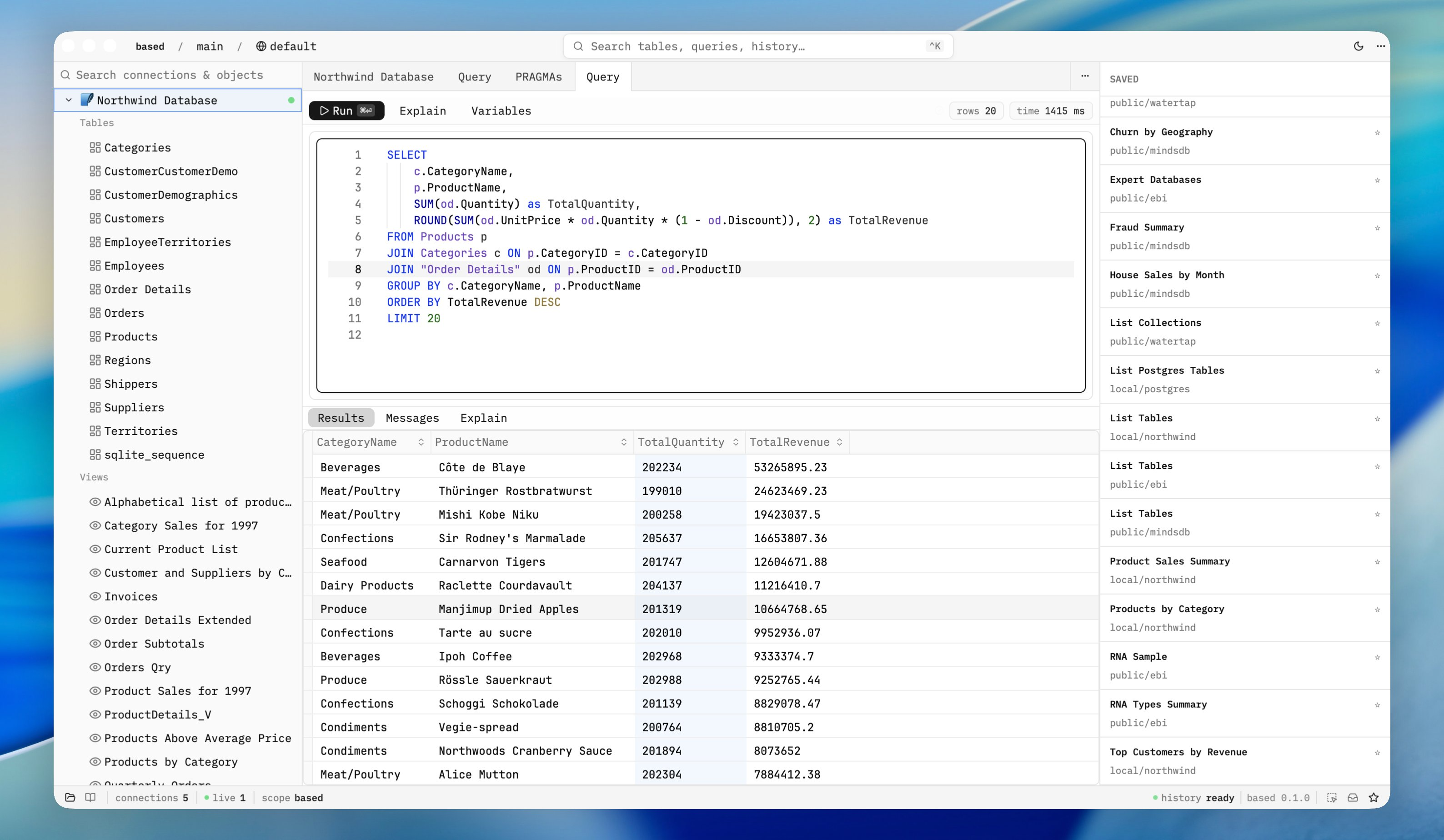
Productive SQL editor
Multi-tab editor with syntax highlighting, one-key formatting, and autocomplete. Run the selection, the current statement, or the whole script — and cancel long runs.
Query variables
Parameterize queries with user variables and built-in {{$…}} injection, so the same query works across environments without edits.
Fast schema explorer
Browse schemas, tables, views, indexes, and functions in a responsive tree. Search across objects and open data or DDL instantly.
Safe data editing
Inline-edit rows with an explicit dirty state and save/discard. No silent commits — writes never happen behind your back.
History & favorites
Every run is saved to a searchable local history. Pin the queries you reach for and rerun a past one in seconds.
Command palette
Drive everything from the keyboard — new query, connect, refresh, format, run, history — without hunting through menus.
Engines
Three databases, one project.
Postgres, SQLite, and MongoDB connections live side by side in the same .based/ folder — pick the engine per connection file.

PostgreSQL
The primary engine. Schemas, SSL modes, test-before-connect, and deep daily-driver parity for local, staging, and prod.

SQLite
File-backed databases with connection-time PRAGMA control — journal mode, synchronous, and foreign keys, right in the connection file.

MongoDB
Collections and aggregations alongside your SQL connections, in the same version-controlled project.
Local-first
Yours to run, yours to trust.
based is a native desktop app that keeps you in control of your data and your setup — by design.
No backend, no accounts
There's no service to sign up for. based runs entirely on your machine — nothing to provision, nothing to trust.
Your data stays put
Connections go straight from the app to your database. No proxy, no telemetry pipeline, no cloud in the middle.
Native Rust + GPUI
Built on the same GPU-accelerated UI framework as Zed. It launches fast and stays responsive on large schemas and result sets.
Open source, MIT
The whole client is MIT-licensed and developed in the open. Read it, fork it, ship it.
Install
Download based v2026.8.1.
Grab the latest stable release for your platform. Free and open source — no sign-up required.
Detected
macOS
Apple Silicon
SHA-256 `fa722158…9562f062` Copy
Or with Homebrew
`brew tap pavi2410/tap && brew install --cask based`
Detected
Linux
x86-64
SHA-256 `45718494…fef25bd3` Copy
SHA-256 `91930754…5d5e8ff8` Copy
Detected
Windows
x86-64 · Windows 10 & 11
SHA-256 `507d159e…cc89fffd` Copy
Or with winget
`winget install pavi2410.Based`
- macOS builds are ad-hoc signed (not Apple Developer ID). First launch may show an unverified-developer prompt — right-click the app and choose Open, or use System Settings → Privacy & Security → Open Anyway.
- On Windows, choose More info → Run anyway.
- Compare your download with the SHA-256 beneath each installer (hover for the full hash).
- Browse all releases →
Support
Help keep based independent.
based is free and MIT-licensed. Sponsorship funds time for features, fixes, and releases across macOS, Windows, and Linux.
Sponsor on GitHub Star the repo
FAQ
Questions, answered.
Is my data sent anywhere?
No. based has no backend and no telemetry. The app connects directly from your machine to your databases — nothing is routed through a server in between.
How do secrets stay safe if everything's in git?
Connection files store hosts and non-secret config only. Passwords and connection URLs reference environment variables (for example { env = "LOCAL\_PG\_PASSWORD" }), and the actual values live in a gitignored .env. A committed .env.example documents which vars teammates need.
Which databases are supported?
PostgreSQL, SQLite, and MongoDB. Postgres has the deepest daily-driver support, with SQLite and MongoDB connections living in the same project. See the databases and docs.
Do I need an account?
No accounts, no sign-up, no license keys. Download it and connect.
What does it cost?
based is free and open source under the MIT license — no license keys or subscriptions. If it saves you time, you can sponsor development on GitHub to help fund ongoing work.
Which platforms can I run it on?
macOS (Apple Silicon), Windows, and Linux (.deb and .AppImage).