

FilesToolkit Powerful Mac File Management Right-Click Tools
Available now for macOS
FilesToolkit
Powerful Mac File Management Right-Click ToolsBoost productivity on macOS with FilesToolkit. Rename, compress, convert images, manage PDFs, and organize files instantly from your Finder right-click menu.
Download for MacExplore Features
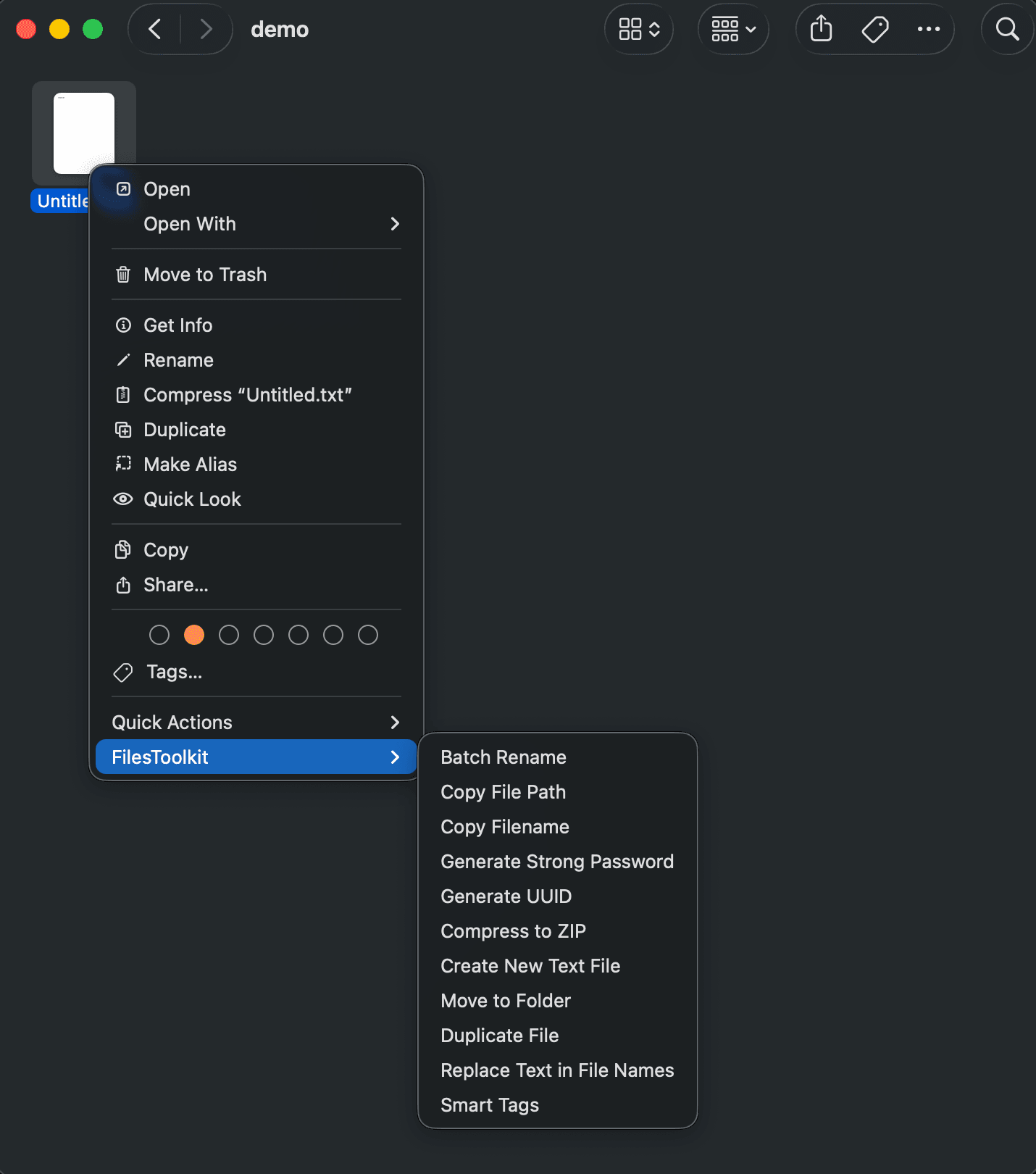
All the tools you need,
right where you work.Stop switching between apps. FilesToolkit adds powerful file management capabilities directly to your Finder right-click menu.
Batch Rename
Rename hundreds of files in seconds with powerful patterns, sequences, and regex support.
#batchrenamemac#renamefilesmac
Smart Compression
Create highly compressed ZIP and 7Z archives. Strip macOS system files for cleaner sharing.
#zipmactool#compressfilesmacos
PDF Power Tools
Merge, split, compress, and convert PDFs without opening heavy applications.
#pdftoolsmac#mergepdfmac
Image Converter
Convert images between formats (PNG, JPG, WebP, HEIC) and resize them instantly.
#imageconvertermac#heictojpgmac
File Organizer
Automatically organize files into folders based on type, date, or custom rules.
#macfileorganizer#organizefilesmac
Quick Actions
Checksum generation, hidden file toggle, and path copying right in your context menu.
#finderrightclicktools#macproductivityapp
Perfect for
Designers & Developers- Batch Rename Assets Organize thousands of design exports with one click. Use patterns like sequence, prefix, or regex.
- Image Conversion Convert HEIC from iPhone or WebP from web instantly to PNG or JPG for your projects.
- Smart ZIP Archives Share projects without .DS\Store or \\_MACOSX folders. Cleaner, smaller, better.
- Basic Batch Rename
- Standard ZIP Compression
- Image Format Conversion
- Path Copying Tools Download Free
- Advanced Regex Renaming
- PDF Merge & Split
- HEIC to WebP/JPG
- Custom Organization Rules
- Checksum Tools
- Priority Support
"FilesToolkit has completely changed how I organize my client projects. It's the ultimate Mac file manager extension."
Simple, Transparent Pricing
Choose the plan that fits your workflow. No subscriptions, just a one-time purchase.
Free
$0
Essential tools for occasional file management.
Most Popular
Premium
$17.99/one-time
The full toolkit for power users who want maximum efficiency.
Loved by Mac Power Users
"FilesToolkit saved me hours of manual work. Converting HEIC to JPG and renaming assets is now a split-second task."
S
#### Sarah Jenkins
Graphic Designer
"The regex renaming and smart compression are indispensable. It's the file manager macOS should have had out of the box."
M
#### Michael Chen
Software Engineer
Frequently Asked Questions
Everything you need to know about FilesToolkit.
How to batch rename files on Mac?
With FilesToolkit, simply select multiple files in Finder, right-click, and choose 'FilesToolkit > Batch Rename'. You can then use patterns, search & replace, or regex to rename all files instantly.
How to compress files on macOS?
FilesToolkit adds a 'Smart Compress' option to your right-click menu. It allows you to create ZIP or 7Z archives while optionally removing macOS-specific metadata (like .DS\_Store) for smaller, cleaner files.
Best file management tools for Mac?
FilesToolkit is among the top-rated tools for macOS productivity. It integrates directly into Finder, providing image conversion, PDF manipulation, and batch renaming without needing to open separate apps.
Does it support HEIC to JPG conversion?
Yes! FilesToolkit allows you to convert HEIC images from your iPhone directly to JPG, PNG, or WebP via the right-click menu in Finder.
Ready to supercharge your
macOS workflow?Join thousands of users who manage files faster than ever. Download FilesToolkit today.
Compatible with macOS 12.0 and later