What’s Hurl?
Getting Started
- Installation
- Manual
- Samples
- Running Tests
- Frequently Asked Questions
- Hurl File
- Entry
- Request
- Response
- Capturing Response
- Asserting Response
- Filters
- Templates
- Grammar
- Your First Hurl File
- Adding Asserts
- Chaining Requests
- Debug Tips
- Captures
- Security
- CI/CD Integration
- License
- Blog
- GitHub
- Installation
- Manual
- Samples
- Running Tests
- Frequently Asked Questions
- Hurl File
- Entry
- Request
- Response
- Capturing Response
- Asserting Response
- Filters
- Templates
- Grammar
- Your First Hurl File
- Adding Asserts
- Chaining Requests
- Debug Tips
- Captures
- Security
- CI/CD Integration
- License
- Blog
- GitHub
File Format
Tutorial
Resources
Getting Started
File Format
Tutorial
Resources


What’s Hurl?
Hurl is a command line tool that runs HTTP requests defined in a simple plain text format.
It can chain requests, capture values and evaluate queries on headers and body response. Hurl is very versatile: it can be used for both fetching data and testing HTTP sessions.
Hurl makes it easy to work with HTML content, REST / SOAP / GraphQL APIs, or any other XML / JSON based APIs.
Choose example
# Go home and capture token
GET https://example.org
HTTP 200csrf_token: xpath "string(//meta[@name='_csrf_token']/@content)"
Do login!
POST https://example.org/loginuser: toto
password: 1234
token: {{csrf_token}}
HTTP 302
# A simple GET with headers
GET https://example.org/news
User-Agent: Mozilla/5.0
Accept: /
Accept-Language: en-US,en;q=0.5
Accept-Encoding: gzip, deflate, br
Connection: keep-alive
# Chaining requests is easy, responses are optional
GET https://example.org/api/healthGET https://example.org/api/step1
HTTP 200
GET https://example.org/api/step2
GET https://example.org/api/step3
# Use query params in the URL:
GET https://example.org/news?order=newest&search=something%20to%20search&count=100Or with a query param section:
GET https://example.org/newsorder: newest
search: something to search
count: 100
GET https://example.org/protectedbob: secret
One can also use an Authorization header
Authorization header value can be computed with `echo -n 'bob:secret' | base64`
GET https://example.org/protected
Authorization: Basic Ym9iOnNlY3JldA==# Sending form data
POST https://example.org/contactdefault: false
token: {{token}}
email: john.doe@rookie.org
number: 33611223344
POST https://example.org/uploadfield1: value1
field2: file,example.txt;
One can specify the file content type:
field3: file,example.zip; application/zip
# Requests in the same Hurl file share the cookie storage
Cookies can also be set per request
GET http://localhost:8000/cookies/set-multiple-request-cookiesuser1: Bob
user2: Bill
user3: {{name}}
HTTP 200
Or we can simply use a Cookie header
GET https://example.org/index.html
Cookie: theme=light; sessionToken=abc123# Go home and capture token
GET https://example.org
HTTP 200csrf_token: xpath "string(//meta[@name='_csrf_token']/@content)"
Do login!
POST https://example.org/loginuser: toto
password: 1234
token: {{csrf_token}}
HTTP 302
# Create a new doggy thing with JSON body.
JSON body can be inlined:
POST https://example.org/api/dogs
{
    "id": 0,
    "name": "Frieda",
    "picture": "images/scottish-terrier.jpeg",
    "age": 3,
    "breed": "Scottish Terrier",
    "location": "Lisco, Alabama"
}
# Like JSON body, XML bidy can be inlined to use SOAP APIs:
POST https://example.org/InStock
Content-Type: application/soap+xml; charset=utf-8
SOAPAction: "http://www.w3.org/2003/05/soap-envelope"
<?xml version="1.0" encoding="UTF-8"?>
<soap:Envelope xmlns:soap="http://www.w3.org/2003/05/soap-envelope" xmlns:m="http://example.net">
<soap:Header></soap:Header>
<soap:Body>
<m:GetStockPrice>
<m:StockName>GOOG</m:StockName>
</m:GetStockPrice>
</soap:Body>
</soap:Envelope># GraphQL queries are supported, even with variables
POST https://example.org/starwars/graphqlPOST https://example.org/models
Content-Type: text/csvPOST https://example.org
Some random comments before body
base64,TG9yZW0gaXBzdW0gZG9sb3Igc2l0IGFtZXQsIGNvbnNlY3RldHVyIG
FkaXBpc2NpbmcgZWxpdC4gSW4gbWFsZXN1YWRhLCBuaXNsIHZlbCBkaWN0dW0g
aGVuZHJlcml0LCBlc3QganVzdG8gYmliZW5kdW0gbWV0dXMsIG5lYyBydXRydW
0gdG9ydG9yIG1hc3NhIGlkIG1ldHVzLiA=;Or use a file
POST https://example.org
file,data.bin;# Using implicit response asserts
GET https://example.org/index.html
HTTP 200
Set-Cookie: theme=light
Set-Cookie: sessionToken=abc123; Expires=Wed, 09 Jun 2021 10:18:14 GMTOr explicit response asserts
GET https://example.org
HTTP 302header "Location" contains "www.example.net"
# Testing 200 OK
GET https://example.org/order/435
HTTP 200Testing status code is in a 200-300 range
GET https://example.org/order/435
HTTP *status >= 200
status < 300
# You can explicitly test HTTP version 1.0, 1.1, 2 or 3:
GET https://example.org/http3
HTTP/3 200GET https://example.org/http2
HTTP/2 200
Or simply use HTTP to not test version!
GET https://example.org/http2
HTTP 200# XPath asserts can be used to check HTML content
GET https://example.org
HTTP 200
Content-Type: text/html; charset=UTF-8xpath "string(/html/head/title)" contains "Example" # Check title
xpath "count(//p)" == 2 # Check the number of p
xpath "//p" count == 2 # Similar assert for p
xpath "boolean(count(//h2))" == false # Check there is no h2
xpath "//h2" not exists # Similar assert for h2
xpath "string(//div[1])" matches /Hello.*/
# Testing a JSON response with JSONPath
GET https://example.org/api/tests/4567
HTTP 200jsonpath "$.status" == "RUNNING"    # Check the status code
jsonpath "$.tests" count == 25      # Check the number of items
jsonpath "$.id" matches /\d{4}/     # Check the format of the id
GET http://myserver.com/home
HTTP 200cookie "JSESSIONID" == "8400BAFE2F66443613DC38AE3D9D6239"
cookie "JSESSIONID[Value]" == "8400BAFE2F66443613DC38AE3D9D6239"
cookie "JSESSIONID[Expires]" contains "Wed, 13 Jan 2021"
cookie "JSESSIONID[Secure]" exists
cookie "JSESSIONID[HttpOnly]" exists
cookie "JSESSIONID[SameSite]" == "Lax"
# Check the SHA-256 response body hash:
GET https://example.org/data.tar.gz
HTTP 200sha256 == hex,039058c6f2c0cb492c533b0a4d14ef77cc0f78abccced5287d84a1a2011cfb81;
Checking Byte Order Mark (BOM) in Response Body
GET https://example.org/data.bin
HTTP 200bytes startsWith hex,efbbbf;
# Check attributes of the SSL certificate
GET https://example.org
HTTP 200certificate "Subject" == "CN=example.org"
certificate "Issuer" == "C=US, O=Let's Encrypt, CN=R3"
certificate "Expire-Date" daysAfterNow > 15
certificate "Serial-Number" matches /[\da-f]+/
certificate "Subject-Alt-Name" contains "DNS:example.org"
certificate "Subject-Alt-Name" split "," count == 2
certificate "Value" startsWith "-----BEGIN CERTIFICATE-----"
# Pull job status until it is completed
GET https://api.example.org/jobs/{{job_id}}retry: 10 # maximum number of retry, -1 for unlimited
retry-interval: 300ms
HTTP 200
jsonpath "$.state" == "COMPLETED"
GET https://example.org
HTTP 200ip == "2001:0db8:85a3:0000:0000:8a2e:0370:7334"
ip startsWith "2001"
GET https://example.org
ipv4: true
HTTP 200
ip not isIpv6
Chaining multiple requests is easy:
GET https://example.org/api/health
GET https://example.org/api/step1
GET https://example.org/api/step2
GET https://example.org/api/step3
Also an HTTP Test Tool
Hurl can run HTTP requests but can also be used to test HTTP responses. Different types of queries and predicates are supported, from XPath and JSONPath on body response, to assert on status code and response headers.
It is well adapted for REST / JSON APIs
POST https://example.org/api/tests
{
    "id": "4568",
    "evaluate": true
}
HTTP 200header "X-Frame-Options" == "SAMEORIGIN"
jsonpath "$.status" == "RUNNING"    # Check the status code
jsonpath "$.tests" count == 25      # Check the number of items
jsonpath "$.id" matches /\d{4}/     # Check the format of the id
HTML content
GET https://example.org
HTTP 200xpath "normalize-space(//head/title)" == "Hello world!"
GraphQL
POST https://example.org/graphqlHTTP 200and even SOAP APIs
POST https://example.org/InStock
Content-Type: application/soap+xml; charset=utf-8
SOAPAction: "http://www.w3.org/2003/05/soap-envelope"
<?xml version="1.0" encoding="UTF-8"?>
<soap:Envelope xmlns:soap="http://www.w3.org/2003/05/soap-envelope" xmlns:m="https://example.org">
  <soap:Header></soap:Header>
  <soap:Body>
    <m:GetStockPrice>
      <m:StockName>GOOG</m:StockName>
    </m:GetStockPrice>
  </soap:Body>
</soap:Envelope>
HTTP 200
Hurl can also be used to test the performance of HTTP endpoints
GET https://example.org/api/v1/pets
HTTP 200duration < 1000  # Duration in ms
And check response bytes
GET https://example.org/data.tar.gz
HTTP 200sha256 == hex,039058c6f2c0cb492c533b0a4d14ef77cc0f78abccced5287d84a1a2011cfb81;
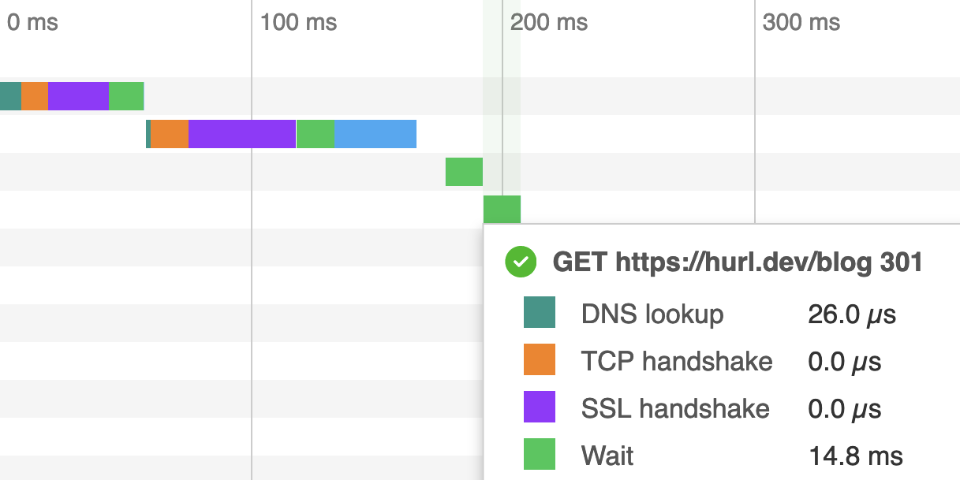
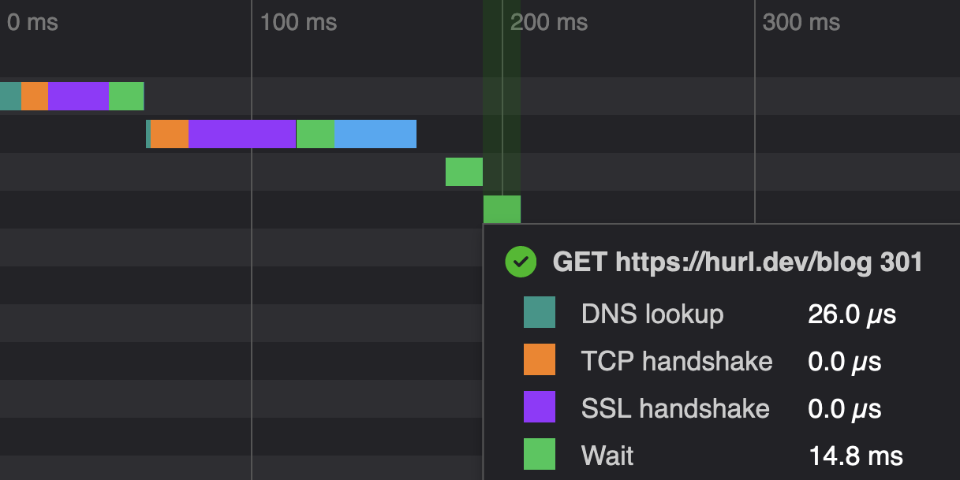
Finally, Hurl is easy to integrate in CI/CD, with text, JUnit, TAP and HTML reports
Why Hurl?
Powered by curl
Hurl is a lightweight binary written in Rust. Under the hood, Hurl HTTP engine is powered by libcurl, one of the most powerful and reliable file transfer libraries. With its text file format, Hurl adds syntactic sugar to run and test HTTP requests, but it’s still the curl that we love: fast, efficient and IPv6 / HTTP/3 ready.
Feedbacks
To support its development, star Hurl on GitHub!
Feedback, suggestion, bugs or improvements are welcome.
POST https://hurl.dev/api/feedback
{
  "name": "John Doe",
  "feedback": "Hurl is awesome!"
}
HTTP 200
Resources
Documentation (download HTML, PDF, Markdown)