

Your voice, in writing. Nothing leaves your iPhone.
Your voice, in writing. Nothing leaves your iPhone.
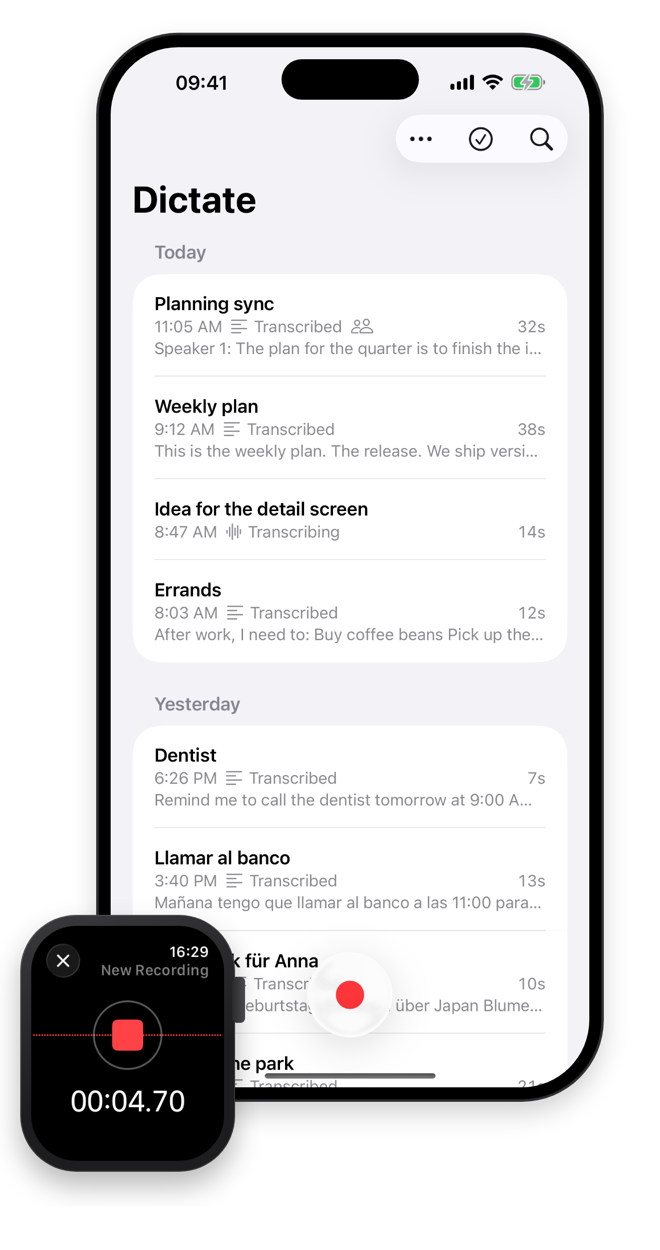
Press once and talk. Dictate turns what you said into text on the device and cleans it up for reading. For iPhone and Apple Watch.

- No cloud processing
- No account
- No data collected
- No subscription
- 25 languages
- Webhooks
- ### Anyone with a lot on their mind Reminders, ideas and to-dos, said out loud on a walk and waiting as a tidy list when you are back.
- ### Journalists and researchers Interviews stay confidential because the audio never leaves the phone. No servers, nothing to leak.
- ### Professionals Meetings and calls on speaker, with every speaker labelled on the device and a reading version to share.
- ### Students Lectures you can read back, play from any block, and search later in your history.
- ### Multilingual speakers Speak Spanish in the morning and German after lunch. Dictate detects the language each time.
- ### Builders
What is in it
Everything runs on your iPhone. Nothing to set up, and nothing to sign in to.
1. ### On your iPhone, nothing to set up Parakeet, a leading open speech model, ships inside the app. It transcribes 25 European languages and detects which one you speak, so you can switch languages without touching a setting. Apple Speech covers the other languages your iPhone has models for. Neither sends audio anywhere, and neither needs a key or an account. 2. ### A transcript you can read Apple Intelligence makes a reading version on your iPhone. Filler words, stutters and false starts are removed. Spoken corrections are resolved: "Tuesday, actually no, Wednesday at two" becomes "Wednesday at 2:00 PM". Counted points become numbered lists, and dates, amounts and numbers get digits. 3. ### The original, one tap away The original is split into timed blocks you can play from or copy one by one, and the words highlight as the audio plays. Add names and terms to your dictionary once, and the reading version spells them your way. 4. ### Meetings, with who said what Record longer than five minutes and it is a meeting: Dictate labels the speakers on the device. The reading version keeps who said what, each speaker in their own colour. 5. ### One press, from anywhere Start from your Apple Watch, the Action button, a shortcut, Control Center, the Home Screen widget or the Lock Screen. Control Center, Siri and Shortcuts start recording without opening the app, and a Live Activity keeps the stop control on the Lock Screen. The Watch records on its own and hands the recording to your iPhone as soon as the phone is in reach. Audio recorded elsewhere comes in too: share it from Voice Memos, Files or another app, pick Dictate, and it is transcribed like any recording. 6. ### Extend it with webhooks Send each transcript to any of your agents, automations or backends: point Dictate at an HTTPS URL, and the original arrives there as signed JSON. Start it from anywhere, a Shortcut, Siri or your Apple Watch, and the text lands where you need it. Optional, under Settings, Advanced. Read the webhook reference.
Who uses Dictate
Where your data is
There is no Dictate server, so these are the only places it can be.
On your iPhone Recordings, transcripts, speaker labels and the reading version are all made and kept on the device. No accounts, no login, no analytics.
On your Apple Watch A recording made on the Watch goes straight to your own iPhone, which transcribes it. Nothing in between.
At your webhook, if you set one The only thing that can leave your iPhone is a transcript you send to your own webhook.
Read the full detail in the privacy policy.